


Related products are the items that complement a base product or extend its use — for a laptop, that's a mouse, a keyboard, or a monitor. Shown at the right moment on the product page, they lift average order value with sales you'd otherwise never see, which is why every serious Magento 2 store uses them.
In this blog, we'll cover the complete toolkit: how to get, add, and remove related products programmatically in Magento 2, plus the manual admin method — and when it makes sense to stop assigning them by hand altogether.
How to Get Related Products Programmatically in Magento 2
To read a product's related products, load the product and call getRelatedProducts(). Here's a complete controller example with the product model injected via the constructor:
<?php
namespace Mageants\Blog\Controller\Index;

use Magento\Framework\App\Action\Action;
use Magento\Framework\App\Action\Context;
use Magento\Catalog\Api\ProductRepositoryInterface;

class Related extends Action
{
    /**
     * @var ProductRepositoryInterface
     */
    protected $productRepository;

    public function __construct(
        Context $context,
        ProductRepositoryInterface $productRepository
    ) {
        $this->productRepository = $productRepository;
        parent::__construct($context);
    }

    public function execute()
    {
        $productId = 44;
        $product = $this->productRepository->getById($productId);

        $relatedProducts = $product->getRelatedProducts();

        if (!empty($relatedProducts)) {
            echo 'Related Products:' . PHP_EOL;

            foreach ($relatedProducts as $relatedProduct) {
                $related = $this->productRepository->getById($relatedProduct->getId());
                echo $related->getId() . ' --> '
                    . $related->getName() . ' --> '
                    . $related->getPrice() . PHP_EOL;
            }
        } else {
            echo 'No related products assigned.';
        }
    }
}
|
In this example we read the related products of product ID 44 and print each one's ID, name, and price. The same getRelatedProducts() call works anywhere you have a loaded product instance — blocks, view models, or templates. Now let's see how to add related products.
Magento 2 Add Related Products Programmatically: Stepwise Explanation
Product relations are stored as product links. To create one, build a ProductLinkInterface object: setSku() takes the base product, setLinkedProductSku() the product being linked, and setLinkType() decides whether it's a related, upsell, or crosssell link. With both factory and repository injected via the constructor:
<?php
namespace Mageants\Blog\Controller\Index;

use Magento\Framework\App\Action\Action;
use Magento\Framework\App\Action\Context;
use Magento\Catalog\Api\Data\ProductLinkInterfaceFactory;
use Magento\Catalog\Api\ProductRepositoryInterface;

class AddRelated extends Action
{
    /**
     * @var ProductLinkInterfaceFactory
     */
    protected $productLinkFactory;

    /**
     * @var ProductRepositoryInterface
     */
    protected $productRepository;

    public function __construct(
        Context $context,
        ProductLinkInterfaceFactory $productLinkFactory,
        ProductRepositoryInterface $productRepository
    ) {
        $this->productLinkFactory = $productLinkFactory;
        $this->productRepository = $productRepository;
        parent::__construct($context);
    }

    public function execute()
    {
        $productLink = $this->productLinkFactory->create()
            ->setSku('24-MB01')                 // base product
            ->setLinkedProductSku('24-MB03')    // product to link
            ->setLinkType('related');           // or 'upsell' / 'crosssell'

        $linkData[] = $productLink;

        // Save the product links
        $product = $this->productRepository->get('24-MB01');
        $product->setProductLinks($linkData)->save();

        echo 'Related product added.';
    }
}
|
Here we've linked 24-MB03 as a related product of base product 24-MB01. One caution: setProductLinks() replaces the product's existing link set, so when adding to a product that already has related products, first read the current links with getProductLinks() and append to that array. Moving on — let's remove related products.
Magento 2 Remove Related Products Programmatically: Step by Step
Relations live in the catalog_product_link table, so bulk removal can be done directly in the database. Before touching these tables, take a database backup — and plan to reindex afterward. Follow these steps:
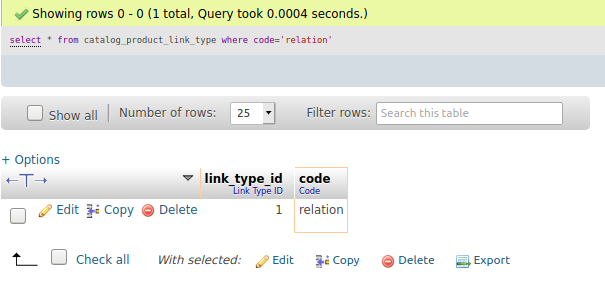
Step 1: Get the relation type ID — for related products the code is 'relation':
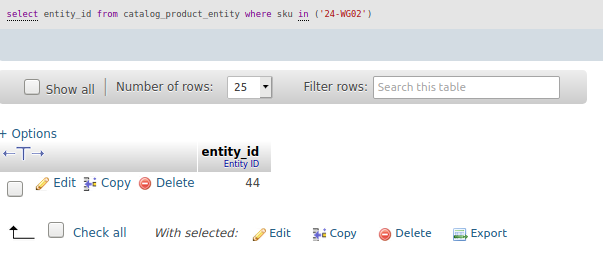
Step 2: Find your product IDs from the SKUs whose related products you want to delete:
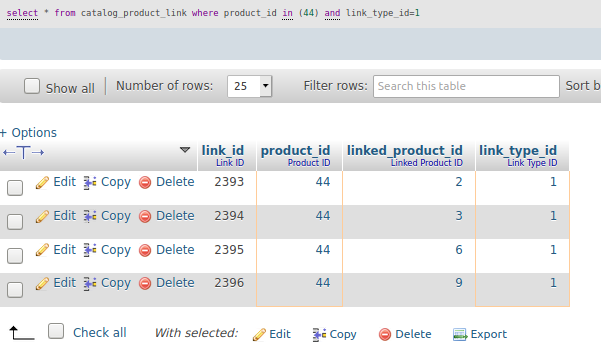
Step 3: Visualize the associated products before deleting:
Step 4: Delete the related product links:
Using the link type ID from Step 1 and the product IDs from Step 2:
DELETE FROM catalog_product_link WHERE product_id IN (44, 45) -- your product IDs from Step 2 AND link_type_id = 1; -- 'relation' type ID from Step 1 |
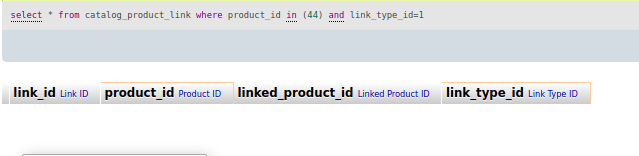
Step 5: Check the results — the products should now have no related products:
Finish with a reindex and cache flush so the frontend reflects the change: php bin/magento indexer:reindex catalog_product_flat catalogsearch_fulltext && php bin/magento cache:flush. And if you only need to clear relations on a handful of products, the safer code-side route is the one from the previous section: read the product's links with getProductLinks(), filter out the entries with link type related, and save the remaining set back with setProductLinks().
How to Add Related Products from the Admin Panel
No code needed for one-off assignments:
- In the admin, go to Catalog > Products.
- Click Edit under the Action column for your product.
- Scroll to the Related Products, Up-Sells, and Cross-Sells section.
- Select any number of products — they'll display as related products on the product page.
The catch is obvious once your catalog grows: hand-picking relations for hundreds or thousands of products — and keeping them fresh as inventory changes — doesn't scale. That's the job the Automatic Related Products extension takes over: rule-based conditions (same category, attribute matches, price ranges) assign related, upsell, and cross-sell products across the whole catalog automatically, so every product page shows relevant recommendations without anyone maintaining the lists.
Conclusion
That's the full picture of related products in Magento 2: getRelatedProducts() to read them, ProductLinkInterface with setProductLinks() to add them, the database or code route to remove them, and the admin section for manual one-offs — with rule-based automation as the way out once the catalog outgrows manual curation. Questions about the code implementation? Contact us or let us know in the comment section.
