



Request a Quote For Magento 2
Ask AI About This Extension




Key Features
- Enable “Add to Quote” button on product and category pages
- Define customer groups eligible to request quotes
- Create quotes from the admin panel manually
- Set automatic quote approvals based on discount thresholds
- Email notifications for both admin and customers
- Download and attach PDF quotes
- Configure quote expiration and reminder settings
- Restrict quote requests by category or specific products
- Customize shipping options during quote creation
- Complete quote management system from the admin panel
- Allow guest users to request quotes and auto create accounts
- Convert quote requests directly into orders
- Track customer quote history and activity





Current Limitation in Magento 2
What Magento 2 Cannot Do
Magento 2 does not have a built-in Request for Quote (RFQ) feature in its native open-source or standard B2B/Adobe Commerce packages out-of-the-box for all workflows (though Adobe Commerce B2B has a requisition lists and negotiable quotes feature). To enable full RFQ workflows, store owners typically install third-party extensions.
How Our Extension Solves This
Wholesale and B2B buyers usually expect to negotiate before they order. They want a better rate on volume and the final price in writing. Magento Open Source has no built-in way to handle this, so it ends up in email threads and phone calls. MageAnts Request a Quote for Magento 2 moves that negotiation into your store. Shoppers and guests add products to a quote from the product page, category page or cart, suggest their own price per item and send the request with a note. Your team reviews it in the admin and can see the gap between the asked price and the product cost. From there, you approve it as it is or counter-offer with a discount, a surcharge or custom shipping. Quotes under a discount limit you set can be approved automatically. Every update reaches the customer by email, and once a quote is approved they can download it as a PDF or turn it into an order in one click.
Description
Let Customers Start the Conversation with Flexible Quotes
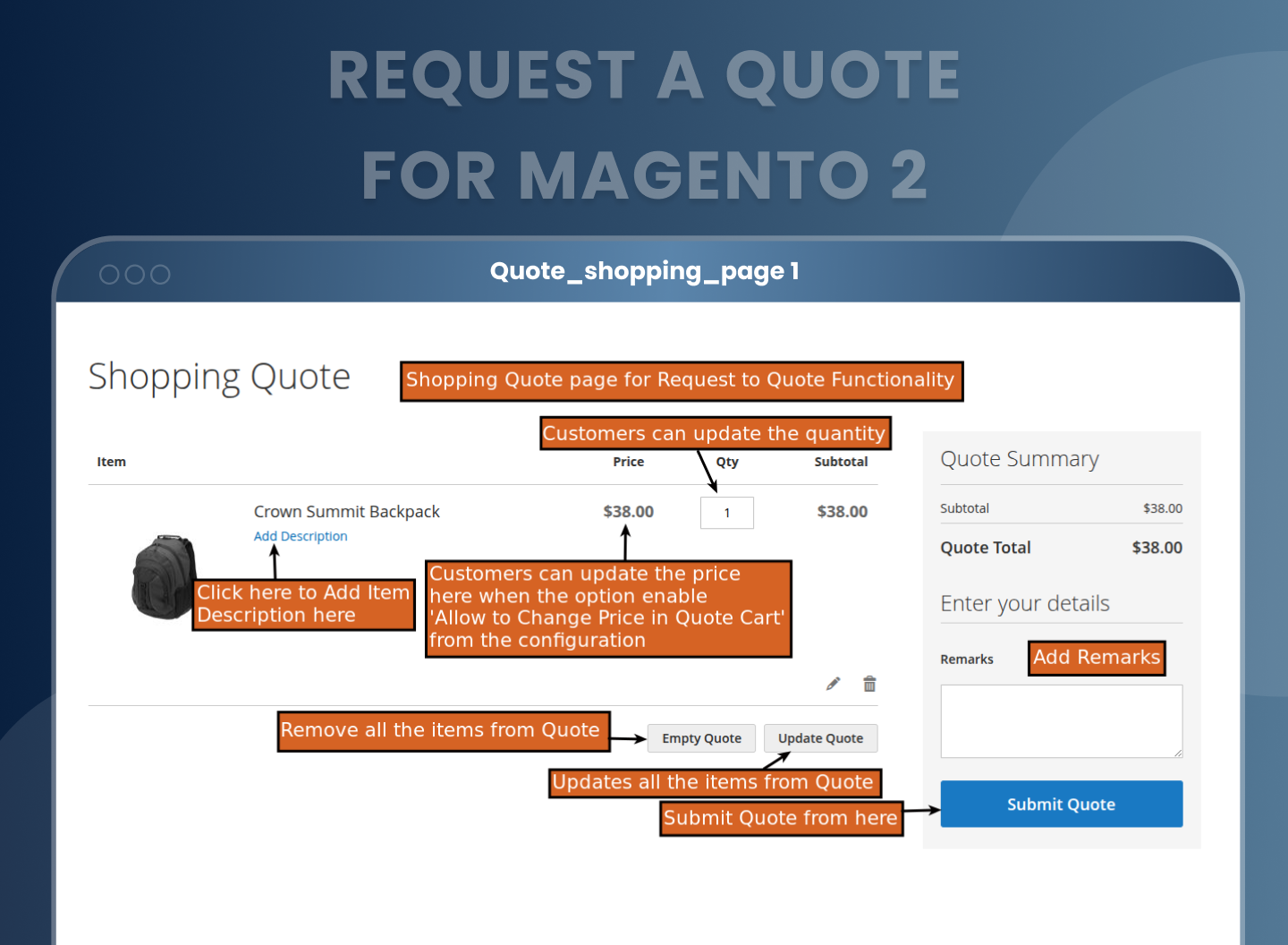
Buyers can request a custom price directly from product or category pages. Once enabled, the “Add to Quote” button appears alongside products, allowing customers to build a quote cart with multiple items, define the quantity, add price suggestions, and submit their offer. This suits B2B customers and bulk buyers who want to agree terms before ordering.
Hide Prices Strategically for Targeted Groups
The extension also supports price hiding functionality, allowing you to hide product prices for specific categories, customer groups, or even guest users. Instead of the standard “Add to Cart,” you can display a custom button like “Request a Quote”. This not only prevents direct checkout but invites users into the Magento 2 negotiated pricing flow, helping you better understand buyer purpose and tailor your offers accordingly.
Manage Every Quote Request from One Admin Grid
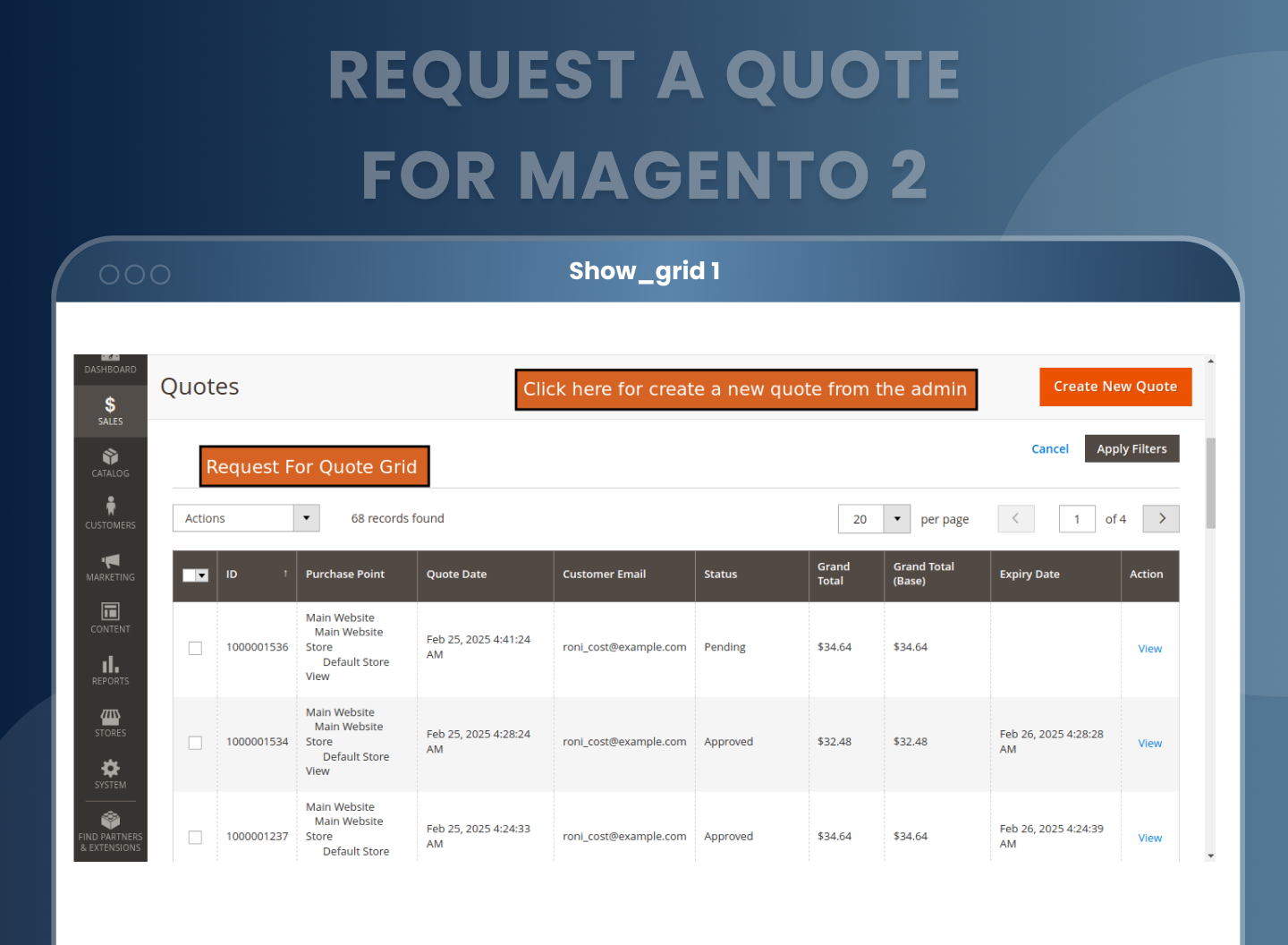
Track, view, and respond to every quote using a dedicated quote management grid in the admin. You’ll see key details like quote ID, customer email, status, and grand total at a glance. You can open any request to adjust pricing, approve or decline offers, set expiration dates, or even leave internal notes for team coordination. The entire quote system is built for efficiency and visibility.
Set Smart Auto-Approval Rules
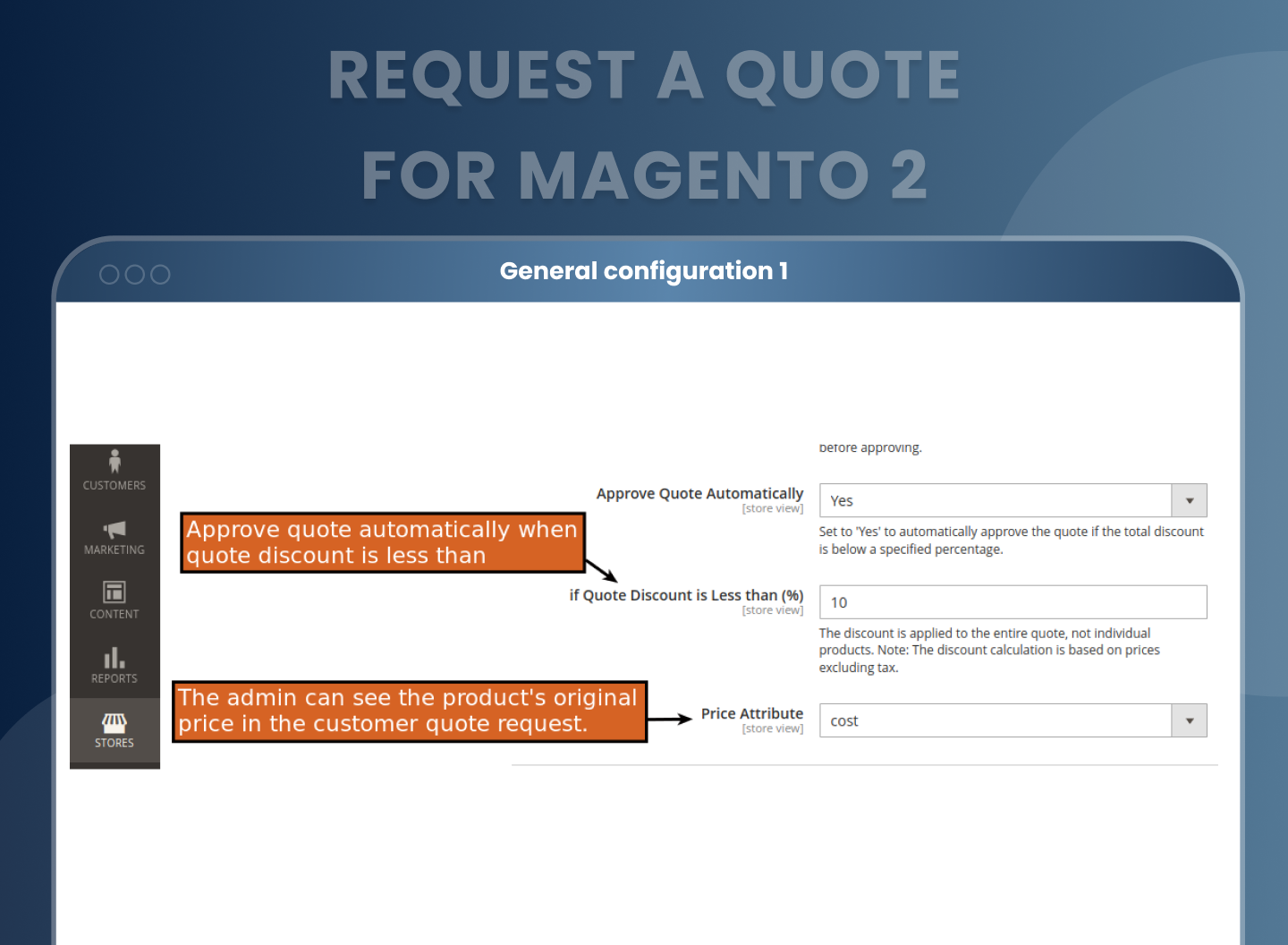
Speed up the process by configuring automatic quote approval based on discount thresholds. If a customer's request falls within an acceptable margin, the quote can be approved instantly, removing manual review for low risk deals and helping close sales faster.
Define Cost Attribute for Admin Review
Choose a product attribute to represent cost so that during quote review, the admin can see margin differences between cost and proposed pricing. This helps ensure you’re approving quotes that still make business sense.
Let Admins Create Custom Quotes from the Backend
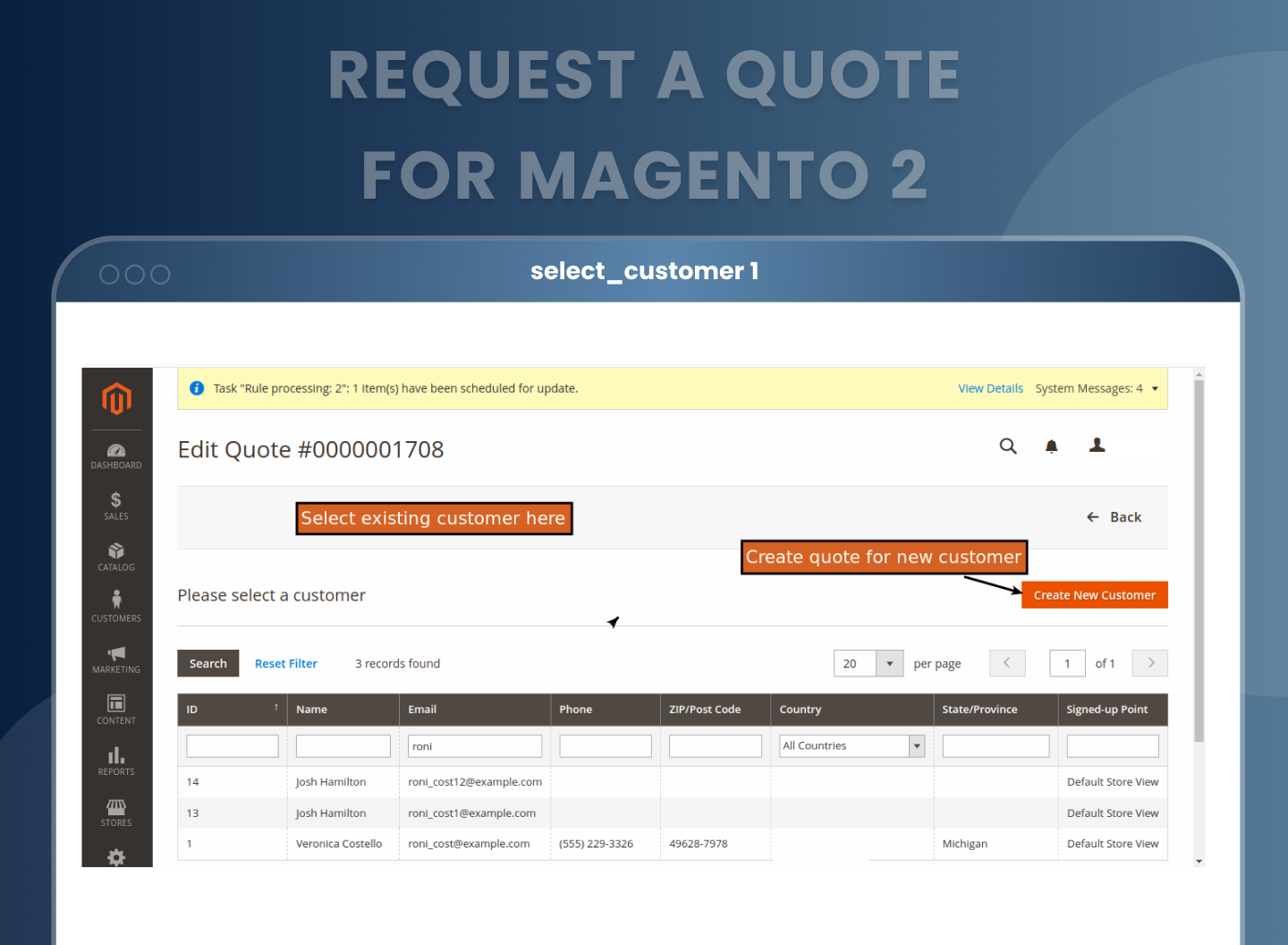
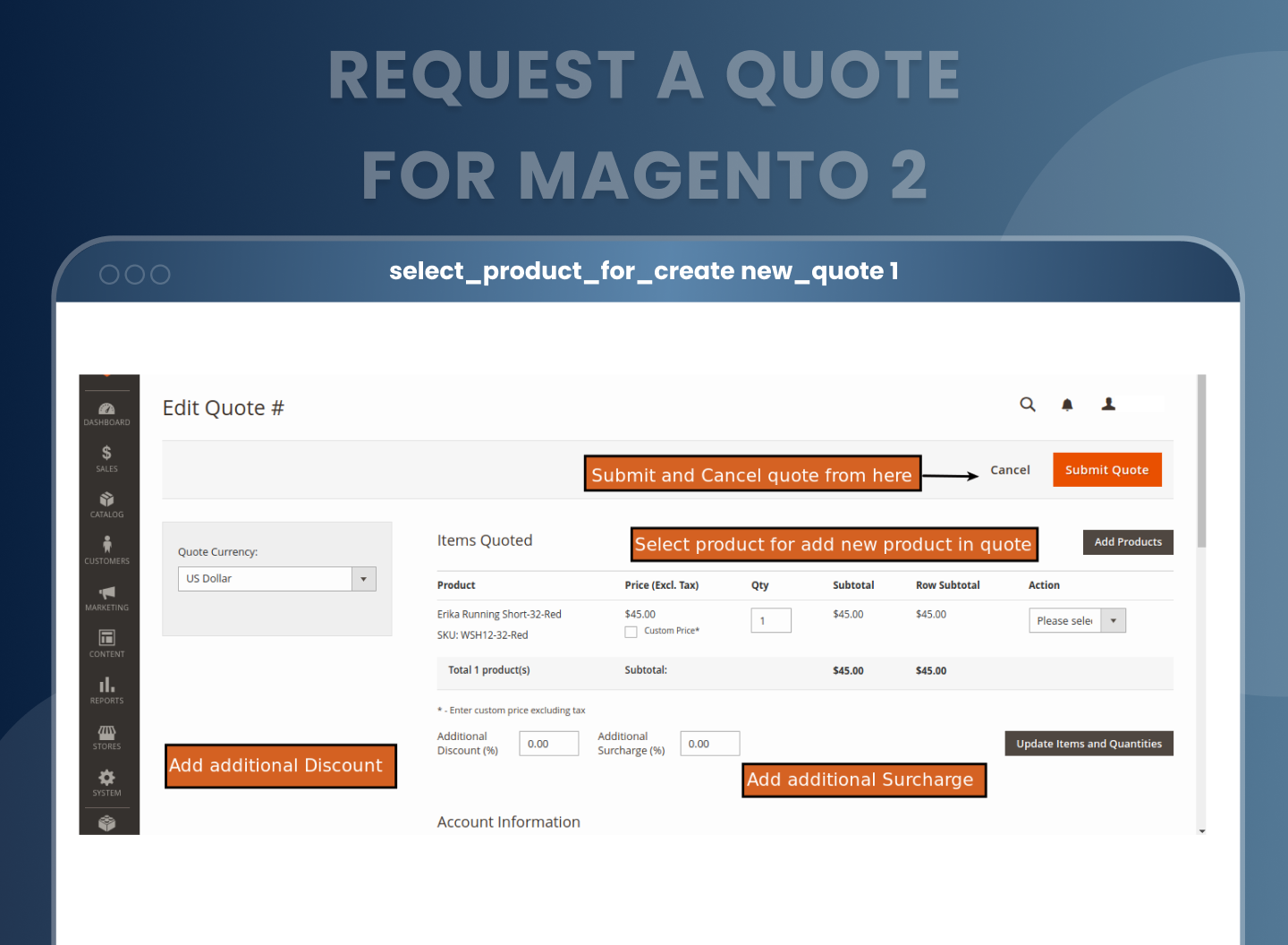
With the Magento 2 quote module, store admins can create new quote requests directly from the backend. Just select a customer (or add a new one), choose products, adjust prices, and send a personalized offer via email.
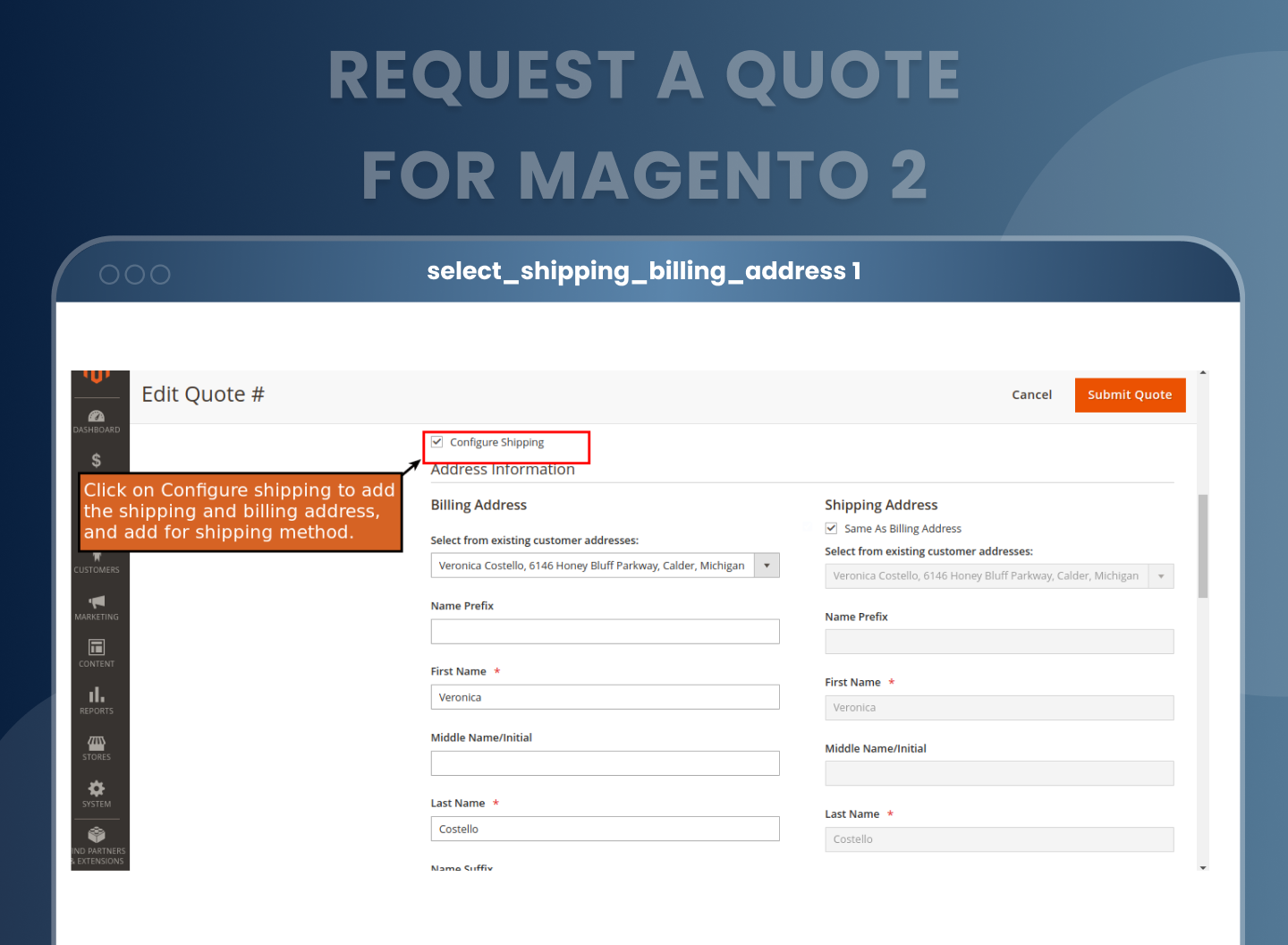
Configure Shipping on Quotes
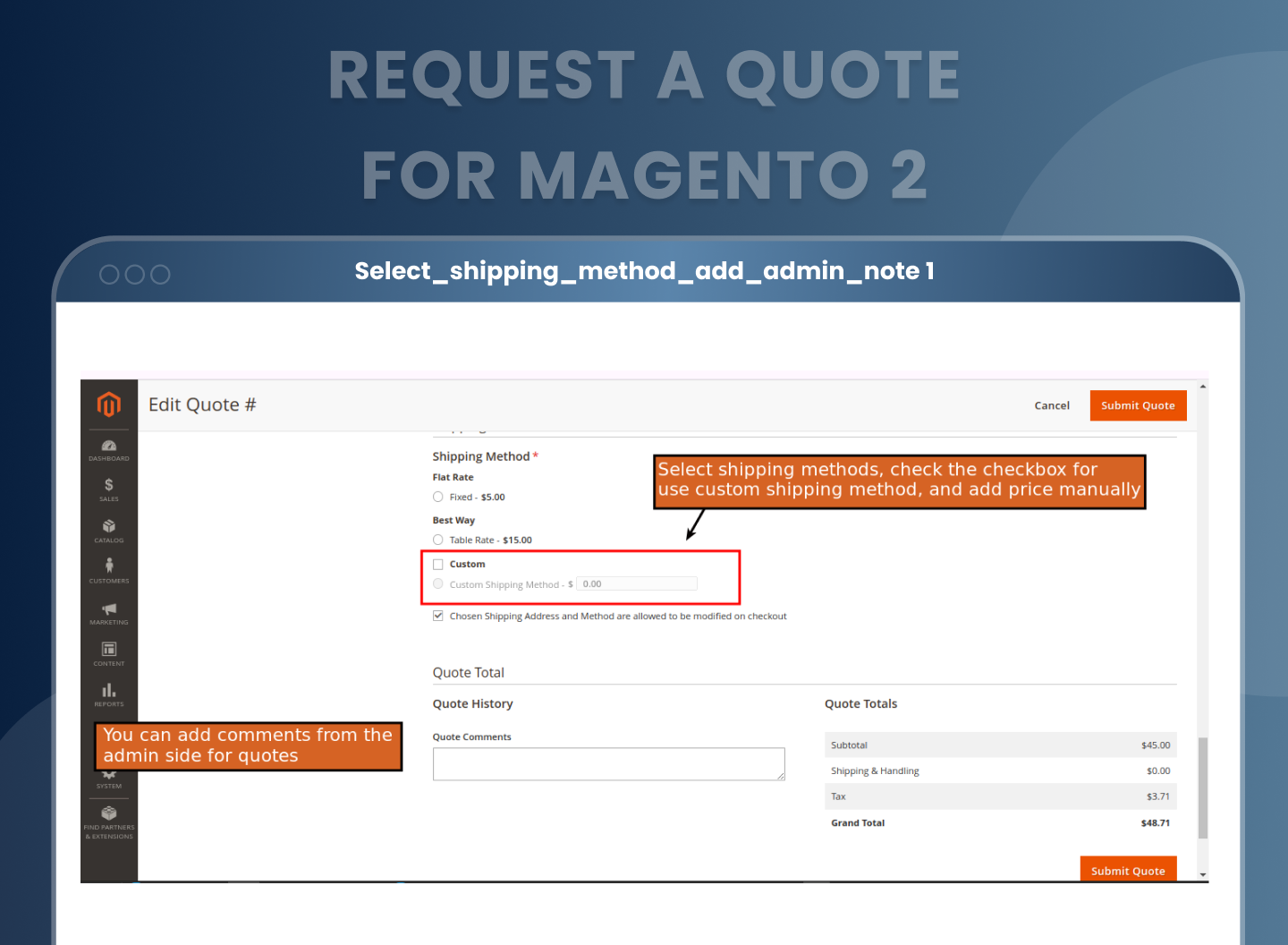
Admins can set or edit shipping methods and fees while creating or modifying quotes. You can offer custom delivery charges or restrict editing at checkout, depending on the business case. Whether it's setting flat rate shipping for a bulk order or applying free shipping as part of the deal, you get full control.
Keep Everyone Informed with Smart Notifications
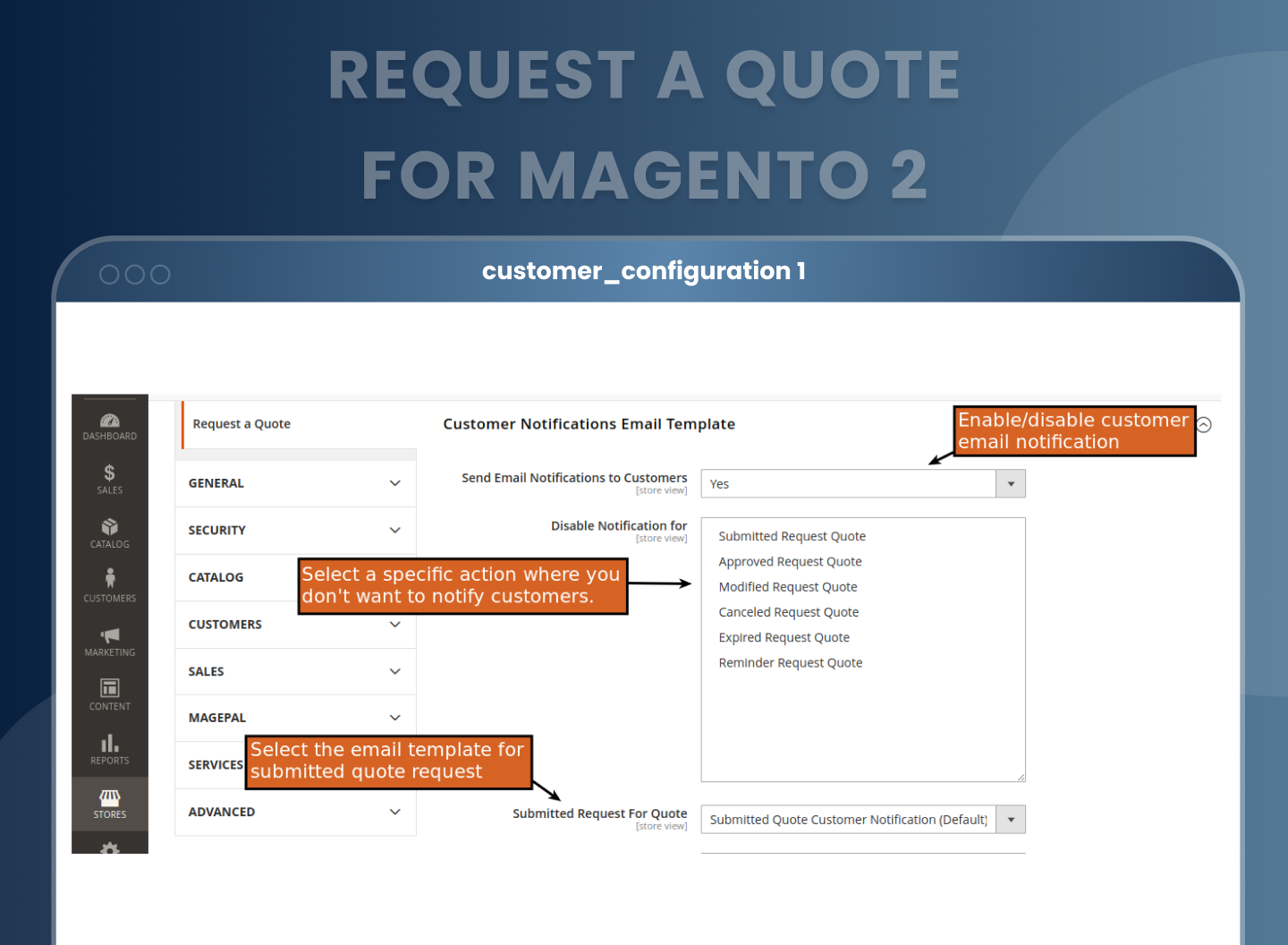
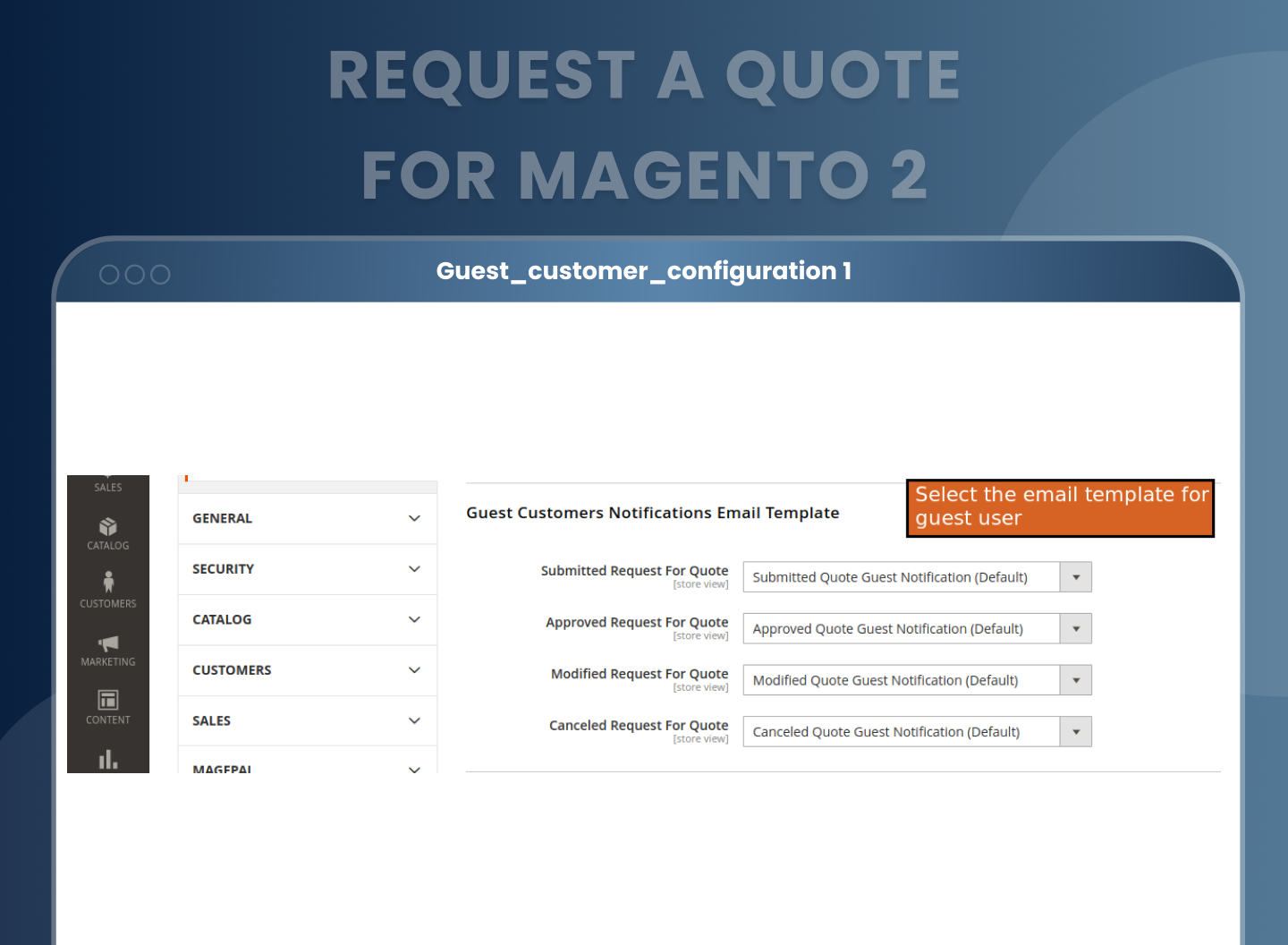
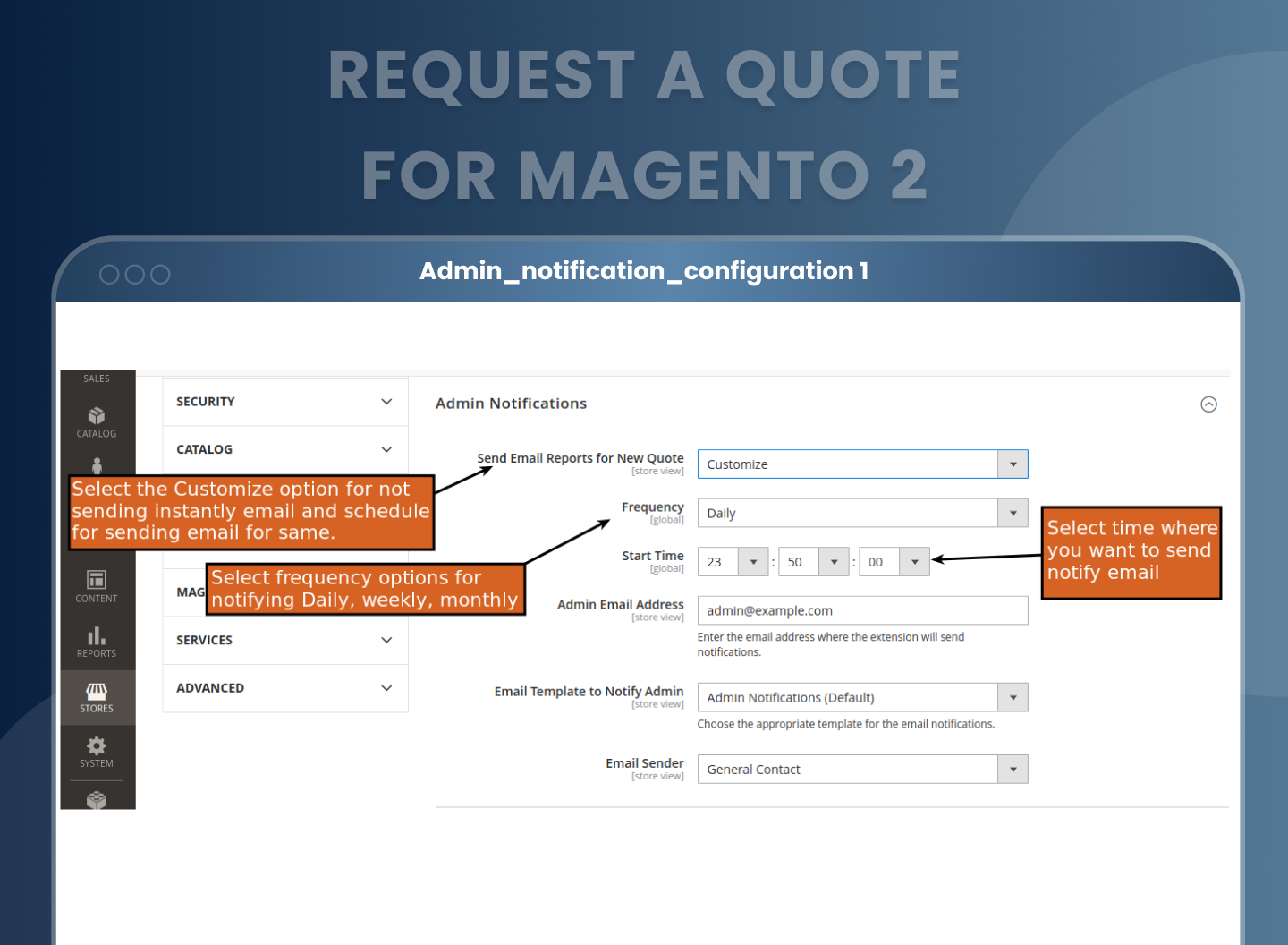
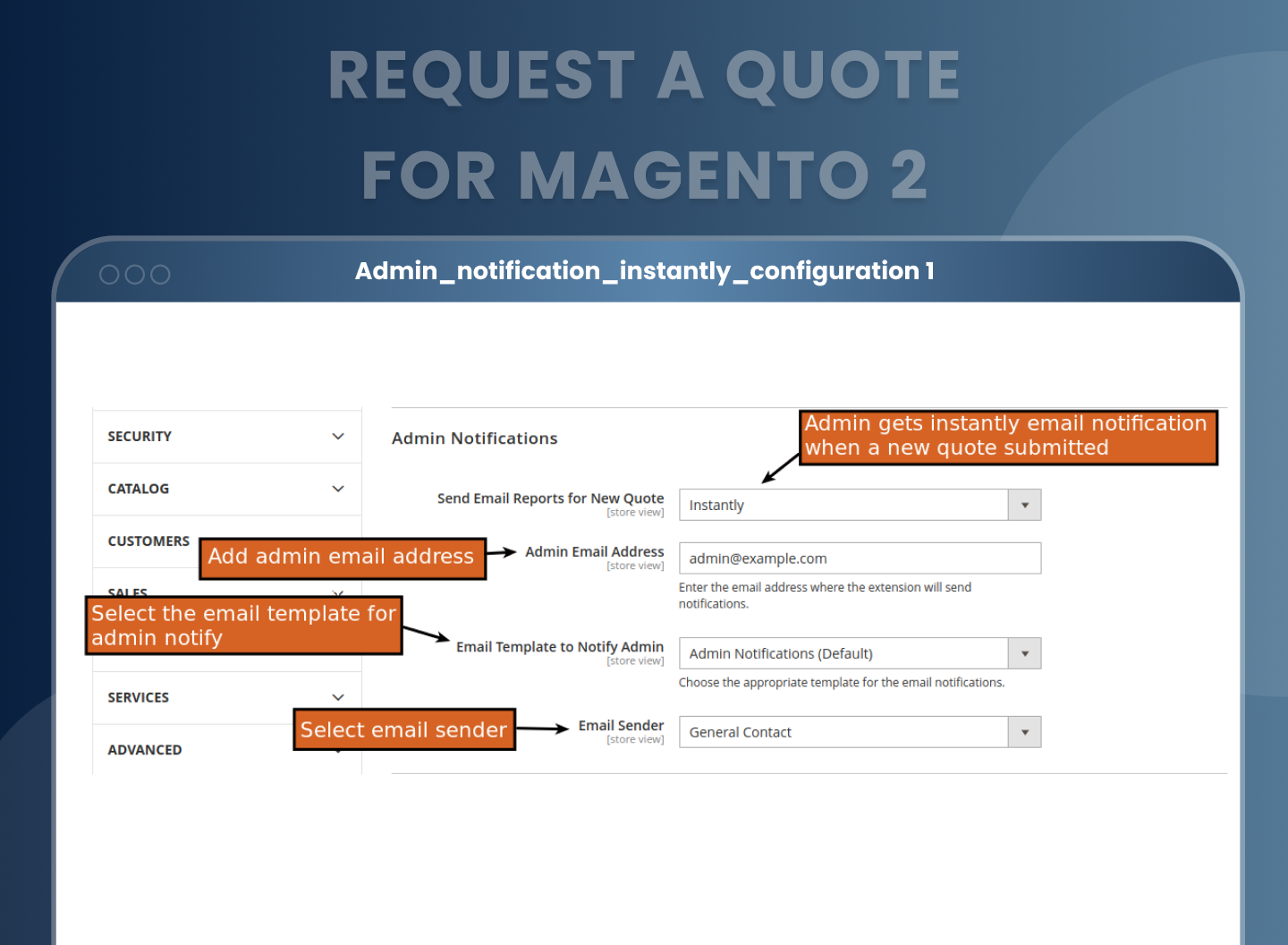
Stay connected with both customers and your internal team using built in notification tools. You can set up custom email templates for every action: when a quote is submitted, modified, approved, cancelled, or expired. Guests and logged in users each get custom notifications, and you can even plan admin alerts daily, weekly, or monthly.
Track, Remind, and Expire Quotes Automatically
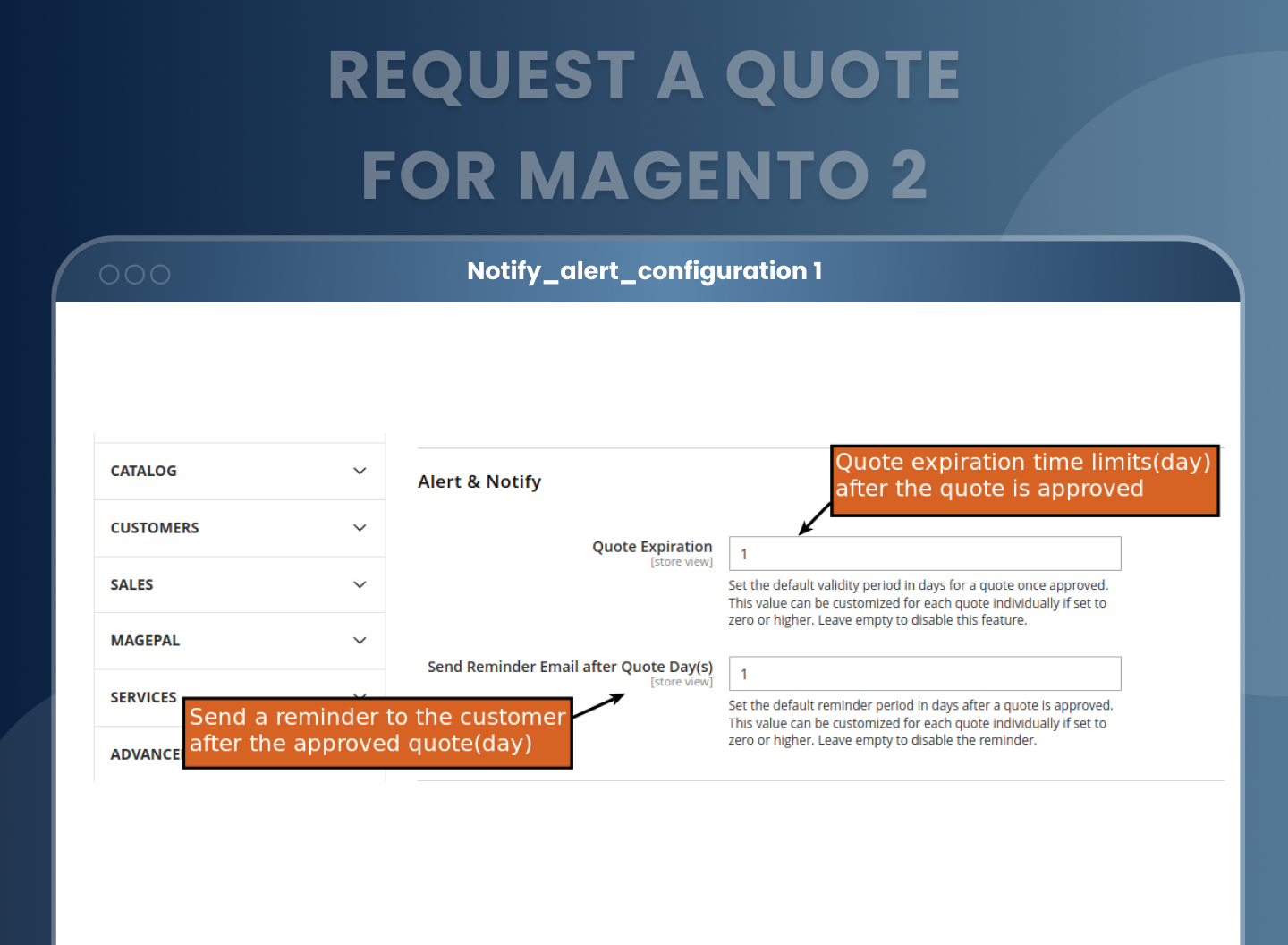
Don’t let quotes go close. Define a default expiration period for each quote and send automated reminder emails to nudge buyers toward a decision. This keeps your pipeline active and motivates customers to act before their offer expires.
Convert Quotes to Orders in One Click
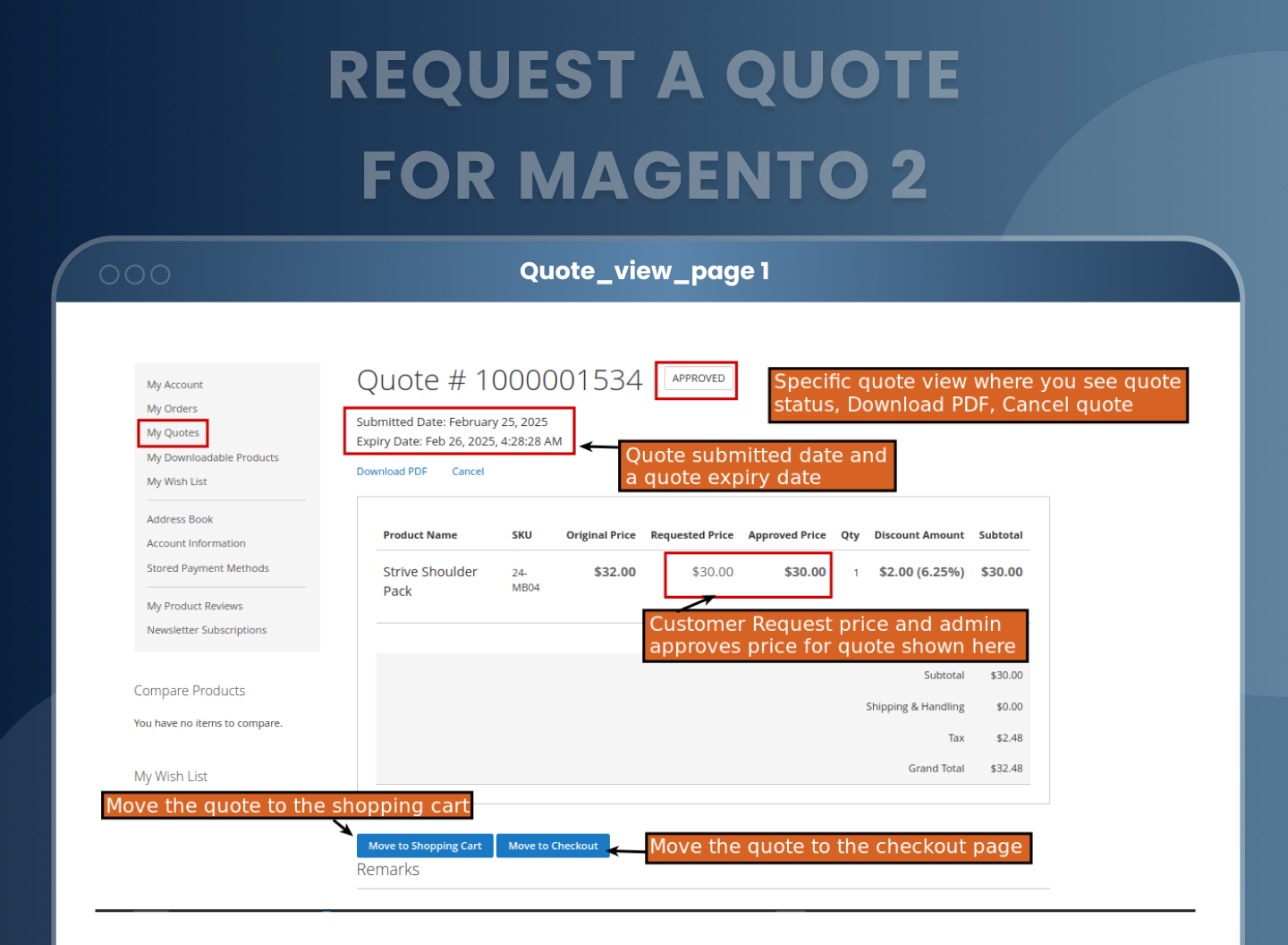
Once approved, the quote can be converted to an order. Customers can either move all items to their cart or move directly to checkout, with the agreed pricing already applied. This makes your Magento 2 quote requests frictionless and conversion friendly.
Allow Guest Quote Requests with Auto Account Creation
Not every buyer will have an account, but that shouldn’t stop them from requesting a quote. Guest users can fill in their contact details and submit quotes. You can even enable automatic customer account creation, turning casual interest into a registered customer lead.
PDF Quote Generation
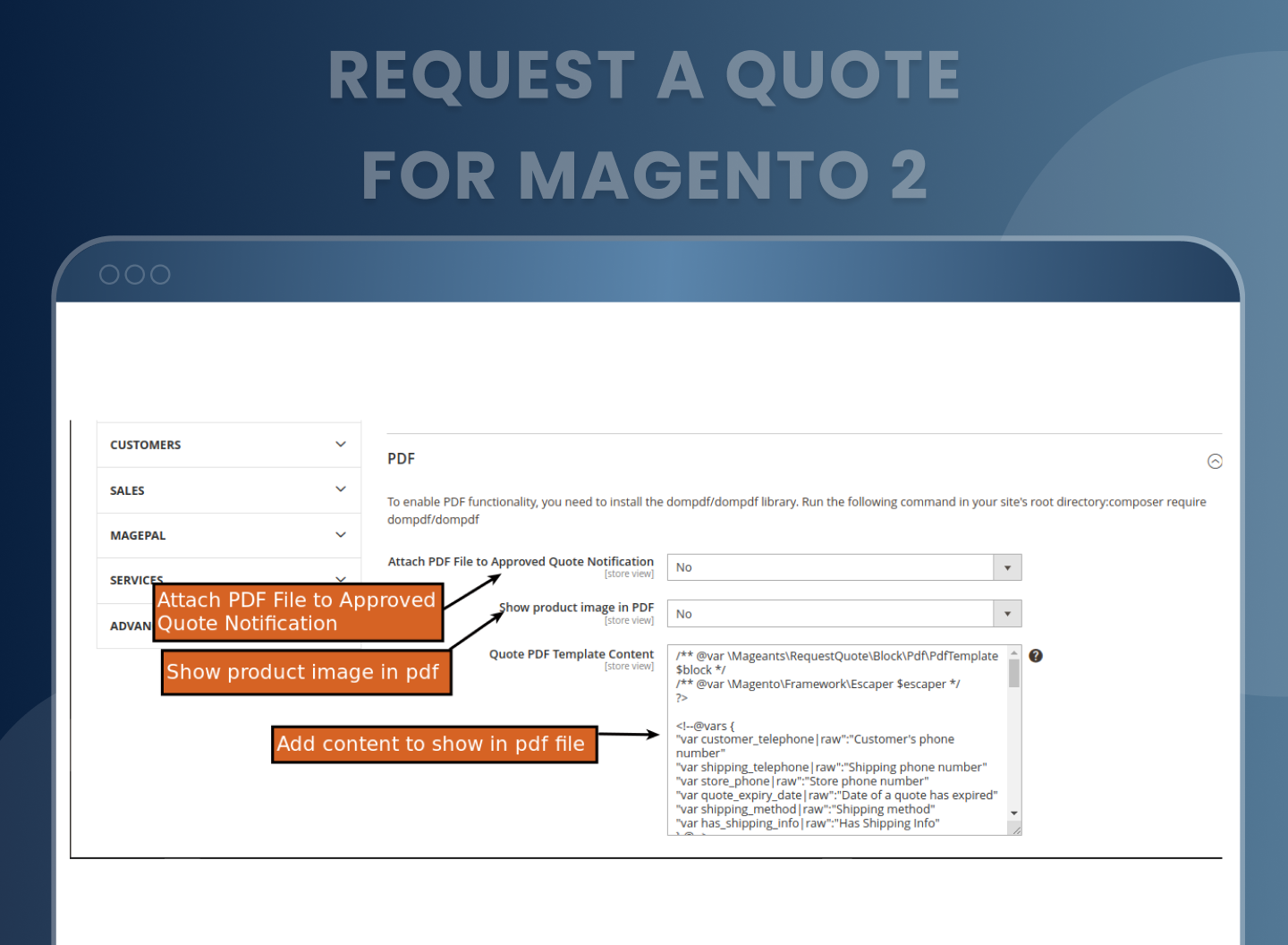
Admins and customers can download quote details in PDF format. You can also attach this PDF automatically to the approval email. The PDF layout can be customized per store view.
Bulk Manage Quotes with Mass Actions
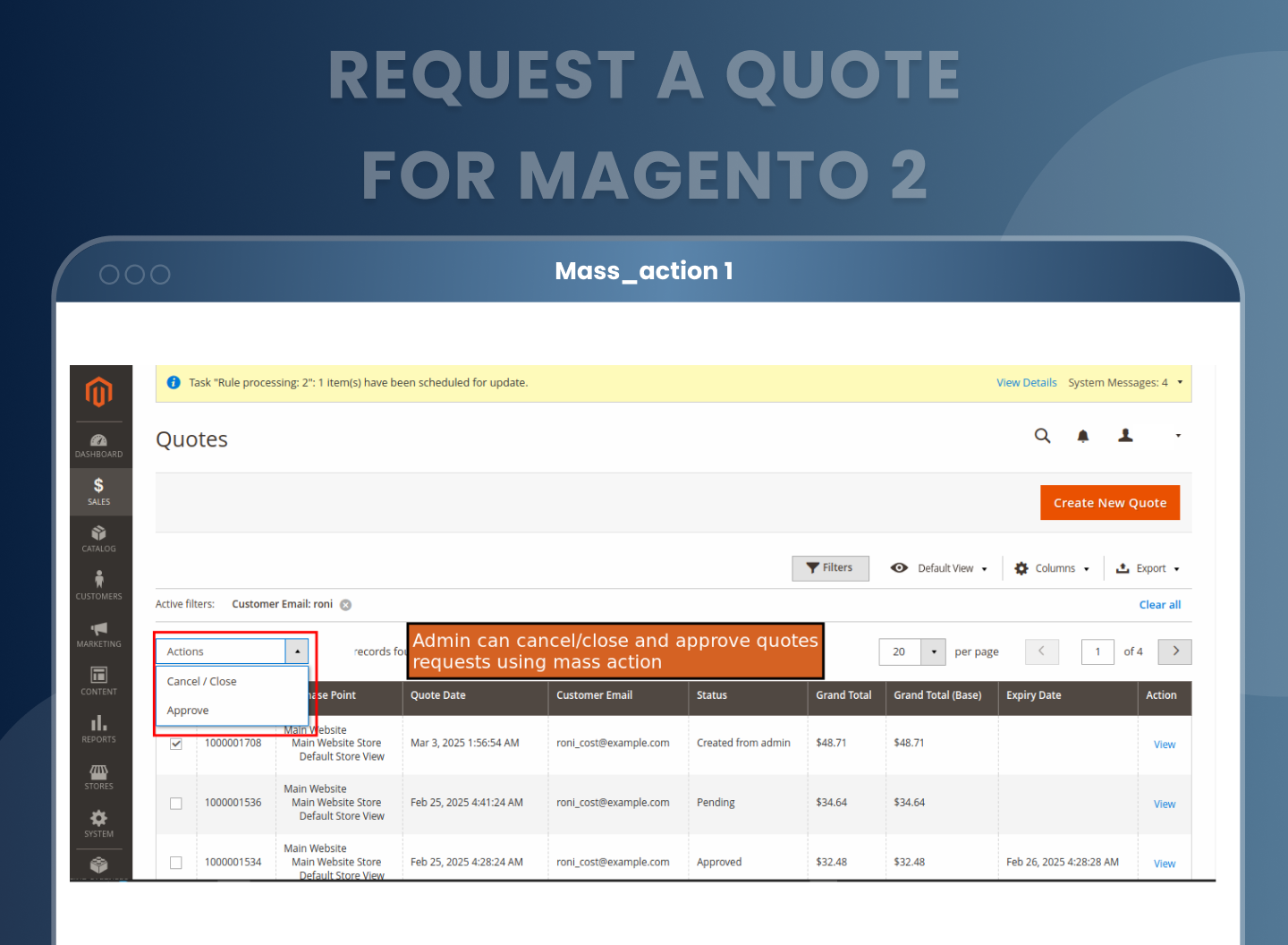
Running a busy store? No problem. Use Mass Actions in the admin grid to approve, cancel, or close multiple quote requests at once. It’s an efficient way to keep your quote pipeline organized, especially during seasonal promotions or high volume sales cycles.
Add Internal Notes and Collaborate with Your Team
Every quote supports internal comments so your team can log decisions, track conversations, or flag special considerations. This makes your magento 2 quotation extension not just functional, but collaborative.
Clone Previous Quotes for Repeat Orders
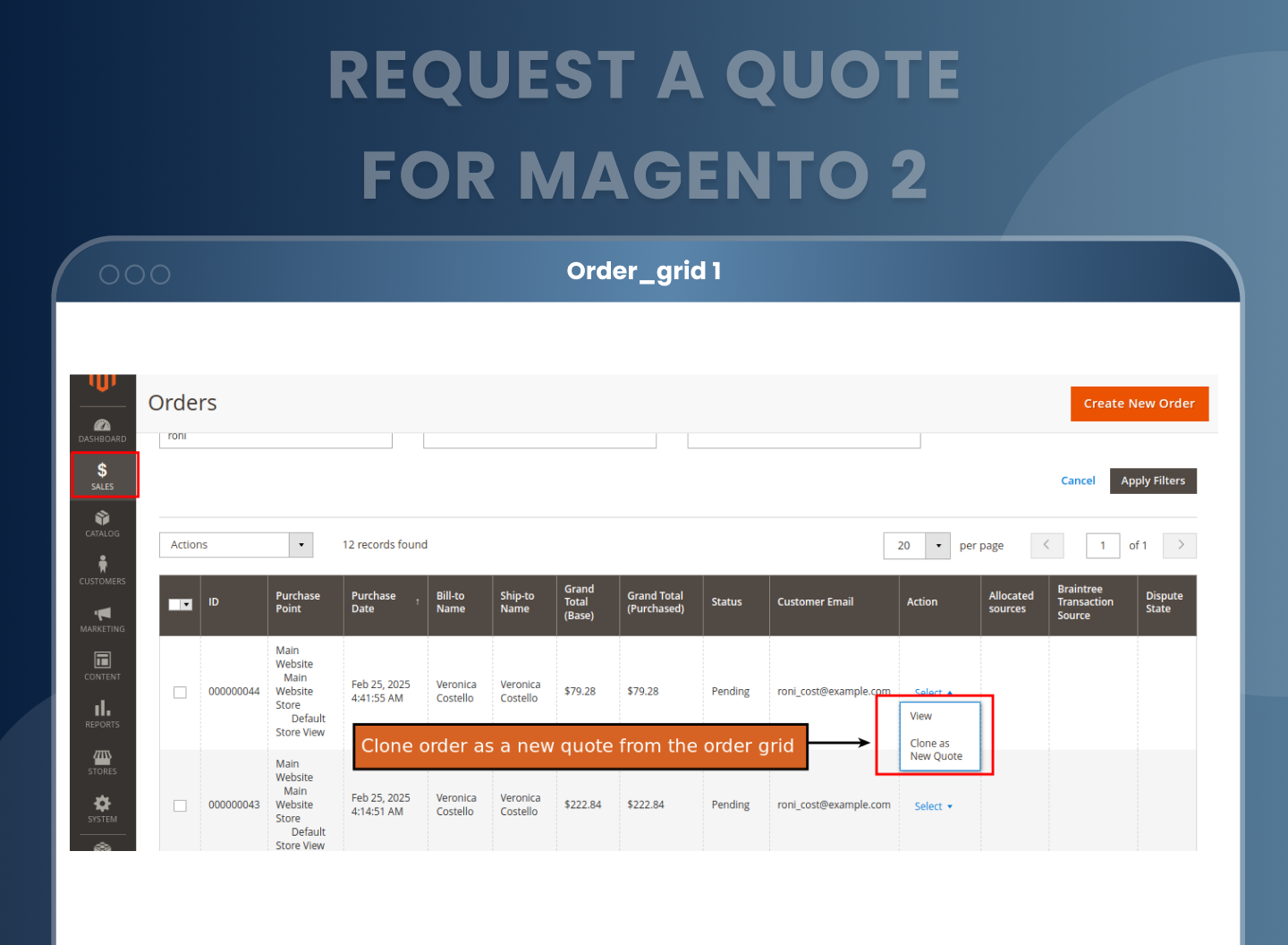
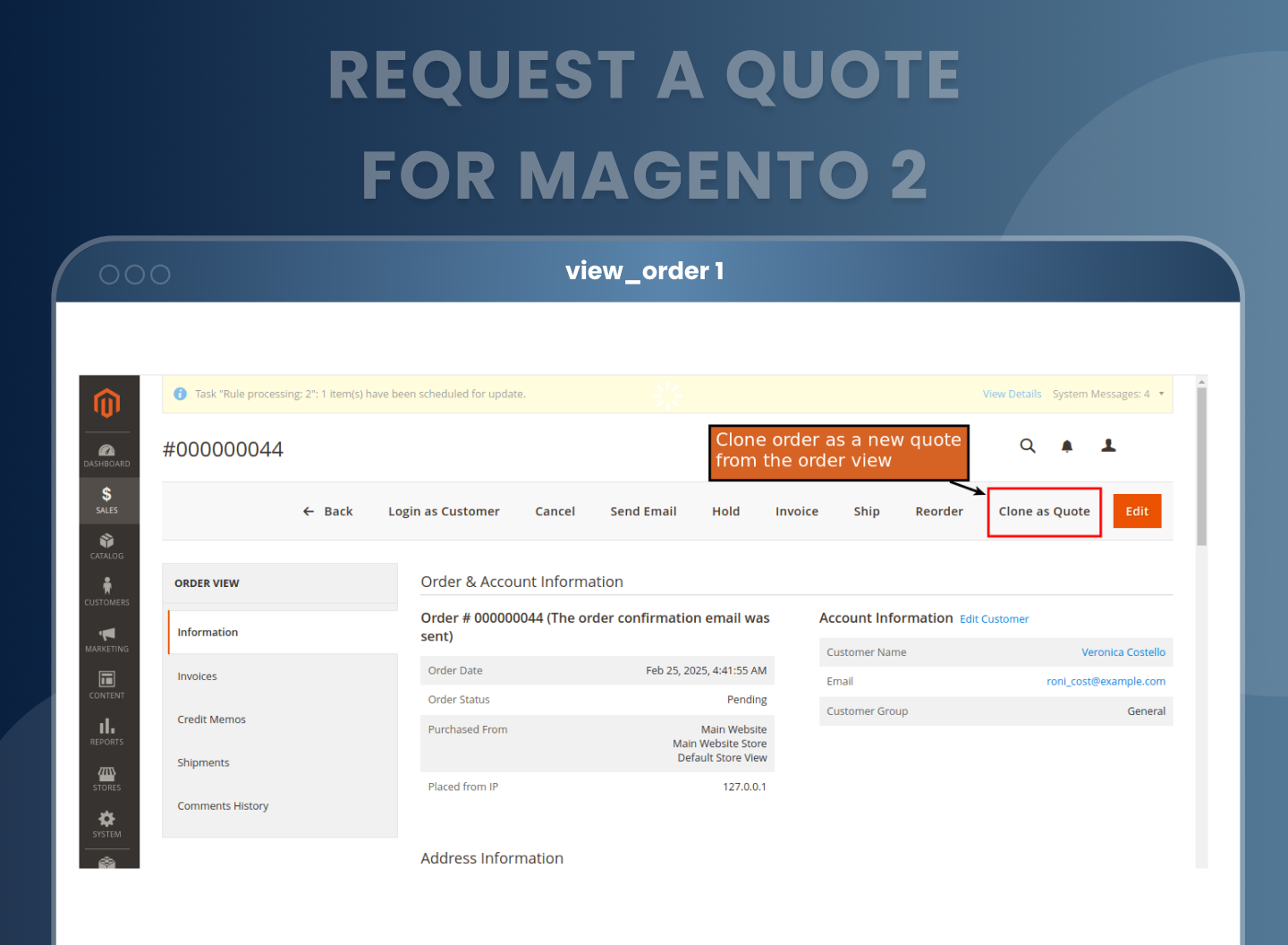
Need to send a similar quote again? Just use the “Clone as New Quote” option to duplicate any past request. This is great for long-term B2B clients with recurring needs or when working with seasonal campaigns.
Allow Full Cart to Quote Conversion
Give your customers the power to convert their entire cart into a quote request. Ideal for those who want custom pricing across multiple products, this one click feature makes negotiations easy, without losing their shopping selections.
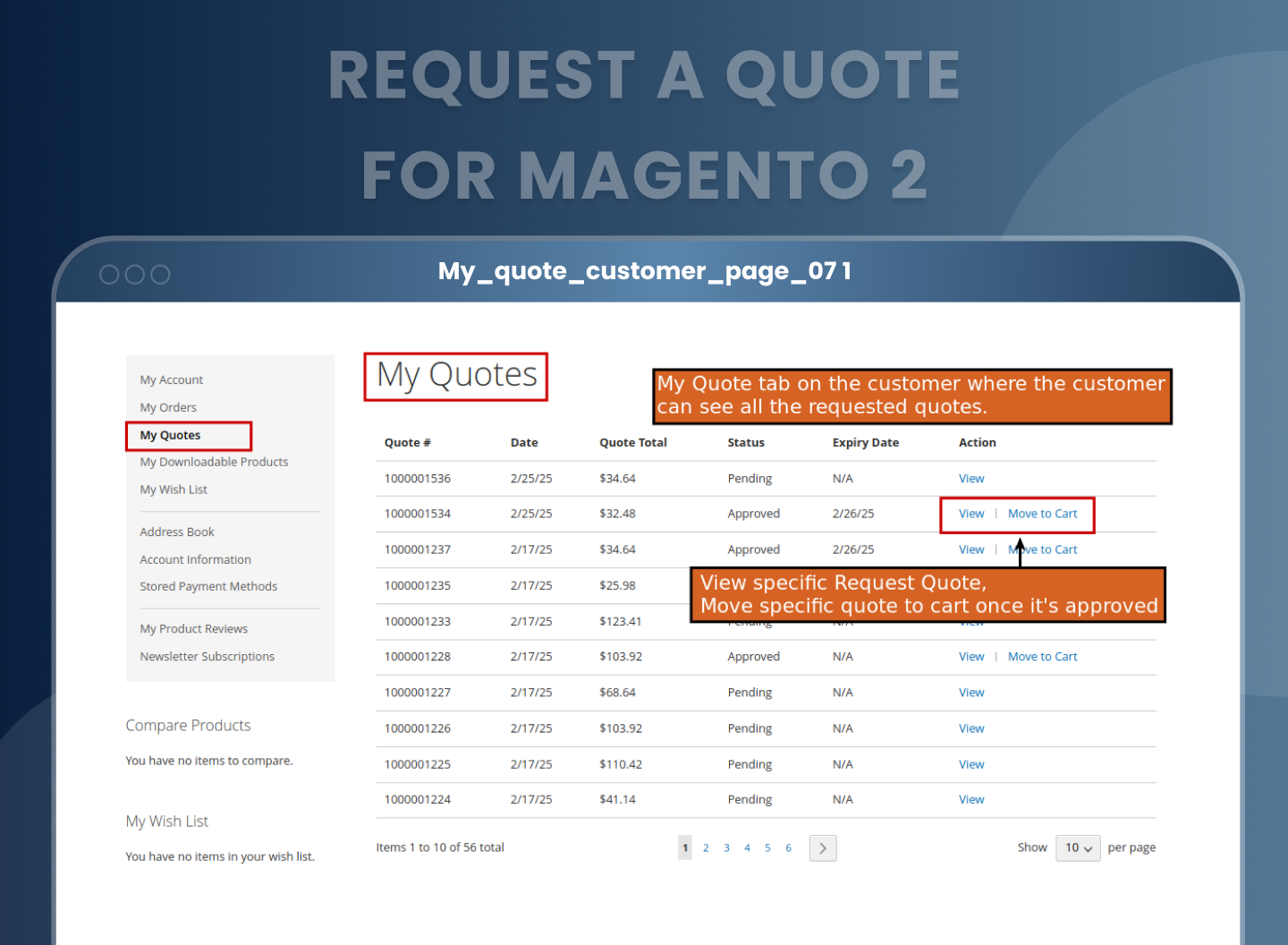
Customer “My Quotes” Dashboard
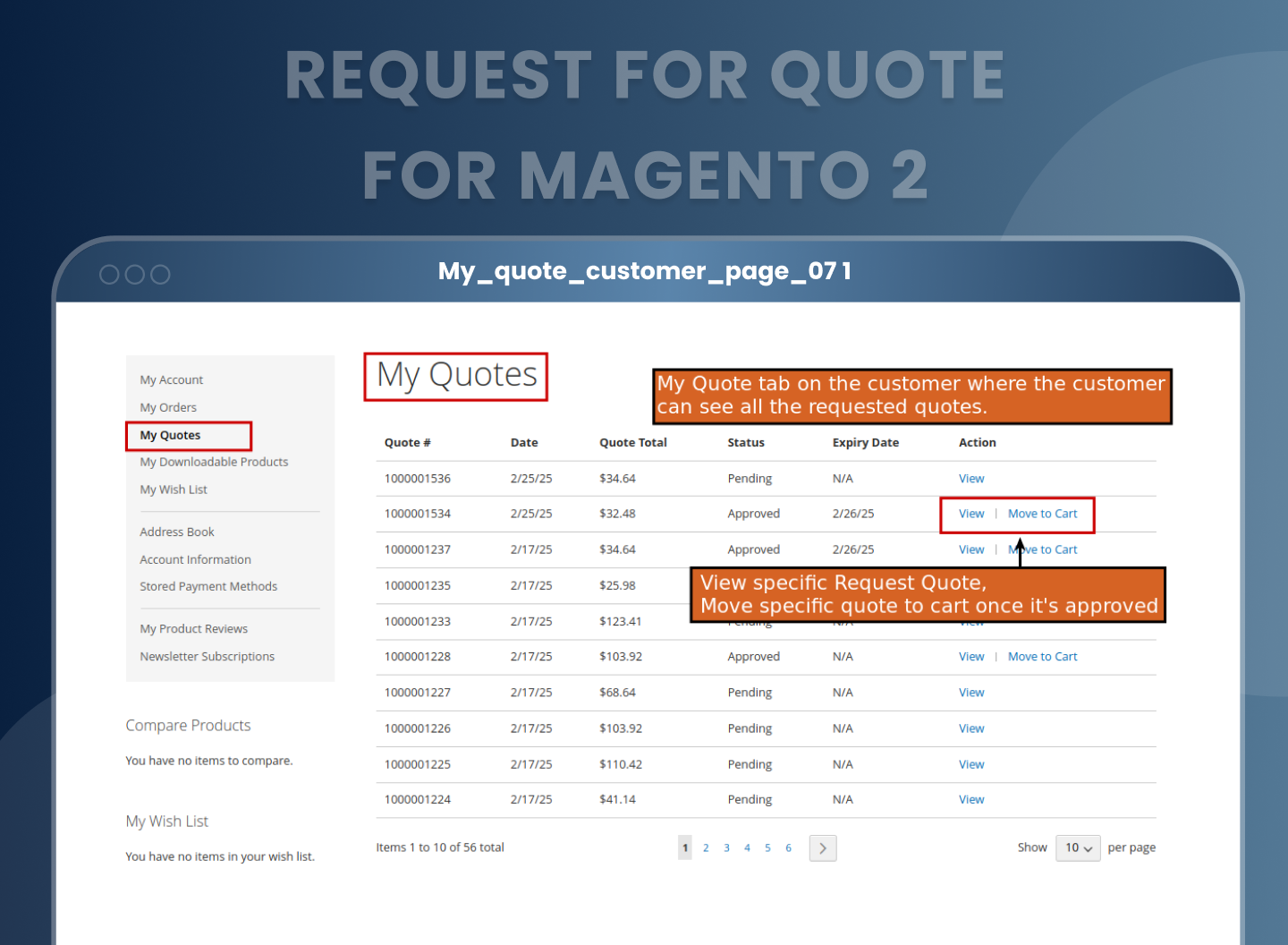
In the customer account section, buyers can view all their past and active quote requests under the “My Quotes” tab. They can check status, download PDFs, cancel if needed, or instantly convert approved quotes into orders, making it a self-service hub for B2B interactions.
Magento Open Source vs Adobe Commerce vs MageAnts Request a Quote
| Capability | Magento Open Source | Adobe Commerce B2B | MageAnts Request a Quote |
|---|---|---|---|
| "Add to Quote" on product & category pages | Not available | Quote from cart only | Yes, both |
| Quote cart and "My Quotes" account section | Not available | Yes | Yes |
| Buyer proposes their own price per item | Not available | Yes | Yes |
| Admin counter-offer with discount or surcharge | Not available | Yes | Yes |
| Auto-approve below a discount threshold | Not available | Not available | Yes |
| Guest quotes with automatic account creation | Not available | Not available | Yes |
| Quote expiry date and reminder emails | Not available | Expiry only | Expiry and reminders |
| Quote PDF download, front end and admin | Not available | Not available | Yes |
| Restrict by customer group, category or product | Not available | Company-level only | All three |
| Clone an existing order or quote as a new quote | Not available | Not available | Yes |
| Convert the whole cart to a quote in one click | Not available | Yes | Yes |
| Available on Magento Open Source | — | No, Adobe Commerce only | Yes |
FAQs
What is the Magento 2 Request a Quote extension?
It adds an "Add to Quote" button to your product and category pages so a buyer can ask for a price instead of paying the listed one. The request lands in a quote grid in your admin panel, where you can adjust prices, add a discount or surcharge, and approve it. Once approved, the customer moves the quote straight to checkout as a normal order.
Does Magento 2 have a built-in request for quote feature?
Magento 2 does not have a built-in request for quote (RFQ) feature in Magento Open Source. Without an extension, an Open Source store cannot show an “Add to Quote” button, collect a price request or send a buyer a custom price from the admin. Adobe Commerce, the paid edition, does include Negotiable Quotes, but only as part of its B2B module. That module has to be switched on, the buyer must belong to a company account, and the quote is requested from the shopping cart, not from a product or category page. Guests cannot request one. For most Magento 2 stores, especially those on Open Source or selling to buyers who are not set up as companies, a third-party RFQ extension is the only way to handle quote requests inside the store instead of over email and phone.
How do I add a Request a Quote button in Magento 2?
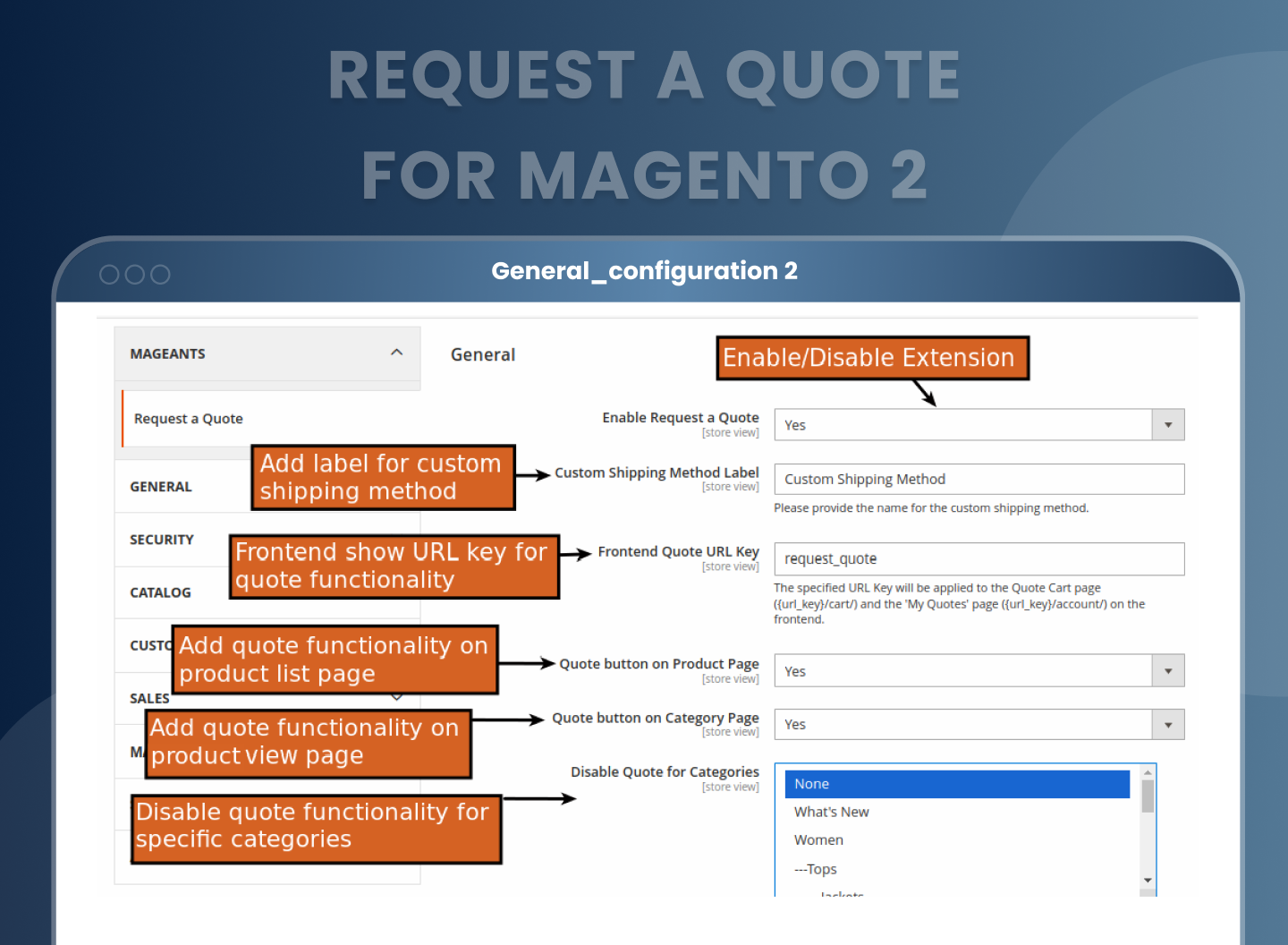
After installing the extension, go to Stores > Configuration > Mageants > Request a Quote and set Enable Request a Quote to Yes. From the same screen you control whether the button shows on the product page, the category page, or both.
Can guests request a quote without creating an account?
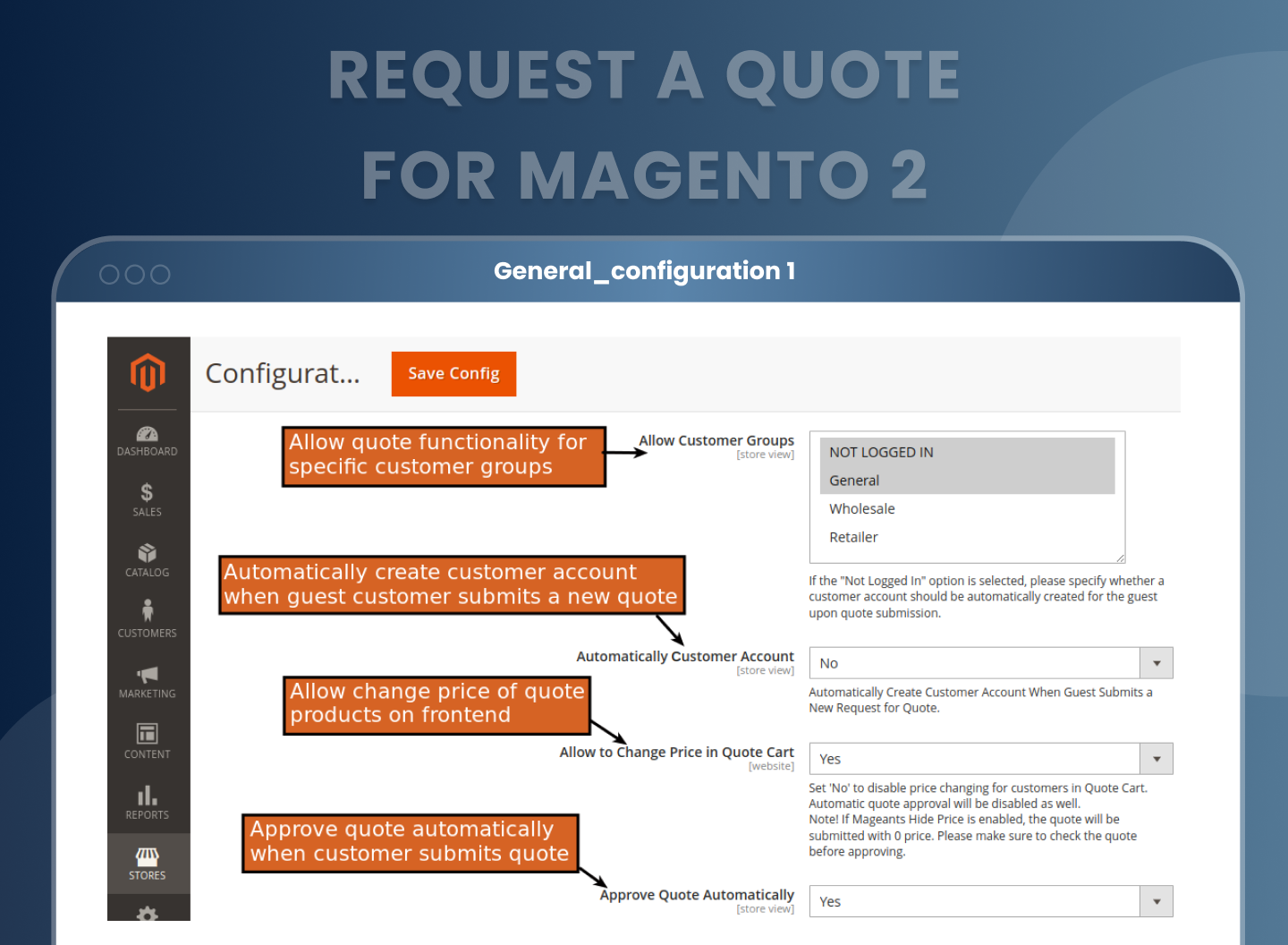
Yes. Add "Not Logged In" to Allow Customer Groups and guests can submit a quote by giving their email address, first name and last name. You then have a choice: with Automatically Customer Account switched on, an account is created for them at submission. With it switched off they can still submit a quote, but they will not be able to convert it into an order.
Can I limit quote requests to specific customer groups?
Yes. Allow Customer Groups controls which groups see the "Add to Quote" button, so you can open quoting to Wholesale and Retailer while leaving General customers on standard checkout.
Can I hide the quote button for certain products or categories?
Both. Disable Quote for Categories switches quoting off for whole categories in configuration. For a single product, open it in the catalogue and set the Hide Add To Quote Button toggle. Useful for anything with fixed, non-negotiable pricing.
Can customers propose their own price?
Yes, if you allow it. Set Allow to Change Price in Quote Cart to Yes and the buyer can enter the price they want against each item and add a note in the Remarks field. Setting it to No locks the listed price, and automatic approval is switched off along with it.
How does automatic quote approval work?
Turn on Approve Quotes Automatically and set a percentage in "If Quote Discount is Less than (%)". Any quote whose discount falls under that figure is approved without you touching it. Watch the two details that catch people out. The discount is measured against the quote total, not per product, and the calculation runs on pre-tax prices.
Can the admin create a quote on behalf of a customer?
Yes. Go to Sales > Mageants Request For Quote > Request For Quote and click Create New Quote. Pick an existing customer or create one, choose the store, add products, then set prices, an additional discount or an additional surcharge. Once approved it appears in that customer’s My Quotes section.
Can customers download their quote as a PDF?
Yes, from both the customer account and the admin panel. You can also attach the PDF automatically to the approved-quote email, show product images in it, and edit the PDF template per store view. PDF output needs the dompdf library, installed with composer require dompdf/dompdf in your site root.
Do quotes expire, and can reminder emails be sent?
Set Quote Expiration to the number of days a quote stays valid after approval, and Send Reminder Email after Day(s) to chase the customer before it lapses. Both can be overridden on an individual quote, and leaving either field empty turns that feature off.
Does the extension email quotes to customers?
Yes. Customers are emailed when a quote is submitted, approved, modified, cancelled or expired, and again as a reminder before it lapses. Each email has its own template and can be switched off on its own. Guest users get a separate template set. Admins can be emailed the moment a quote arrives, or take a daily, weekly or monthly digest at a time you set.
Can a whole shopping cart be turned into a quote?
Yes. A "Request a Quote" button sits on the standard shopping cart page and moves the entire cart across in one click. You can also work the other way round: from the order grid or an order view, "Clone as Quote" turns a past order into a new quote request, which saves time on repeat B2B orders.
Is there a free Magento 2 request for quote extension?
Community modules exist on GitHub, and most do one job: put a quote form on the product page and email you the result. What they leave out is everything that happens after that — a quote cart the buyer can edit, counter-offers from the admin side, approval thresholds, expiry and reminder emails, PDF quotes. There is also the maintenance question. An unmaintained GitHub module becomes your problem at the next Magento patch, not the author’s.
Is this a full Magento 2 quote system or just a request form?
A full system. All your Magento 2 quotes land in one grid under Sales, showing quote ID, purchase point, date, customer email, status, grand total and expiry date. From there you open a quote, change prices and quantities, add a discount or a surcharge, leave comments the customer can read, approve or cancel it, or download it as a PDF. Approving and cancelling also work in bulk from the grid.
Reviews
Customization
Changelog
Version 2.0.2 – October 27, 2026
- Compatibility:- Mageants team make extension compatible with Magento version 2.4.9.
- Compatibility:- Mageants team make extension compatible with Hyva theme.
- Fixes:- Resolved deprecation issue when run upgrade command.
Version 2.0.1 – October 15, 2025
- Fixes:- When a quote was placed as an order at a reduced price after an admin edit, available discounts showed as 0. Fixed for all product types.
- Fixes:- Quote details edited in the admin were not updating in the customer's account section. Fixed.
- Improvement:- Editing a bundle or grouped product quote in the admin applied an extra discount after the product price reached 0. Fixed.
Version 2.0.0 – August 04, 2025
- New:- MageAnts released the Request a Quote extension with API support.
Why Choose MageAnts
-

30 Days Money Back Guarantee
We offer 30 Days money back guarantee if customer meets our refund policy. For more info you can read our terms and condition
-

Tested Before Every Release
Every version is tested on the latest Magento 2.4 release before it goes live, and bugs reported during your support period are fixed by our team.
-

Free 90 Days Support
MageAnts ensures quick and quality technical support. Take advantage of our 90 days free support for a smooth and efficient experience.
-

Frequent Extension Updates
Intensive update roadmaps ensure highly compatible, bug-free, great performance, and innovative extensions.
