



Geo IP Store Switcher For Magento 2
Ask AI About This Extension




Key Features
- Automatically detect the user's location and redirect them to the appropriate store view.
- Add a custom URL to redirect to a specific page.
- Restrict redirection for particular IP addresses.
- Use a CSV file to import the geo-IP details of your stores.
- Add the features of a store switcher and auto-redirection to your stores.
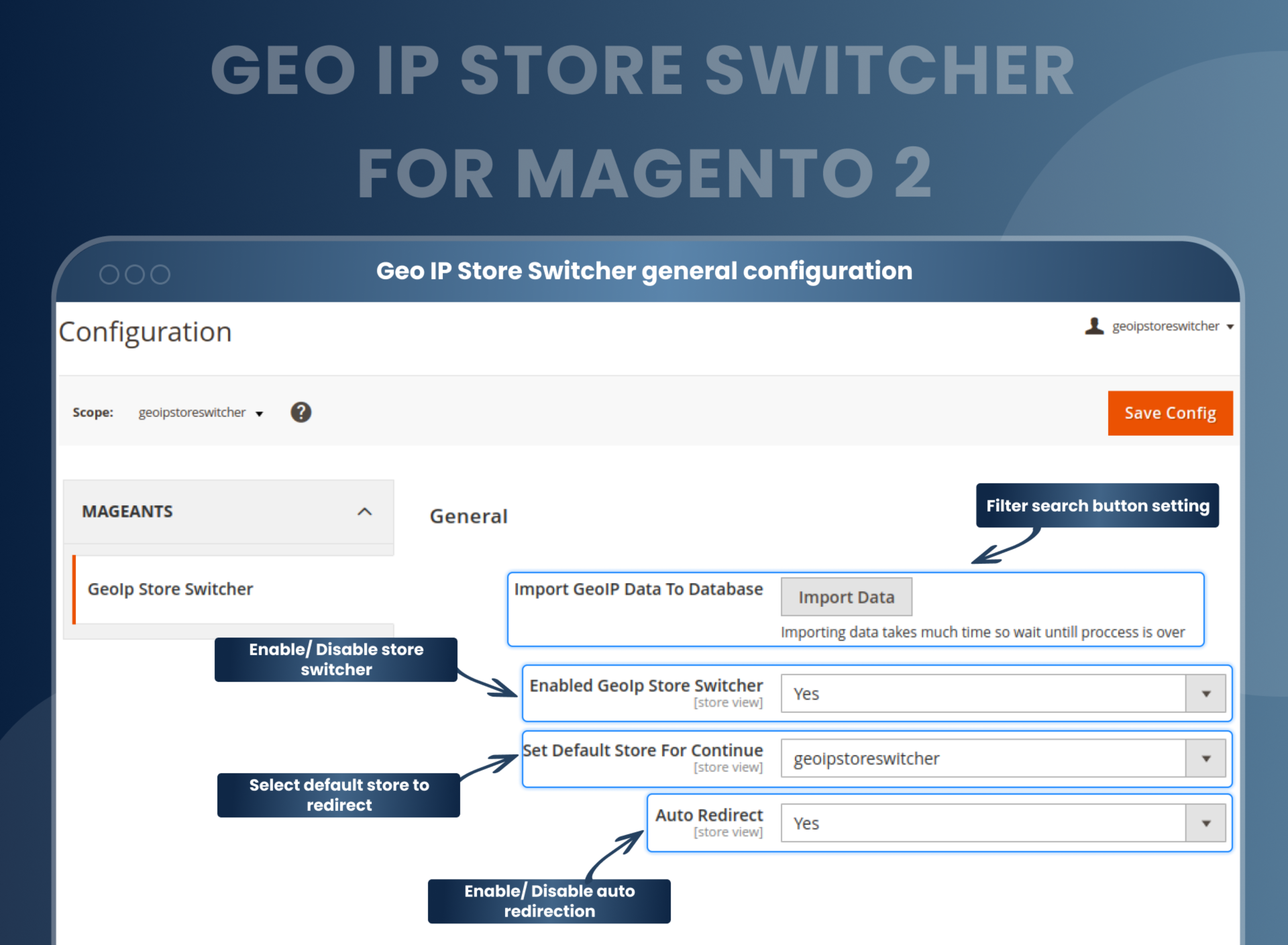
- Select the default auto-redirection store.
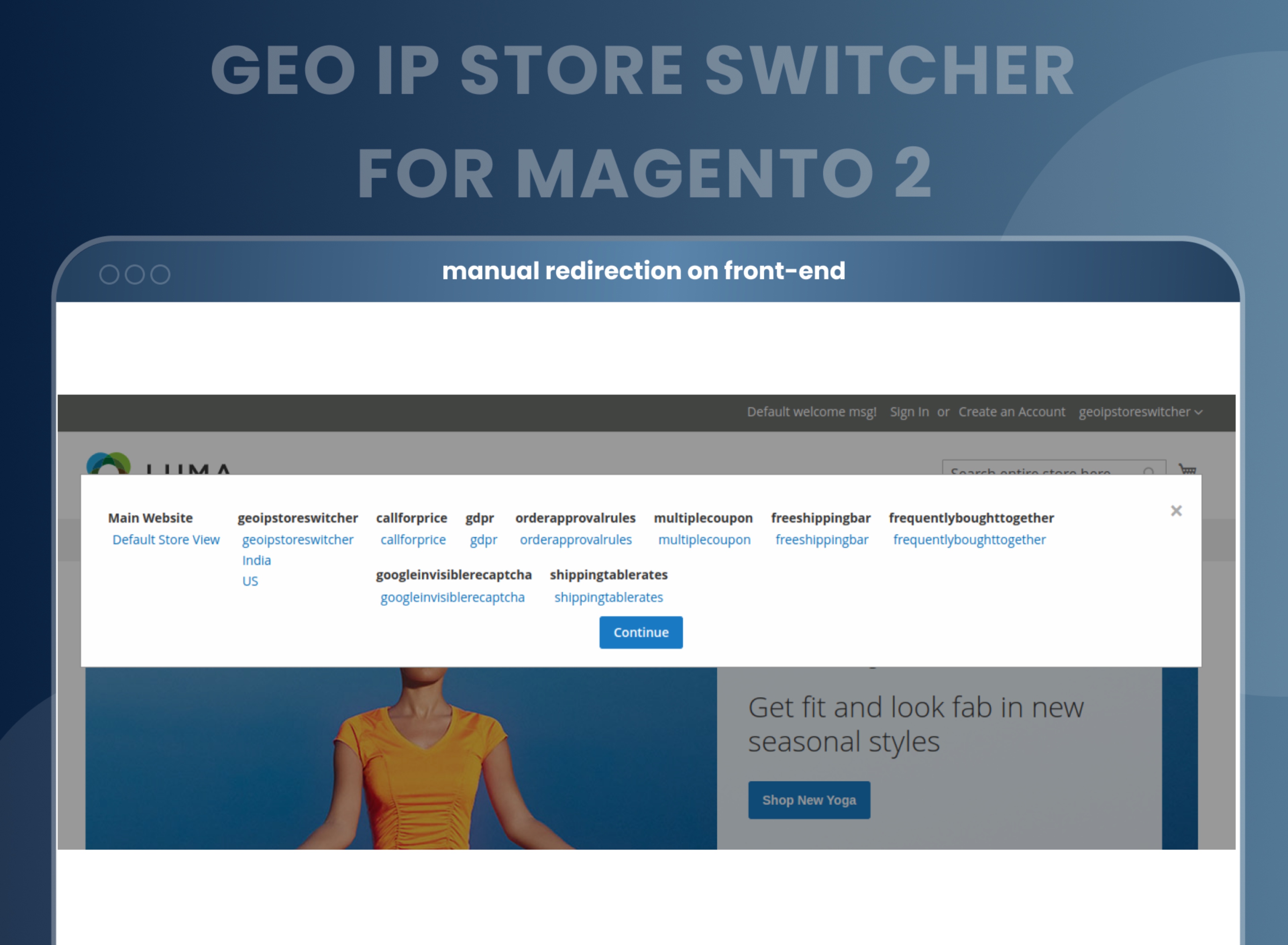
- Display a popup for all stores so customers can redirect to specific stores as per their needs.





Current Limitation in Magento 2
What Magento 2 Cannot Do
Magento 2 handles customers from different countries. By default, Magento 2 does not provide functionality to store owners that would allow them to automatically redirect customers from certain countries to a specific store view based on their IP address. This means that customers from different countries will not be directed to a different store view based on their IP address, but instead will be shown the same store view.
How Our Extension Solves This
This Magento 2 Geo IP Store Switcher extension detects customers' location based on their IP address and redirects them to the respective store views and custom URLs, or switches the language and currency for the store automatically. Use Magento 2 GeoIP Store Switcher with multi-store, multi-currency, and multi-language functionality to make your customers' local or international shopping experiences better.
Description
Automatically direct visitors to the right store view.
Magento 2 GeoIP Store Switcher detects customer locations and redirects them to region-specific store views. For example, show localized pricing and language to international customers.
Import all the required geo-IP data with a simple CSV file
When you start working with our store, you don’t need to manually input all the geo-IP data. Simply upload a CSV file with the required data, and your job is done.
Automate the process of store switching for all your websites
The main purpose of this extension is to assist you with the management of various e-commerce stores that you own. Appropriate customers need to switch to the appropriate stores. With our extension, this process becomes automated. After you have uploaded your requirements, the extension works on its own.

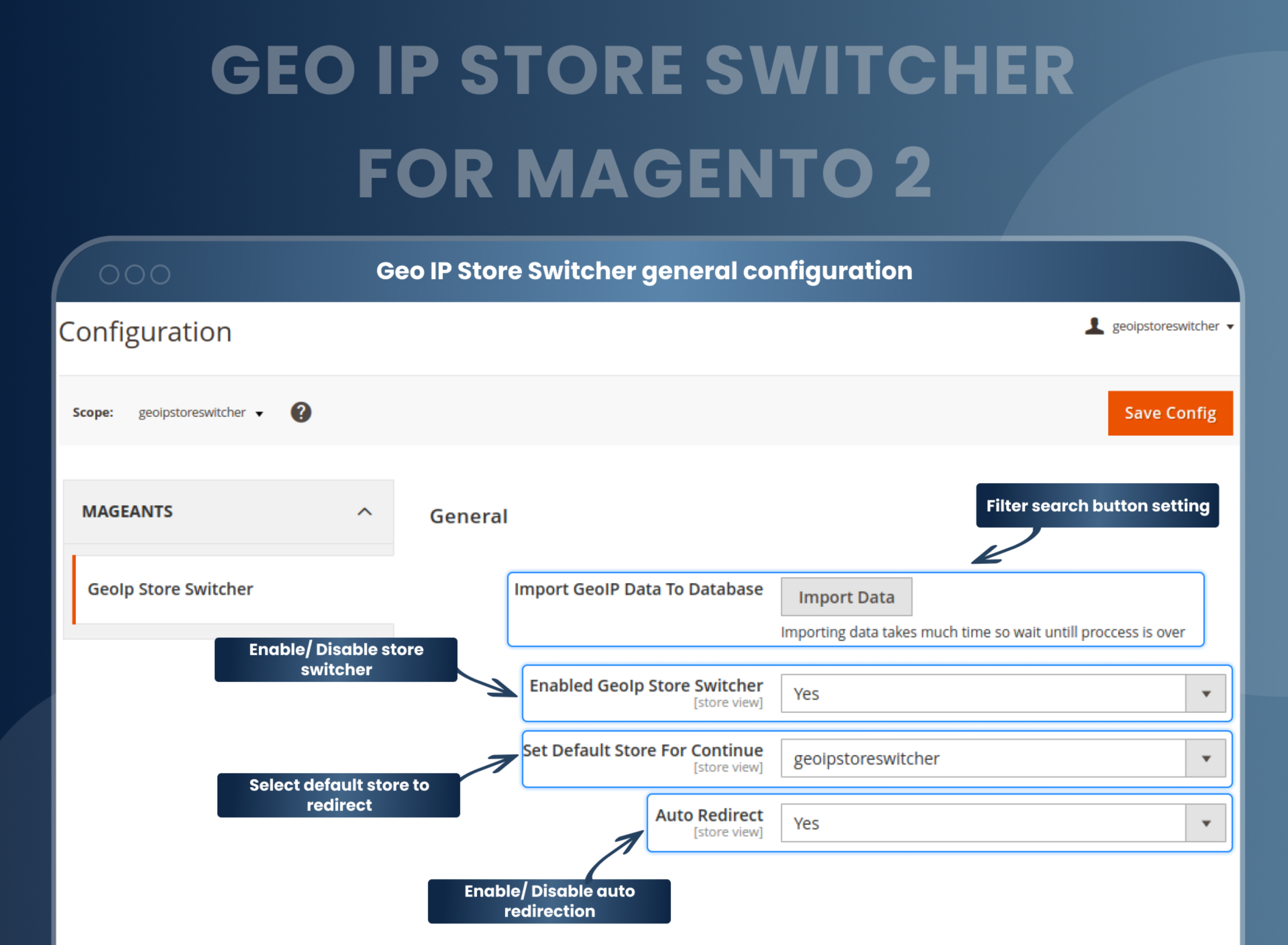
Select the default redirection store
If a particular website visitor is not from the specific geographic location that you work for, you need to redirect them to an appropriate website as well.
For such clients, Geo IP Store Switcher for Magento 2 allows you to select the default store to which you wish to redirect them. Once set, such clients will be automatically redirected to the mentioned store.
Manage all your stores from one portal
When you have different e-commerce stores, you need to manage and monitor the functioning of all of them. This can be a tiring and time-consuming process. But with the Geo IP Store Switcher Magento 2 extension, this problem of yours can be completely solved. With one single portal of our extension, you can monitor and manage the geo-IP of all your stores.
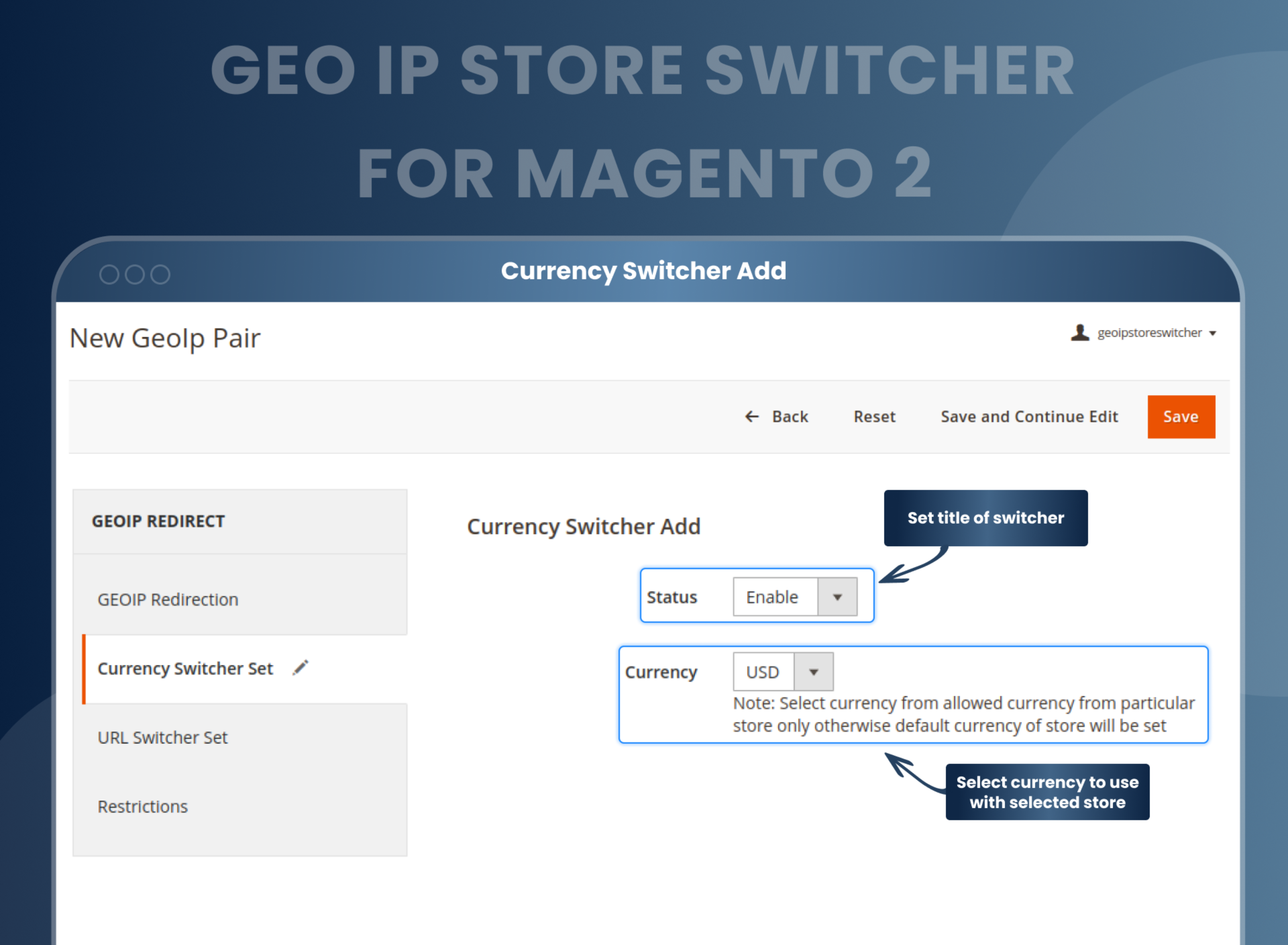
Select the currency to be used with each and every store
With each Geo IP that you create, you can also select adjacent currencies. Hence, when you enable the Magento 2 Geo IP Currency Switcher, these currencies will be automatically used in the mentioned stores, simplifying your work. If we're talking about currency exchange here, then you should also look into the Magento 2 Store View Pricing Extension , which allows admins to manage the same products with different product prices per store view and easily set up base currency per store view. Setting up the base currency and the display currency per store view makes the store more user-friendly, and it will also be easy for customers to buy products with their currencies without making any exchange.
Select the language to be used for a specific store
Magento 2 language switcher has a stunning feature that allows you to assign a specific language to a specific store so that the user gets a personalized experience of their native language, because of which the scope of your targeted audience enlarges.
Create various restrictions for redirection
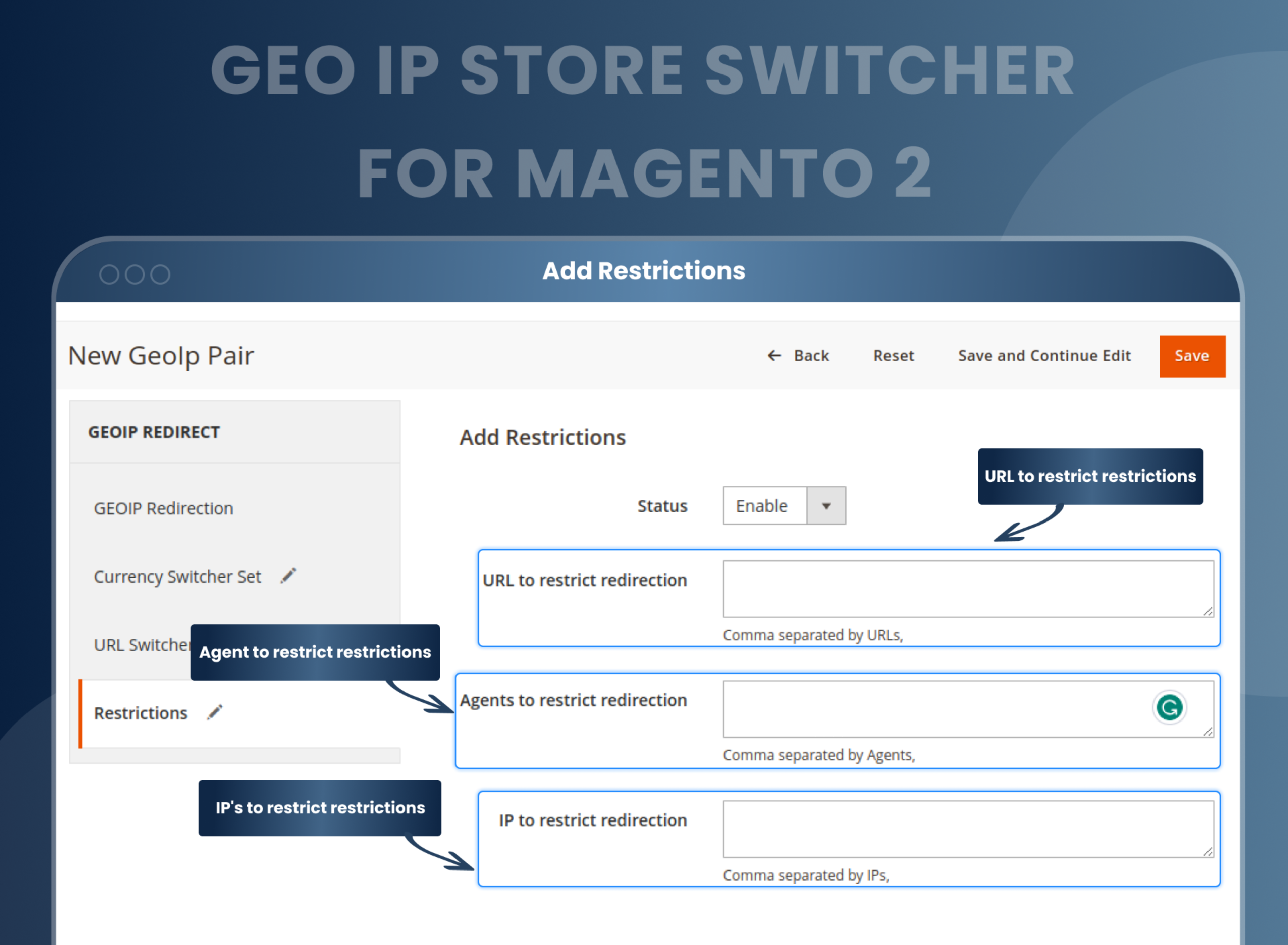
The Magento 2 store switcher by MageAnts also helps you to create certain restrictions that, if found on the user’s computer, would prevent the redirection. You can choose various URLs, agents, or IP addresses for which you want to create the restrictions. Such a system is required to protect your website against different security threats.
How To Configure Geo IP Store Switcher In Magento 2?
MageAnts Magento 2 Geo IP Store Switcher Extension
How Does This Work?
MageAnts Magento 2 GeoIP Store Switcher Extension
Benefits of the Geoip Store Switcher Magento 2 Extension
- Install the Geo IP store switcher Magento 2 extension in your store.
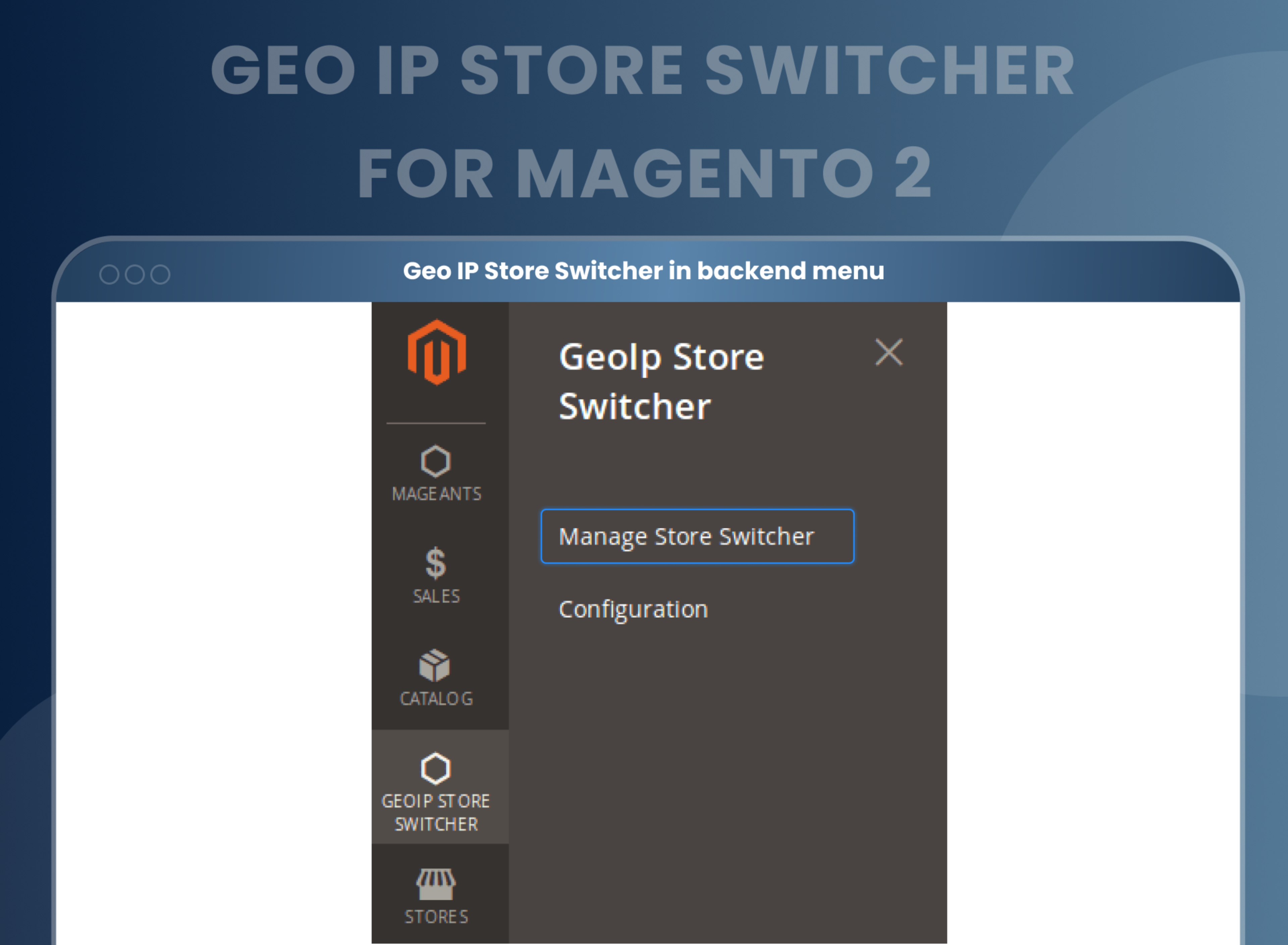
- You can enable the extension from store > Configuration > Mageants > Geo IP store switcher.
- You can set other configurations as per your needs and requirements.
- Admin can set auto redirect or continue with the specific store for the customer.
- Specific country customers redirect to a particular store based on IP address.
- Also, the admin can give the option to display all stores in the popup and customer redirect as needed.
- Create redirection from Geo IP store switcher > Manage store switcher and create your store switcher.
- The main feature of the extension is customer is redirected to specific stores based on IP address, which helps to admin as well as the customer.
- E commerce doesn’t restricts you in any means, it provides you a vast marketplace where you strict your products or services to your local customers. You can find interested people from around the world and deal with them.
- This benefit of e-com stores comes with a special requirement for multiple stores or websites. You need to redirect your customers to other stores of yours based on their country, language, currency, etc. Sellers usually find it convenient to use one single setup for all these various stores. This diminishes the need of developing multiple websites and maintaining them.
- However, if you wish to create such a system for your stores, you need an extension that would automate the process of redirection and currency changing. That is why we MageAnts have come up with the Magento 2 GeoIP store switcher extension. This extension will help you with the mentioned processes effortlessly. Because of its quality of switching the core aspects of the store it can also be called as Magento 2 website Switcher. Personalize your store according to your “ Audience” with Magento 2 Store Switcher extension which enables Geo IP switch, Geo IP redirect, Language, Currency and Location switch.
- Our Magento 2 GeoIP Redirect extension has a design that will simplify your work of handling multiple e-com stores. All you need to do is upload the required Geo IP Magento 2 data, manage the settings of various crucial settings as you wish and monitor the work of the extension. Thereafter, the extension would automatically redirect your customers to the required websites. It would also modify the currencies for the customers accordingly. Thus, simply by maintaining the settings at first, you can get all your work done.
- E commerce doesn’t restricts you in any means, it provides you a vast marketplace where you strict your products or services to your local customers. You can find interested people from around the world and deal with them.
- This benefit of e-com stores comes with a special requirement of multiple stores or websites. You need to redirect your customers to other stores of yours based on their country, language, currency, etc. Sellers usually find it convenient to use one single setup for all these various stores. This diminishes the need of developing multiple websites and maintaining them.
- However, if you wish to create such a system for your stores, you need an extension that would automate the process of redirection and currency changing. That is why we MageAnts have come up with the Magento 2 GeoIP store switcher extension. This extension will help you with the mentioned processes effortlessly. Because of its quality of switching the core aspects of the store it can also be called as Magento 2 website Switcher. Personalize your store according to your “ Audience”, with Magento 2 Store Switcher extension which enables GeoIP switch, GeoIP redirect, Language, Currency and Location switch.
- Offer multiple store views and currencies.
- Easy and intuitive store switching.
- Offer auto-redirect to store view.
- Provide localized content and user experience to customers.
- Increase customer engagement and loyalty.
- Increase sales by targeting customers in different countries.
- Enhances the user experience by providing content in the customer’s language.
- Increases customer satisfaction by providing a personalized shopping experience.
- Increases store conversions by providing customers with the most suitable store view.
- Improves user navigation by automatically redirecting customers to the right store view
- Enhances store security by preventing customers from accessing the wrong store view.
FAQs
What is Magento 2 Geo IP Store Switcher?
Magento 2 Geo IP Store Switcher extension identifies the customers’ location based on their IP address. It helps to redirect the user to a proper store view based on the Geo IP address. With the help of this extension, the store owner can bring a better experience to customers during the shopping journey.
Is it possible to set customers to redirect to a specific store with this extension?
Yes, by using Geo IP Store Switcher Extension, you can redirect your customer to a particular store.
Is auto redirection possible?
Yes, by doing configuration, you can achieve redirection.
Is it possible to redirect customers and show a popup as per store requirement?
Yes, it is possible to redirect customer and display popup as per store requirement.
Can I restrict the URL with this extension?
Yes, you can restrict a specific URL with the help of this extension.
Reviews
Customization
Changelog
- Mageants Team make extension compatible with magento versions 2.4.7 & 2.4.8.
- MageAnts team update the code by following the Magento coding standard.
- Setup upgrade command threw an error when installing the extension in magento2.4.2 version.
- Manage store switcher grid did not display and threw an error in the frontend.
- Mass actions didn't work of manage store switcher grid.
- country customer redirection to particular store than it's not working in Magento 2.3.3version, MageAnts solve issue and make compatible with all Magento version.
- MageAnts update Geo IP Store Switcher extension in latest magento2.3 version, Now extension working with all Magento version.
- Update module version name in composer.json file same as module.xml file.
Why Choose MageAnts
-

30 Days Money Back Guarantee
We offer 30 Days money back guarantee if customer meets our refund policy. For more info you can read our terms and condition
-

Tested Before Every Release
Every version is tested on the latest Magento 2.4 release before it goes live, and bugs reported during your support period are fixed by our team.
-

Free 90 Days Support
MageAnts ensures quick and quality technical support. Take advantage of our 90 days free support for a smooth and efficient experience.
-

Frequent Extension Updates
Intensive update roadmaps ensure highly compatible, bug-free, great performance, and innovative extensions.
