



Product Images by Customer For Magento 2
Ask AI About This Extension





Key Features
- Allows registered and guest users to upload product images when they purchase products.
- Enhance the traffic and sales in your store by displaying real-life images of products purchased by other customers.
- Receive email notifications when customers upload images.
- Approve, manage, and display images in attractive slideshows or grid tables.
- Build customer trust and allow them to inspire other customers.





Current Limitation in Magento 2
What Magento 2 Cannot Do
Do you know why people prefer to shop in-store rather than buy online? The main reason is that when people shop in-store, they have the ability to see the product in person and make sure that it is of good quality. Additionally, online shoppers often look for feedback from other customers who have purchased the same product, which they can't do when shopping in-store.
How Our Extension Solves This
MageAnts Magento 2 Product Images by Customers extension encourages customers to upload images of the products they have purchased from your brand. This way, customers can add purchase product images to gain the trust of other customers and inspire other customers to purchase it.
Magento 2 product images by customers help boost the credibility of your online Magento 2 store, enhance your product trust among customers with the help of your existing customers, and increase the sales of your website.
Description
Let you customer showcase and share product images
Magento 2 Product Images by Customers extension enables customers to upload and share images of purchased products, boosting trust and engagement. For instance, a clothing store can allow customers to display their photos wearing the purchased outfits.
Improve product trust with real-life images
The Magento 2 Customer Image Upload extension will allow registered as well as guest users of your store to upload real-life images of the products they received and thus share their experience with others.
You can also configure the presentation of images by setting a tab panel and naming and describing them for other users to understand and explore.
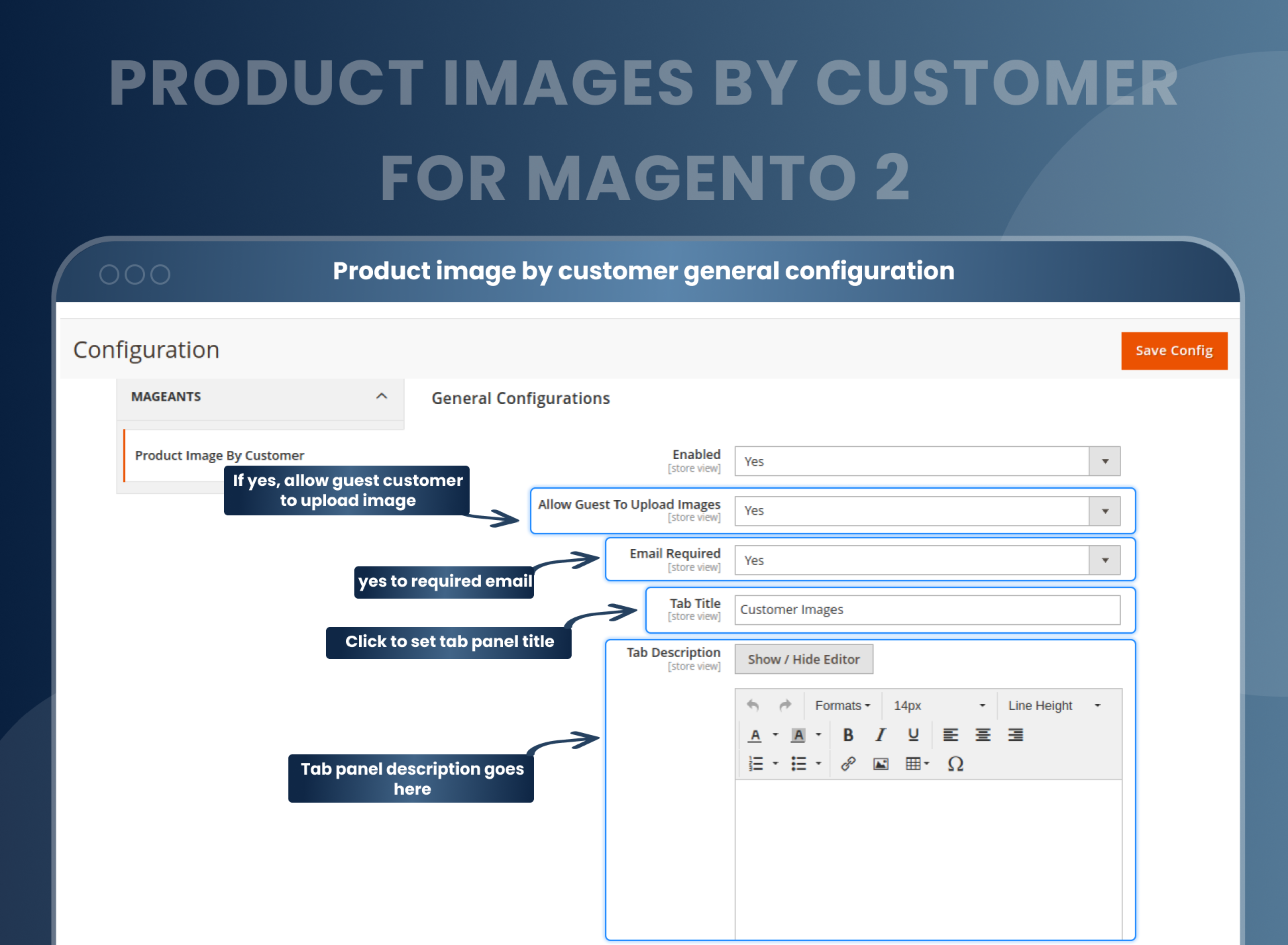
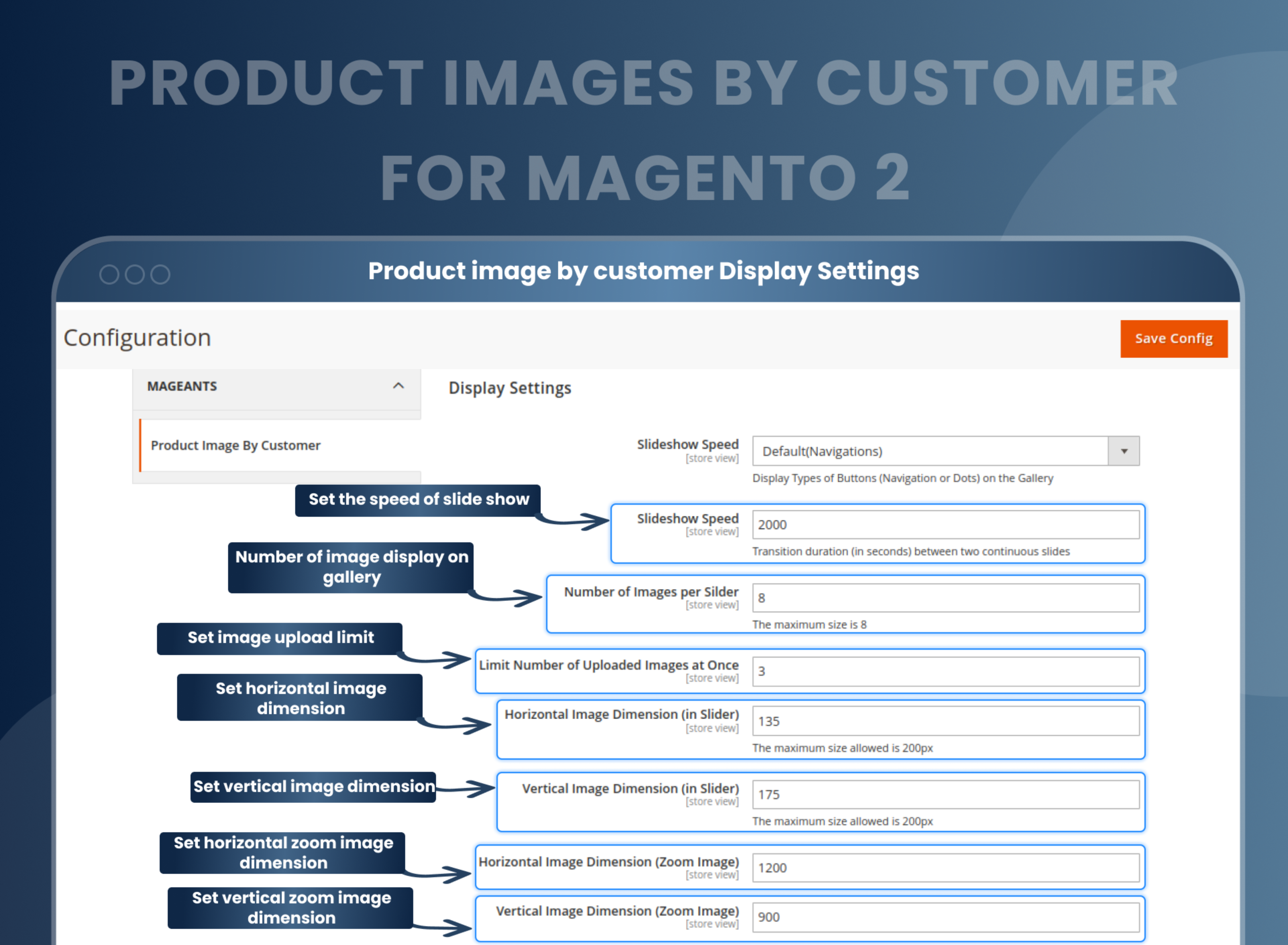
Configure the appearance of product images
With Magento 2 product images by the customer, you can decide how you want to display the product images to your customers right from its presentation, i.e., in a grid table or slideshow, the count of images, the image upload limit, its alignment, i.e., vertical or horizontal, etc., in its backend settings.
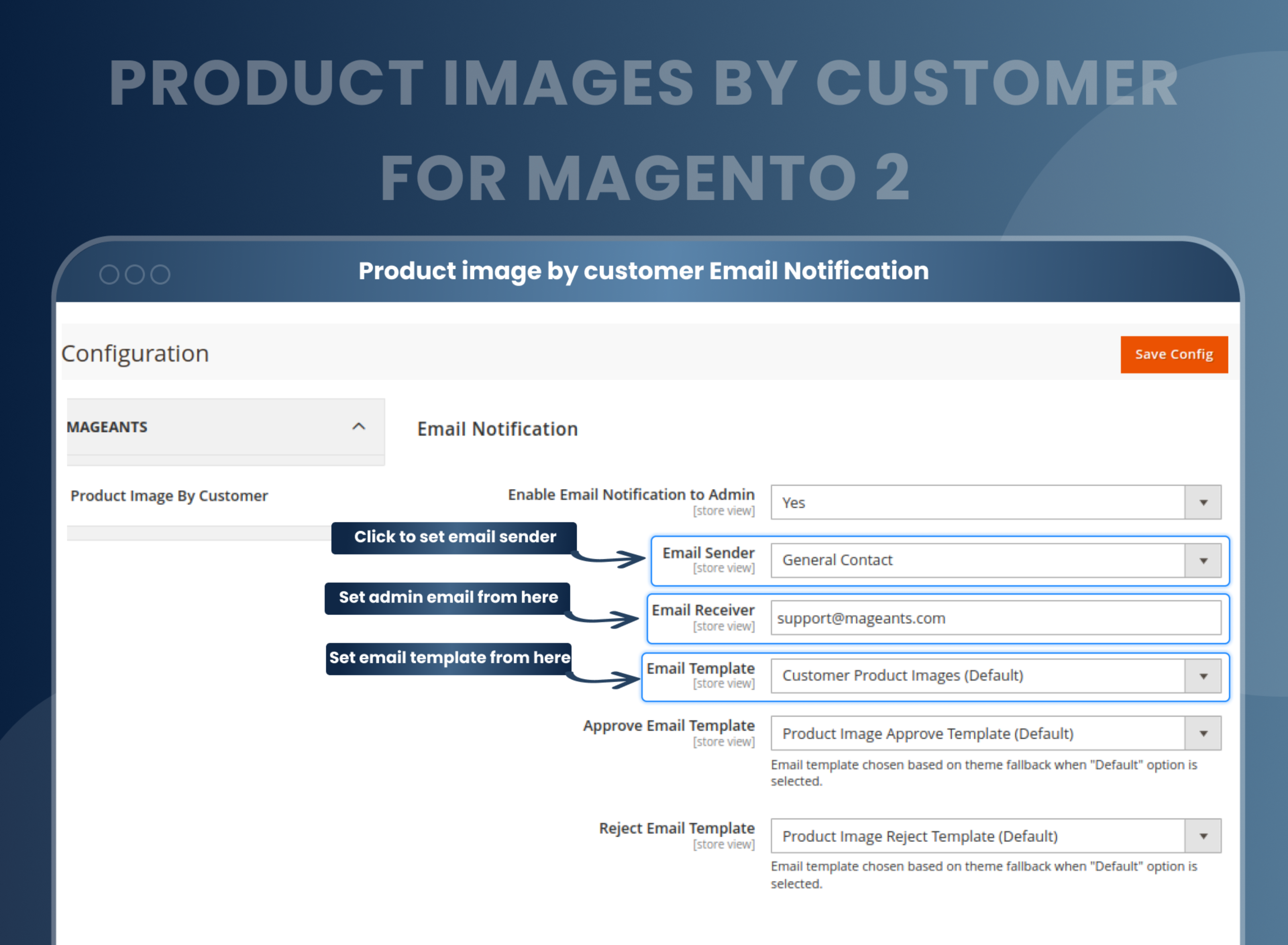
Send and receive e-mail notifications
Set up email functionality to receive notifications whenever a customer uploads product images to your store.
You can also set up email templates and email senders and add an image attribute to the customer extension.
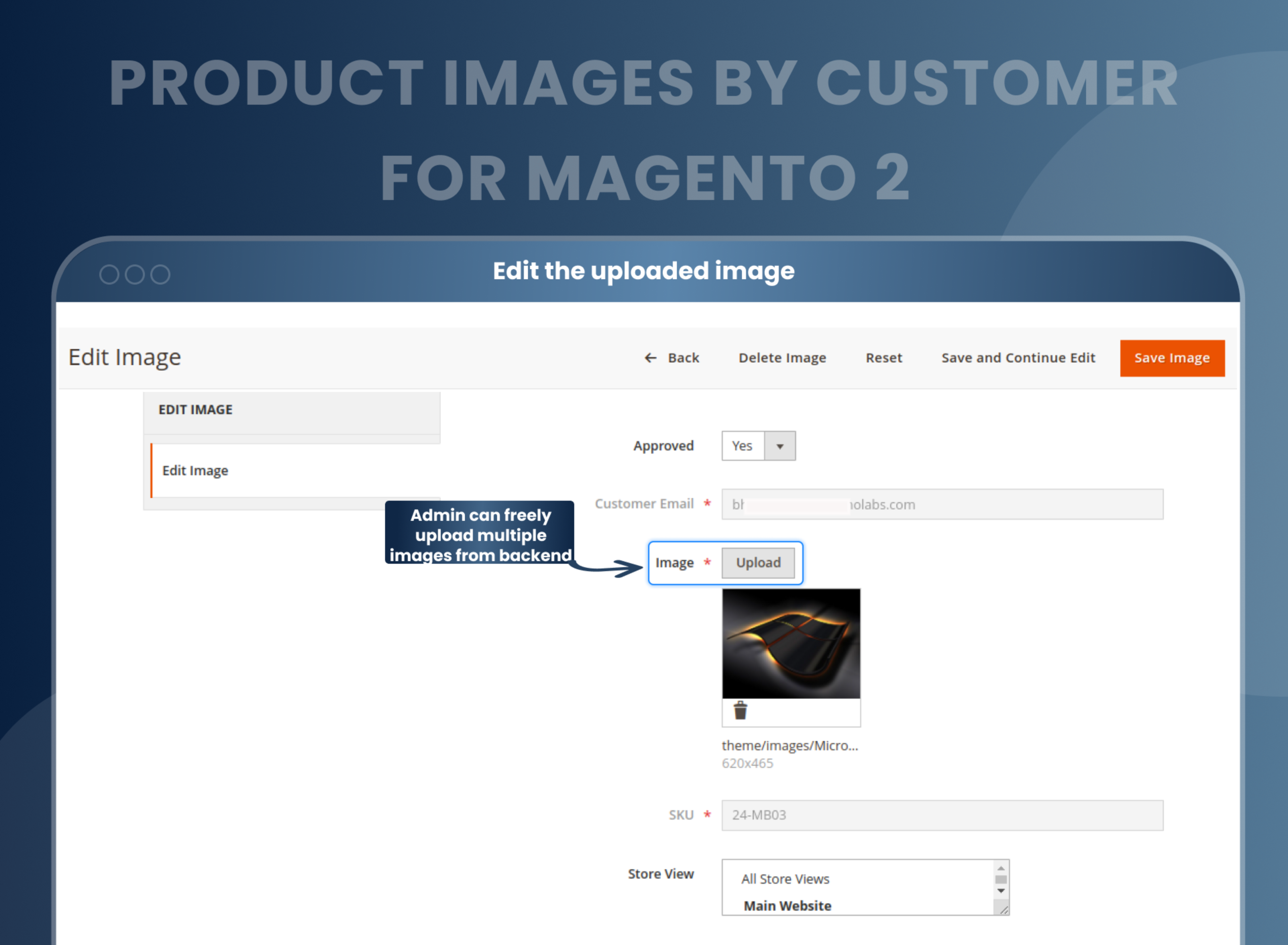
Store admin features
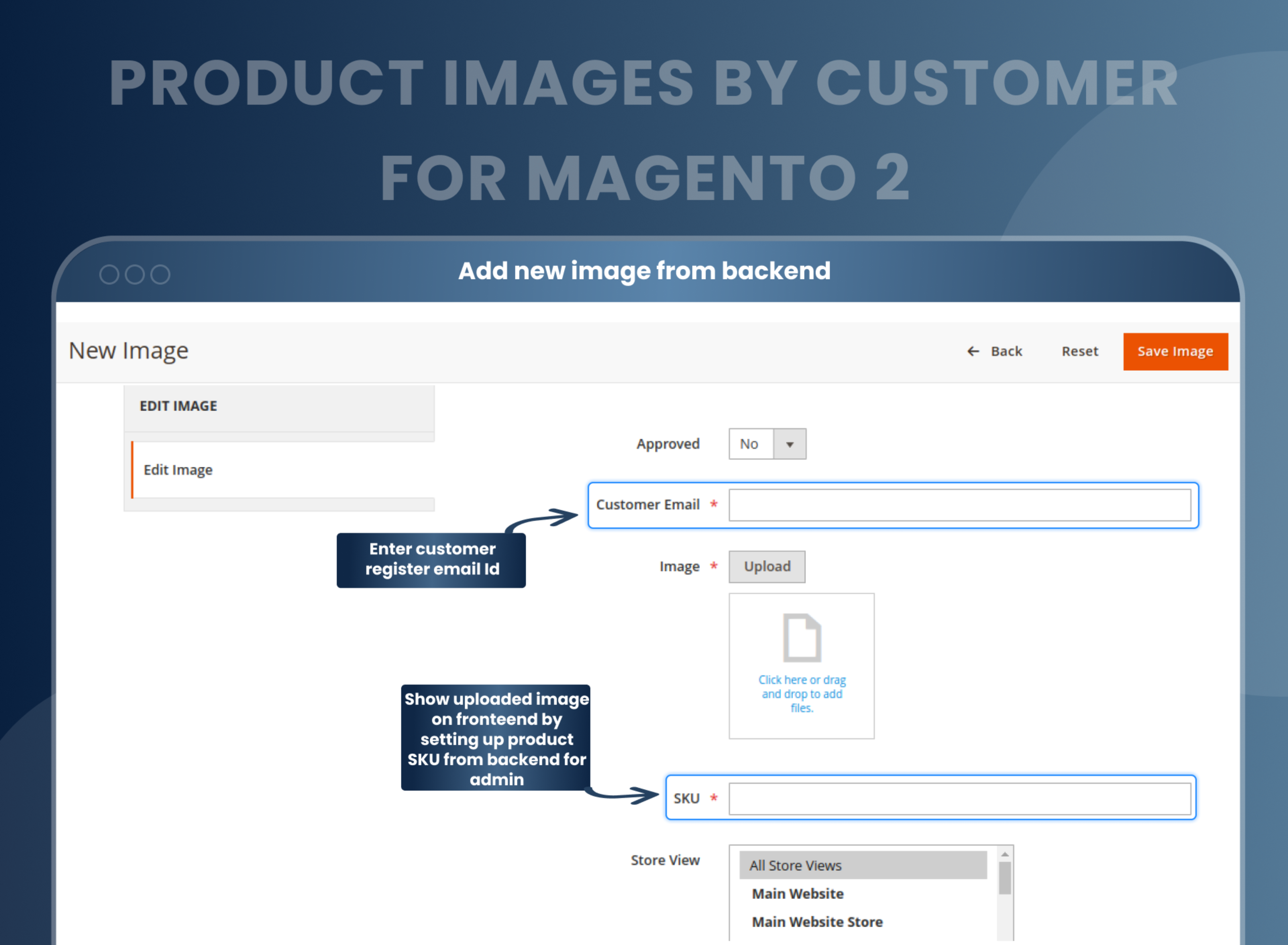
Not just customers; as a store admin, you too can upload product images from the backend and display the uploaded images on the frontend by setting up product SKUs from the backend.
You can also edit yours as well as customers’ uploaded images from the backend.
Customer Notifications
The user had to provide a name and email address before uploading images to the store.
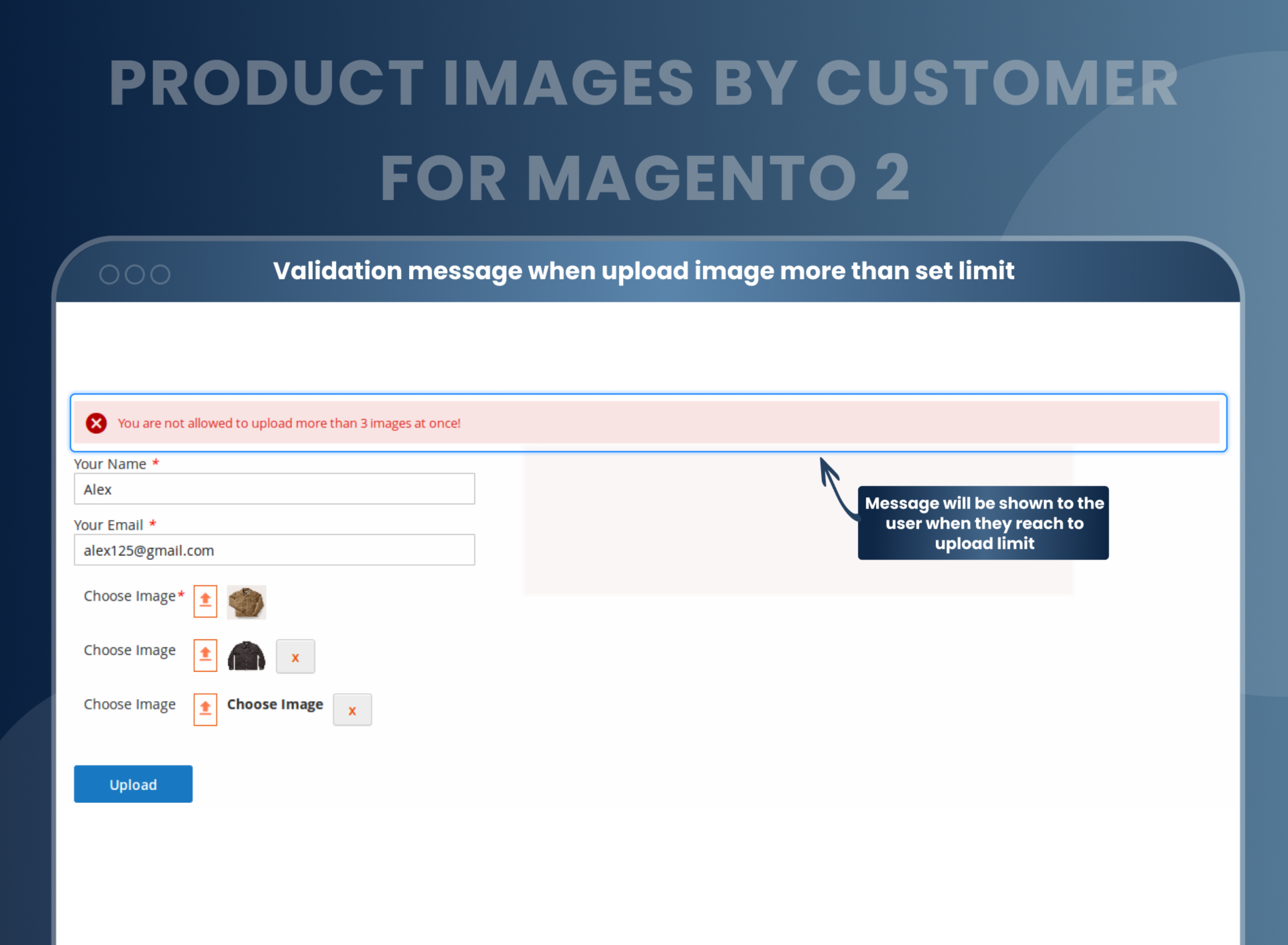
The user will be able to upload only a certain number of images set by the store admin, reaching the limit of which a message will be displayed to the user. Also, after the upload, the user will be notified about the approval from the store admin.
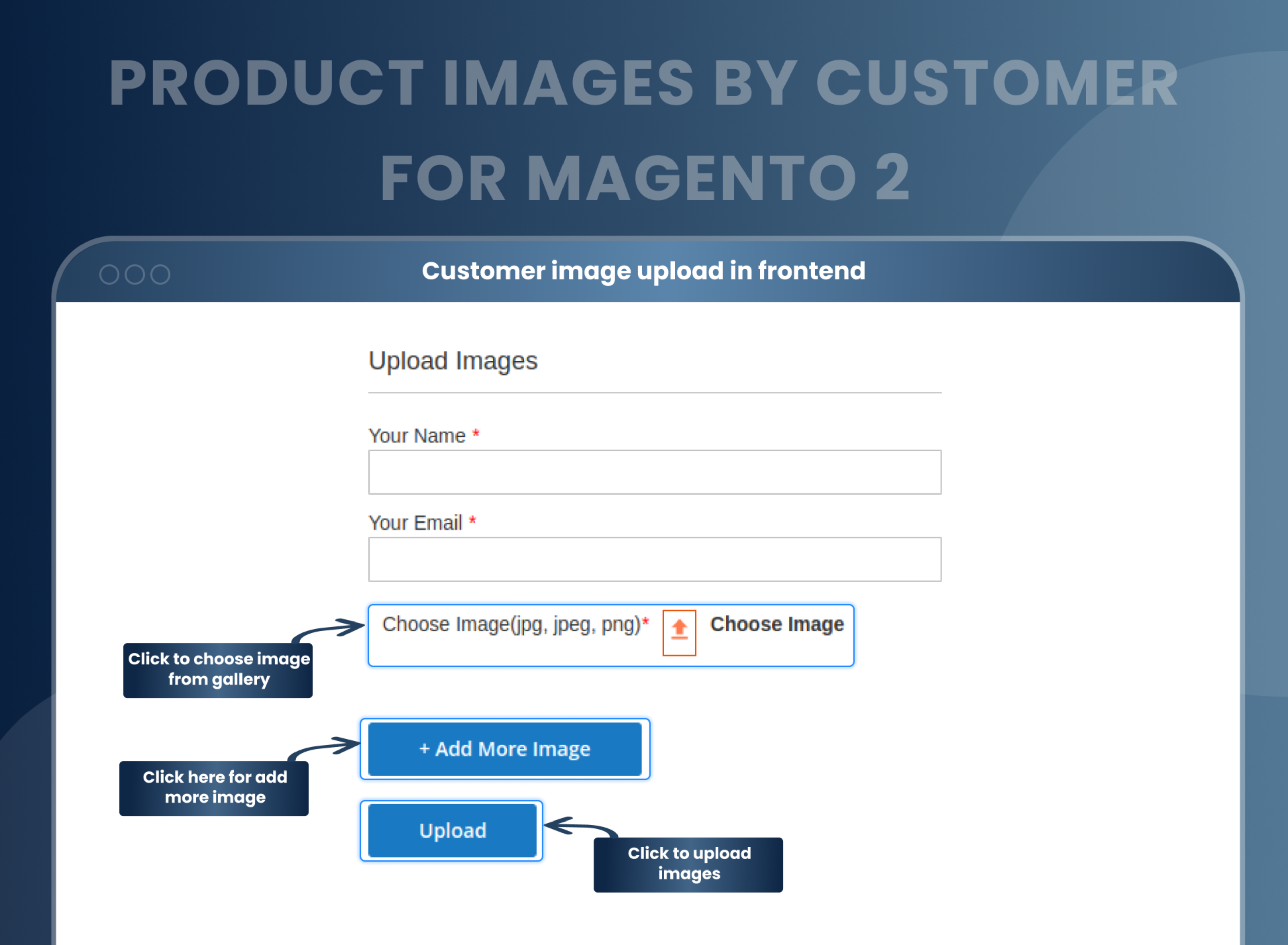
How Can Customers Upload Product Images In Magento 2?
How Does Magento 2 Product Images by Customer
Why You Need Product Images by Customer Extension for Magento 2?
Benefits of Product Images By Customer Magento 2 Extension
- Install Product image by customer Magento 2 extension in your store.
- You can enable extension from store > Configuration > Mageants > Delete account.
- You can set other configuration as per your need and requirement.
- Customer can upload multiple product images from product page.
- Customer can add images and email at time of upload.
- Admin can approve or reject upload images by customer.
- Approved images display in frontend.
- Magento 2 Product Images by Customer extension, when added to your online store, will give the registered and guest users of yours the freedom to share their experience with their products by uploading the real-life images of the products they received as well as you as a store admin to give them a visual demo of the product they are going to receive via images. This will enhance the customer experience as the others visiting your store will be able to make the decision based upon such visual testimonials.
- Nobody likes to buy things without seeing and verifying them and since in online shopping, it becomes difficult, it's the reviews and product images that work as a trust-factor. Hence, in order to increase the credibility of your store, Magento 2 Product Images by Customer is a much-needed extension that allows you and your users to upload real-life images of the products to your store, looking upon which others will make the decision to shop from your store.
- Enhances customer engagement as they have an interactive platform to engage with products.
- Increases website visibility by creating more attractive visuals.
- Improves customer loyalty by building a sense of participation.
- It increases user confidence and builds customer trust.
- Increases website traffic
- Increase sales and conversions.
- Encourage more customers
FAQs
What is Magento 2 Product Images by Customer?
Magento 2 Product Images by Customer Extension helps to give a chance to experience how actual products are looking to your customers. Due to this, a customer can place an order without confusion or hesitation. In short, this extension improves your product presentation.
Is it possible to notify the admin when a customer adds an image?
Yes, it is possible to notify admin via email when a customer adds an image on the frontend side.
Can the user upload multiple images at the same time?
Yes, the user can upload multiple images at the same time.
Which type of image format support?
It supports most of the well-known image formats, including JPG, JPEG, PNG, etc.
Can admin able to add product images?
Yes, admin can add product images.
Is there any option for a guest user?
Yes, you can enable/disable functionality for guest users from setting.
Can I set a number of the images in slider?
Yes, you can set the default number to display an image in slider.
How to get product image in Magento 2?
Customer can upload product image as relevant product so admin get idea about all related product customer want, after added by customer need confirmation from admin to display.
Reviews
Customization
Changelog
- Compatibility:- Verified and confirmed compatibility with Magento 2.4.8 and PHP 8.4.
- Mageants Team make extension compatible with Magento latest version.
- Mageants Team make extension compatible with Hyva Theme.
- Mageants Team make extension comaptible with magento version 2.4.6.
- Image didn't display in the backend when image name contains any special character. MageAnts team resolved this issue in all the Magento versions and made it compatible with the Magento version 2.4.
- Extension works fine in all the Magento versions.
Why Choose MageAnts
-

30 Days Money Back Guarantee
We offer 30 Days money back guarantee if customer meets our refund policy. For more info you can read our terms and condition
-

Tested Before Every Release
Every version is tested on the latest Magento 2.4 release before it goes live, and bugs reported during your support period are fixed by our team.
-

Free 90 Days Support
MageAnts ensures quick and quality technical support. Take advantage of our 90 days free support for a smooth and efficient experience.
-

Frequent Extension Updates
Intensive update roadmaps ensure highly compatible, bug-free, great performance, and innovative extensions.
