



Order Attributes For Magento 2




Key Features of Order Attributes:
- Create custom order attributes with multiple input types.
- It's easy to set flexible conditions for attribute fields’ display.
- Display custom attribute information on the order grid, invoice grid, shipment grid, and credit memo grid.
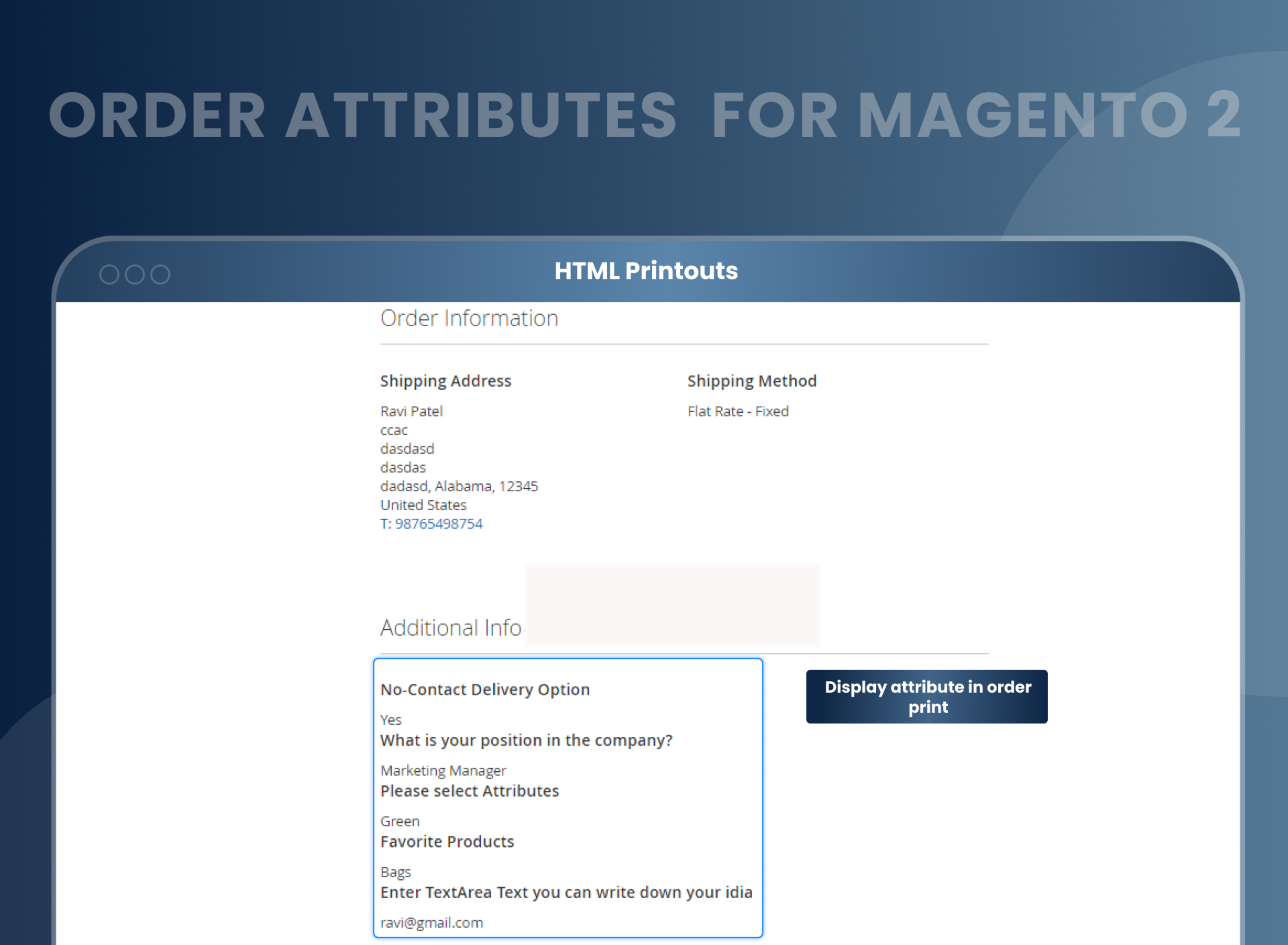
- Show custom order attributes in PDF documents and emails.
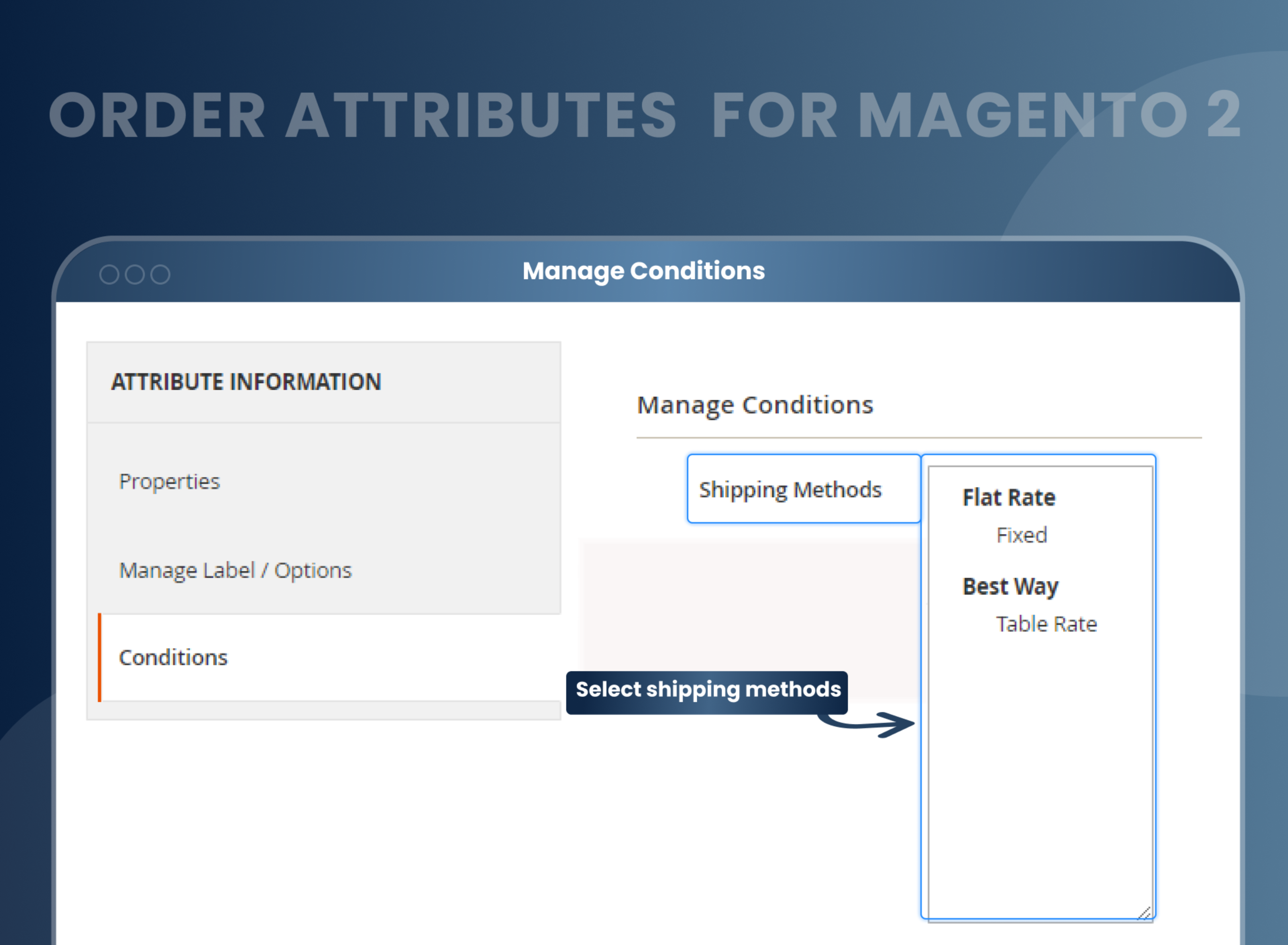
- Display order attributes depending on a particular shipping method.
- Various positions are available to display order attributes.





Problem:
Default Magento 2 does not allow store owners to add additional input fields on the checkout, shipping, and payment pages to collect more information from customers, such as their phone number, email, favorite products, and many more. Store owners must use the existing input fields that are available to gather customer information.
Solutions:
MageAnts order attributes Magento 2 extension provides a solution for all store owners to add custom order attributes to their checkout process and collect adequate information about customers so that they can use the collected information for marketing and other operational purposes.
These Magento 2 Order Attributes allow the admin to give a professional look and feel to their online store due to detailed information and increase the rate of processing the orders with the help of information collected about customers.
Description
FAQ
Using Order attributes Magento 2 extension, store owners can add multiple attributes to order at checkout page to get more information about customers.
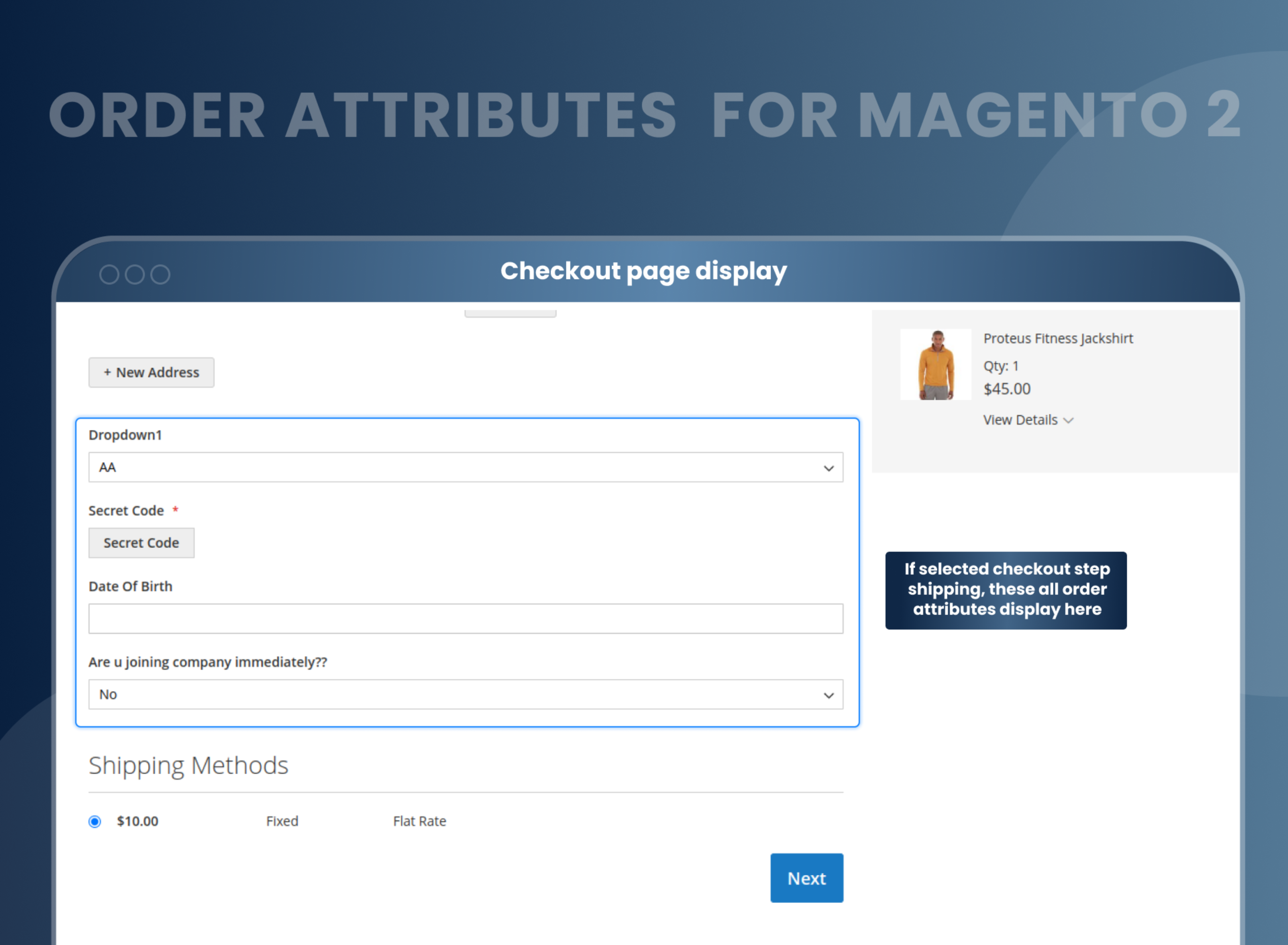
Show Order attributes on checkout shipping and payment page with various different types of attributes like Text box, radio button, Checkbox, Etc.
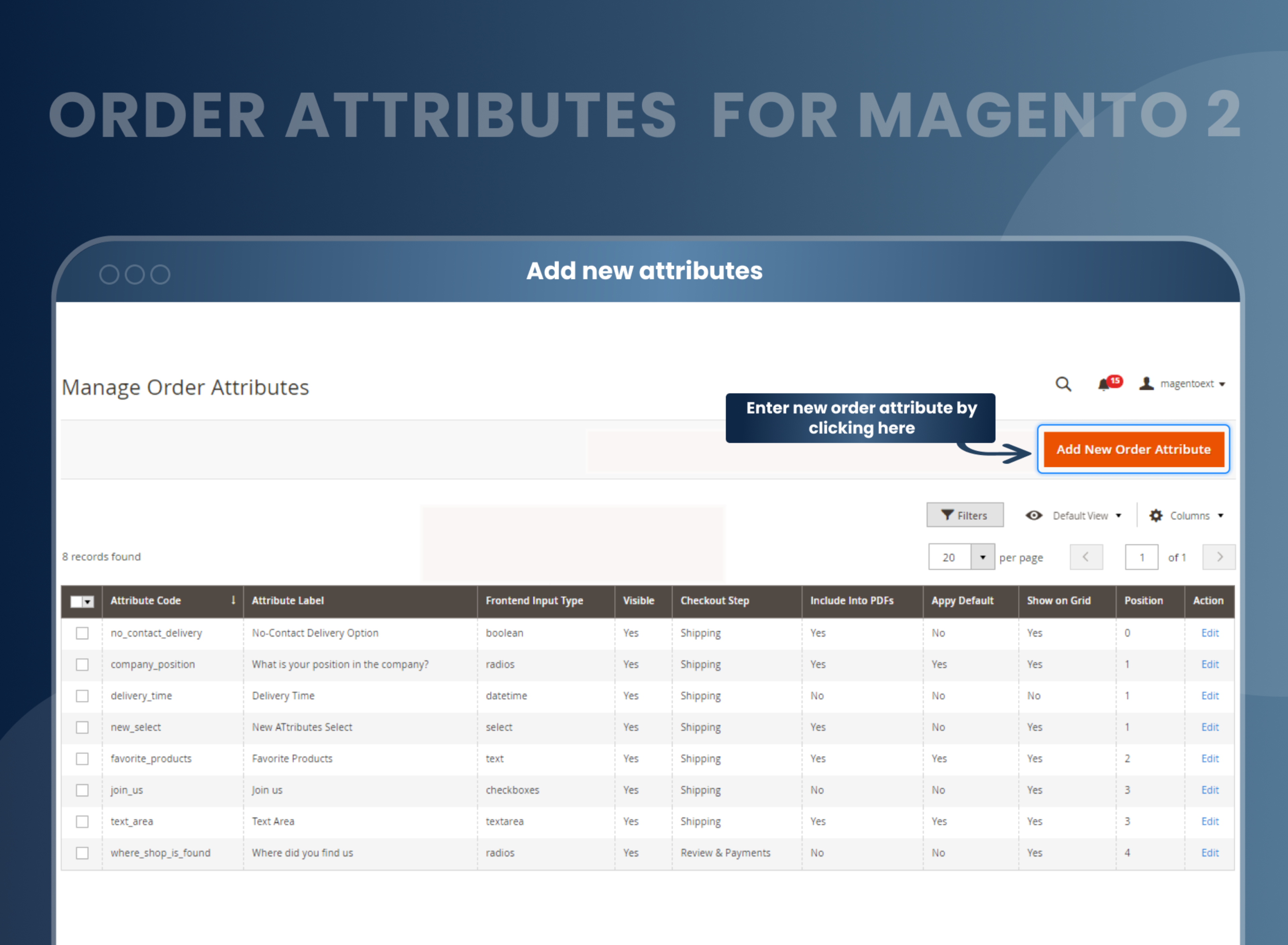
You can enable configuration from store --> Order attributes after you can create order attributes from Order attributes grid --> Manage order attribute / Order attributes relation.
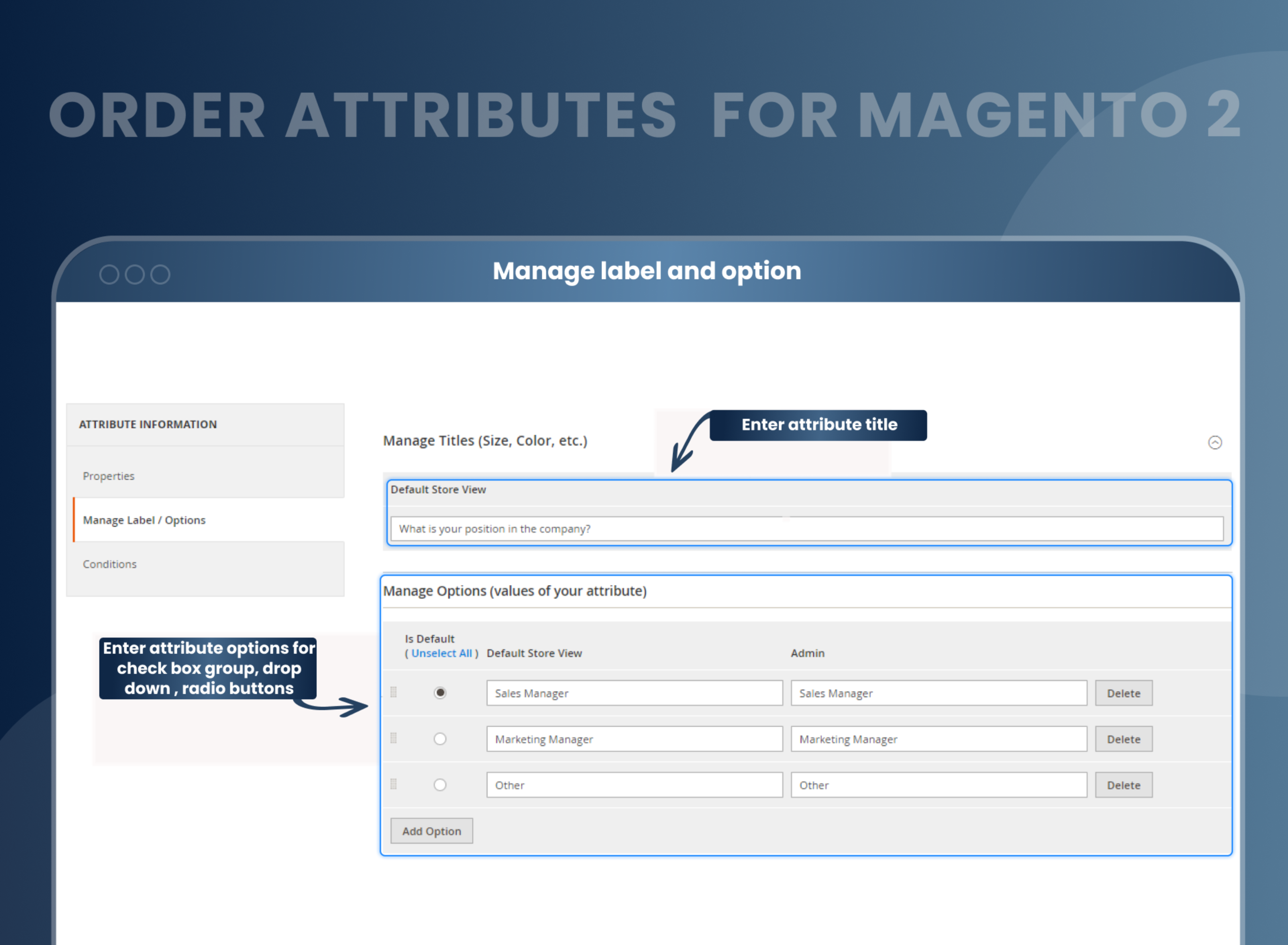
You can create new order attributes with specific input types such as Text field, Text area, Date, Date and time, Radio button, Checkbox, Dropdown. For example, If you have added a question to select a gender Male or Female, the customer can answer by selecting a particular option on the checkout page.
Reviews
Customer 6 Reviews
Customization
Change Log
Current Version Number : 2.0.3
Date : 05/10/2023
Bug solved
- MageAnts team make extension compatible with magento 2.4.6 version.
- MageAnts team add new file upload order attributes so customer can easily add any file upload on checkout page.
Current Version Number : 2.0.2
Date : 23/01/2023
Coding Standard
- Mageants team makes this extension coding as per the Magento coding standard.
Current Version Number : 2.0.1
Date : 15/02/2022
Bug fixed
- When run compile command then gives an error in Magento2.4.3 version.
- Admin try to print invoice with order attributes then gives an error in Magento2.4.3 version.
- When admin set date and time attributes in shipping page and user open shipping page then by default it's redirect to date and time attributes.
Current Version Number : 2.0.0
Date : 10/12/2020
New extension
- MageAnts develop new Order Attributes extension working fine in all Magento version.
How To Configure Magento 2 Order Attribute Extension?
How Does MageAnts Order Attributes For Magento 2 Work?
Other Features Of Magento 2 Add Attribute To Order:
Why Do You Need Magento 2 Customer Attributes Extension For Your Store?
Benefits of Order Attributes in Magento 2
- Install Order attributes Magento 2 extension in your store.
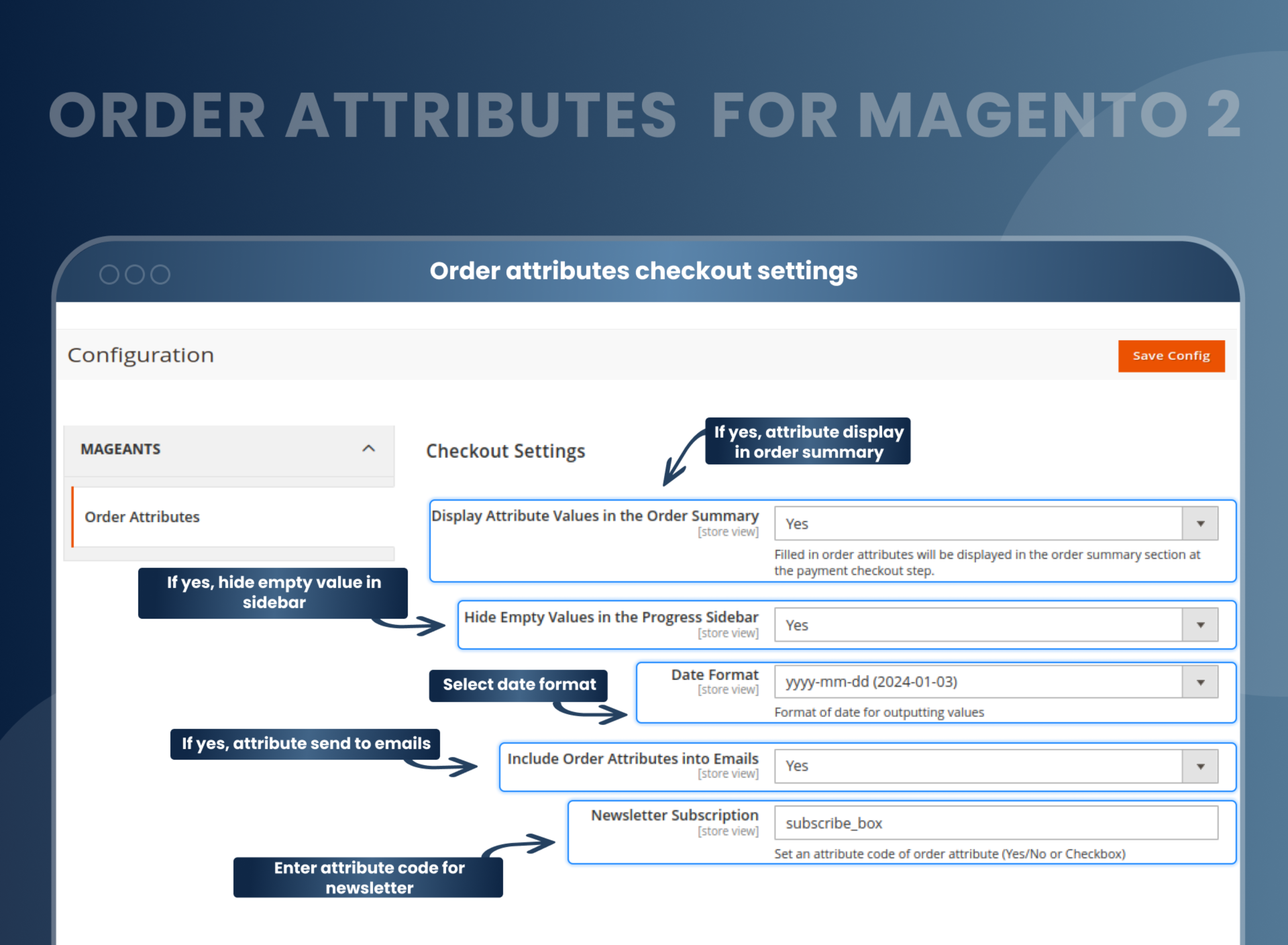
- You can enable extension from store > Configuration > Mageants > Order attributes.
- You can set other configuration as per your need and requirement.
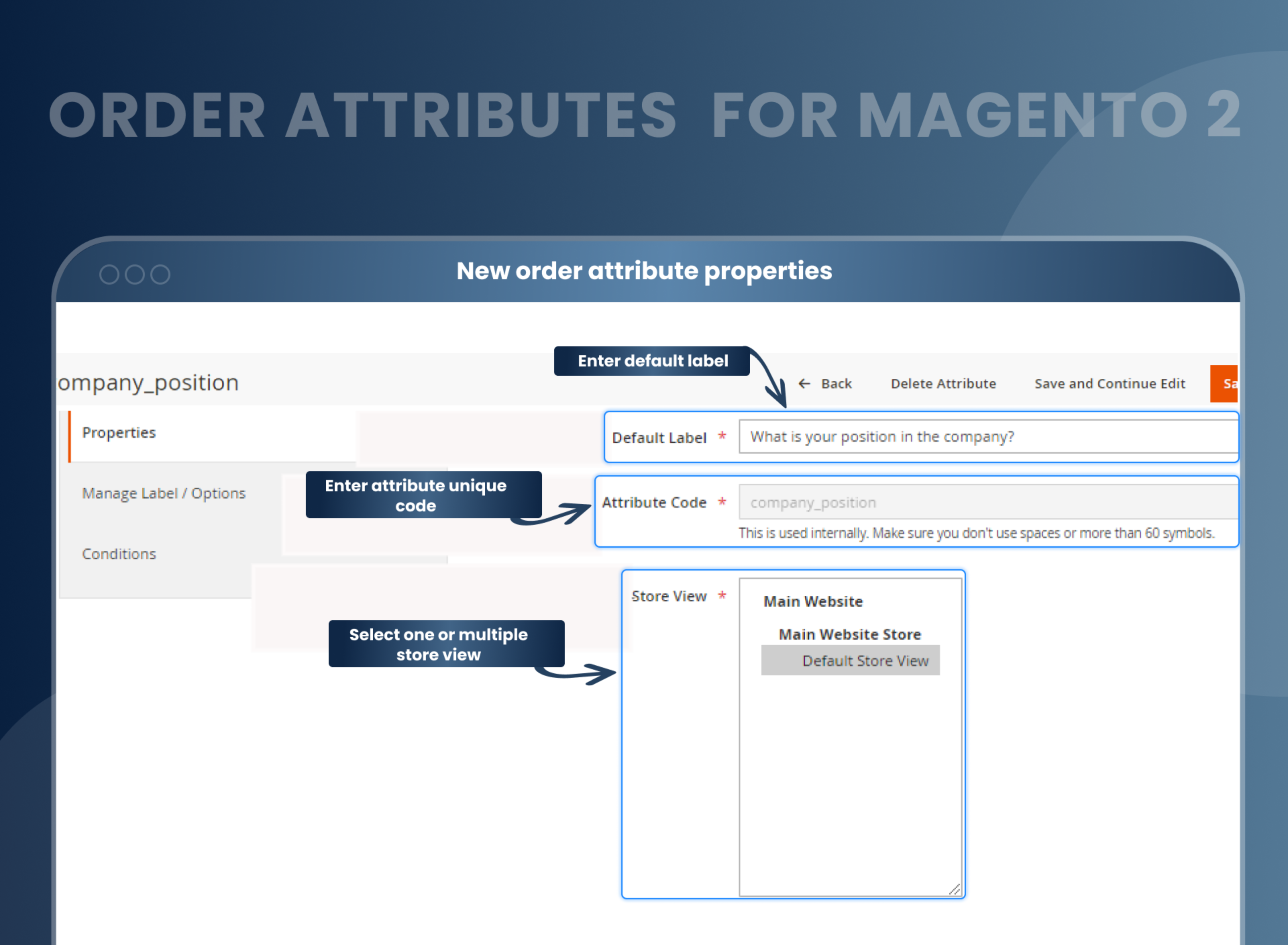
- Add order attributes from Order attributes > Manage order attributes.
- Admin can create input types such as radio button, checkbox, textarea, text box, date time, for custom order attribute.
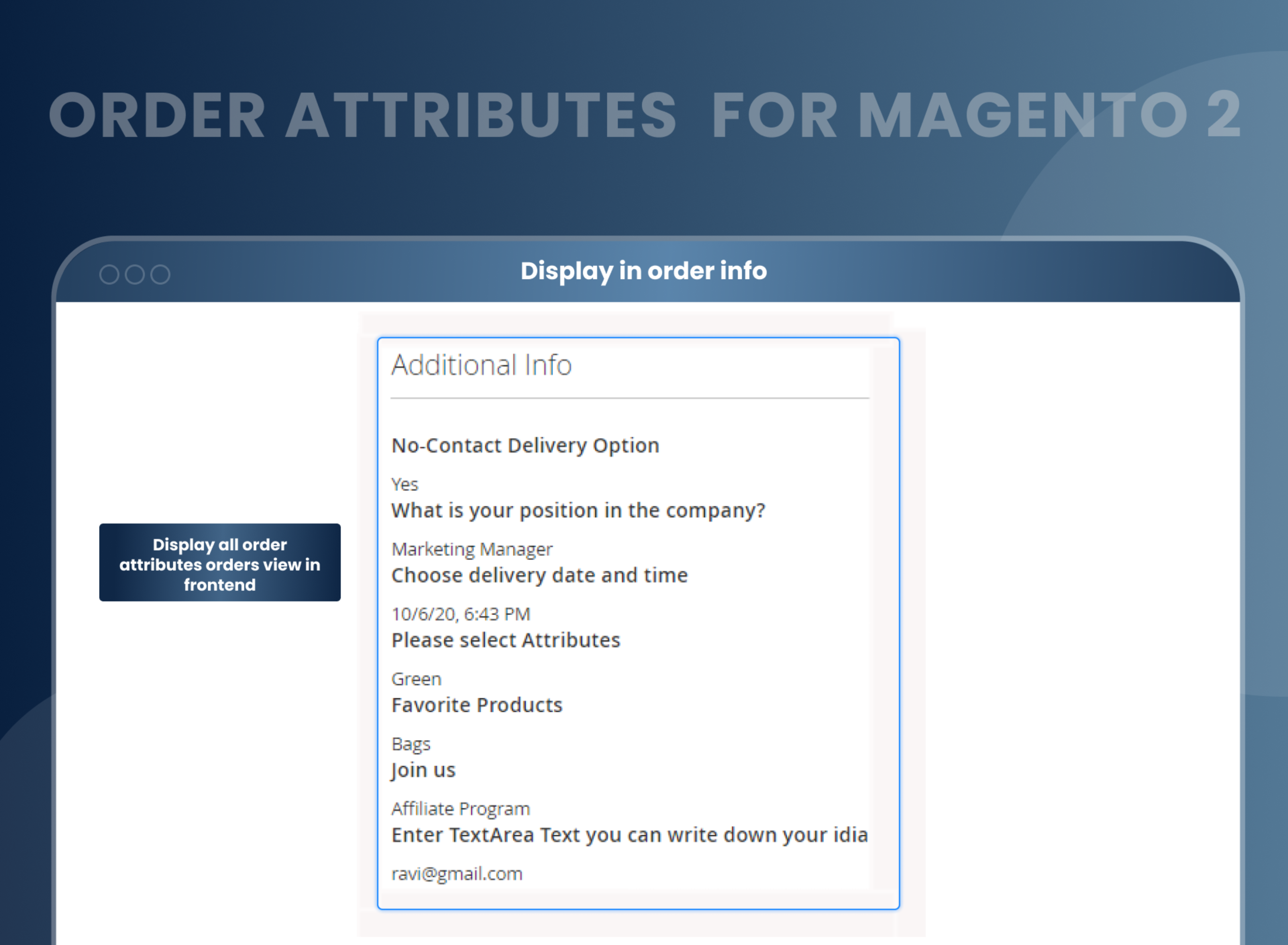
- Created order attributes will be displayed on the checkout page.
- Learn more: How to Create Order Attribute Programmatically in Magento 2?
- Magento 2 Order Attributes Extension enables store owners to add necessary attributes at checkout steps. By installing this extension, store owners can create custom fields on the checkout page and gain more information about the customer expectation about their purchase like delivery time, surveys, and order comments.
- Admin can select appropriate input types for each order attribute and set the display of an attribute on the front end. Besides, additional fields of orders can also be displayed in email and PDF documents like invoices, credit memos of the customers. In the sales order grid, the admin can overview all attributes of the orders. With Magento 2 Custom Order Attribute features, sellers can add, edit, and manage custom fields of the orders.
- Enable/Disable the module
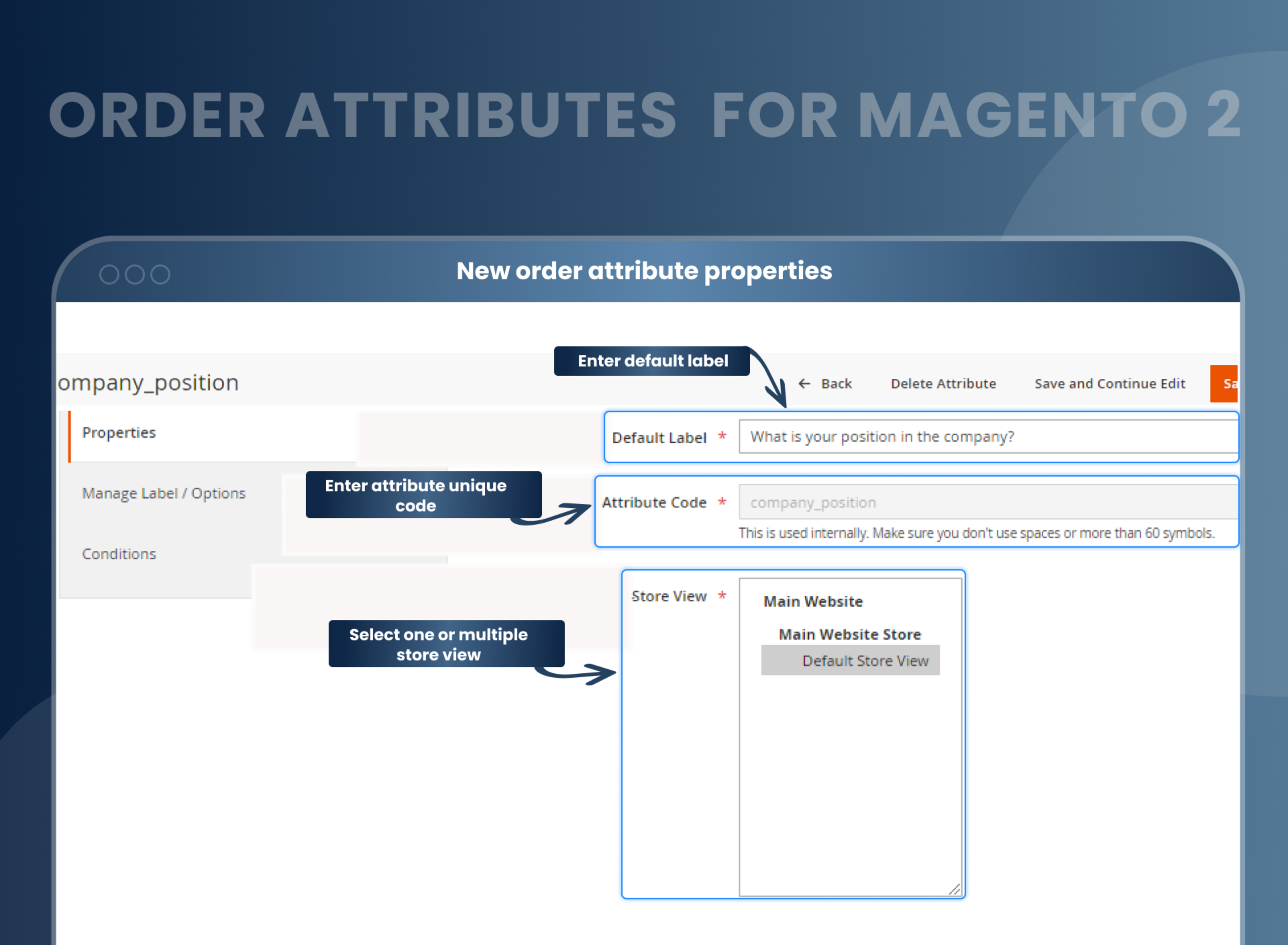
- Place default label for attribute
- Choose an input type of attribute
- Allow adding sales order grid
- Add custom attributes to PDF Invoice
- Add custom attributes to confirmation emails
- Custom attributes depending on shipping methods
- Choose input validation
- Choose input/output filter
- Mobile friendly
- Flexible condition options for attribute fields display
- Customize checkout
- Multi-store functionality
- Place attribute priority
- Look and manage all attributes
- Add or delete attributes as per requirements
- If you are an online store owner, it's important to know about your overall site performance. There is lots of data you can collect from the analytics about the performances of your specific page and specific products. Moreover, direct answers or feedback from customers can help you evaluate and analyze your site better.
- Asking some questions to your customers directly is necessary. So how about customers willingly giving you information or views on your specific question while ordering their favorite products? With Magento 2 Add Custom Order Attribute module, you can know the specific details by creating an order attribute.
- Magento 2 Order Attributes offers multiple display options that help store owners to show and hide order attributes, so the same attribute can appear precisely when and where store owners want to display them. Optimize your store with this easy-to-use extension and enhance your store performance.
- Personalize each order with more customer information.
- Customers can add feedback to improve store efficiency.
- Enhance marketing strategies.
- Improve your online store's performance.
- Allows merchants to gather and store customer data for marketing purposes.
- Improve the customer's shopping experience.
- Flexible attribute configuration options
- Support for multiple stores
Why Choose MageAnts
-

9+ Years of Industry Experience
9+ years of extensive experience in delivering Magento solutions & services. Over the years, we have watched technologies change and bounds, and our team has always focused on staying ahead in this competition.
-

100% Bug Free
Our team follow rules and takes care of perfect setup to ensure a bug-free and error-free code for the development process of theme, extension, or website development.
-
Extension created By Certified Developers
Team of certified developers for developing MageAnts Magento extensions. Skilled, qualified, and committed professionals to work on every extension.
-

Quick Technical Support
MageAnts ensures quick and quality technical support. Take advantage of our 90 days free support for a smooth and efficient experience.
-

Frequent Extension Updates
Intensive update roadmaps ensure highly compatible, bug-free, great performance, and innovative extensions.
Our services
-

Hyva Theme development
Are you facing Speed issues? Integrate Hyva Theme
-

Hire Magento 2 Developer
Hire Developer as per your custom requirement
-

Magento 2 Upgrade Services
Upgrade your Store with Magento 2 Latest Version
-

Support & Maintenance Services
Maintain your Store with MageAnts Support Services