


Zip Code COD Check For Magento 2
Ask AI About This Extension





Key Features
- Add the zip code COD manually or by using a CSV file
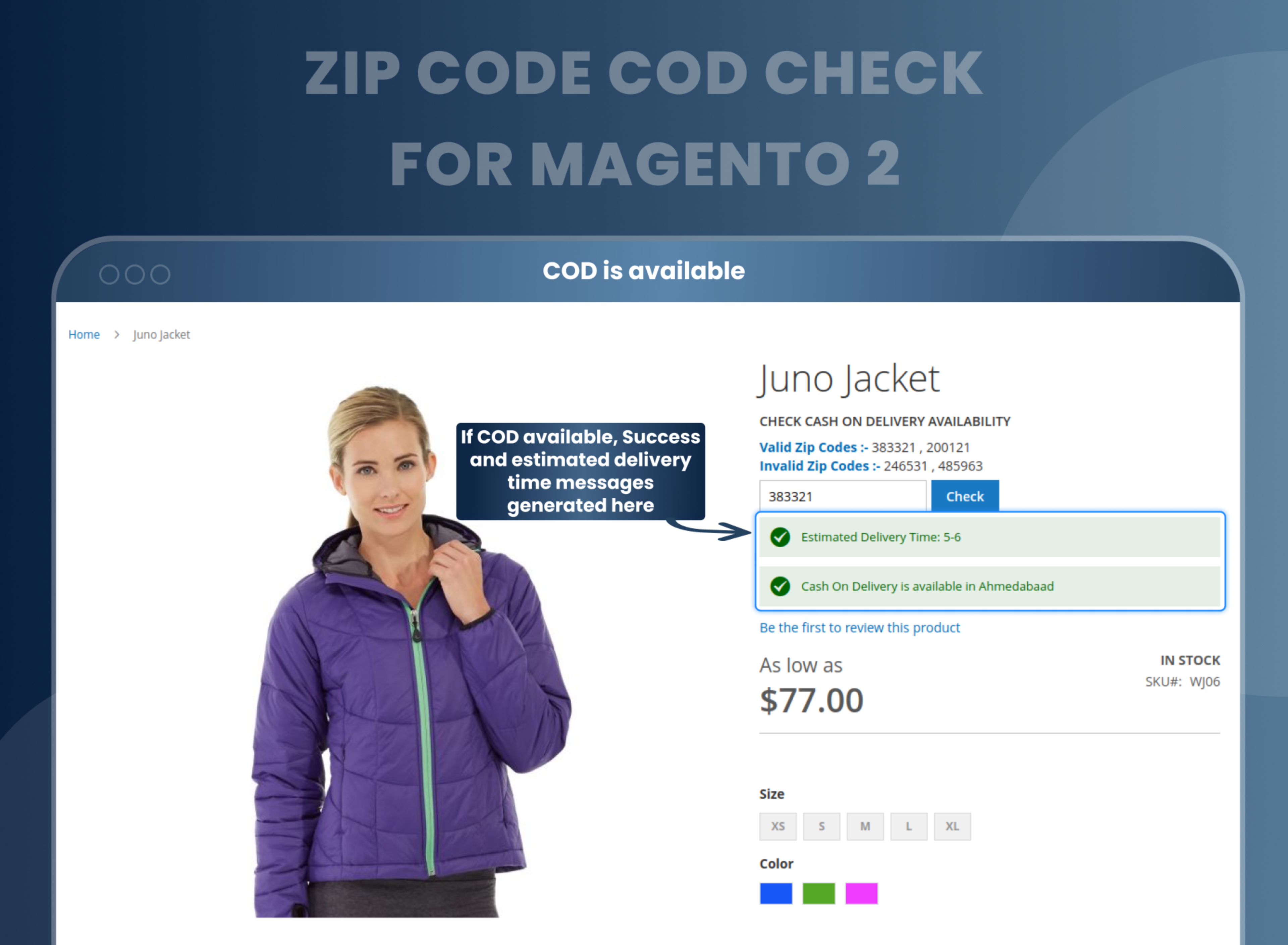
- Customers can check COD availability on the product page.
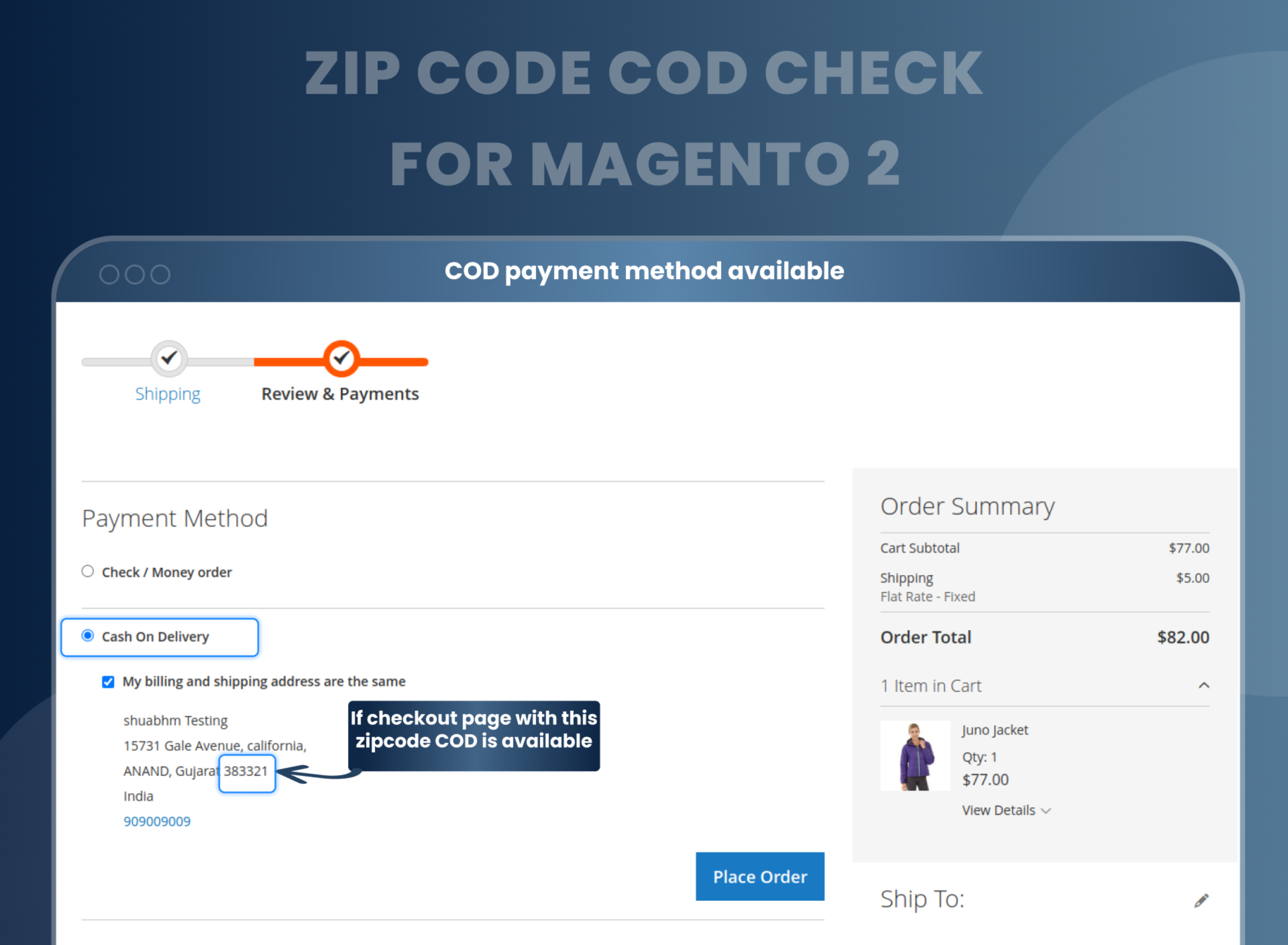
- Automatically COD payment method shows on checkout if Cash of delivery (COD) is available.
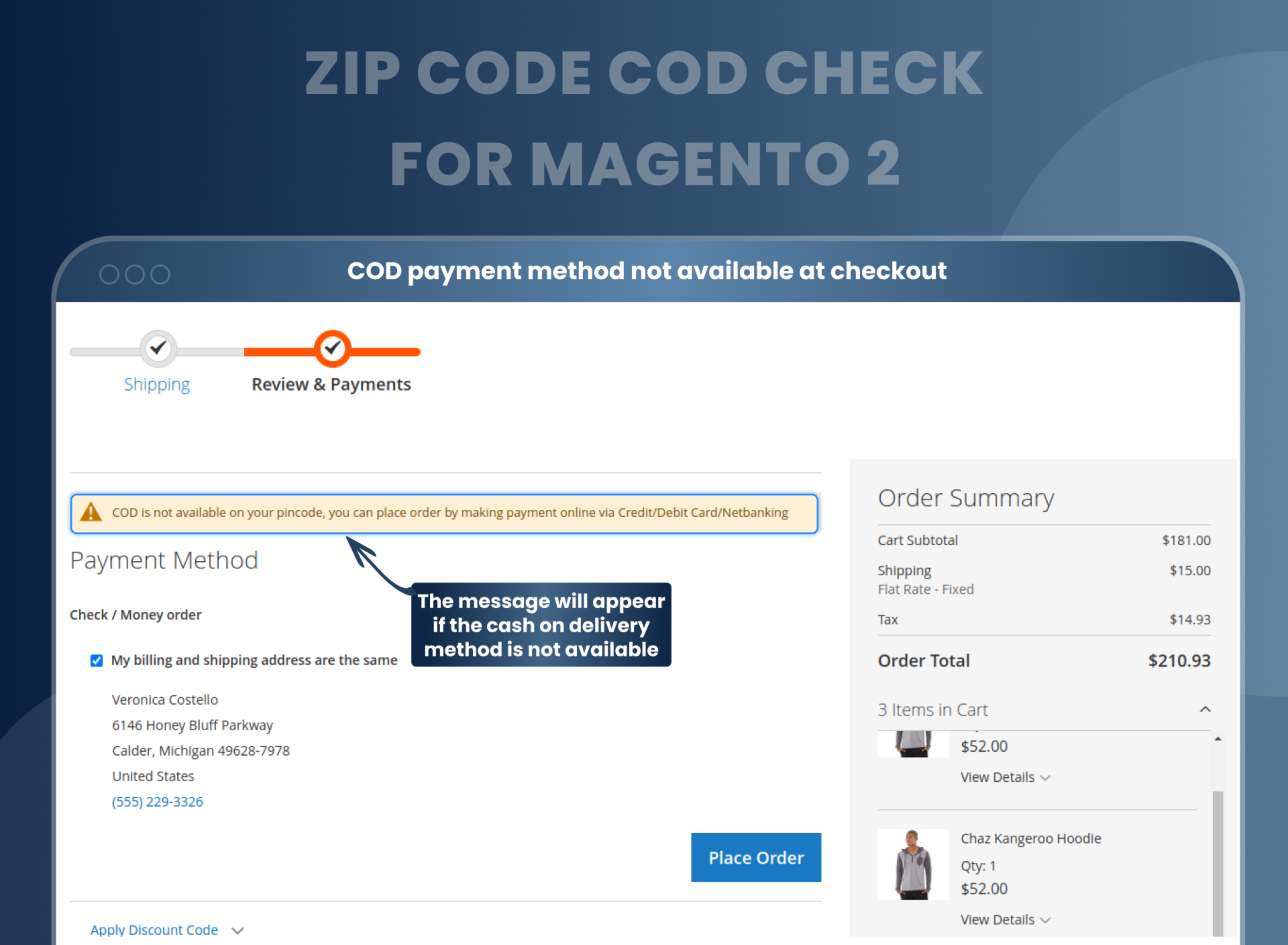
- Display a message when the zip code is not available on the checkout page.
- Display delivery availability with estimated delivery time.





Current Limitation in Magento 2
What Magento 2 Cannot Do
By default, Magento 2 does not have a feature that allows users to check if cash on delivery is available for a specific area by entering a zip code. This functionality is not enabled by default in Magento 2, and the merchant would need to add it themselves in order for customers to be able to check if cash on delivery is available in their area based on their zip code. This could be done through customization or by using a Magento 2 extension.
How Our Extension Solves This
Zip Code COD Check extension for Magento 2 that allows customers to check the availability of Cash on Delivery (COD) payment options based on their zip code. This extension allows store owners to update all the details regarding the COD availability based on zip codes along with the delivery days from the admin panel. It also helps streamline the payment process and provides a better user experience for customers by giving them the option to use COD only if it is available in their area.
Description
Enable precise Cash-on-Delivery options based on customers' zip codes.
Magento 2 Zip Code COD Check extension allows customers to verify Cash-on-Delivery availability based on their zip code, ensuring transparency and reducing cart abandonment. For instance, a shopper can confirm COD availability before proceeding with their order.
Check the availability of COD for specific ZIP codes
With the Zip Code COD Check Magento 2 extension enabled on your website, your customers can easily check the availability or the availability of the Cash on Delivery payment method for their specific respective ZIP codes.
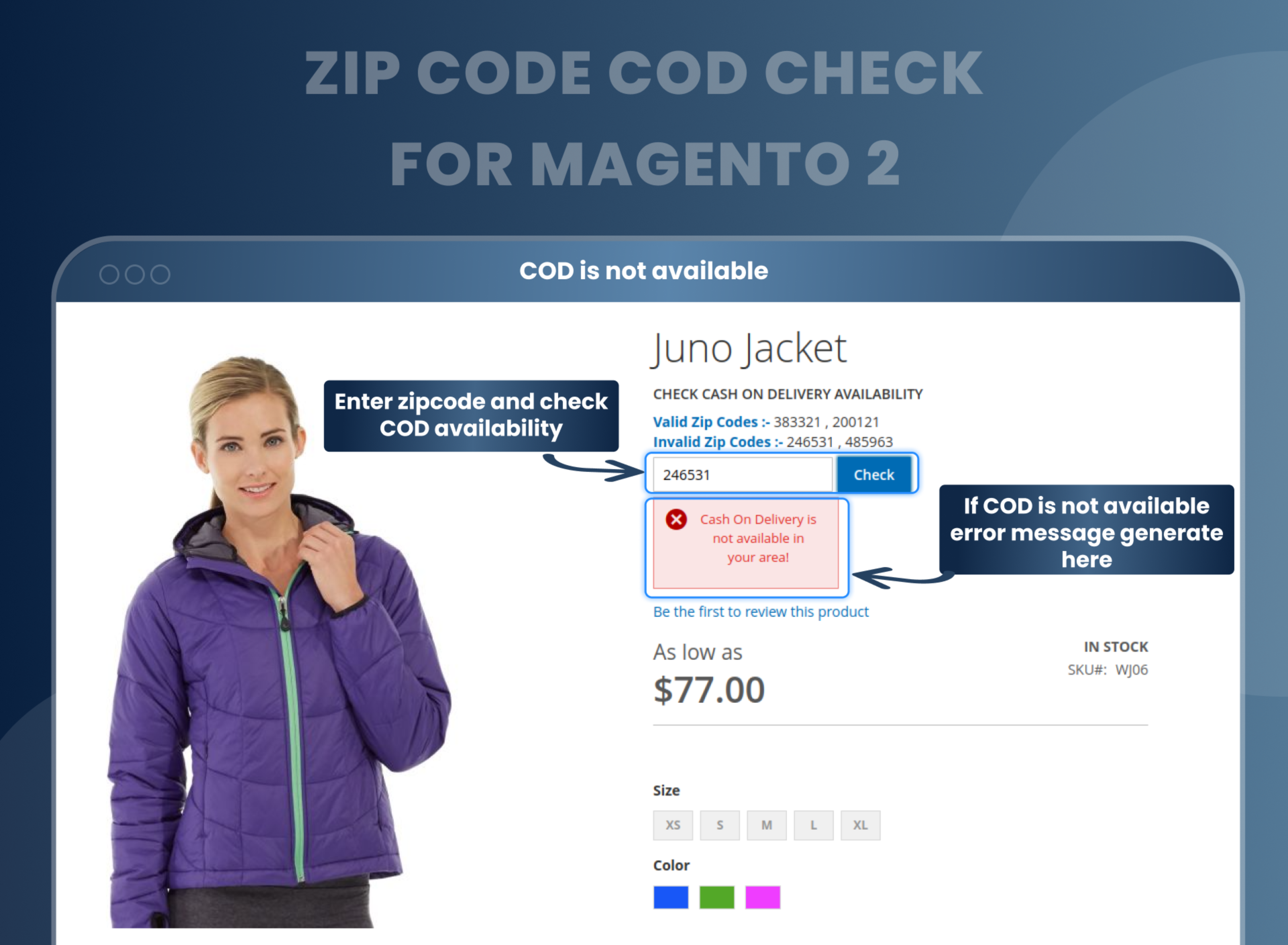
Auto Hide Cash on Delivery payment method based on the ZIP code entered by the customer
The extension comes with an intuitive interface. As soon as the customers enter their ZIP code, the extension automatically hides the option of Cash on Delivery payment method if it is not available for the given code.
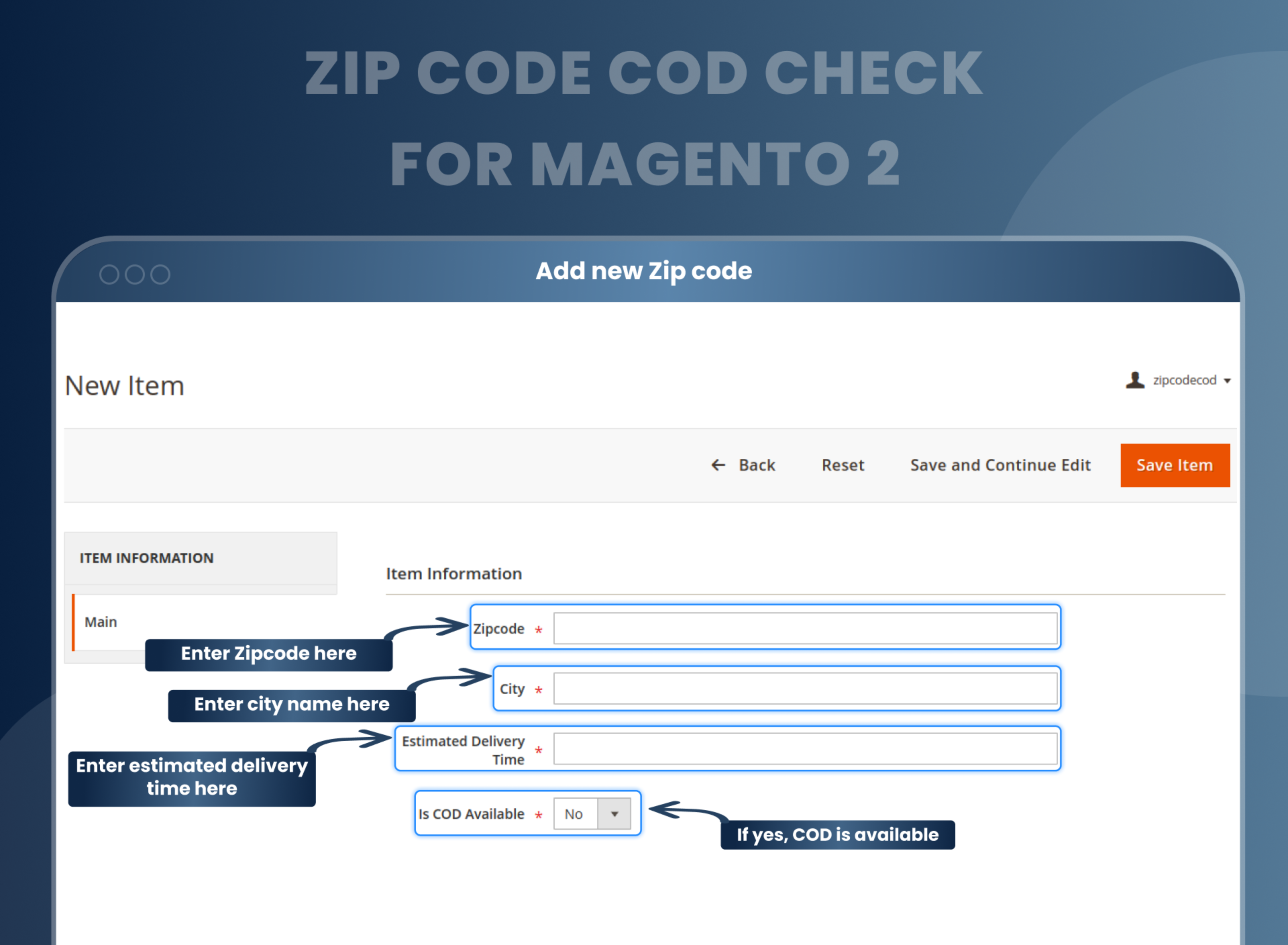
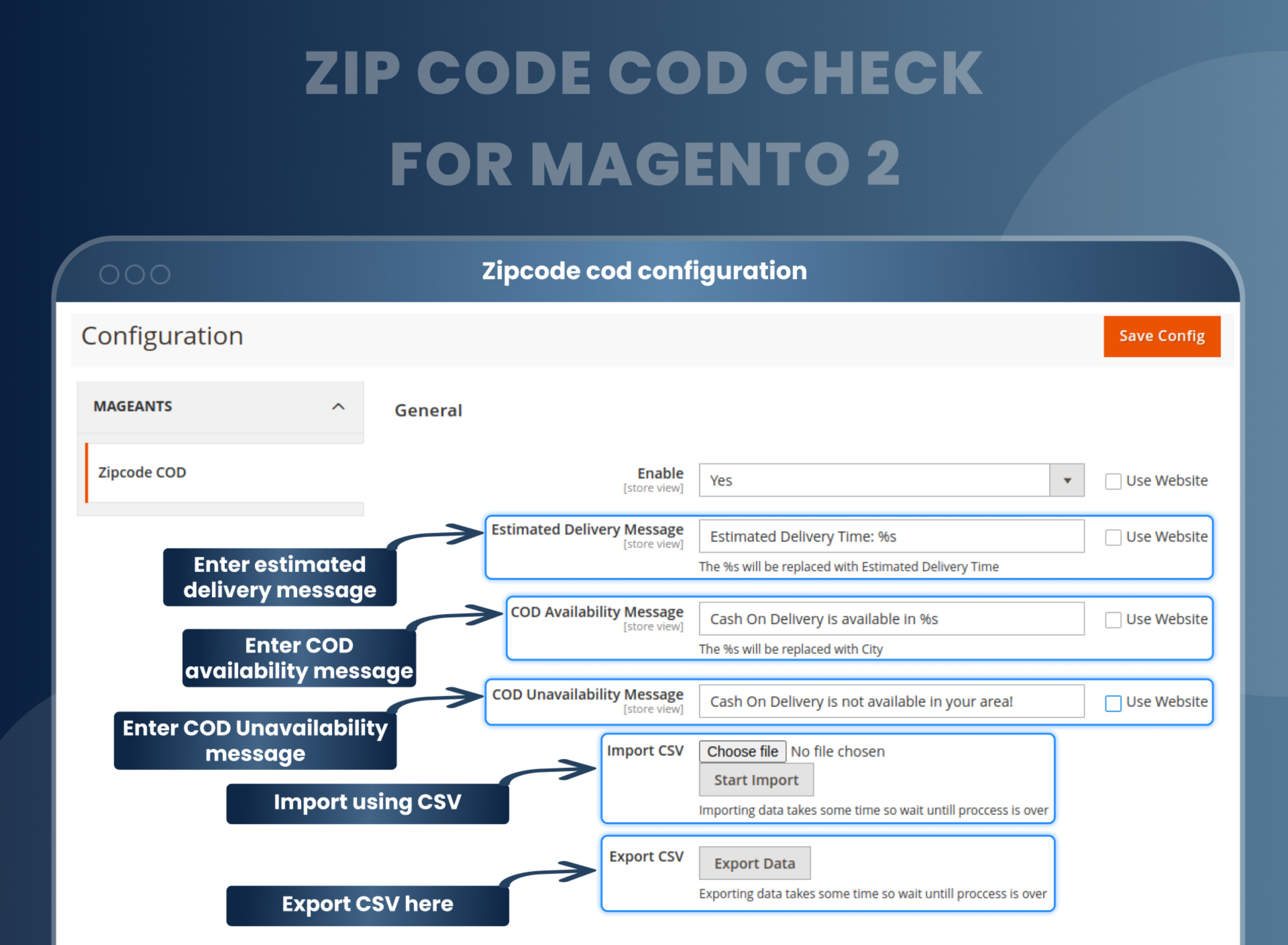
Add/ Edit/ Update information of ZIP code and COD availability
This MageAnts extension comes with a functional admin panel which is very useful for the sellers. It allows them to add/ edit/ update all the information regarding PIN codes and their respective COD availability and eligible days of delivery. Thus, the sellers can easily configure all the information for customer use.
Import/ Export ZIP code information from the backend configuration
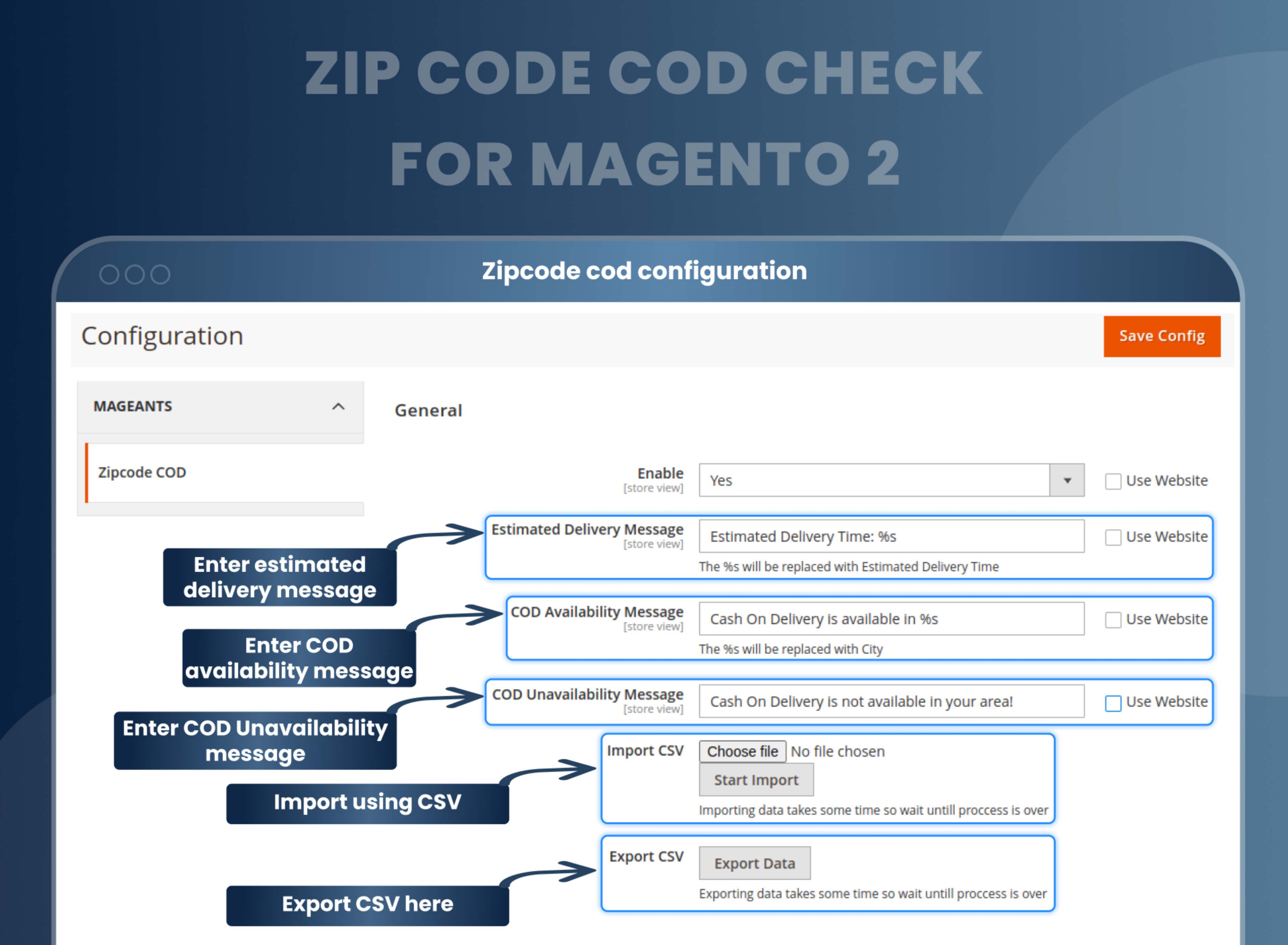
If you have the COD and PIN code details ready, you don't need to manually enter them on the website. The extension allows you to quickly import/ export this data from the backend configuration panel.
Mobile Responsive extension
The team MageAnts have made this extension with the purpose of accessibility for all. That is why this extension is made to be mobile responsive as well. Thus, the users can find the required information about COD from their mobile devices also.
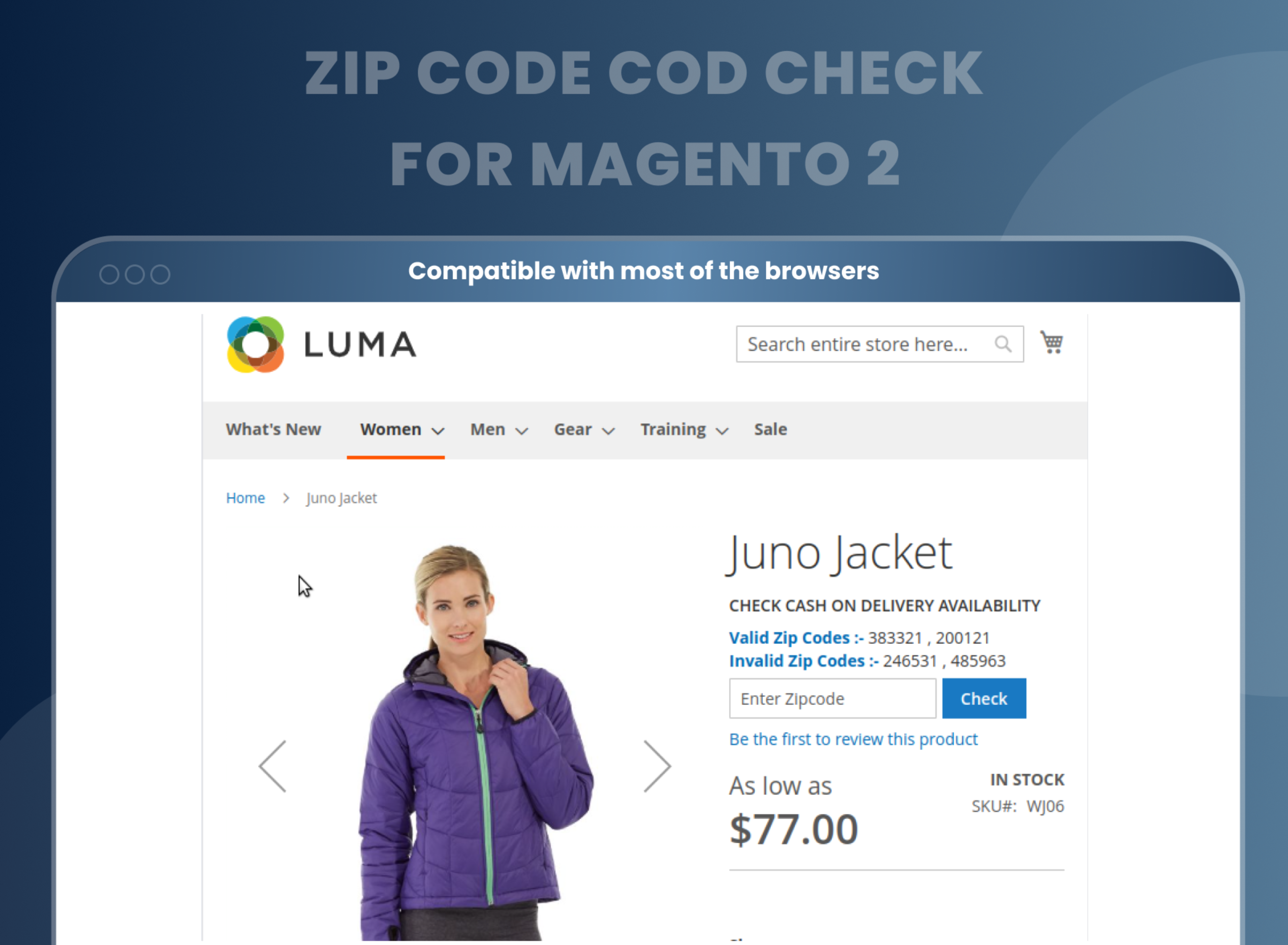
Efficient Cash on delivery checker block
In order to be user-friendly and highly efficient, our Zip Code COD Check For Magento 2 comes with a delivery checker block. The customers simply have to enter their ZIP code information in this block and the extension will update them with the availability of COD and the eligible delivery days.
Compatible with most of the browsers
As mentioned, the extension is made to be accessible to all. That is why we have ensured that our extension is compatible with most of the top browsers.
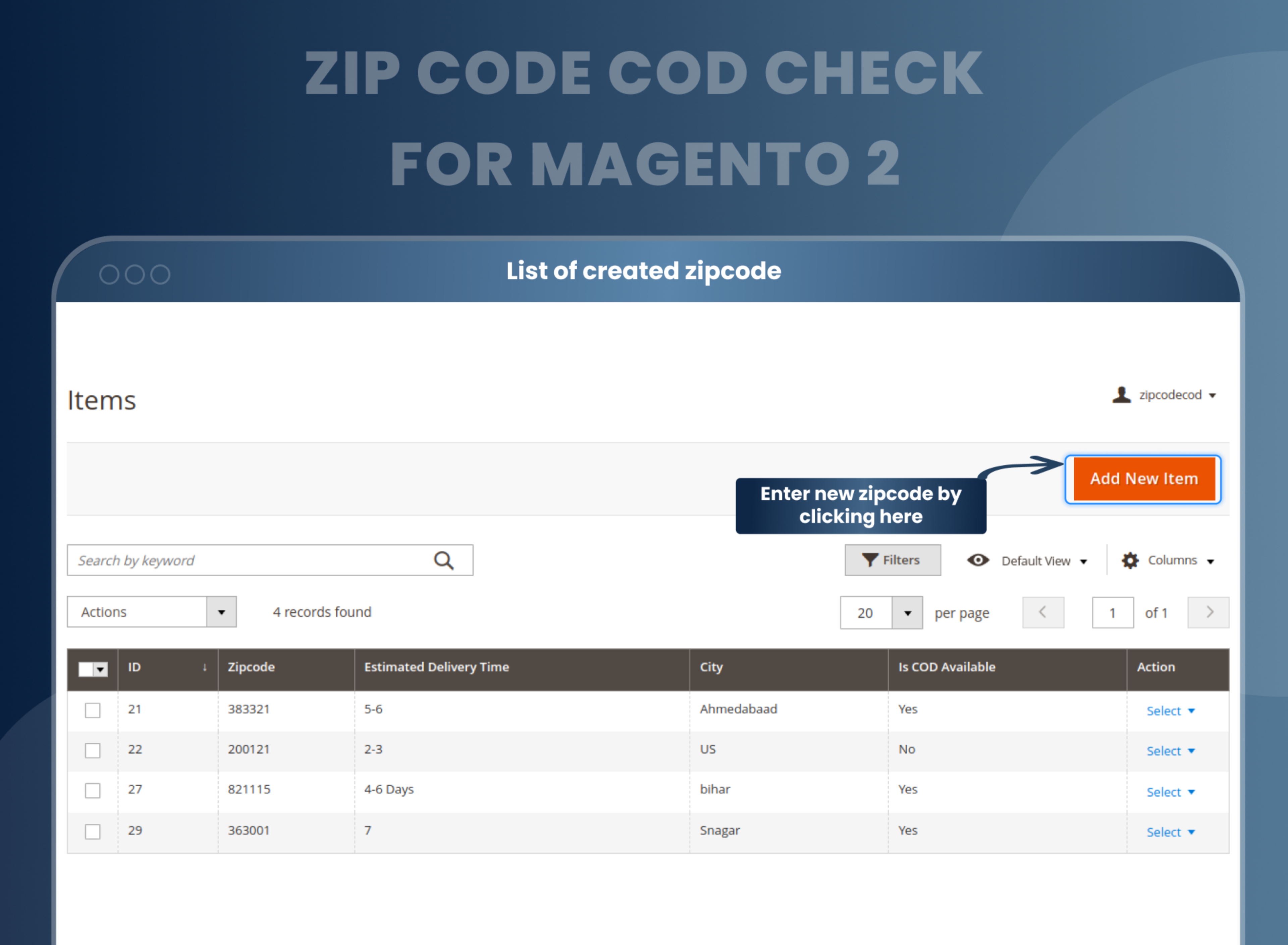
Add any number of PIN codes/ ZIP codes from admin panel
The sole motive of our extension is to be used by sellers rigorously. That is why all the features are made to be useful for them. With our extension, there is no number restriction to the sellers for adding PIN codes/ ZIP codes from the admin panel.
Enable/ Disable the extension
In any case, if you feel that the extension features are not useful for you currently, you can also disable the extension. Then, whenever the need arises, enable it again from the admin panel in just a few clicks.
How To Enable COD Option For Different Zip Codes In Magento 2?
How Does Cash on Delivery Availability Checker Magento 2 Extension Work?
Why Do You Need Magento 2 ZIP Code COD Check Plugin
Benefits of Zip Code COD Check Magento 2 Extension
- Install Zip code cod Magento 2 extension in your store
- You can enable extension from store --> Configuration --> Mageants --> Zip code cod
- You can set other configuration as per your need and requirement.
- Admin can create zip code cod option from zip code cod grid --> Zip code cod
- Customer can check zip code in product details page as well as checkout.
- In particular zip code COD available then COD payment display otherwise not.
- This Magento 2 extension for Zip Code COD Check comes with an admin-friendly design. The extension provides all the necessary features in the admin panel which can be easily accessed by the sellers. By using these features, sellers can update all the information regarding COD availability according to PIN code / ZIP code and the delivery days available for the same.
- In order to provide extensive convenience to sellers, the extension even allows them to update all this information on the website by importing/ exporting ZIP codes from the backend.
- One of the most crucial things that customers demand while making a purchase is accurate information. This includes correct product details, accurate pricing, and everything else.
- While performing e-com purchases, customers have some added apprehensions. They need extra specifics not just about the product but also about its shipping, delivery, payment options, etc. One such thing they need updated information about is the availability of COD options. The availability of COD options varies according to the PIN code / ZIP code on which the order is to be shipped. That is why customers expect immediate information regarding the same before going deeper into the product details.
- It is the responsibility of an efficient seller to inform the customers about the same. The days which are eligible for COD delivery also need to be specified by a seller. Updating all of this information on your e-com website and ensuring that the customers are able to access it as per their requirements is quite of a task. It takes a lot of time and effort for assimilating and updating all of this information.
- Recognizing this problem, the MageAnts team has come up with a solution. The MageAnts Zip Code COD Check extension for Magento 2 is the comprehensive tool which would help you with all of this.
- Time saving
- Improved user experience
- Accurate COD Verification
- Ensures a smoother order fulfillment process
- Compatible with most of the top browsers
FAQs
What is Magento 2 Zip Code COD?
Magento 2 Zip code COD extension allows admin to set COD for specific zip codes or pin codes from the backend. In short, it helps the store owner to manage cash on delivery for a specific location.
How to manage s number of zip codes?
You can import the list of zip codes using the CSV file.
Can I add an estimated delivery time for a particular zip code?
Yes, you can add estimated delivery time for a particular zip code.
Can I set a special message for COD unavailability zip code?
Yes, you can set a special message for COD Unavailability zip code.
Can I check all the added zip codes?
Yes, there is a separate grid in the backend where you can check all the zip codes and related information enlisted.
Can I export the list of zip code data?
Yes, you can export the list of zip code data.
Is zip code COD extension works in the checkout?
Yes, it is work in the checkout if COD available for particular pin code than COD payment method display in checkout.
Reviews
Customization
Changelog
- Compatibility:- Mageants Team Make extension compatible with Magento versions 2.4.7 & 2.4.8.
- Compatibility:- Mageants team make extension compatible with Hyva theme.
- Fixes:- Mageants team make extension as per magento coding standard.
- Fixes:- Resolved deprication errors when run upgrade command.
- MageAnts team make extension compatible with latest magento 2.4.6 version.
- MageAnts team makes this extension compatible with the Magento coding standard.
- Remove multiple times same entry with CSV import functionality. Extension make a compatible with latest magento2.4 version.
- Zip code Cod Check Search by keyword isn't working on zip code COD page.
- COD method should display in checkout page when extension is disabled.
- In checkout cod delivery available or not available message did not display MageAnts fixed bugs in zip code cod extension now cod available or not available message display in the checkout page.
- When user add zip code in shipping method and Case on Delivery payment method available than in mobile version place order button not display, Now issue fixed in all Magento version and working fine in all version..
- MageAnts update Zip Code-COD extension in latest magento2.3 version, Now extension working with all Magento version.
- Update module version name in composer.json file same as module.xml file.
- Testing Zip Code-COD in all Magento versions, it's working fine in all versions.
Why Choose MageAnts
-

30 Days Money Back Guarantee
We offer 30 Days money back guarantee if customer meets our refund policy. For more info you can read our terms and condition
-

Tested Before Every Release
Every version is tested on the latest Magento 2.4 release before it goes live, and bugs reported during your support period are fixed by our team.
-

Free 90 Days Support
MageAnts ensures quick and quality technical support. Take advantage of our 90 days free support for a smooth and efficient experience.
-

Frequent Extension Updates
Intensive update roadmaps ensure highly compatible, bug-free, great performance, and innovative extensions.
