


Estimated Delivery Date For Magento 2
Ask AI About This Extension





Key Features
- Show estimated shipping and delivery dates on the category, product page, cart, etc.
- Exclude weekends and holidays.
- There are multiple options to show the delivery date, like inherited, dynamic date, dynamic date range, static date, static date range, and static text.
- Display shipping and delivery dates on the order confirmation, invoice, and shipment email.
- Working with all Magento 2 products.





Current Limitation in Magento 2
What Magento 2 Cannot Do
“When will I receive my order?” or “How long does it take to deliver my product?” are the biggest and most consistent thoughts that online buyers have. Default Magento 2 does not have a feature that allows store owners to specify the estimated shipping and delivery date before customers place an order. This can be confusing for customers, as they may not know when their order will arrive.
How Our Extension Solves This
MageAnts Estimated Delivery Date in Magento 2 allows store owners to display the estimated product delivery date on the checkout or product detail page. This will help customers know the estimated delivery date of the product they are looking to purchase. This feature can improve the overall customer experience and increase customer satisfaction, as it gives customers a better understanding of when they can expect to receive their purchases.
Description
Build trust by displaying accurate delivery timelines.
Magento 2 Estimated Delivery Date extension shows customers the expected arrival date for their orders based on location and shipping method. For example, display "Delivery by Friday, Jan 5" on product pages to boost purchasing confidence.
Manage the estimated delivery date with a user-friendly interface
Magneto 2 estimated delivery date displays the estimated date of shipping and arrival for your customers on the order view page.
Store admins can select and display the expected delivery date on multiple pages.
- Category page
- Product Page
- Shopping Cart Page
- Checkout Page
Besides, store owners can send essential emails with an estimated delivery date to their customers.
- Order Confirmation Email
- Invoice Email
- Shipment Email
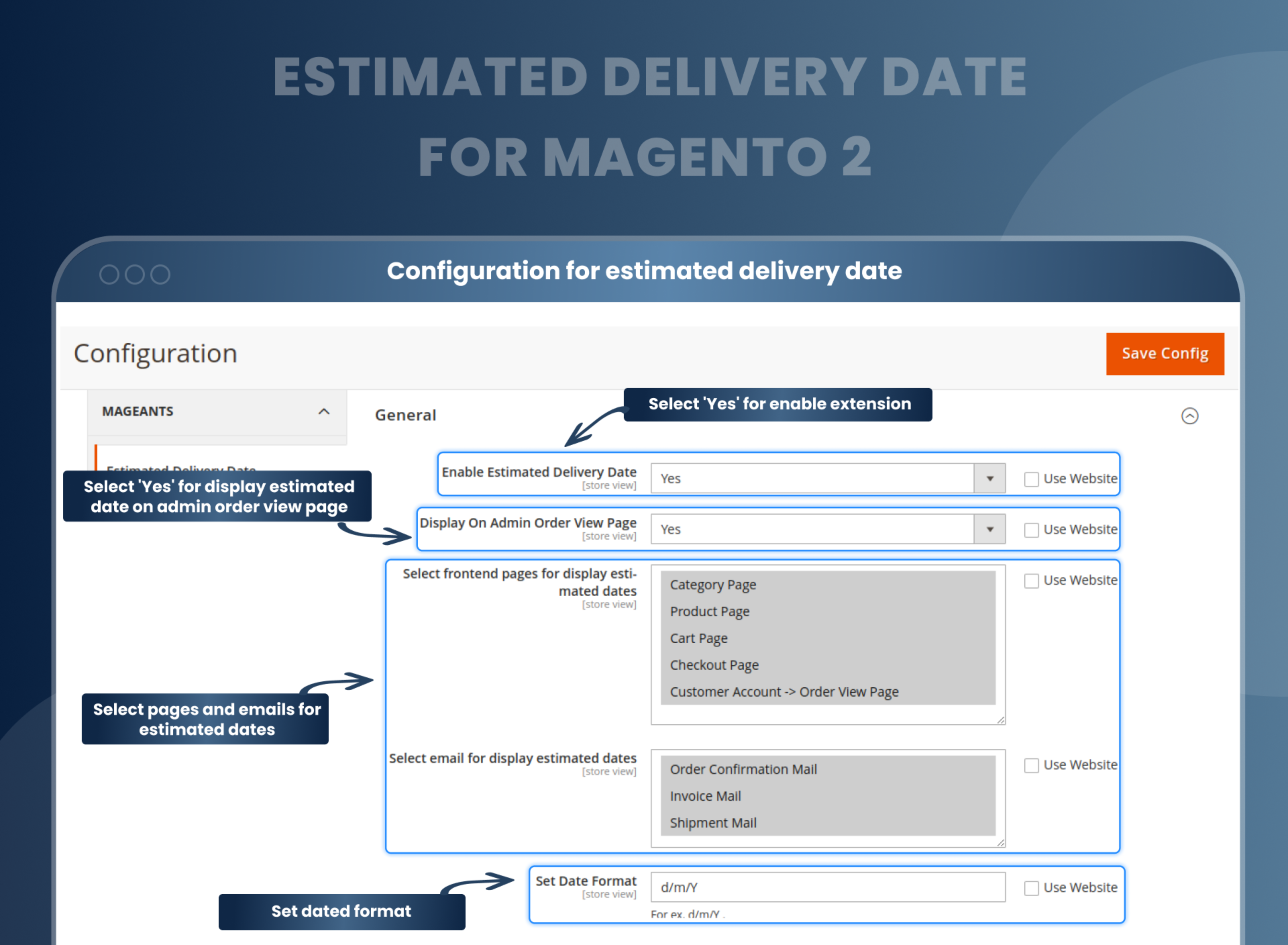
Show estimated shipping and arrival dates or date ranges
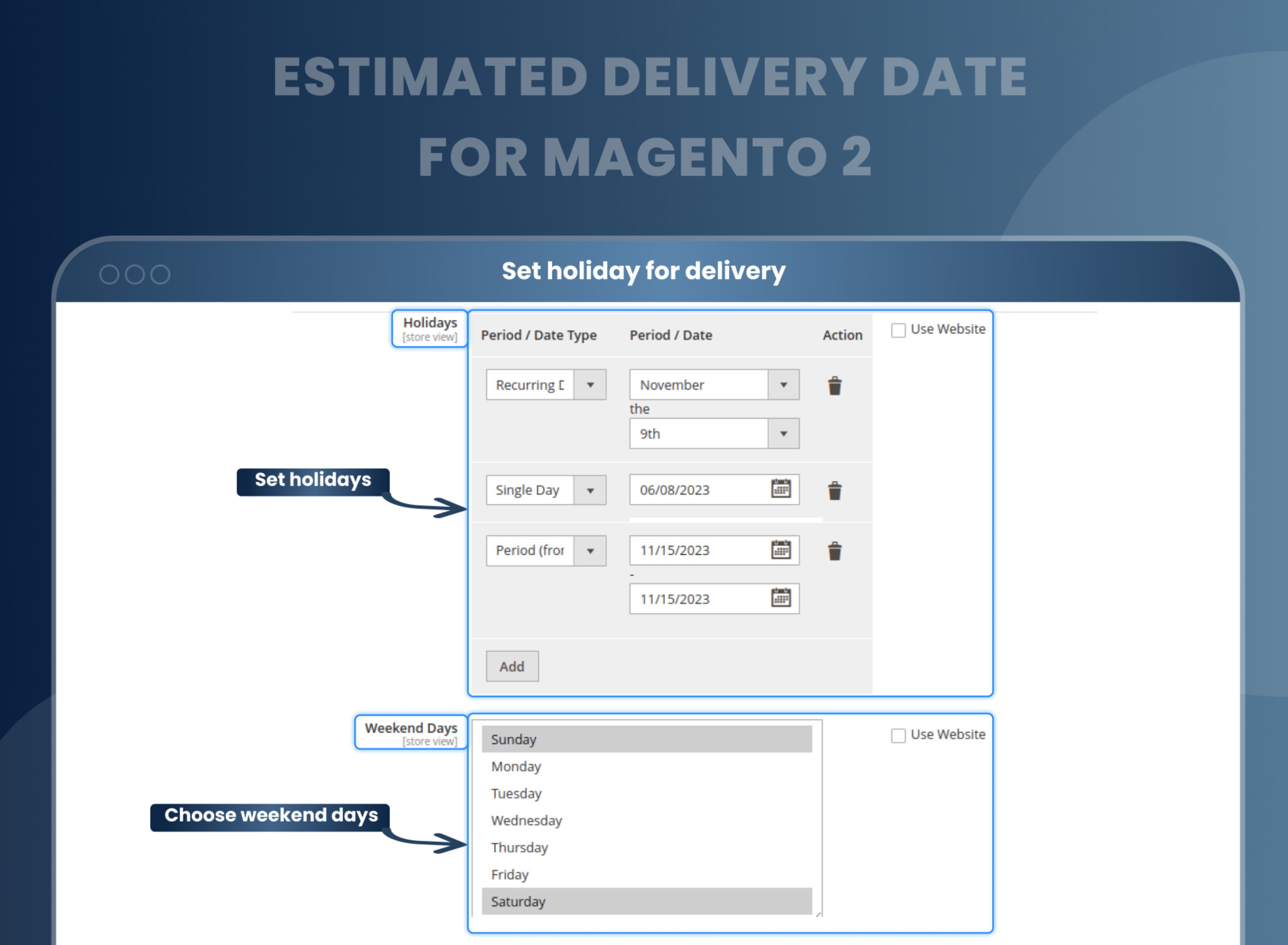
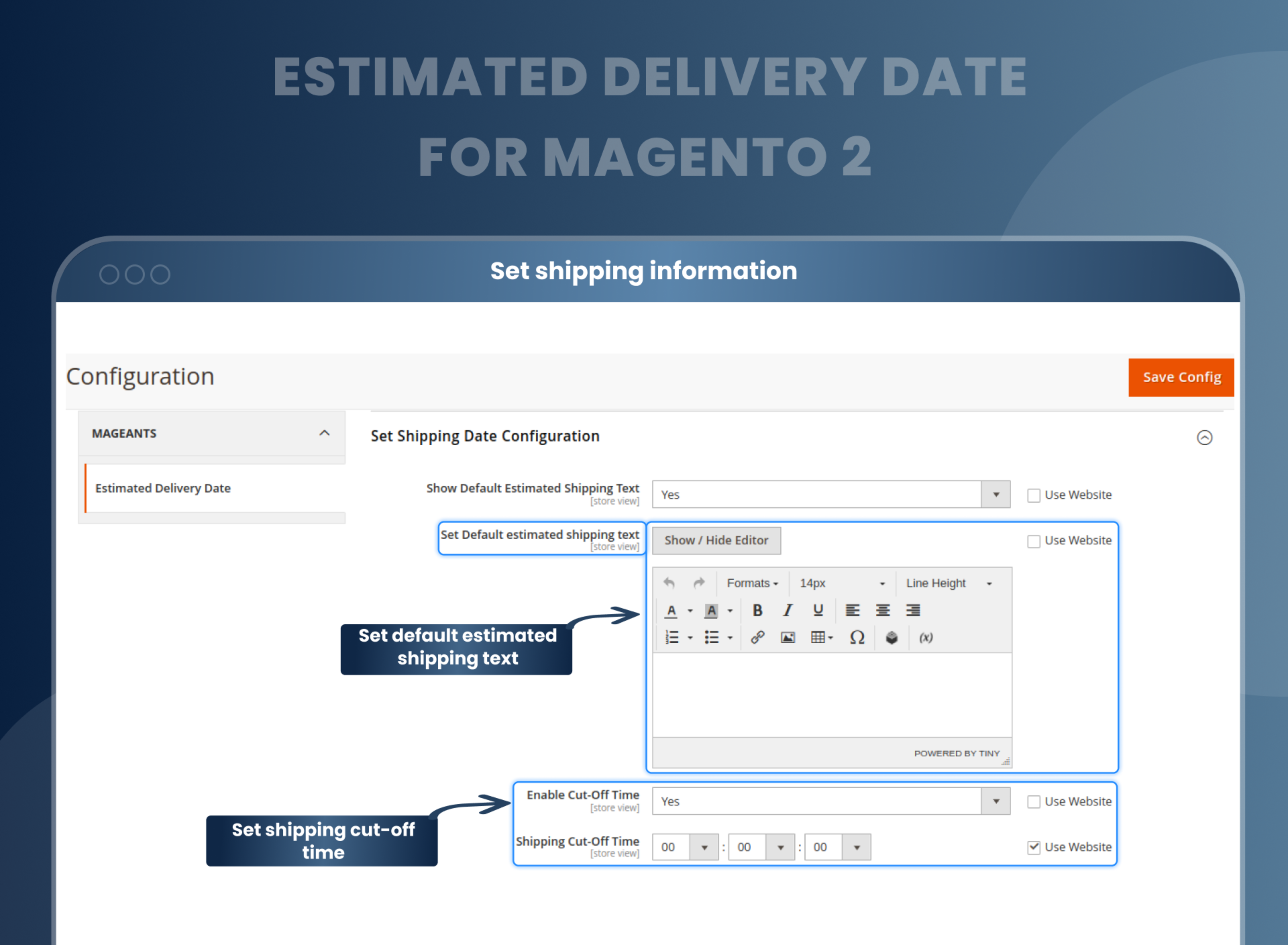
As per need, you can set default delivery date messages, delivery holidays, and weekdays. Using different types, you can select delivery holidays, including recurring days, single days, and specific periods.
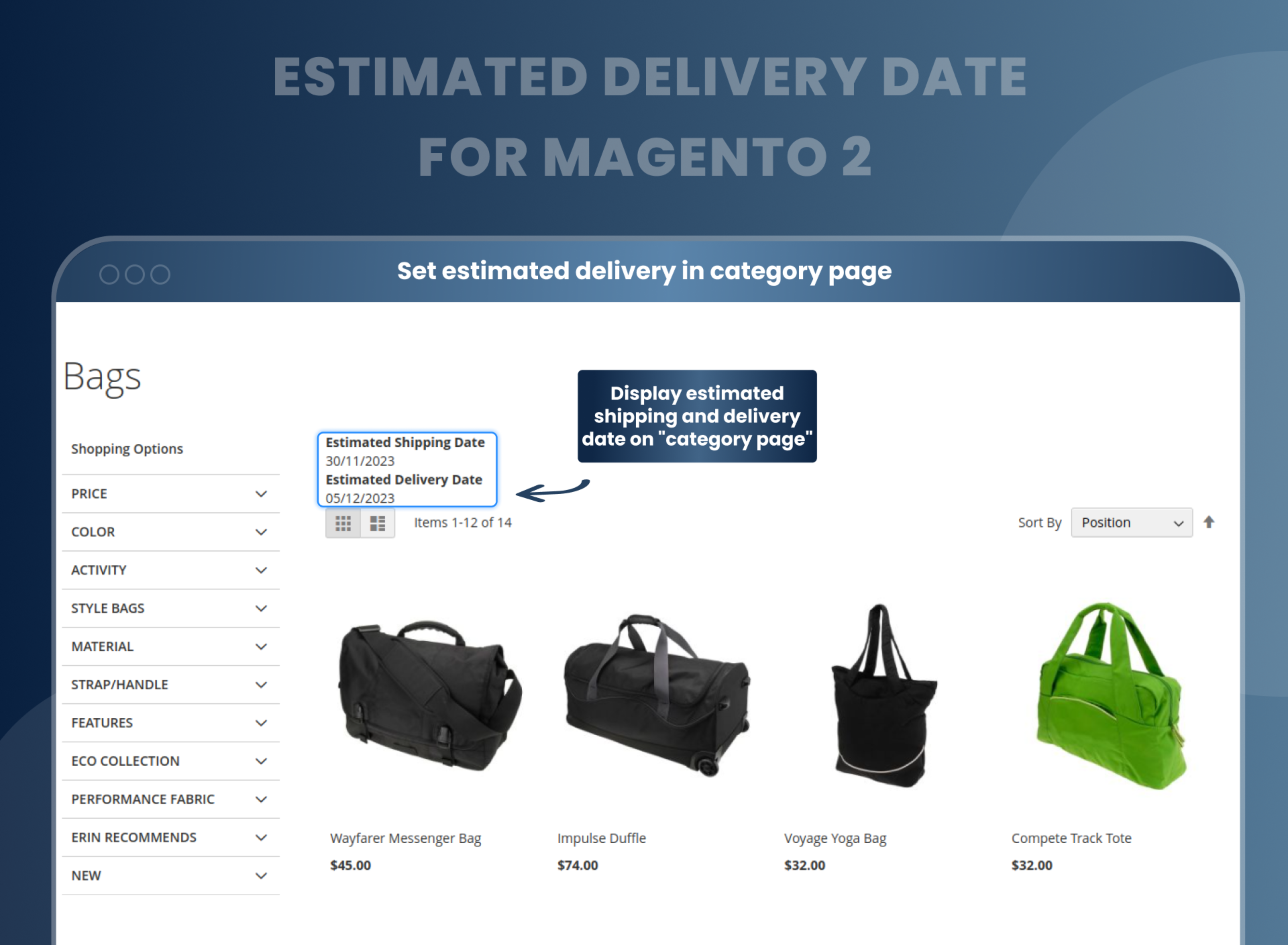
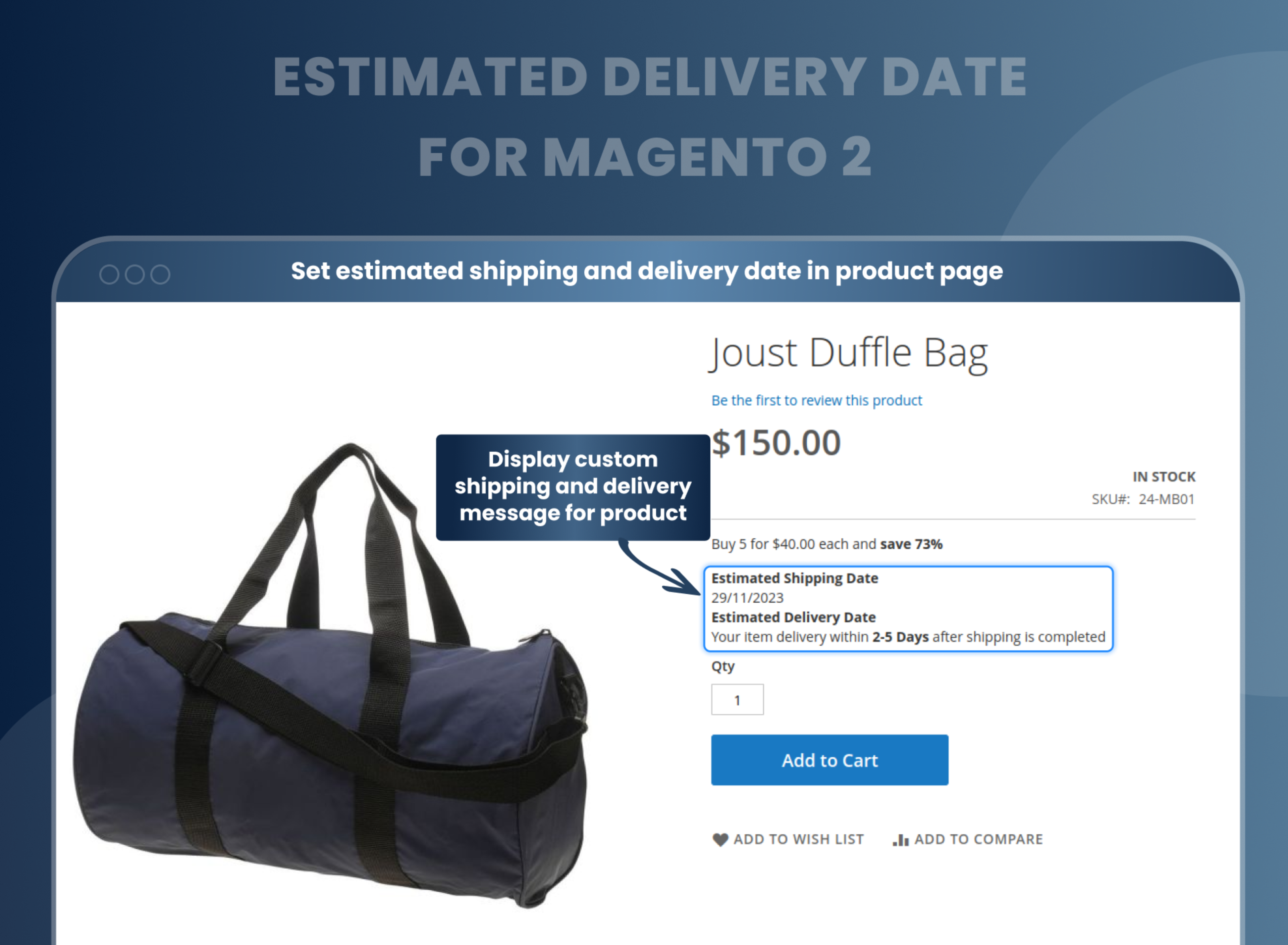
The estimated delivery date can be displayed on the checkout and product pages
You can show the estimated date of delivery on the category page and each product page. This feature provides an advanced quality that keeps customers on the page, and because of this, the abandonment rate is cut down effectively.
Display a message regarding delivery availability
With the help of the Estimated Delivery Date for Magento 2 extension, admins can set default text if the estimated shipping and delivery date is not available to display a custom message. So, that user gets an idea about the delivery and shipping date, and based on that, they can take action.
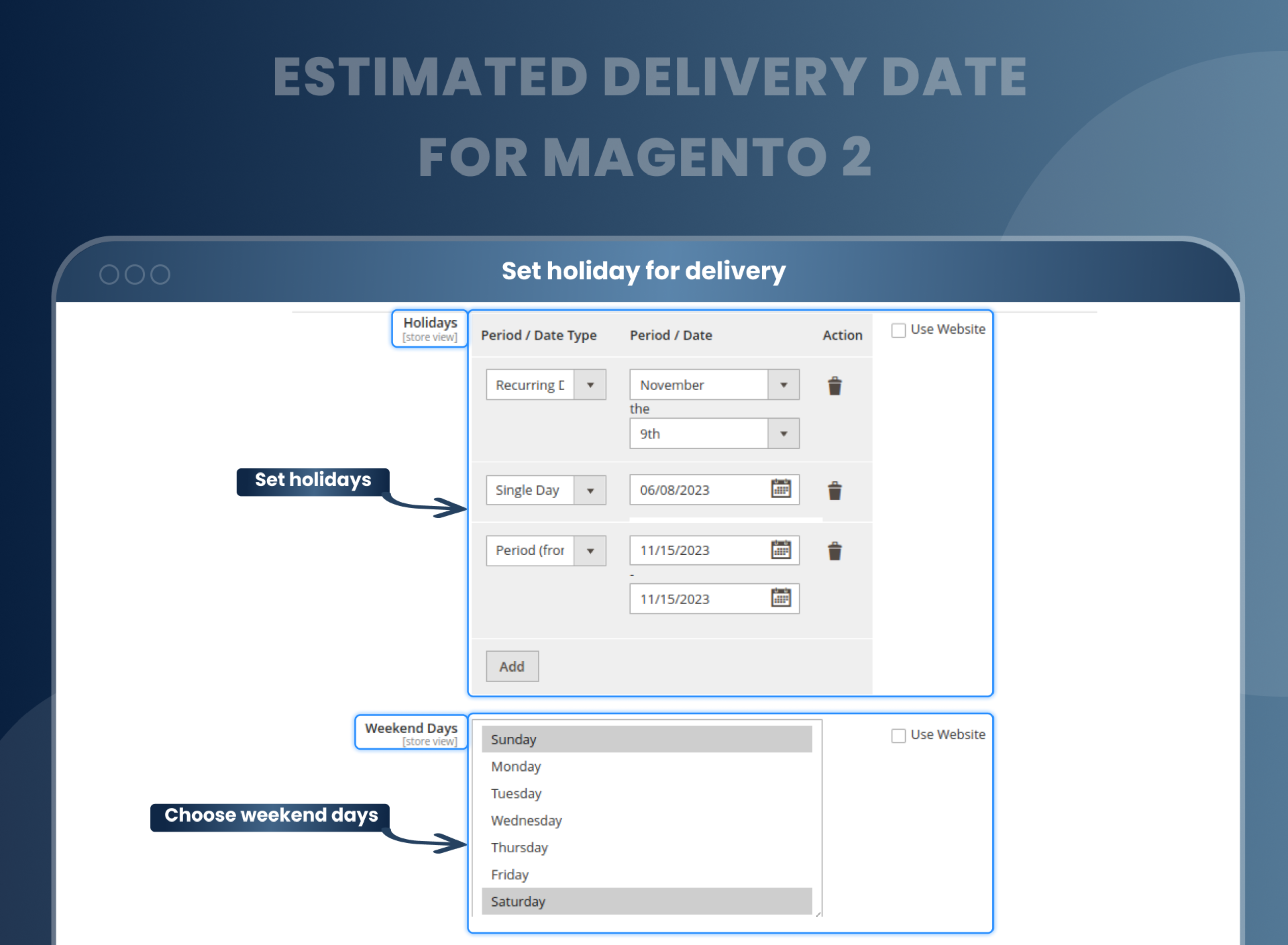
Easy to set to restrict days off
Estimated Delivery Date Magento 2 allows you to select weekend days and holidays easily, as holidays can be set as a recurring date, a single date, or a date range. Additionally, admins can add as many global or local holidays at the same time. Holidays can be set as: Single date Recurring date Period (date range)
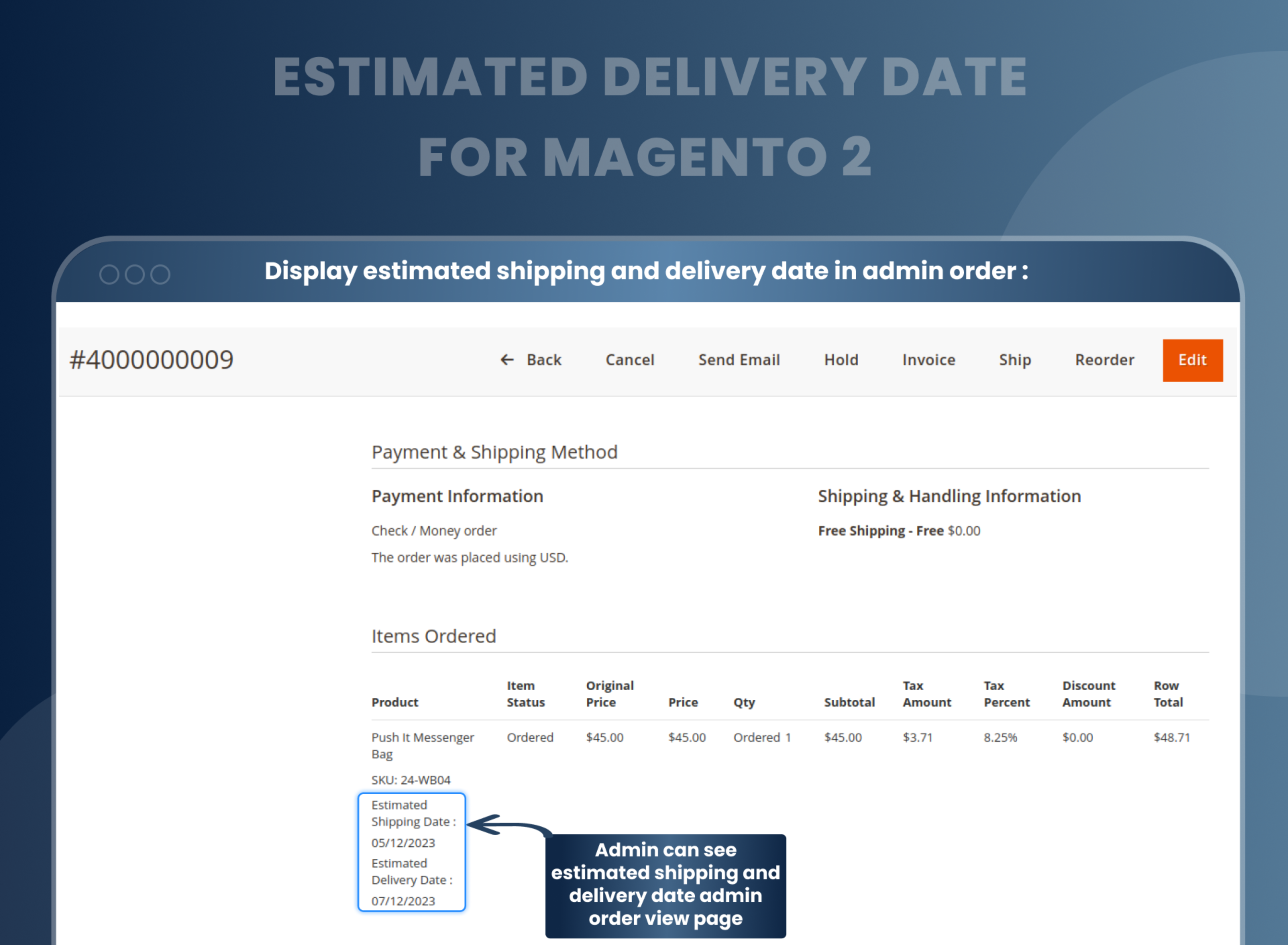
Check the estimated delivery and shipping dates on the order view page
It is easy for the store admin to see estimated delivery and shipping dates on the back-end order view page. Admin can check product name, item status, original price, price, quantity, shipping and tax details, discount details, and total price on the same page.
How To Show Estimated Delivery Date And Time In Magento 2?
How Does Estimated Delivery Date Magento 2 Work?
Other Advanced Features Of MageAnts Estimated Delivery Date
Why Does Your Store Need Estimated Delivery Date Magento 2 Extension?
Benefits of Estimated Delivery Date Magento 2 Extension
- Install Estimated delivery date Magento 2 extension in your store.
- You can enable extension from store --> Configuration --> Mageants --> Estimated delivery date.
- You can set other configuration as per your need and requirement.
- Admin can add estimated shipping and delivery date in category and product details page.
- Customer can check shipping and delivery date category, product, cart, checkout page.
- Estimated shipping and delivery date display in orders, invoice, shipment and credit memo and emails.
- After a configuration and installation of the Magneto 2 Estimated Delivery Date Extension, you need to make only the required changes. It allows you to create and manage lead times for each product that is available in your store and on several levels. You can also display personalized delivery messages to your customers.
- MageAnts Magento 2 Estimated delivery date extension helps you manage the product delivery date in a very simple and appropriate manner.
- Configuration of date format in multiple ways :
- 1. Inherited (from the category above)
- 2. Dynamic Date ("n" days from today's date)
- 3. Dynamic Date Range ("n - m" days from today's date)
- 4. Static Date
- 5. Static Date Range
- 6. Static Text
- Ability to choose days off and dates off
- Extension can be enabled or disabled
- Compatible with other Magento 2 extensions
- Facility to create, edit, delete and add delivery time frames
- Full API support
- Ability to select a day to get orders delivered
- Save time on discussing delivery preferences
- Relieve from product delivery assessment difficulties
- Timely delivery
- Consumer delivery expectations are growing. According to Statista, 41.6 % of customers wished for more clarity on the exact delivery time while purchasing online. To satisfy these ever-changing customer demands, providing an estimated shipping date or estimated delivery date of product is necessary now.
- Magento 2 Estimated delivery date extension is a perfect solution to provide an excellent shopping experience to your customers and indirectly it helps you to improve the brand. This extension not only helps to increase the level of customer service in your store but also you can choose the desired date and time for product delivery.
- User-friendly interface
- Enhance your store's performance and customer experience.
- Improved conversion rate
- Improved Customer Satisfaction
- Help reduce cart abandonment rates.
- Increased Trust and Credibility
- Improved Efficiency
FAQs
How can I get delivery date in Magento 2?
You can find the estimated product delivery date for the product in the product detail page. Also, you can check the shipping page as well.
What does it mean when it says estimated delivery date?
Estimated delivery date means when your order is delivered to you. It is the date when customers can expect the delivery of their orders.
Where is estimated delivery date in Magento 2?
Magneto 2 estimated delivery date can provide the estimated Date of arrival and shipping dates on various store pages.
Why does estimated delivery date change?
Magento 2 estimated delivery date extension is a perfect solution to provide an excellent shopping experience to your customers, and indirectly it helps you to Improve the brand. This extension not only helps to increase the level of customer service in your store, but also you can choose the desired date and Time for product delivery.
Reviews
This extension is simply perfect for displaying shipping and delivery times on our webshop. It works out of the box and is incredibly easy to install. Not to mention, the price for this module is very affordable. Highly recommended!
Customization
Changelog
- Compatibility:- Mageants Team make extension compatible with Magento latest versions 2.4.7 & 2.4.8.
- Compatibility:- Mageants Team make extension compatible with Hyva Theme.
- Make extension compatible with magento 2.4.6 version.
- MageAnts team makes this extension coding as per magento coding standard.
- Estimated Shipping and Delivery Date Range not working, MageAnts team resolved issue in all magento version.
Why Choose MageAnts
-

30 Days Money Back Guarantee
We offer 30 Days money back guarantee if customer meets our refund policy. For more info you can read our terms and condition
-

Tested Before Every Release
Every version is tested on the latest Magento 2.4 release before it goes live, and bugs reported during your support period are fixed by our team.
-

Free 90 Days Support
MageAnts ensures quick and quality technical support. Take advantage of our 90 days free support for a smooth and efficient experience.
-

Frequent Extension Updates
Intensive update roadmaps ensure highly compatible, bug-free, great performance, and innovative extensions.
