


Shipping Restrictions For Magento 2
Ask AI About This Extension

Key Features
- Create unlimited shipping restriction rules
- Restrict shipping by country, state, city, ZIP code, or street keywords
- Apply shipping restrictions by product attributes or categories
- Limit shipping based on customer groups or store views
- Set date-based restrictions (from-to date range)
- Display custom restriction messages on the frontend
- Create and manage custom shipping areas
- Use condition combinations for advanced rule logic
- Enable shipping restrictions for admin order creation





Current Limitation in Magento 2
What Magento 2 Cannot Do
Magento’s default system lacks the flexibility to restrict shipping methods based on custom benchmarks such as customer group, region, or product type. This limitation generates logistical issues, increased shipping costs, and possible delivery failures, especially for stores serving various locations or B2B clients.
How Our Extension Solves This
That’s exactly where the Magento 2 Shipping Restrictions Extension comes in handy. It gives you the control to offer options based on who’s buying, what they’re buying, and where it’s going. You can easily set up rules to hide or show shipping methods depending on location, product type, or even customer group, without any code or complex setup.
Description
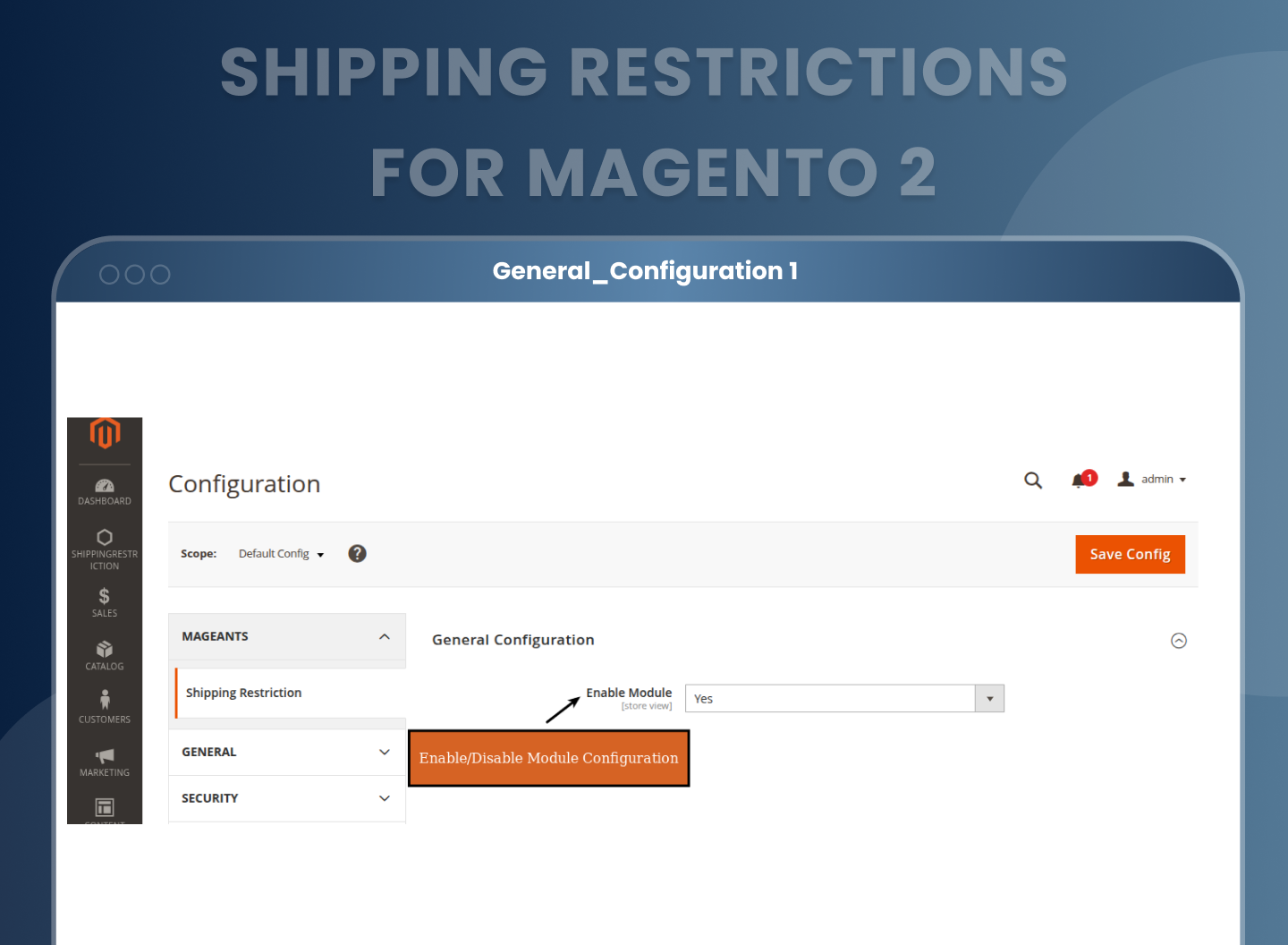
Enable Extension from Configuration
You can manage to activate an extension through the Magento admin panel. Simply go to Stores > Configuration > MageAnts > Shipping Restriction , where you’ll find an option called Enable Module.
Setting this to "Yes" activates the shipping restriction functionality, while "No" disables all configured rules.
Create and Manage Shipping Areas
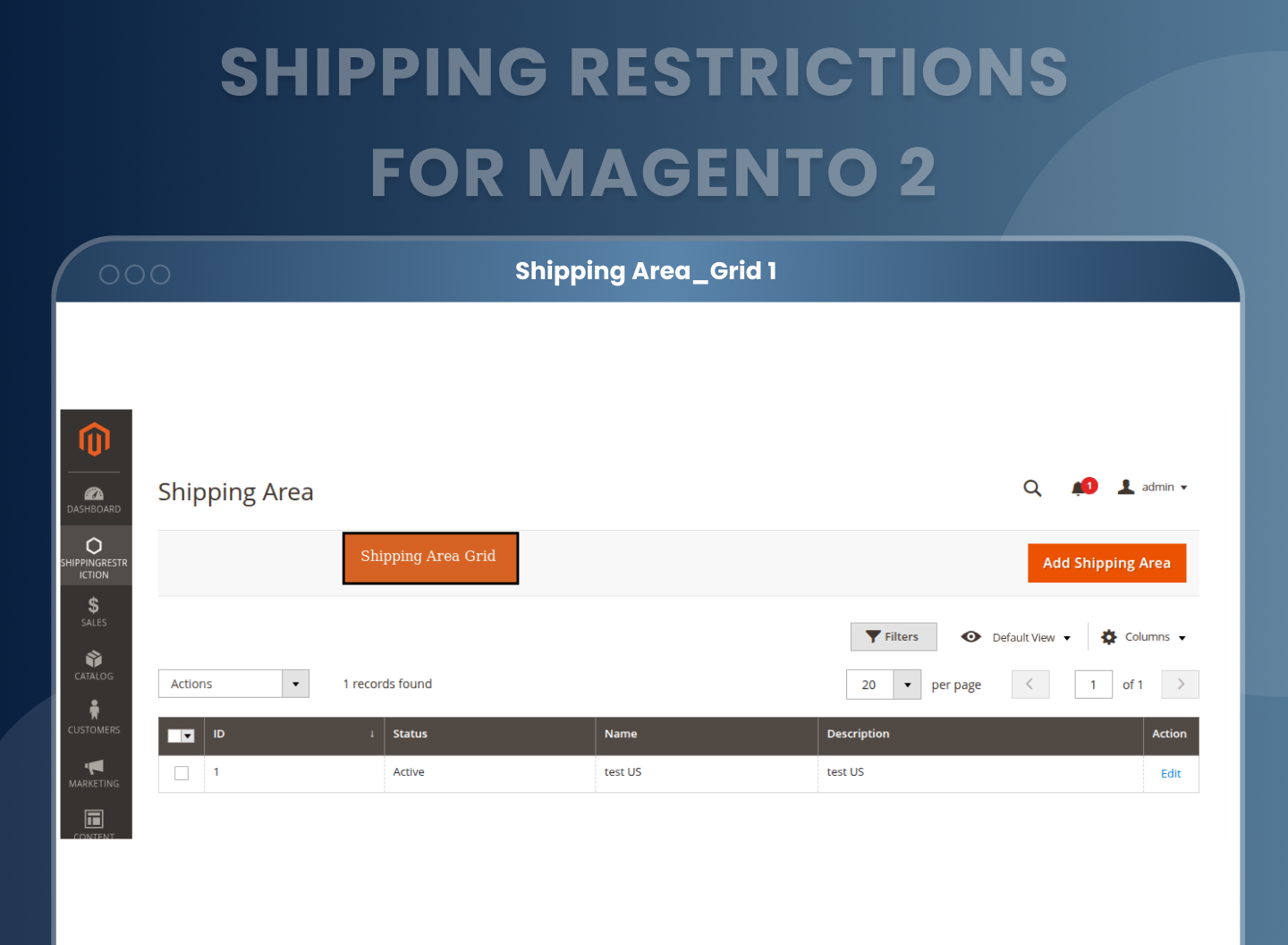
The extension offers a robust Shipping Area feature that allows you to define custom delivery zones based on several location attributes. This functionality is accessible via the Shipping Area Grid, where all previously created areas are listed in a tabular format for easy management and quick edits.
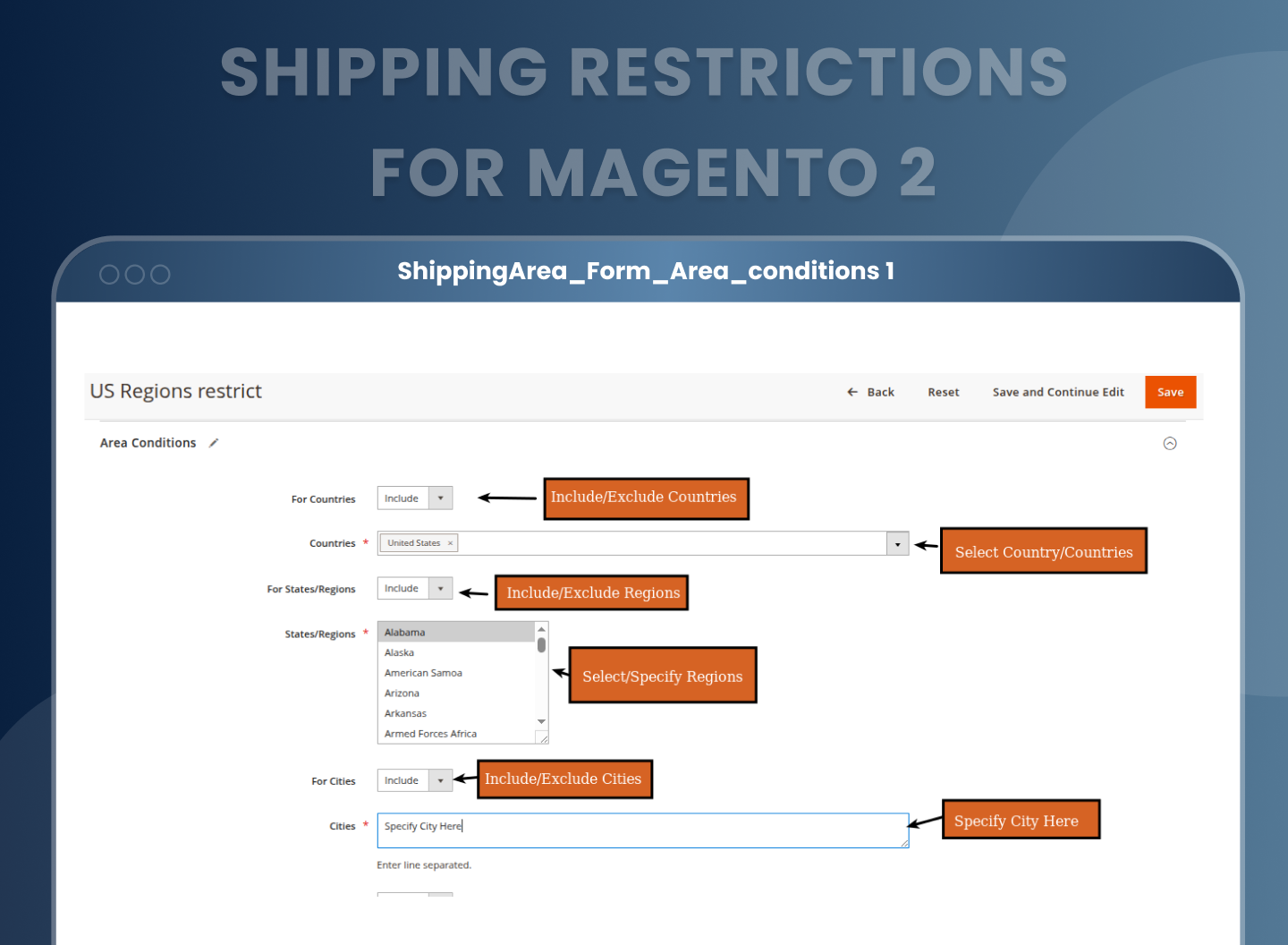
The Shipping Area Form can be used to create a new shipping area. It allows you to give the area a name, enable or deactivate it, and include a short description. By choosing which country, states, cities, or even matching keywords in the street address are included or excluded, you may then define the regions that this area should cover. These grouped areas help apply shipping restrictions with high precision and are reusable across multiple rules.

Filter by Country, State, City, or Street Address
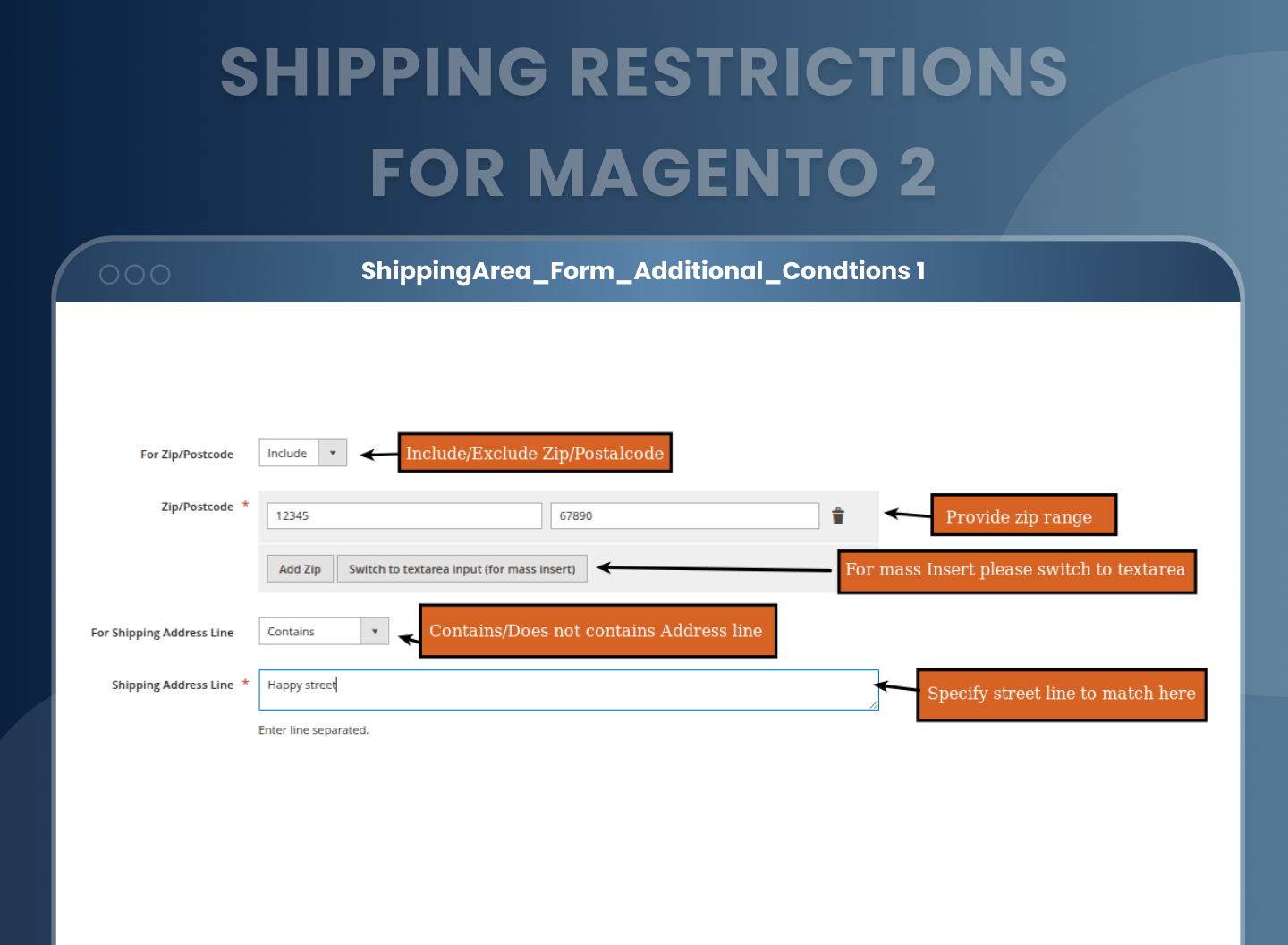
TWhen defining shipping areas, the form allows you to create layered location based filters to target delivery restrictions accurately. You can:
- Include or exclude countries where certain shipping methods should or shouldn’t apply.
- Narrow it further by selecting states or regions within a country.
- Target specific cities to allow or block deliveries based on urban or remote locations.
- Use postal codes either individually or as ranges, or in bulk using comma separated values.
- Match street line keywords to refine restrictions based on address type.
Shipping Restriction Rule Grid
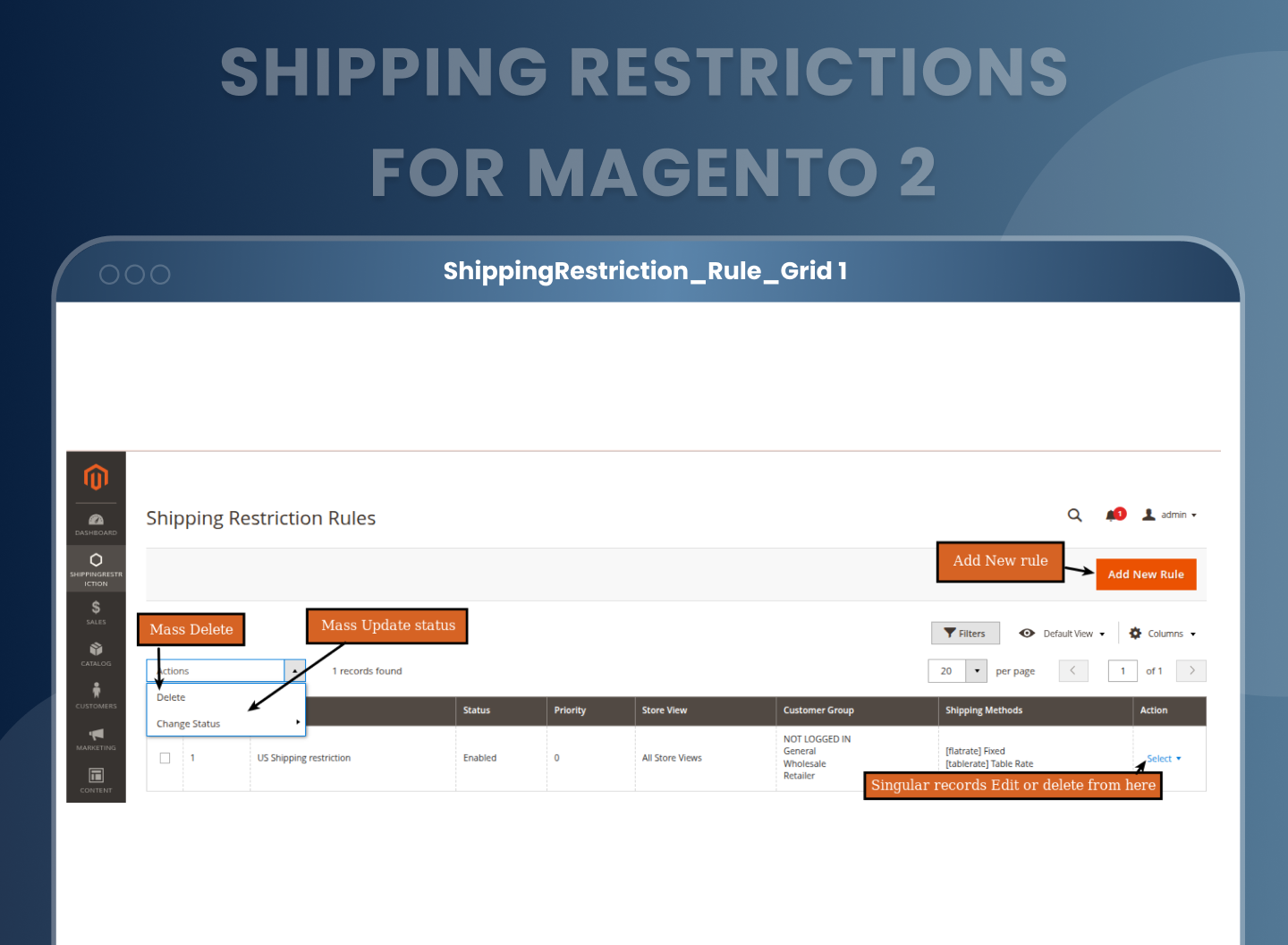
Once shipping rules are created, they are displayed in a structured list called the Shipping Restriction Rule. You may quickly review all of the rules that have been added to the system with this list, which includes the rule name, status, priority, associated shipping methods, relevant date range, and assigned customer groups or store views.
You may quickly add new rules or modify current ones from this list. It also allows you to an options like “Mass Update Status” and “Mass Delete”. It helps in managing complex shipping logic across multiple customer types and store views with full visibility and quick access.
Create Flexible Shipping Restriction Rules
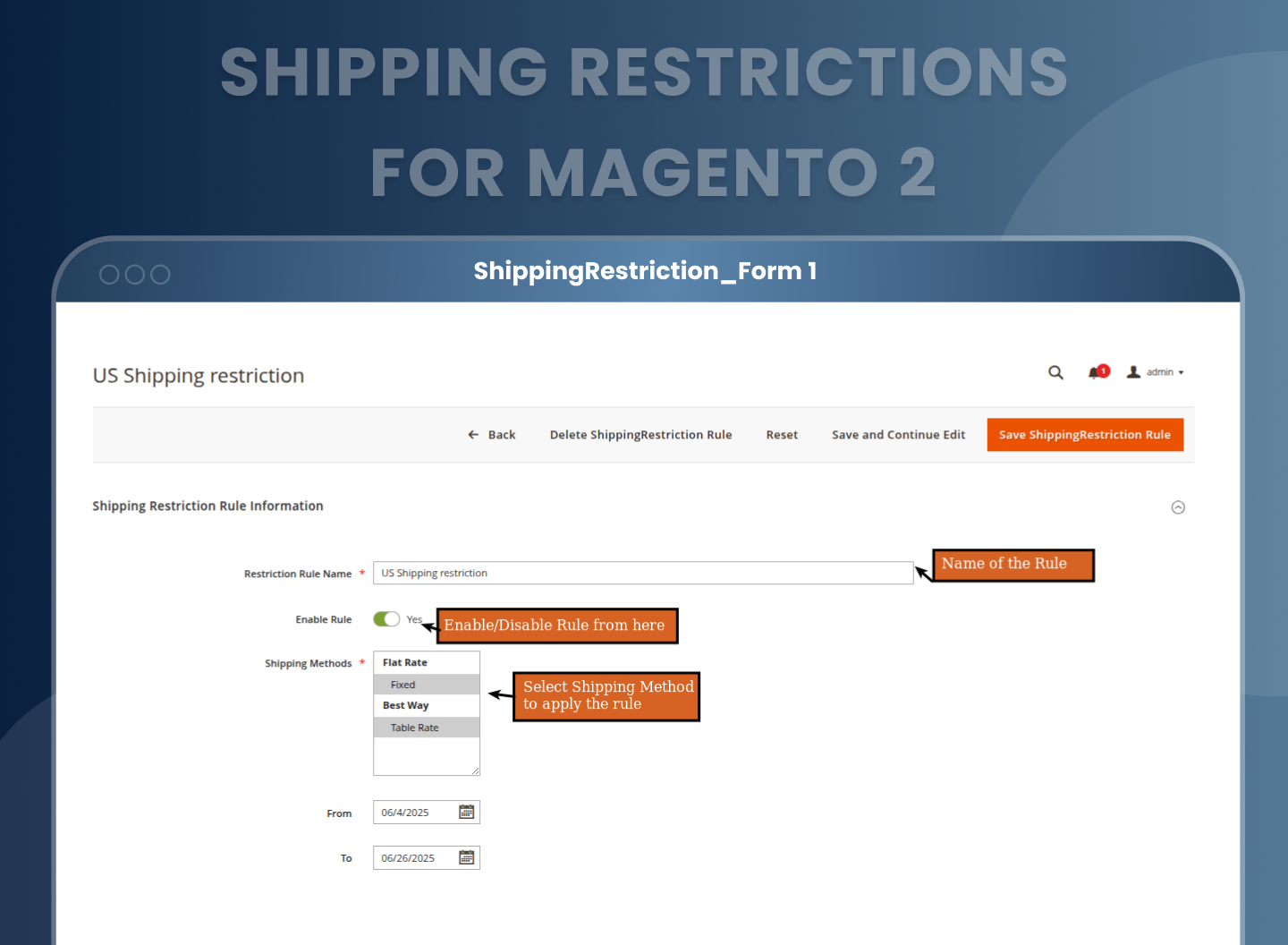
You can create flexible rules to easily manage and specify when and which specific shipping methods should be restricted. Simply choose which shipping options (such as Flat Rate, Free Shipping, or Table Rates) each rule should apply to, as well as give each rule a name and a status. You can also specify the From and To Date Range for which the limitation will be in effect.
Show or Hide Shipping Methods with Custom Messages
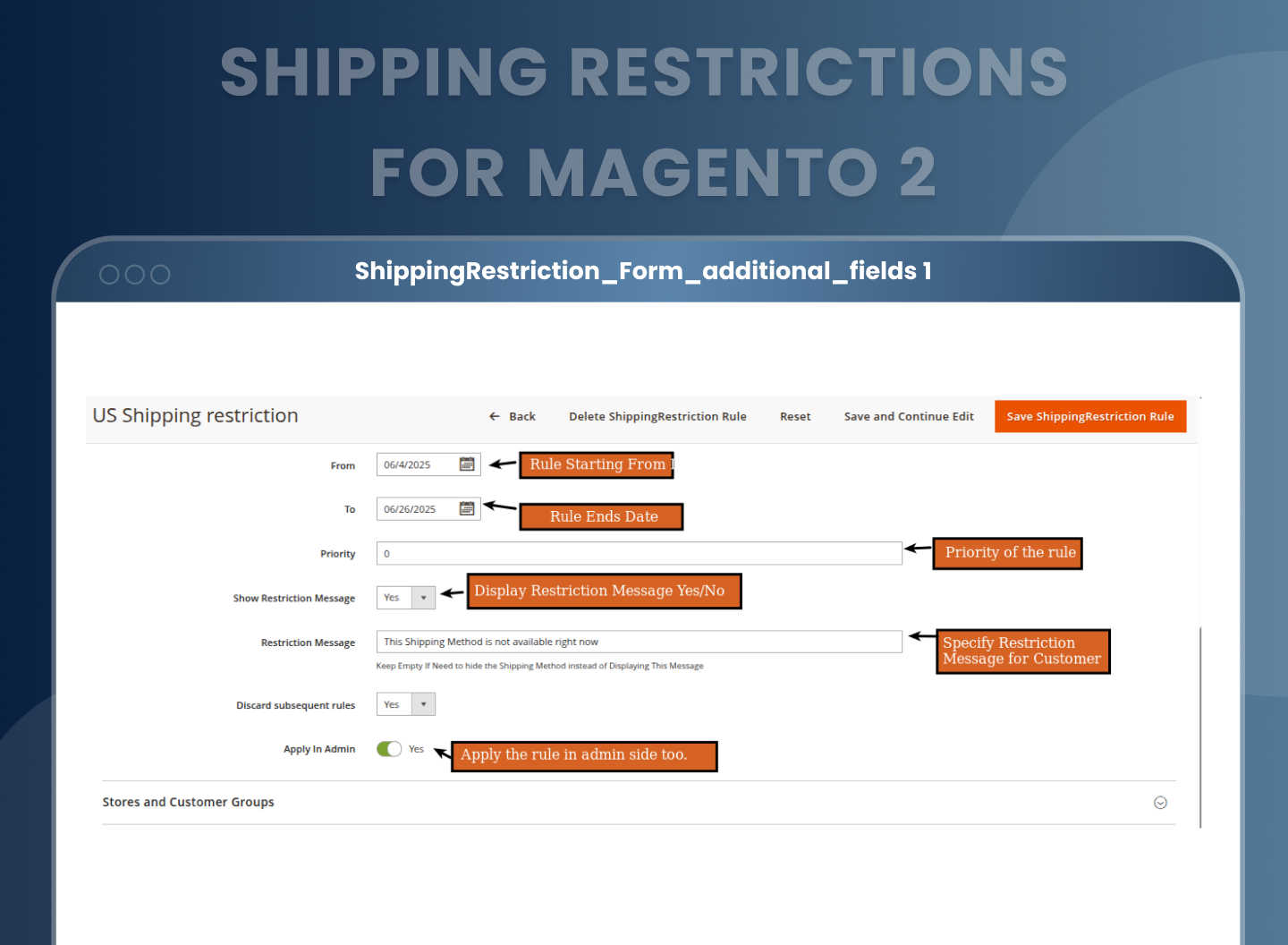
Magento 2 Restrict Shipping Methods extension offers you full control over how restricted shipping methods appear to customers on the frontend. For each rule, you can decide whether a restricted method should be hidden completely or displayed with a message.
If you set Show Restriction Message to Yes, the shipping method will still appear, but it will include a custom error message to inform the customer. If you set it to “No,” the shipping method will be removed from the list completely.
Apply Shipping Restrictions in Admin Orders
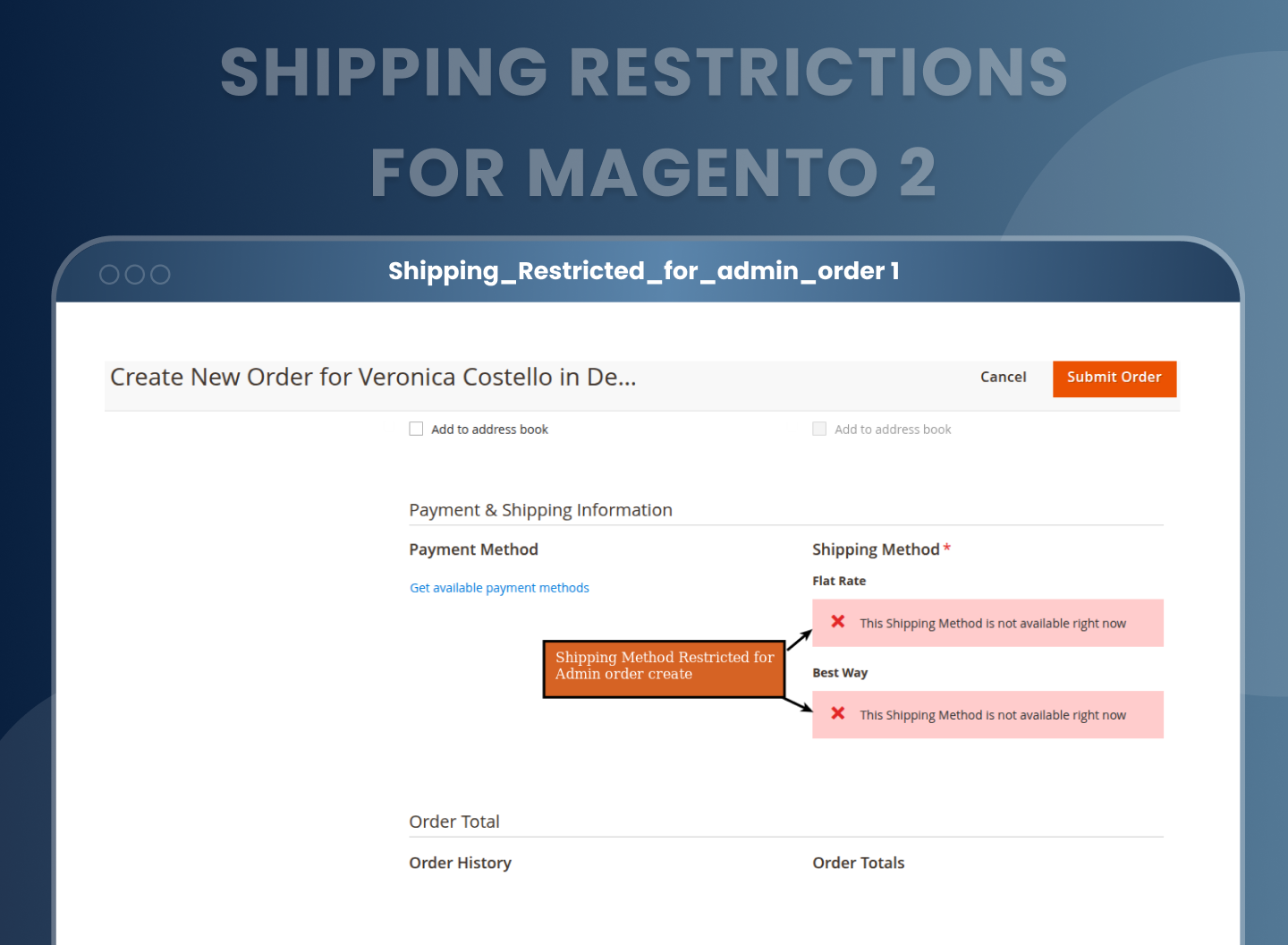
Shipping Restrictions Magento 2 supports the ability to apply restrictions on orders created through the Magento admin panel. When the Apply in Admin option is enabled within a rule, the shipping restrictions will also be applied for backend orders created by the admin.
Assign Rules by Customer Group and Store View
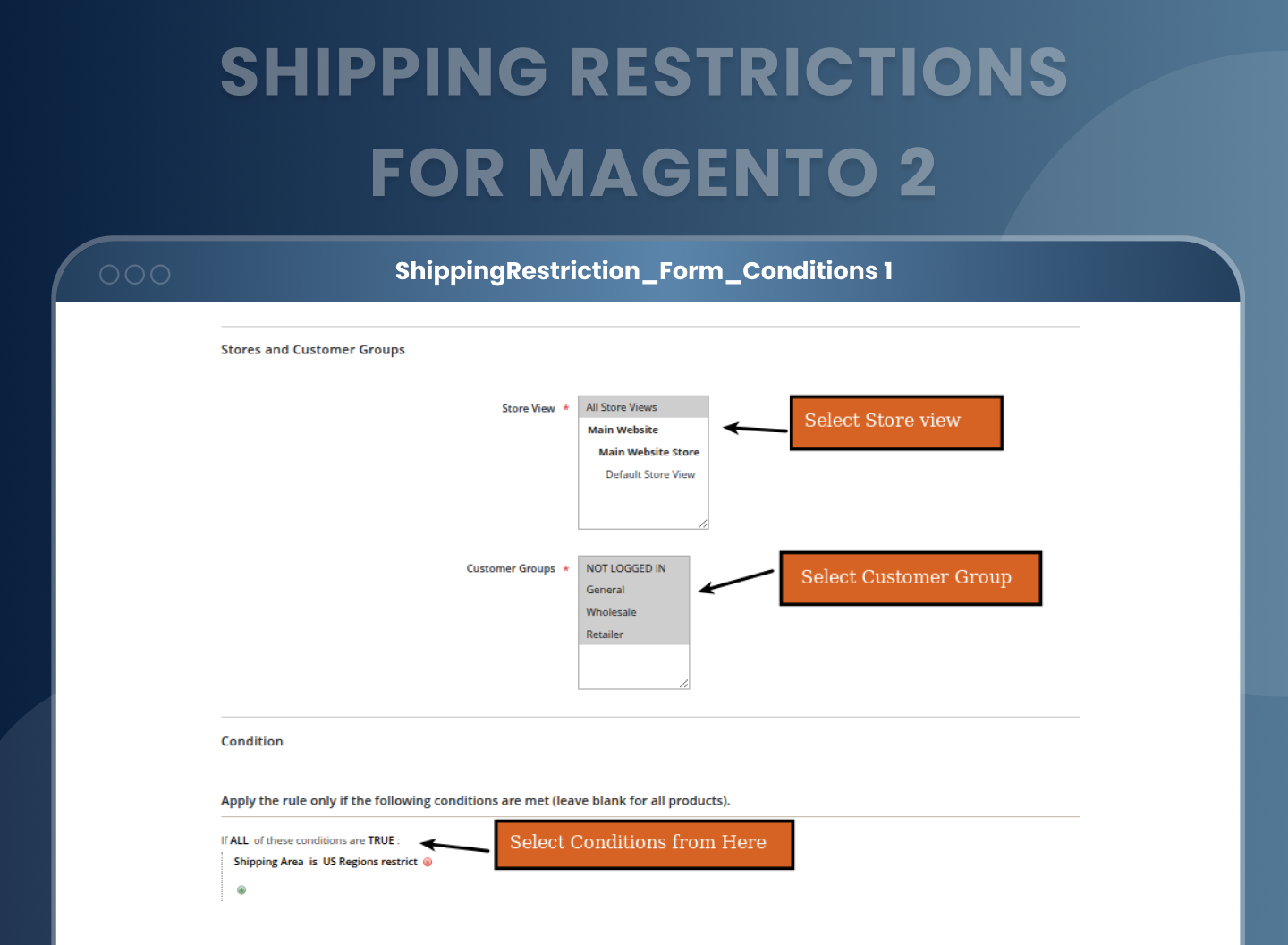
Specific customer groups and store views can be linked to each shipment restriction rule. This enables you to customize the delivery choices for your customers, including wholesale clients, retail buyers, and guest users.
You can also apply restrictions selectively to store views, making it ideal for businesses running multiple regional or language based storefronts. For example, you might allow “Express Delivery” only on your UK store view and only for registered customers.
Advanced Rule Conditions Using Condition Tree
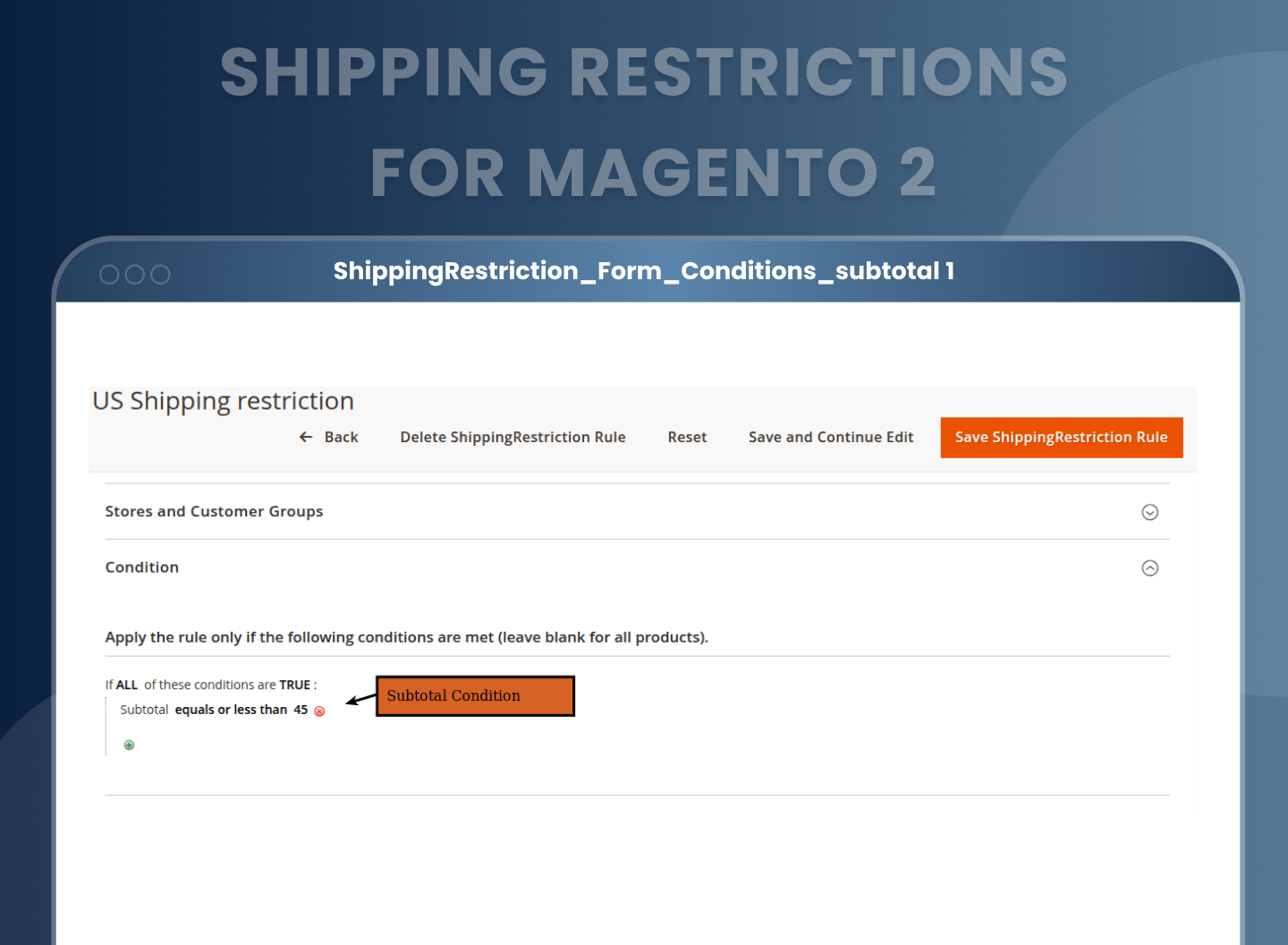
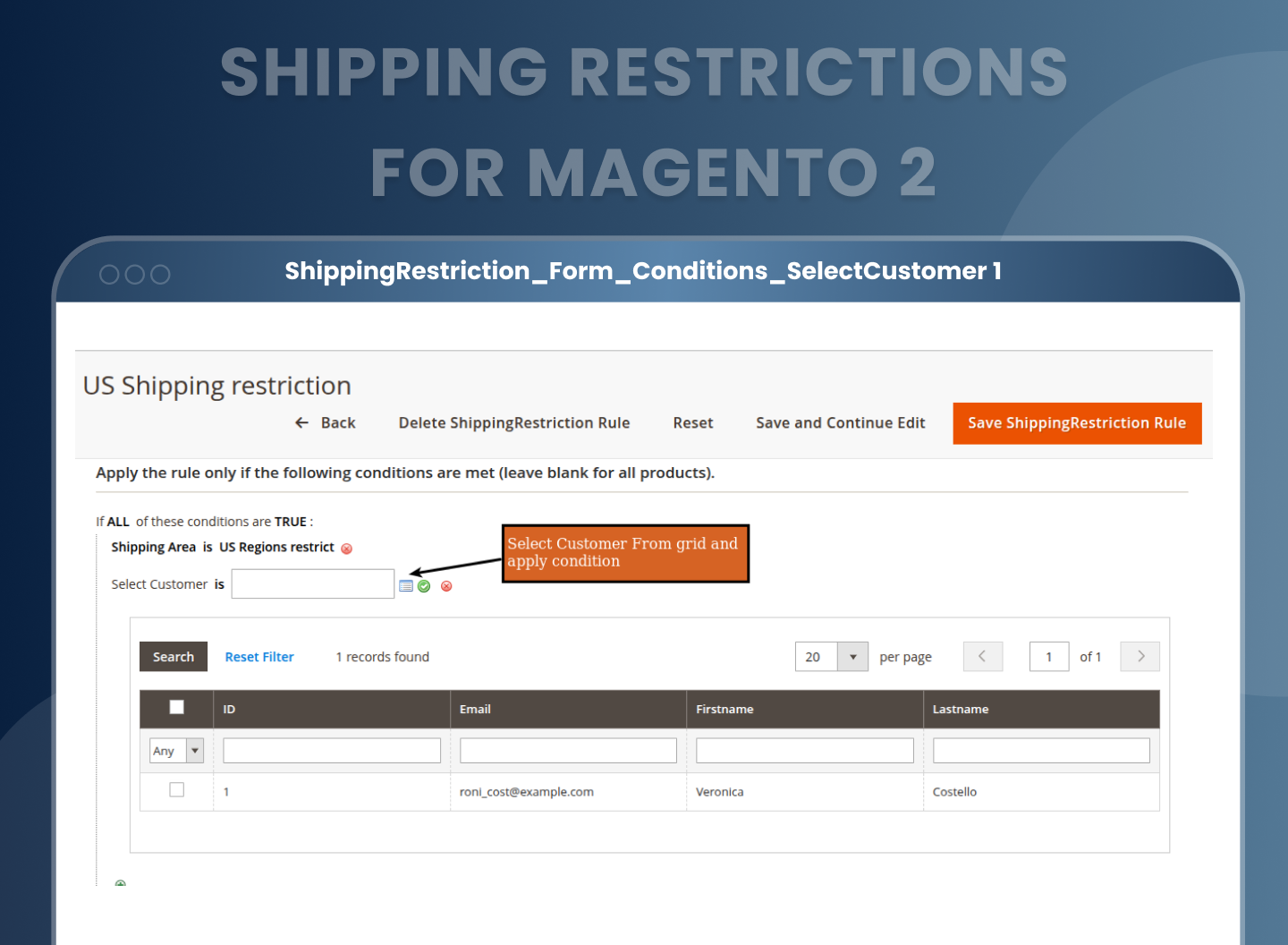
Magento 2 shipping conditions extension comes with a feature that leverages Magento’s powerful condition builder to let you create highly specific rules. You can apply restrictions based on:
- Product Subselection: such as restricting shipping if a certain product category or SKU is in the cart.
- Cart Attributes: including subtotal amount, total quantity, or total weight.
- Customer Attributes: like select customer from grid, email, gender, date of birth, etc.
- Shipping Areas: rules can be connected to the custom shipping areas you created earlier.
- Billing Address Attributes: This is a new feature that adds billing address logic to the restriction.
You can create complex conditions by combining multiple attributes using logical operators (AND/OR), allowing you to fine tune how and when shipping methods should be available.
Frontend Enforcement of Shipping Rules
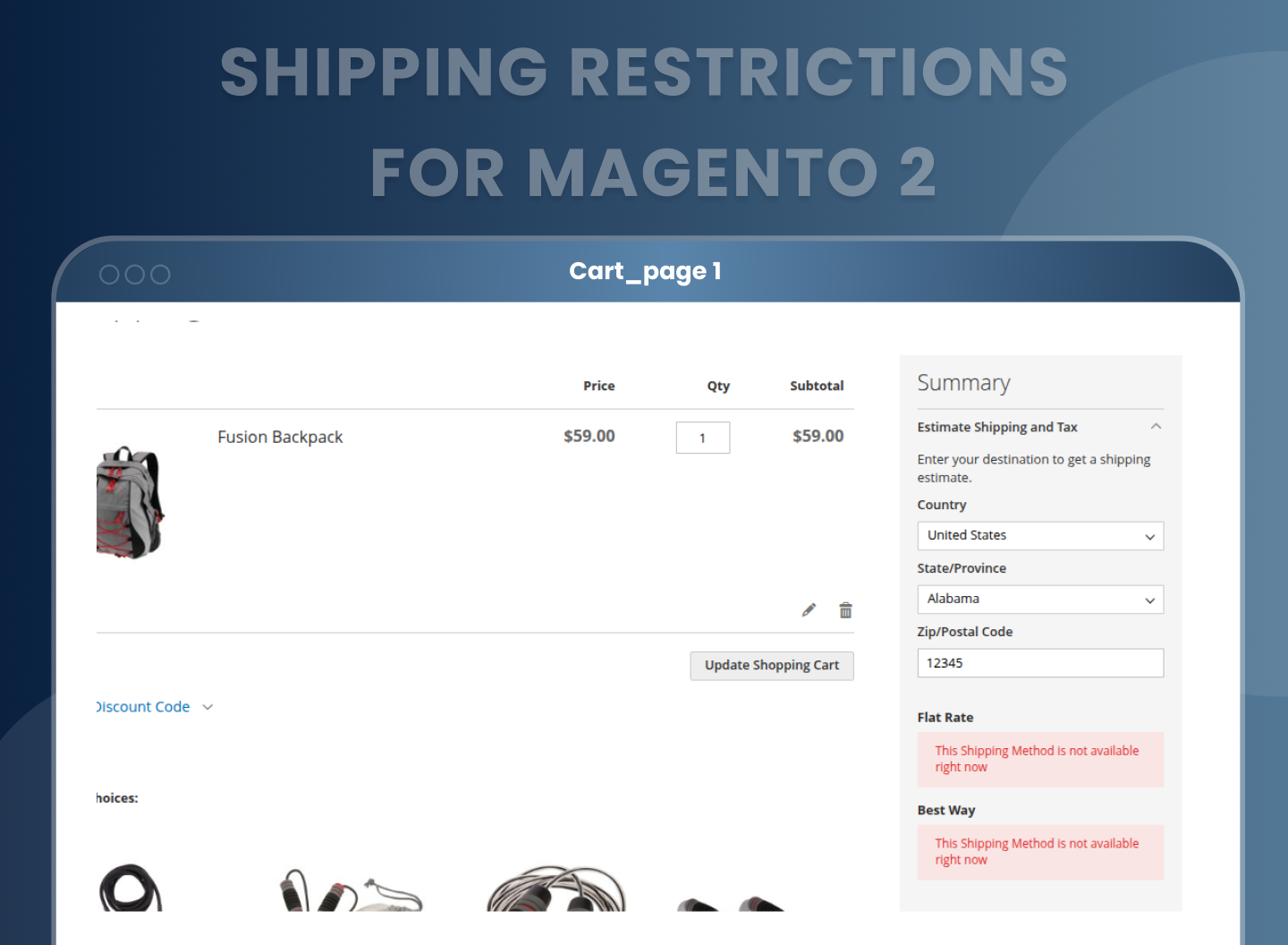
Once all configurations and conditions are set, the Shipping Restrictions For Magento 2 automatically applies the shipping rules during the checkout process. On the Cart and Checkout pages, the extension checks the active rules and filters out the shipping methods that are restricted based on the customer’s details, order conditions, and shipping address.
If a restriction message is enabled, it will be shown alongside the affected method. If not, the shipping method will be completely hidden. This ensures that customers are only presented with valid, applicable shipping choices, helping avoid failed deliveries or frustration.

Seamless Integration and Backend Usability
The entire configuration interface is clean and fits naturally into the Magento backend. Whether you are managing shipping areas, setting up new rules, or adjusting conditions, the entire process is designed for ease of use.
Benefits Of A Shipping Restriction Extension For Magento 2
Why Does Your Store Need Magento 2 Shipping Restriction Extension?
How Does This Extension Work?
- Control shipping options by location, product, or customer group
- Reduce shipping errors and costs
- Improve customer experience with relevant methods only
- Customize shipping for different store views or regions
- Prevent unprofitable or unavailable shipping choices
- Simplify complex shipping rules with flexible conditions
- Avoid cart abandonment caused by unsuitable shipping options
- Increase backend efficiency with admin-level restrictions
- If you’ve ever had a customer select a shipping method that you know won’t work for their address, you’ll understand the headache this extension solves. We had situations where people from remote locations would pick express shipping, even though our courier doesn’t deliver there. It led to order delays, customer complaints, and awkward refund requests.
- That’s exactly where the Magento 2 Restrict Shipping Locations Extension becomes valuable. It gives you full control to decide which shipping options should appear, and to whom. Whether you want to block express shipping for certain zip codes, offer free shipping only to specific customer groups, or stop delivery to PO Box addresses, it’s all possible without needing any technical skills.
- It’s not about restricting customers, it’s about showing them only what’s available and reliable for them. It keeps things smooth for the buyer. If you're running a Magento store and juggling multiple shipping rules manually, this tool just makes sense.
- MageAnts Magento 2 Shipping Restrictions Extension is designed to give store owners full control over which shipping methods are available under different conditions. With this smart and flexible tool, you can easily create shipping rules based on location, product details, cart attributes, and even street level keywords, all from your Magento 2 admin panel.
- The working of the extension is simple yet powerful. You start by setting up custom shipping areas by grouping countries, states, cities, ZIP/postal codes, or specific street keywords. These are used to set precise Magento 2 shipping locations restriction rules.
- Then, define shipping restriction rules using various filters like shipping methods, date ranges, customer groups, store views, or specific products and cart conditions. The extension automatically applies these rules in real time, both on the frontend and in admin created orders.
- What makes this extension truly effective is the Condition Tree feature. It allows you to create detailed conditions such as restricting shipping for certain categories, cart values, or customer attributes. You can also display custom error messages when a method is restricted or choose to hide it completely. This helps confirm that customers only see valid shipping methods, preventing confusion or errors during checkout.
FAQs
Reviews
Customization
Changelog
Current Version Number : 2.0.0
Date : 04/08/2025
New Extension
- Mageants Team make new "Shipping Restriction" extension.
Why Choose MageAnts
-

30 Days Money Back Guarantee
We offer 30 Days money back guarantee if customer meets our refund policy. For more info you can read our terms and condition
-

Tested Before Every Release
Every version is tested on the latest Magento 2.4 release before it goes live, and bugs reported during your support period are fixed by our team.
-

Free 90 Days Support
MageAnts ensures quick and quality technical support. Take advantage of our 90 days free support for a smooth and efficient experience.
-

Frequent Extension Updates
Intensive update roadmaps ensure highly compatible, bug-free, great performance, and innovative extensions.
