



Order History For Magento 2
Ask AI About This Extension




Key Features
- Easy view of customer-related products and orders.
- The customer's purchased items are listed.
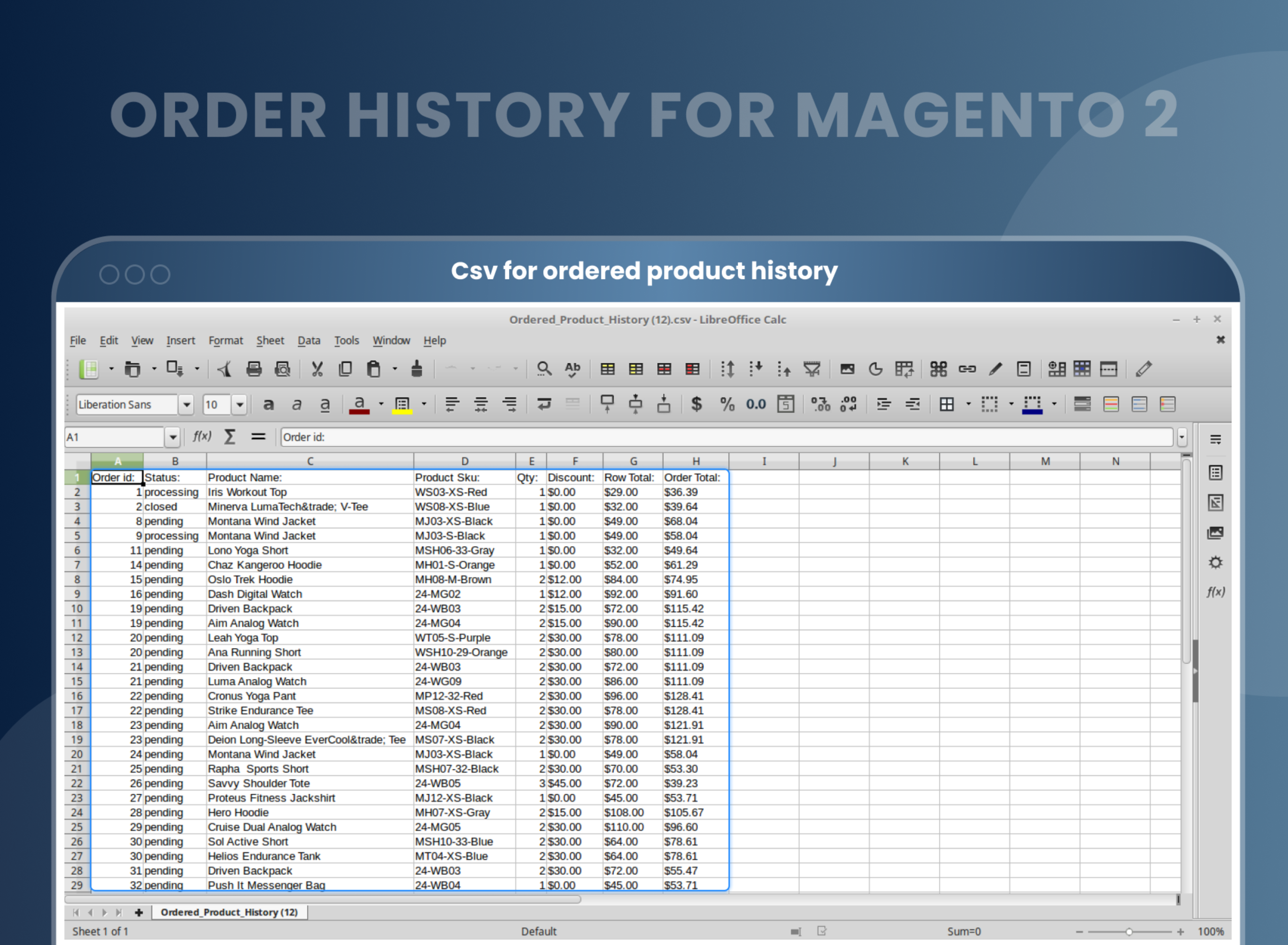
- The customer's purchase order is exported via CSV file.
- Compatible with the Order Grid, Delete Orders, and Order Attributes
- Order history for specific customers.
- Order product history for specific customers.





Current Limitation in Magento 2
What Magento 2 Cannot Do
By default, Magento 2 does not allow store owners to find specific customer orders from the back end, nor does it allow them to find all orders associated with a particular product. This means that store owners cannot use the Magento 2 backend to locate specific customer orders or all orders from certain products. This limitation prevents store owners from efficiently managing customer orders and makes it more difficult to keep track of orders and products.
How Our Extension Solves This
The Magento 2 Order History extension allows store admins to view and get the order history along with required details anytime via product or customer detail pages in the backend panel. Admin can also export the required information via CSV or Excel XML file easily. This extension enables store owners to quickly and easily view order details, products included in the order, quantity, discount (if any), and order value from their backend.
Description
Empower customers with easy access to their purchase history for better shopping experiences.
Magento 2 Order History Extension by MageAnts gives customers quick access to their past orders, simplifying reorders and purchase tracking. For example, a business client can easily reorder frequently purchased products without manually searching for each product.
Easy view of customer-related products and orders
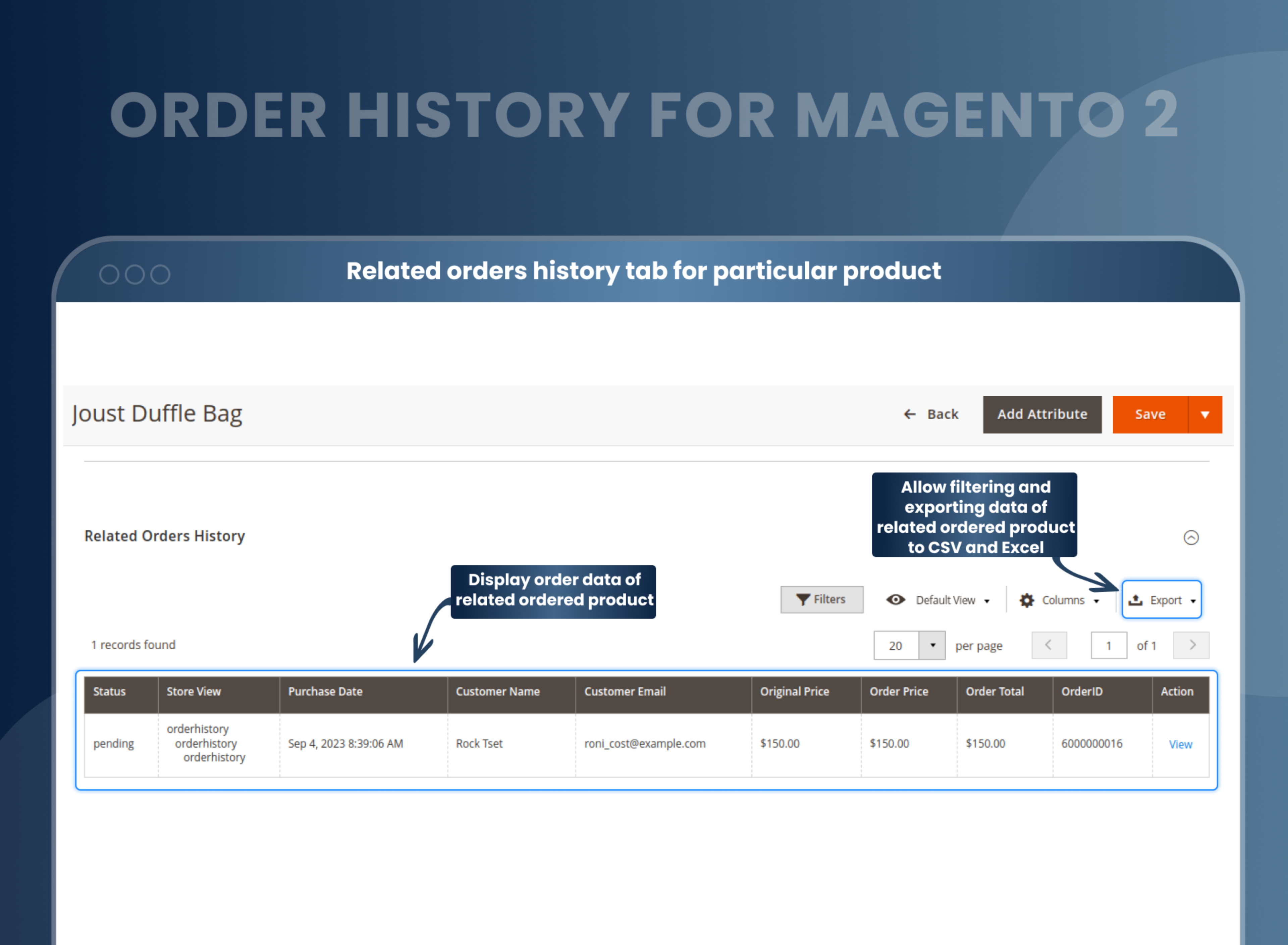
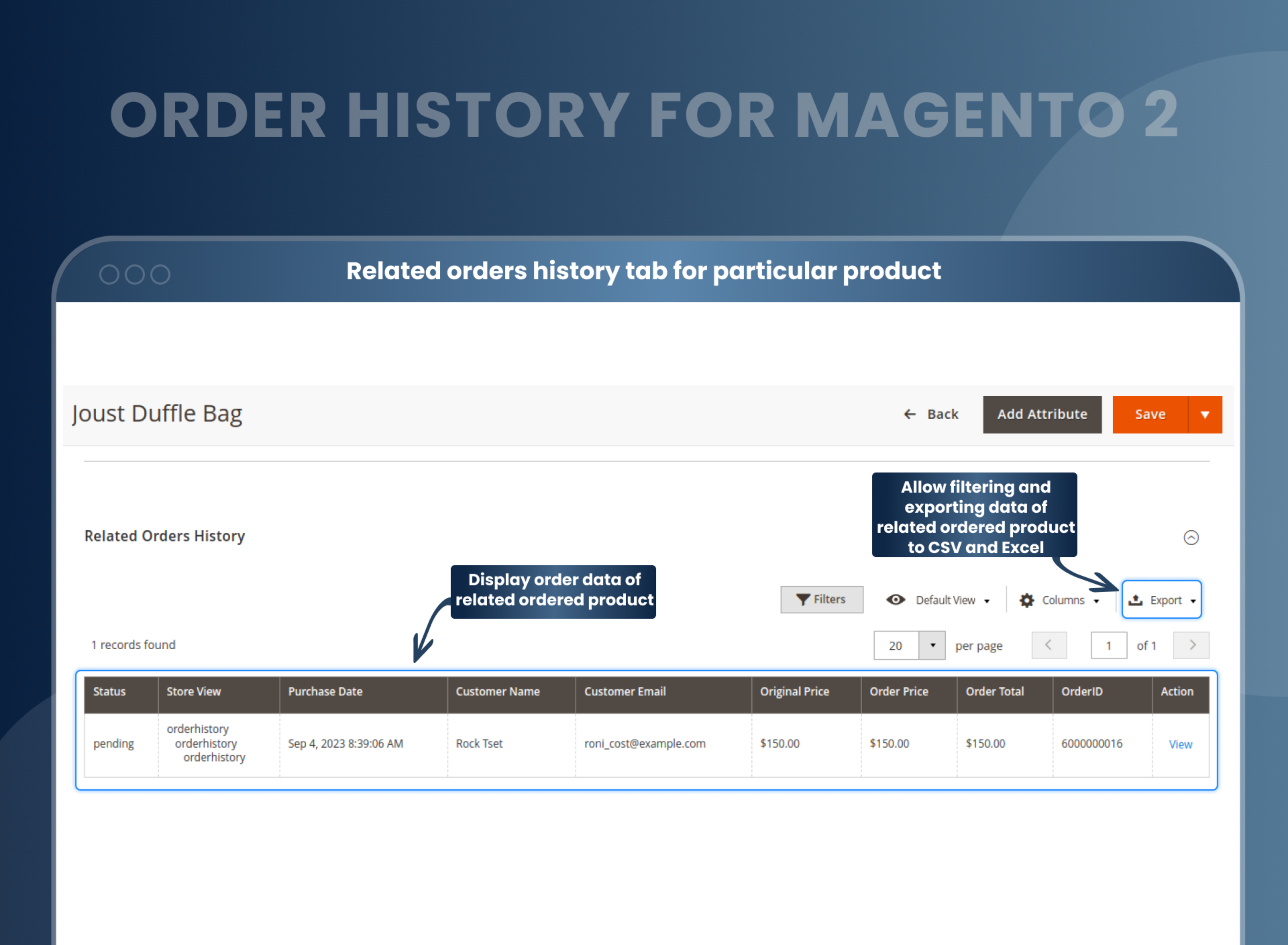
When a store admin views the product details page, Magento 2 Default cannot show orders related to the current products. But the Order History for Magento 2 extension helps store owners view the products, where they're included, and who has purchased them. This way, the admin can keep track of his store's current sales conveniently.
Admin only needs to click on the view button to redirect to the Product Details Page instantly.
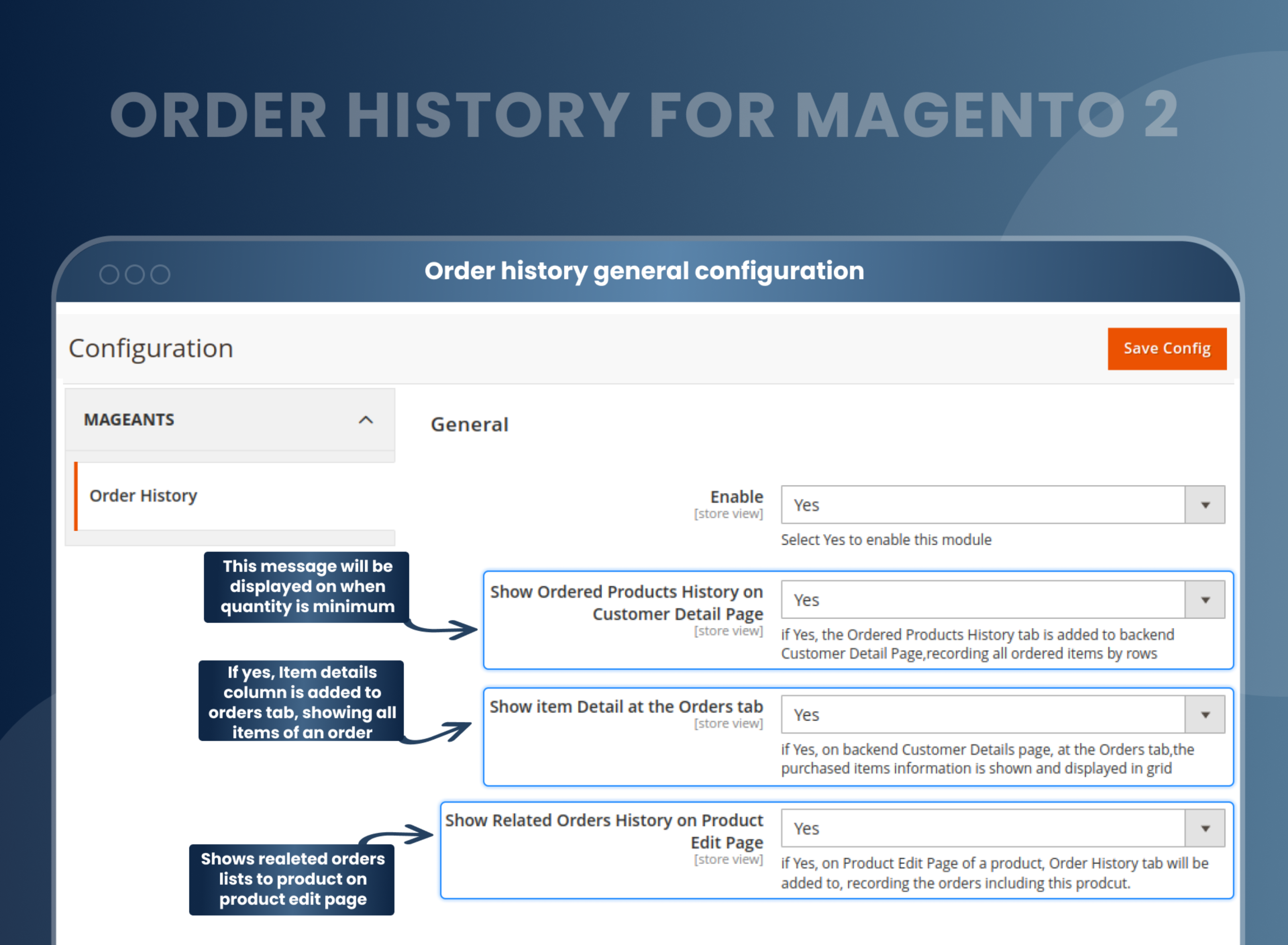
The customer details page is furnished with an upgraded orders tab
This extension of Magento 2 adds the item details column to improve the order tab limitation on the customer details page. The purchase item details in the Orders tab make it more informative.
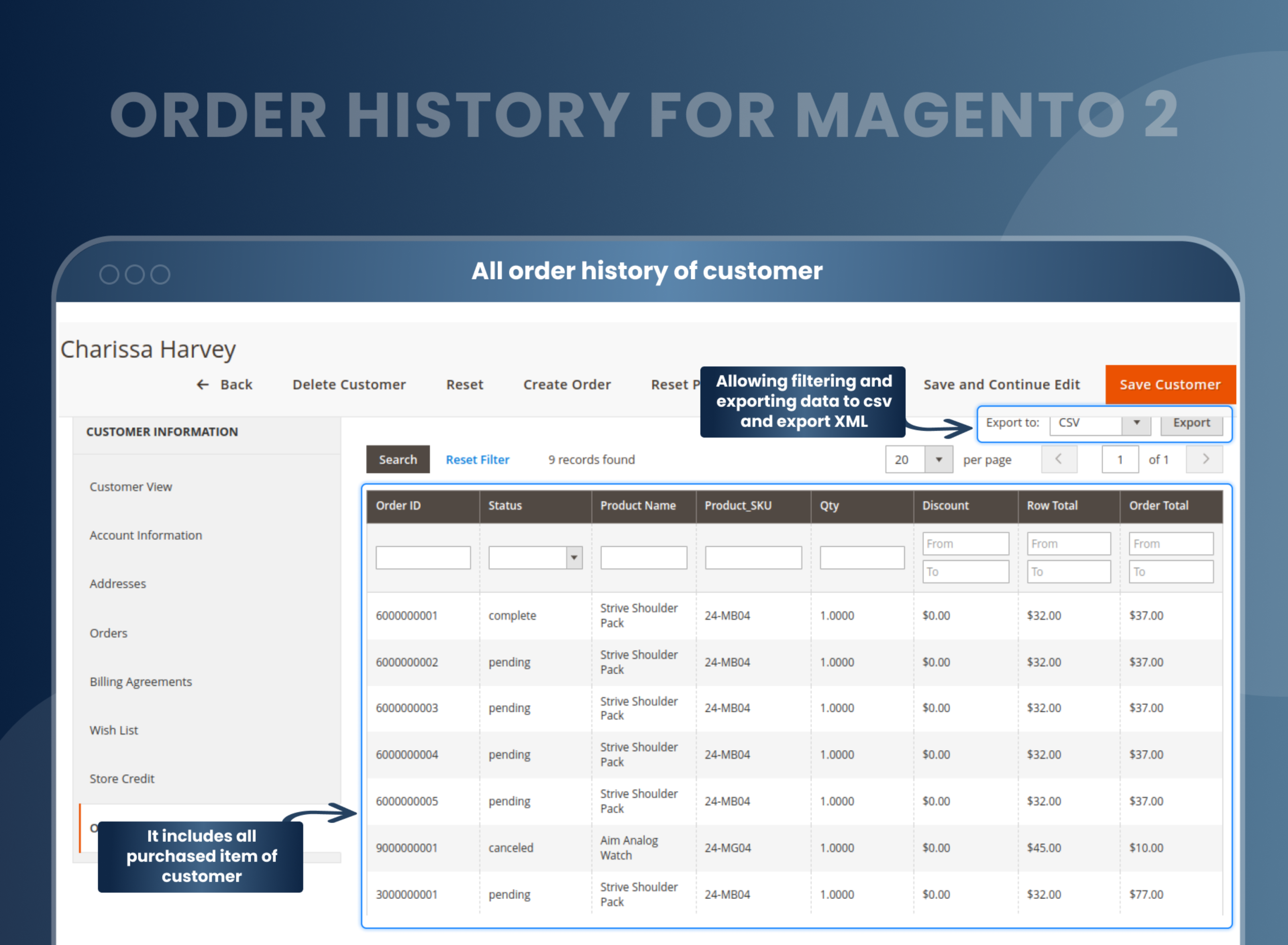
With this feature of the Magento 2 Order History extension, the store admin can easily view the customer's items, including product quantity, SKU, product name, and item status. The information is aligned in the table format, making it look neat and easy to follow.
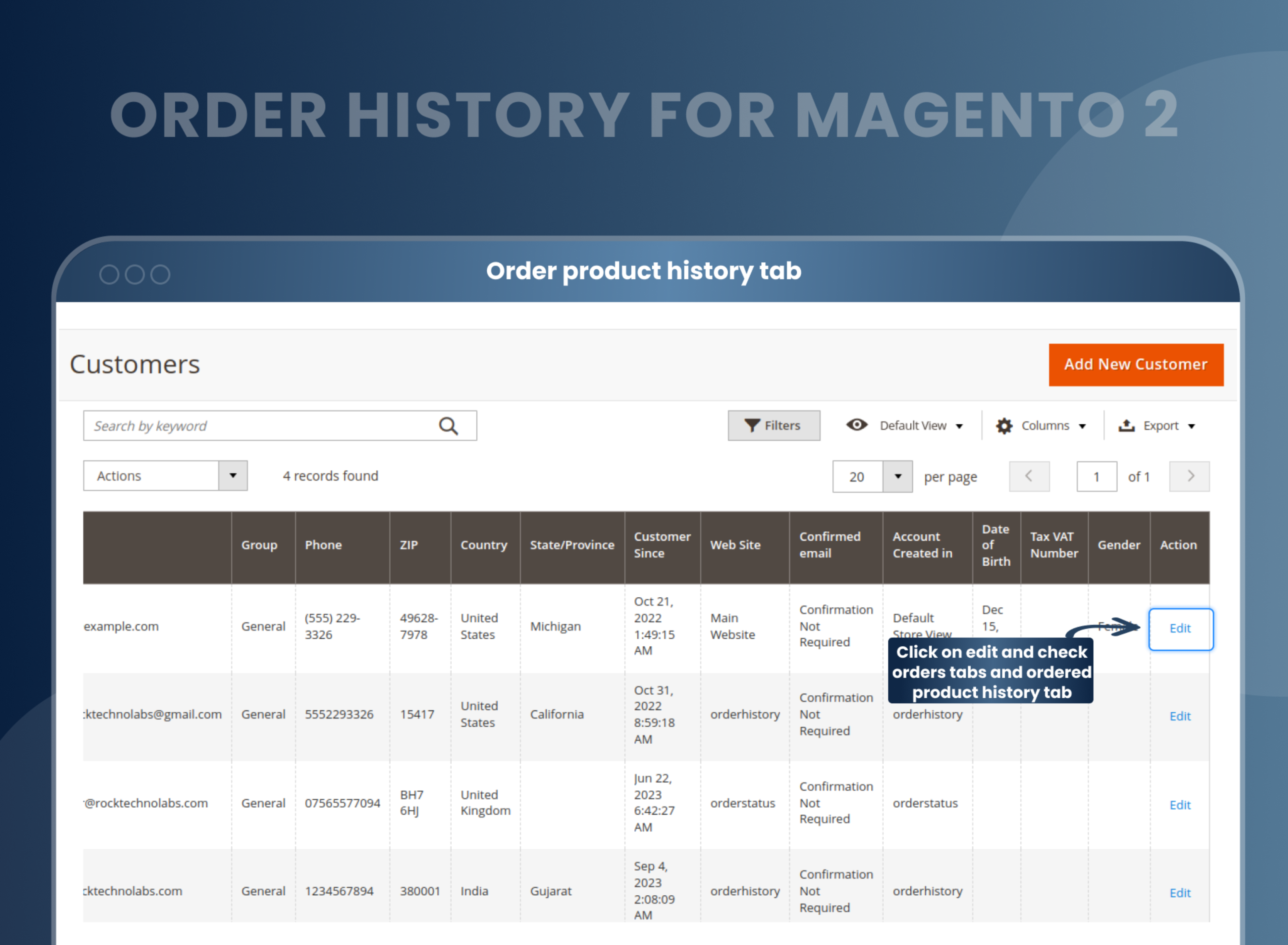
Customers who purchased items are listed
The products ordered by the customers' page are also added to the backend of the customer details page. This tab helps admins view the products bought by consumers.
In which order does the item belong to the product SKU and product name? The quantity of the order discount order's total value.
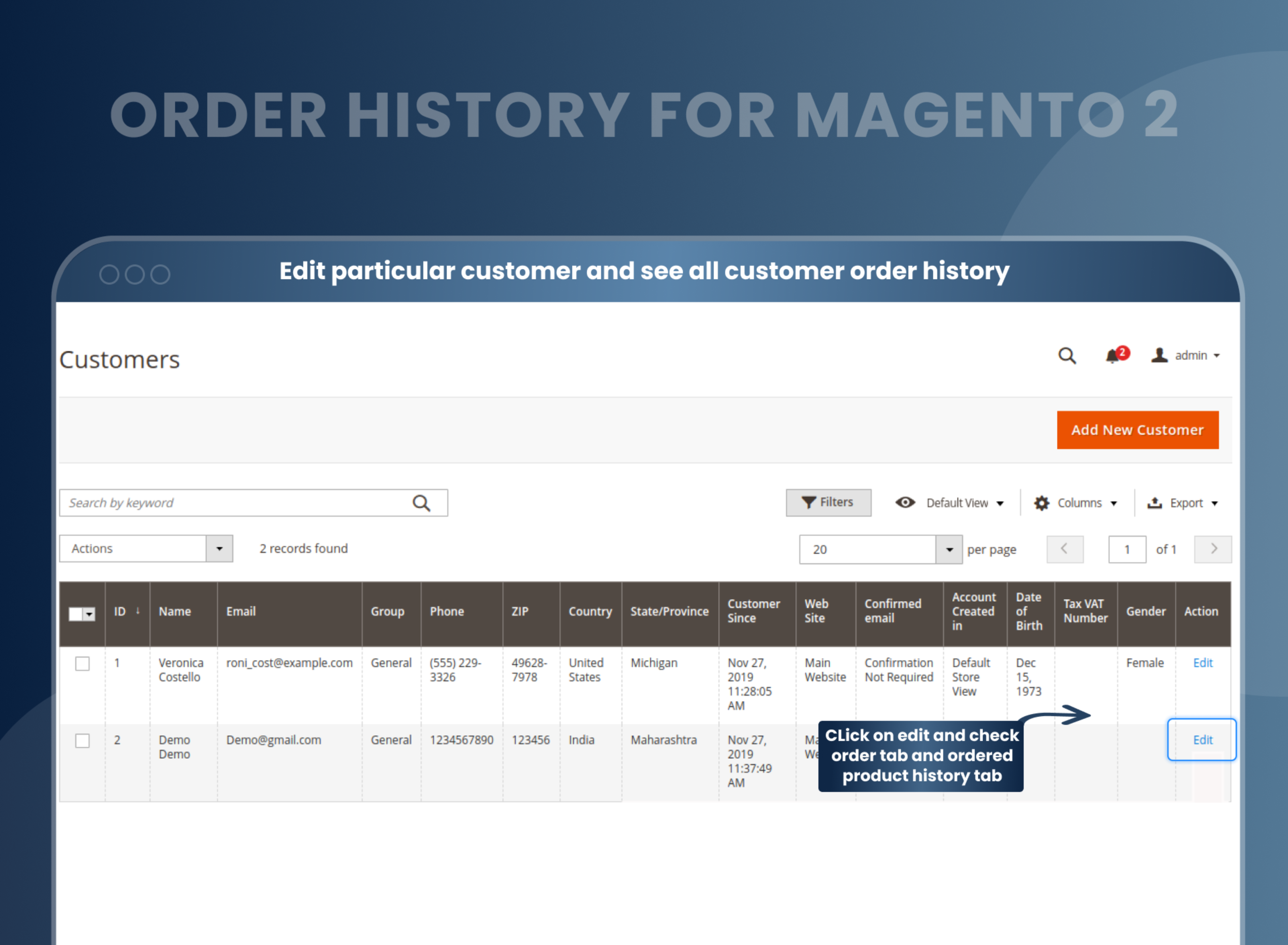
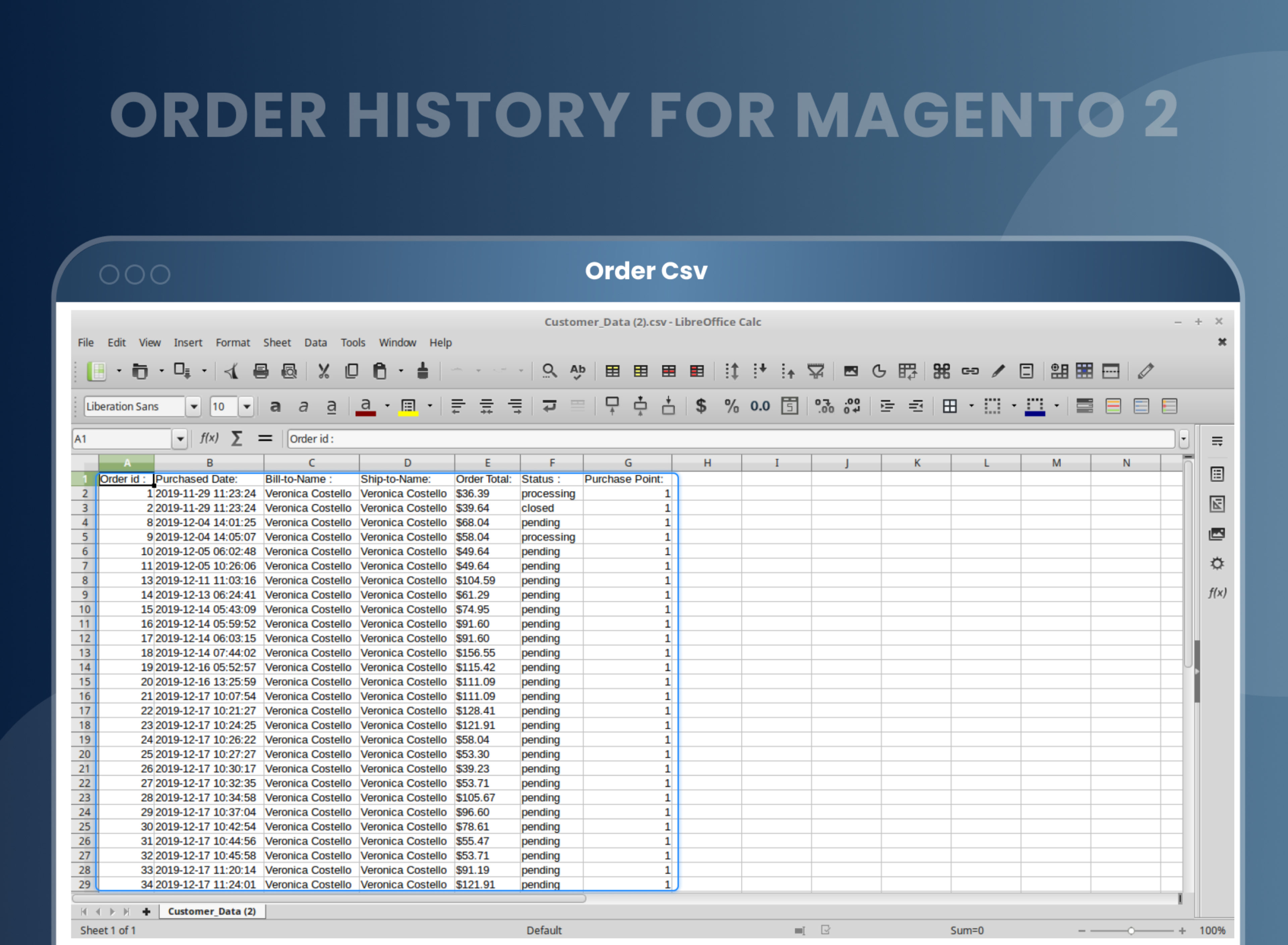
The customer's purchase order is exported
The Order History Magento 2 extension is used by store owners to view the details of the order and can also help them export the required information or data easily.
The advanced order tab helps the store owner export the products ordered by specific customers to Excel XML or CSV quickly.
Admins can also export all the orders related to the item with just a click from the Product Edit Page.
Sort and filter the data in the order
With the help of this Search, Sort, and Filter feature in the Magento 2 Order History, admins can easily administer the store. The store owner can swiftly play with the data through it.
Show or hide details of an order
The admin of the store not only sees the orders of the customer, but with the Magento 2 Order History, the e-commerce store owner can also hide the details in the product edit page and customer detail page.
Compatible with the Order Grid, Delete Orders, and Order Attributes
The extension is compatible with Order Grid, Delete Orders, and Order Attributes. Hence, the admin can easily manage the orders placed by the customers.
How Does It Work?
Full Order History Features
Why Needed
Benefits of Order History Magento 2 Extension
- Through Magento 2 Order History extension, the store admins can easily retain the information of the orders placed and also gets the data of their customers. They can configure to display the history of the products on the product detail page or customer detail page.
- Using this extension, the store admin can get the complete details of the ordered items. The store owner can view the order details of the customer on the customer details page with the quantity and SKU of the products. From the product edit page, the admin can check the related product order history. It also shows the information related to the order, such as status, ID, total price, and customer name.
- The extension can be enabled or disabled
- Easily show or hide the history of ordered products from the customer details page.
- Show or Hide the Products details on the Orders tab
- Show or hide the history of the order on the Product edit page
- Easy filter and sort feature to clear the order of data
- Instant data export to Excel XML or CSV
- To know the orders and deliver the right order to the customer or to check the previous order of the customer in case of return or exchange, the Magento 2 Order History is of great help.
- It furnishes the store owners with the option to look at the order details in no time, thus saving them lots of time. The admin can easily learn what products are included in the order and who is the buyer. Thus, making it convenient for the store owners to update their current sales based on the sale of any product. And, the order tab is upgraded with the additional item information for each order making the grid cleaner and tidier. The extension ensures that store admins can access the order information instantly without extra hassle.
- Get order information quickly.
- Enhanced experience at the backend.
- Order product history.
- Order export facilitates.
- Time-Saving
- Easy to manage product inventory
- Furnish customer’s detail page with improved order tabs
- Easy access to customer order histories
- Option to export order history data to CSV or XML
- Improves Efficiency
FAQs
How to get all product in order history page magento 2?
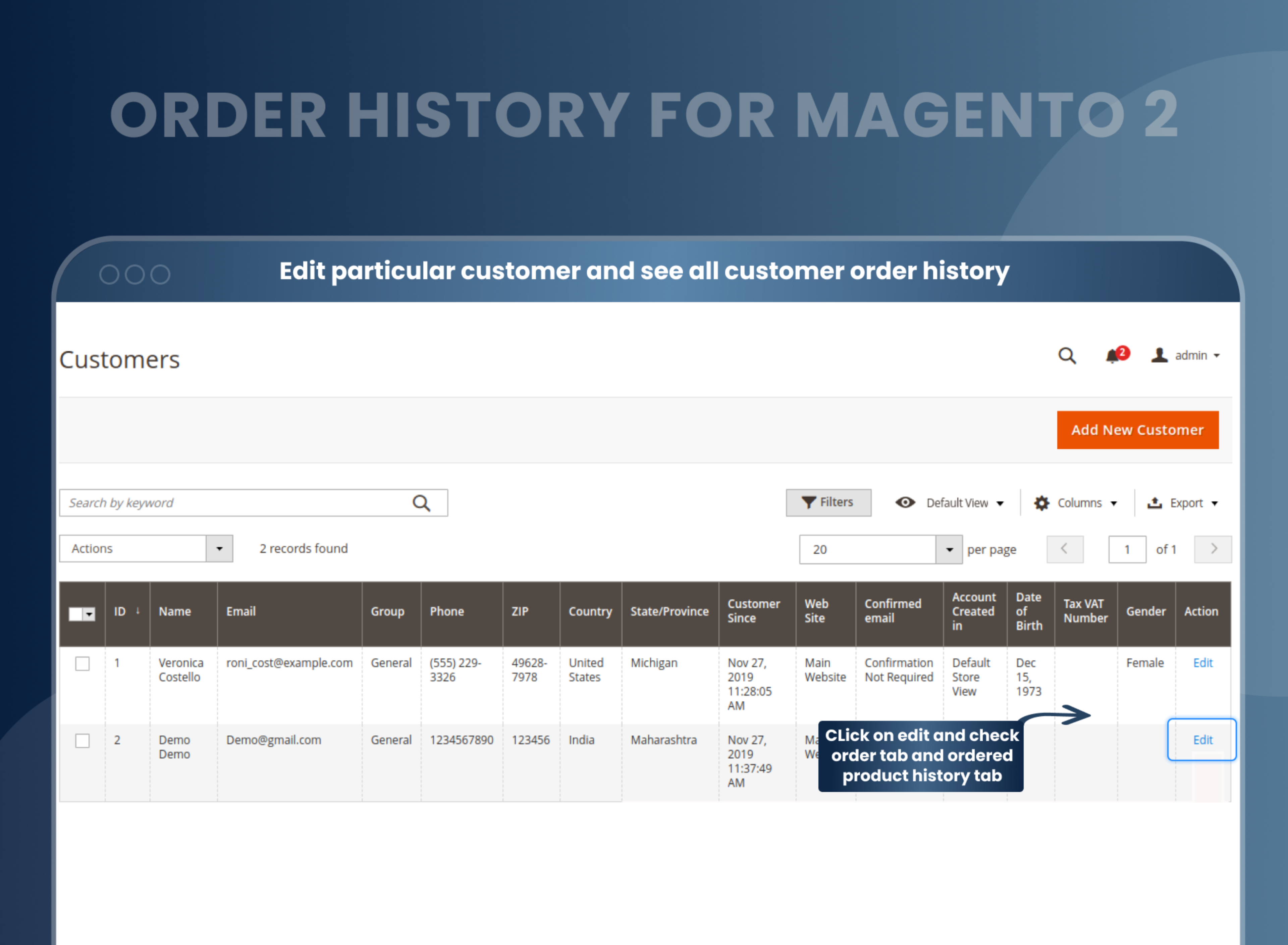
You can find from Customer --> All customer --> Edit particular customer --> Order, You can find in product order history.
How to Set order history page in admin?
You can enable extension to set order history in admin from Store --> Configuration --> Order history --> Enable.
How to find Order History for Customer?
You can find order history from Customer --> All Customer --> Edit particular customer --> Order, You can find all order of particular customer from here.
Reviews
Customization
Changelog
- MageAnts team make extension compatible with latest magento 2.4.6 version.
- MageAnts team makes this extension compatible with the Magento coding standard.
- Customer name did not display if customer is guest in the product related order history.
- MageAnts develop new Order history extension working fine in all Magento version.
Why Choose MageAnts
-

30 Days Money Back Guarantee
We offer 30 Days money back guarantee if customer meets our refund policy. For more info you can read our terms and condition
-

Tested Before Every Release
Every version is tested on the latest Magento 2.4 release before it goes live, and bugs reported during your support period are fixed by our team.
-

Free 90 Days Support
MageAnts ensures quick and quality technical support. Take advantage of our 90 days free support for a smooth and efficient experience.
-

Frequent Extension Updates
Intensive update roadmaps ensure highly compatible, bug-free, great performance, and innovative extensions.
