The MageAnts Free Gift Extension for Magento 2 adds free products to the cart automatically when your cart price rules are triggered — by subtotal, specific SKUs, or coupon codes. You pick whether every configured gift goes into the cart, or the customer chooses from a popup. Works with Hyvä Theme (paid add-on), GraphQL, and REST API.
×
$ 89.00$ 89.00
Transparent pricing
We believe in being open and honest with our customers.
When you buy our module, you get free updates and 90 days of free support.
Here’s what you get:
Free updates: You’ll receive the latest versions of the module at no extra cost.
Free support: 90 days
Cancel & renew options: You can cancel your subscription at any time and renew it later. For details, check our refund policy.
Key Features
Rules & Conditions
Trigger free gifts based on cart subtotal or minimum spend amount.
Attach a free gift to any specific product SKU purchase.
Offer free gifts when customers apply a coupon code at checkout.
Set the maximum quantity of free gift products allowed per order.
Enable, disable, and configure gift rules per store view.
Target rules by customer group – Not Logged In, General, Wholesale,
Retailer
(B2B Ready)
Automated Cart Actions
Auto-send all configured gift SKUs to cart when rules are matched.
Gift Selection
Customers pick their gift from options you configure — one, two,
or more, up to the admin-set limit.
Display & Visibility
Option to display a free gift banner on the product view page.
Display free gift product details on the main product’s view page.
Display free gifts on product, category, cart, and checkout pages.
Customization & Branding
Upload custom Free Gift banner (PNG/JPG/GIF) for product pages.
Customize all labels: “FREE”, “GIFT”, “Select Free Gift” — per
store view.
Choose your trigger type — all configured from the Magento admin panel in minutes
By Cart Value
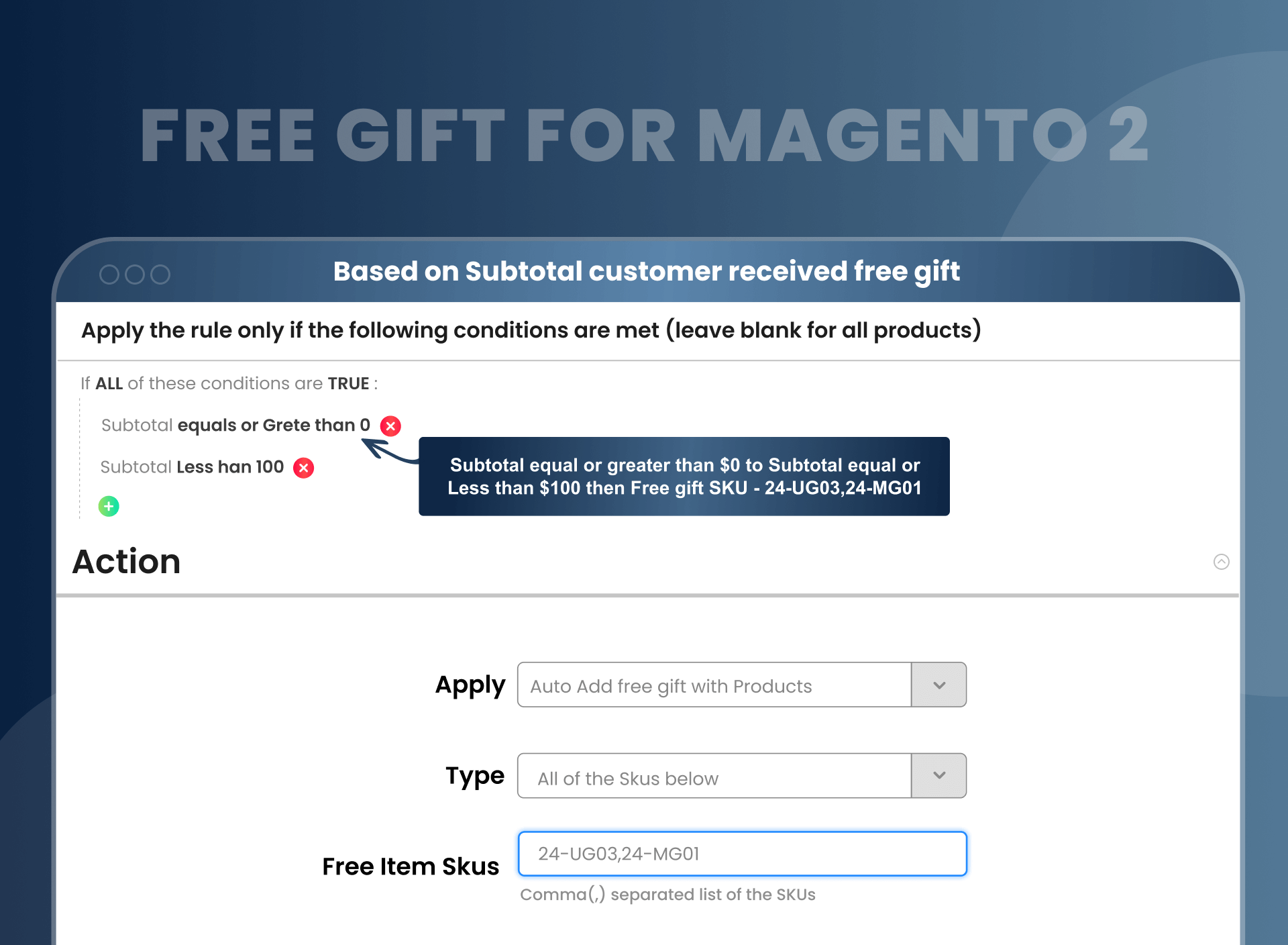
Set a minimum subtotal threshold. When the customer's cart reaches that amount, the free gift is added automatically — no coupon needed.
By Product SKU
Link a free gift to a specific product SKU. When that product is added to cart, the gift appears alongside it automatically.
By Coupon Code
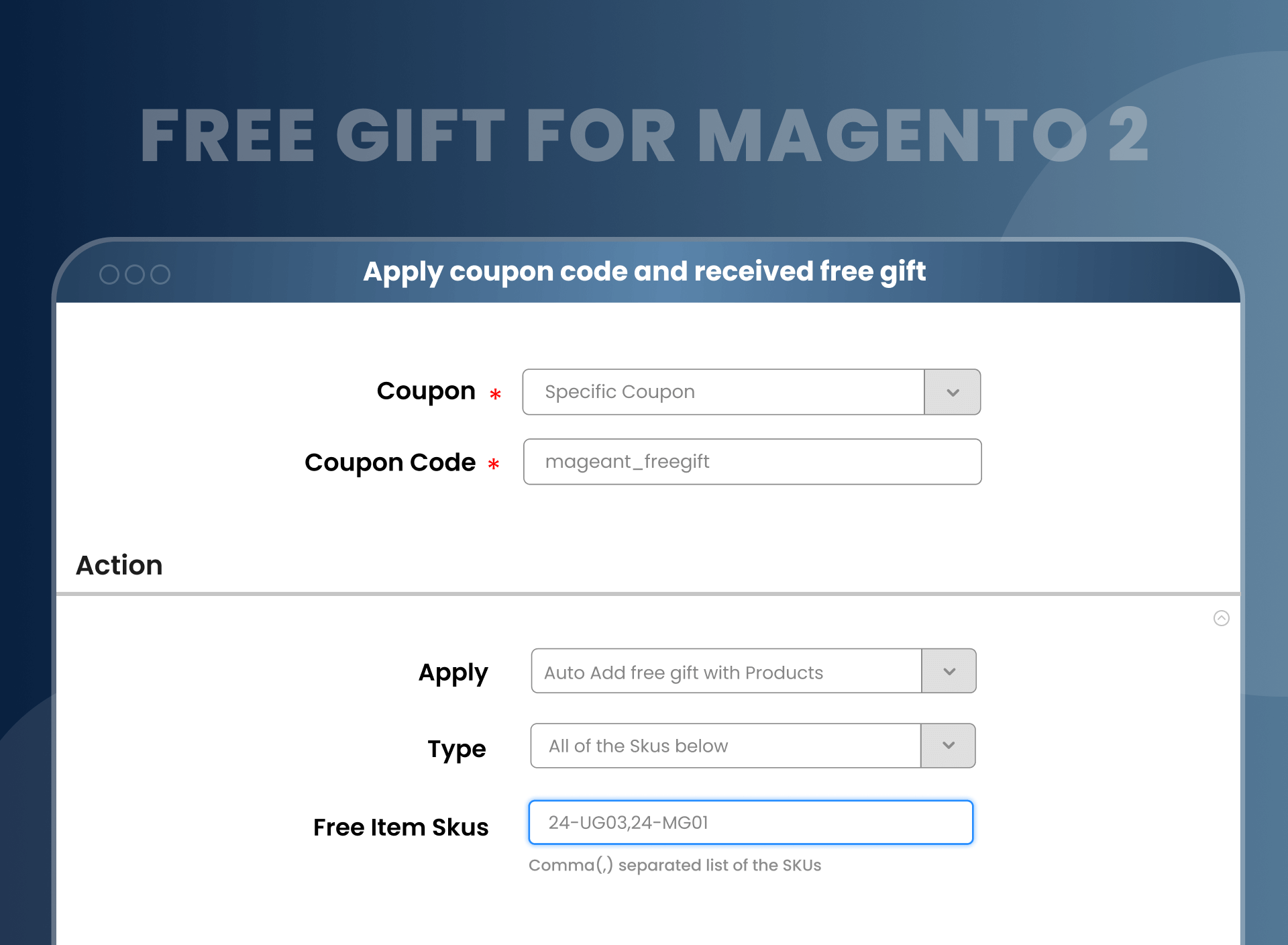
Assign a free gift to a coupon code. When the customer applies the coupon at checkout, the gift appears in the cart at $0.00.
Native Magento 2 vs MageAnts Free Gift Extension
Feature
Native Magento 2
MageAnts Free Gift Extension
Auto-add free product when cart hits subtotal
✗ Not available
✓ Available
Trigger gift via coupon code
✗ Not available
✓ Available
Let customer choose from multiple gifts
✗ Requires custom development
✓ Built-in popup selector
Display gift at $0.00 in cart with “FREE GIFT” label
✗ Not available
✓ Configurable label
Maximum gift quantity per order
✗ Not available
✓ Admin-controlled
Customer group targeting (B2B / wholesale)
Generic only
✓ Granular 4 groups
Promotional banner upload
✗ Not available
✓ PNG / JPG / GIF
REST API / GraphQL for headless
Partial — no gift logic
✓ Full support
Hyvä Theme support
✗ Not available
✓ Add-on available
Configuration time
Days (custom development)
Minutes (admin UI)
Description
Add Free Gifts to Customer Orders Automatically
The Free Gift extension lets store owners add free products to customer orders through cart price rules. Set rules by SKU, product, category, subtotal, or coupon code. Example: run a "Buy 2, Get 1 Free" promotion — the free item adds itself when the rule triggers.
Product-Based Free Gift Options
Magento 2 free products provide two product-based options for the admin to offer free gift items:
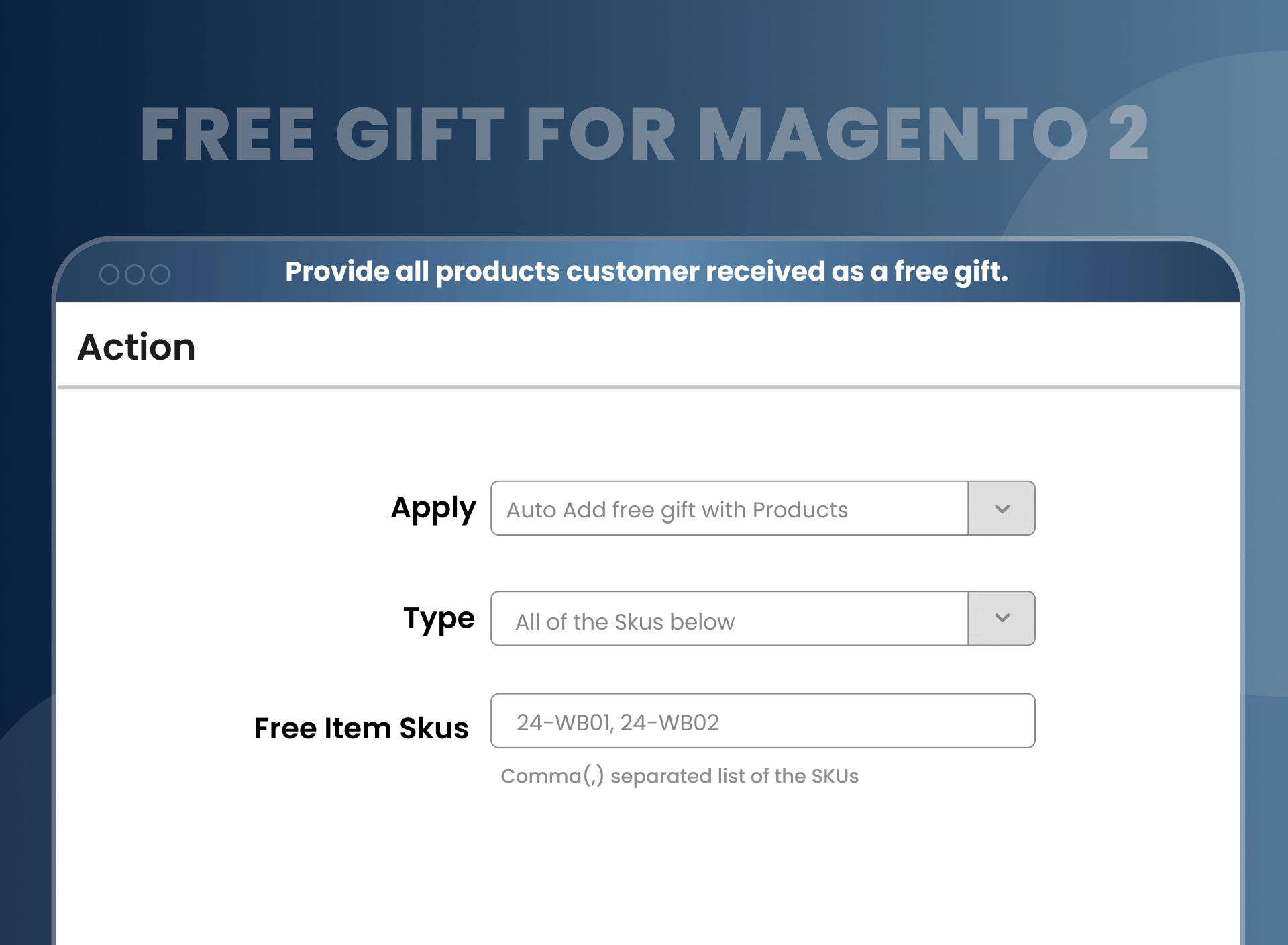
All of SKU: Admin can choose this option to add all products as a free gift to the shopping cart for customers.
Customer selects SKU: This allows customers to choose from the multi-option of free gifts. Admin needs to define some of the product SKUs and enable the option for customers to choose 1 or 2 from the available gift items.
Free Gift by Cart Total / Subtotal / SKU / Product Category
Trigger Free Gifts by Cart Subtotal. Set a minimum subtotal in admin. When a customer's cart reaches that amount, the gift auto-adds. No coupon required. Common use: "Spend $75, get a free tote bag."
Trigger by Specific Product SKU. Link a gift SKU to a trigger SKU. Buy product LAPTOP, get APPLE12 free. Configure in the Action tab of any Cart Price Rule. Multiple SKU pairs supported per rule.
Trigger by Product Category. Apply the rule to a whole category. Use this to introduce new collections — customers buying anything from "Watches" get a complimentary cleaning cloth.
Trigger by Attribute Set. Use Magento attribute conditions to apply rules across product groups (color, size, brand). Maximum flexibility, zero custom code.
Magento Coupon-Based Free Gifts
With Free Gift Magento 2, admins can also enable the option of a coupon with a specific coupon code and a usage limit for that coupon code. Customers need to apply a particular coupon code at checkout and add a free gift to the cart.
Customer Gift Selection Options
Enable "Customer Select SKU" mode in the rule action. Customers see a popup with all eligible free products and pick one (or more, up to the admin-set limit) before checkout. Includes configurable products, customers select color and size from inside the popup.
Display Free Gifts on the Checkout Page
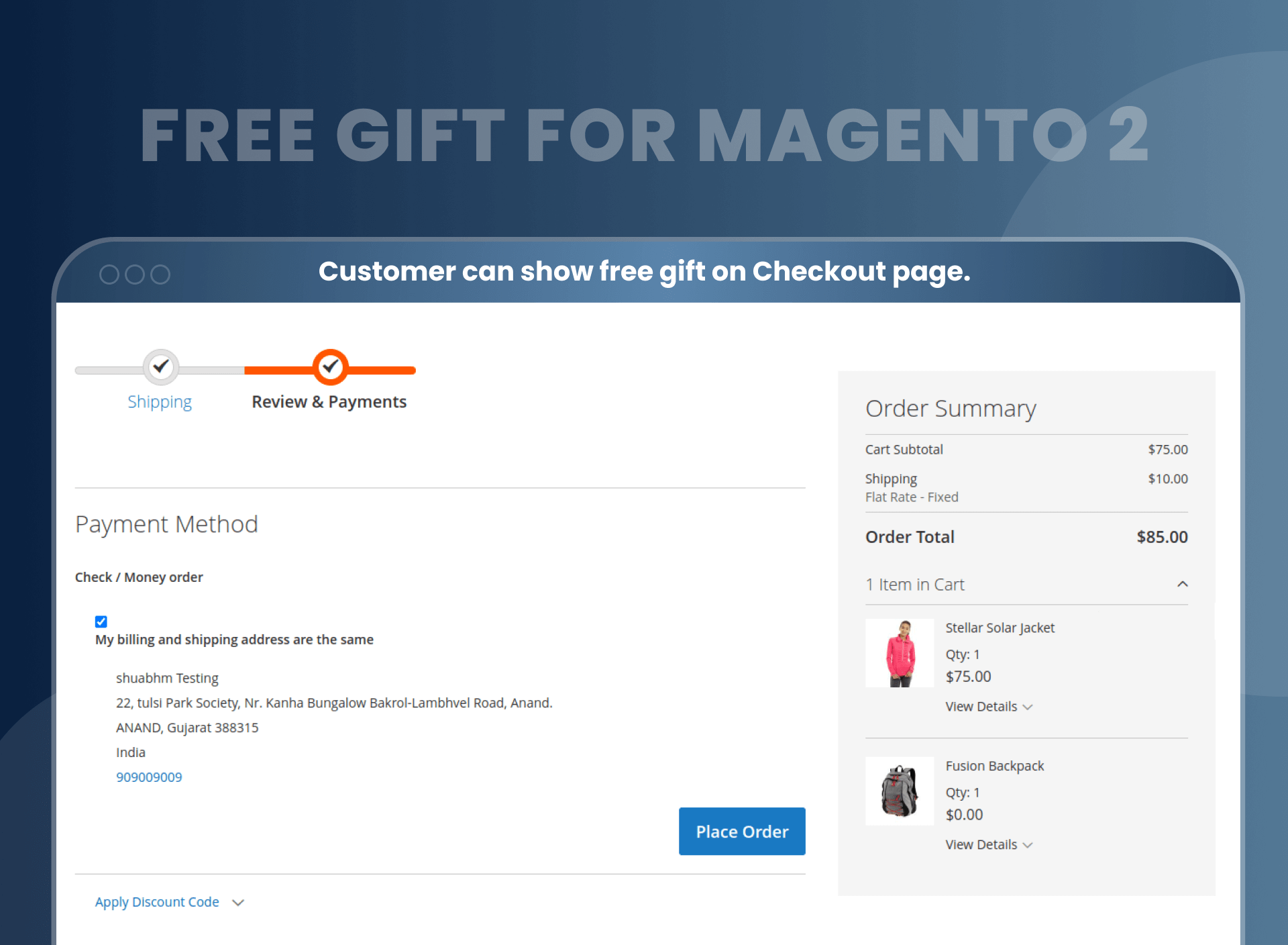
Once customers add the free gift item to their shopping cart, they will be able to view the free gift items on the checkout page. Free gift items show on the checkout page next to regular items — the customer sees them before placing the order.
Purchase History
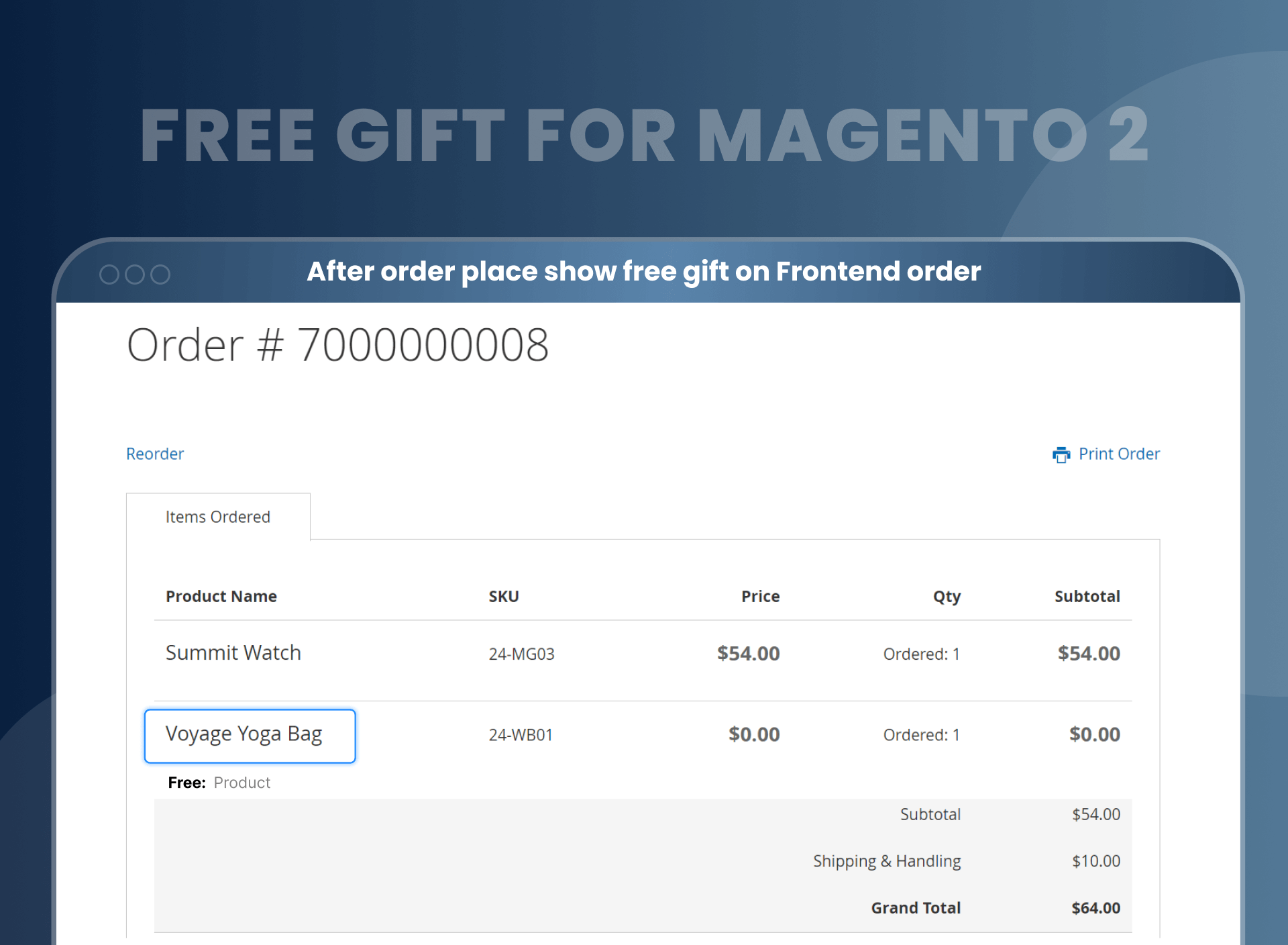
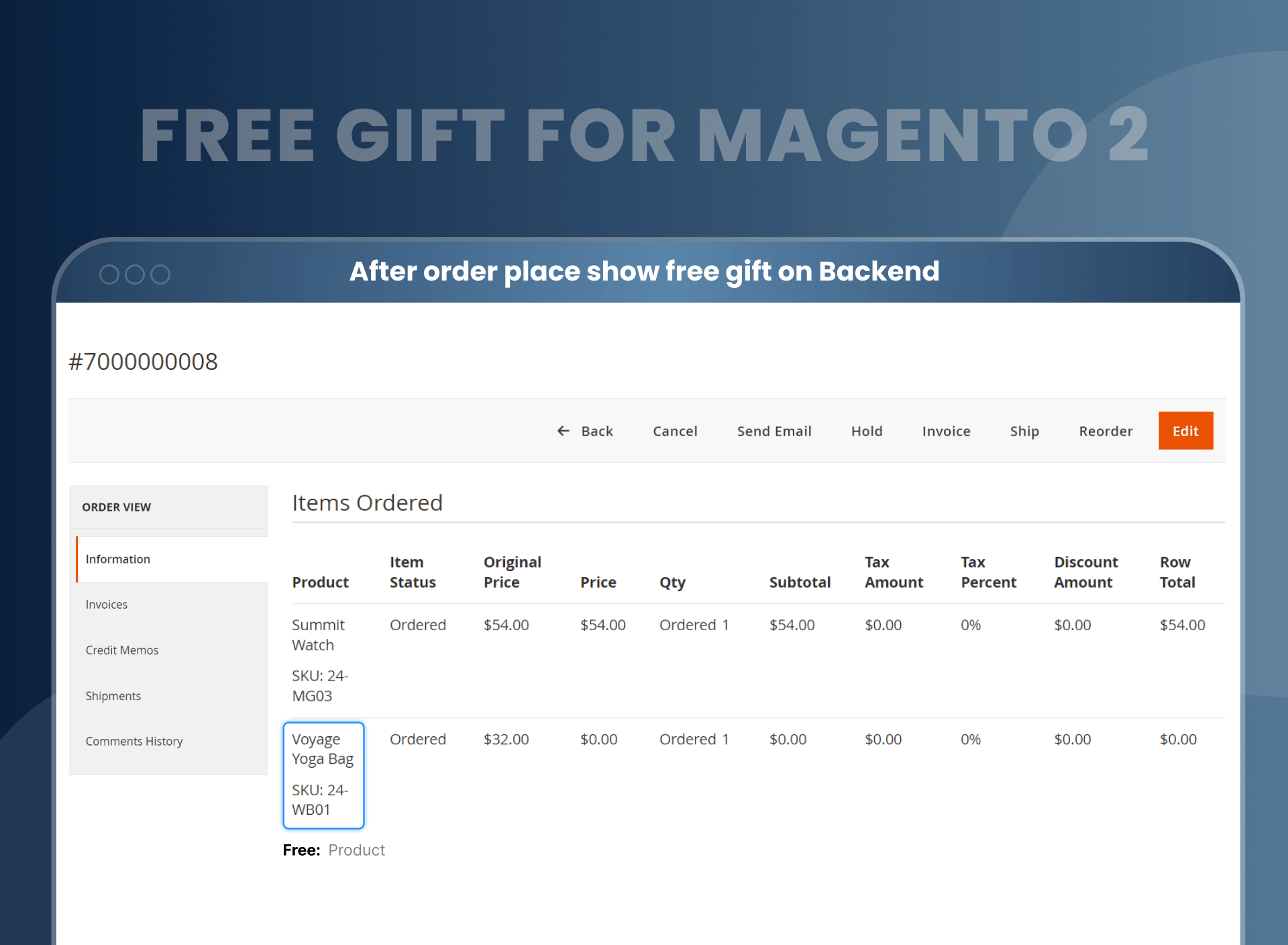
Once the order is placed, the free gift offered with the purchased products will be displayed on backend and frontend orders.
Supported Magento Product Types
Add free product to cart Magento 2 Extension support the following product types:
Simple products
Configurable products
How To Add a Free Gift to Cart in Magento 2
1
Install & Enable
Install the MageAnts Free Gift Extension and enable it from
Stores → Configuration → Mageants → Freeproduct.
2
Create a Cart Price Rule
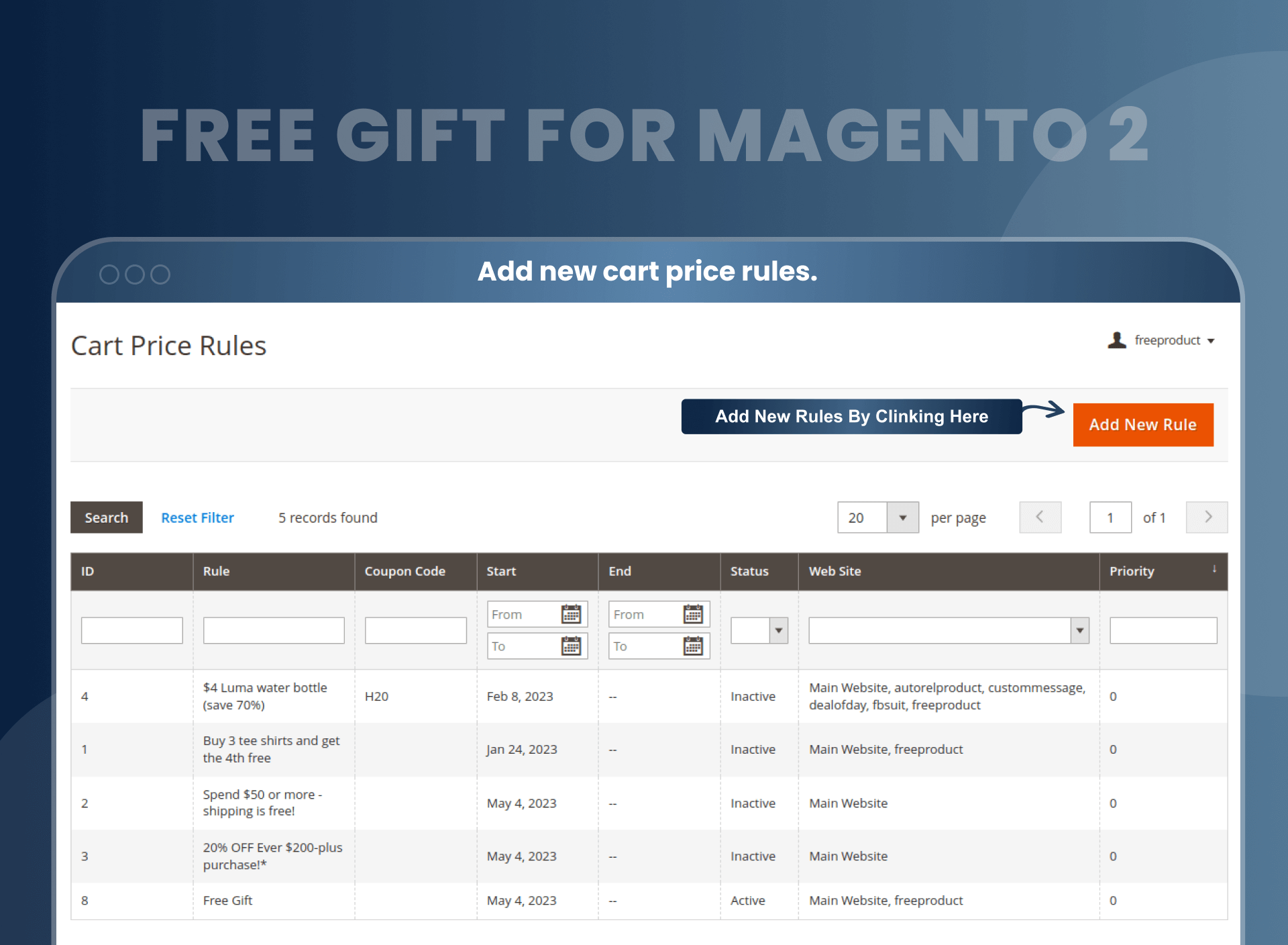
Go to Marketing → Cart Price Rules → Add New Rule. Set your conditions
(subtotal, SKU, or category) and enter the free gift SKU in the Action tab.
3
Customer Adds a Qualifying Product
When a customer adds a product that meets the rule conditions to their cart,
the free gift is automatically added alongside it.
4
Customer Selects Gift (Optional)
If "Customer Select SKU" mode is enabled, a popup appears allowing
the customer to choose their preferred gift from the configured options.
5
Gift Visible in Cart & Checkout
The free gift appears in the cart at $0.00 with a "FREE: GIFT" label
and carries through to checkout and order confirmation.
Free Gifts Visible from Cart to Order Confirmation
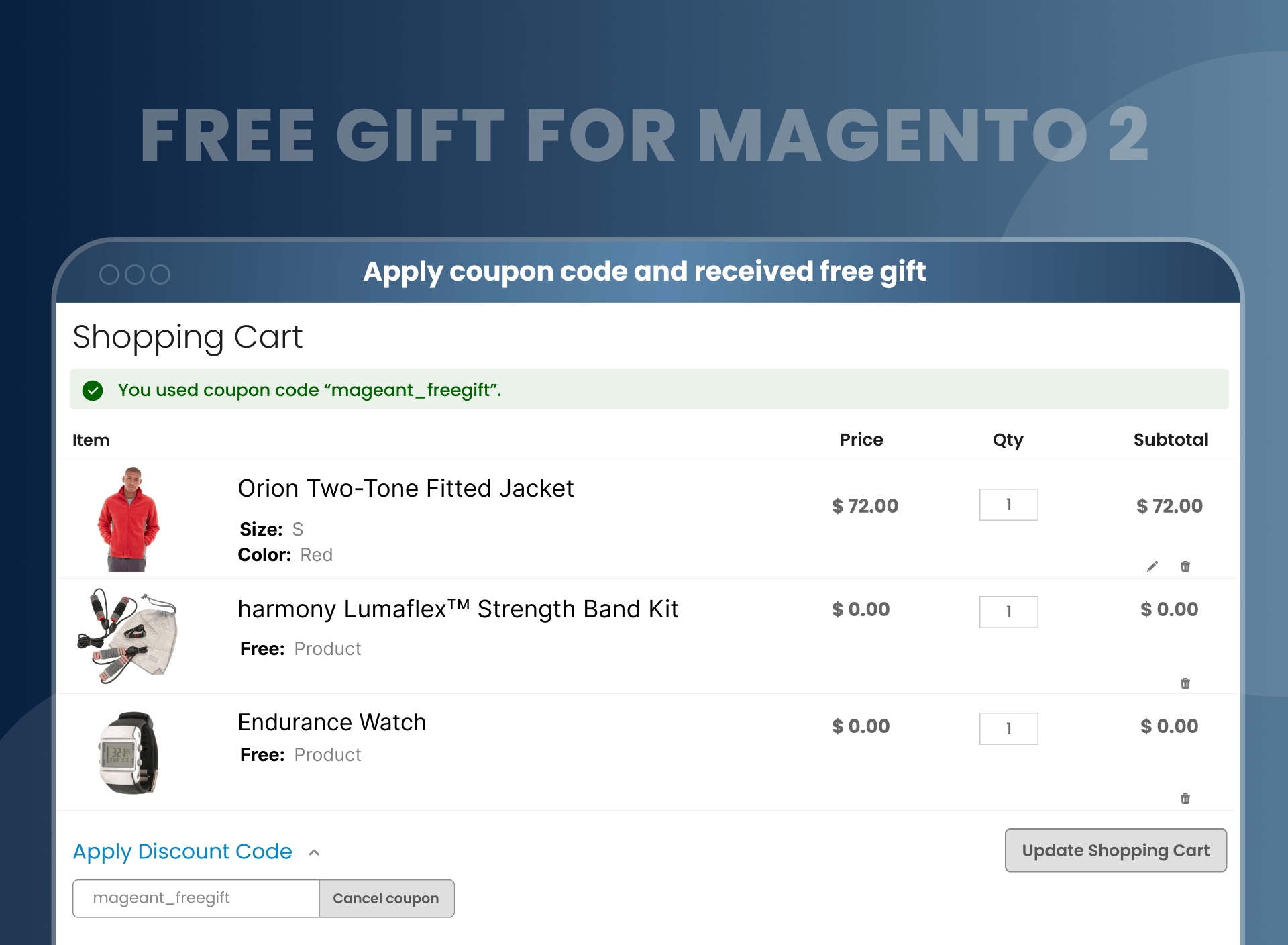
The free gift stays in the cart from product page through checkout. It shows as a separate line item at $0.00 with the "FREE: GIFT" label (you can change this label in admin).
After the order is placed, the free gift appears in the frontend order confirmation and in the admin order detail page.
Cart Preview
Summit Watch × 2$108.00
Fusion Backpack × 1
FREE GIFT
$0.00
Compatibility & Technical Specifications
✓
Magento 2.3.x, 2.4.x (tested up to 2.4.8)
✓
Hyvä Theme (add-on)
✓
GraphQL API
✓
REST API
✓
Multi-store / Multi-website
✓
PHP 7.4 / 8.1 / 8.2 / 8.3 / 8.4
✓
Adobe Commerce Cloud
✓
Simple & Configurable Products
✓
All Modern Browsers
✓
B2B / Customer Groups
✓
Cart Price Rules native
✓
Adobe Bronze Partner certified
Easy Installation — Up and Running in Minutes
1
Download & Upload
Download extension and upload to app/code in your Magento installation.
2
Run Commands
Run setup:upgrade and setup:static-content:deploy from command line.
3
Configure & Go Live
Go to Stores → Mageants → Freeproduct. Create your first Cart Price Rule with gift SKU.
Magento 2 Free Gifts by MageAnts allow the seller to offer customers gifts with shopping. With the help of this, the store owner can choose the action for adding gifts automatically or in a manual way. You can show attractive banners or images to notify your customers about special offers, discounts, and then they can select a gift among available promo code according to their choices. You can set conditions, and if the condition is met, the gifts will automatically get added to the customer's cart according to the current rules applied.
Does the free gift extension work with configurable products?
Yes, MageAnts Free Gift extension works with configurable products. It helps to bring a diversity of promotion to customers, and it gives a reason to return to your store.
Is it possible to apply coupon code and receive a free gift?
Yes, it is possible. Whenever the customer applies a specific coupon code, then they are eligible to receive a free gift
Can I get free support?
Yes, MageAnts provides three-month free assistance to every customer after purchas an extension.
Can I provide a free gift based on a condition?
Yes, MageAnts Free Gift option works on the conditional based system.
Do you provide an installation service?
Yes, we offer installation service. You can opt for an installation service while ordering an extension.
Does the free gift extension work with multi-store?
Yes, all the extension works with the multi-store, and your customer will love it.
Is it possible to select a free gift as per customer choice?
Yes, with the help of free gift, you can allow customers to choose from multiple gift options. It is the best way to encourage customers to buy more from you.
Can I set rules if the customer price subtotal is more than $200, then the customer should receive a free gift? I have created rules in your demo. Can you please check and confirm? Can you please set these rules for me??
Why not? We can help you with your requirements as it is already fulfilled in our extension.
Have a look at the below steps:
Create a cart price rules and select subtotal conditions from regulations.
Add your condition. Subtotal is more than $200.
After implementing the above steps, whenever your subtotal is more than $200, the customer receives free products. We have created rules; please refer to rules with id – 20.
How do I add free gifts to Magento 2?
Install MageAnts Magento 2 add free gift to cart. Using that module, you can create cart price rules from the backend for free gifts. You can find a free gift in the product details page, you can select it and free gift products will be added to the cart.
Can I offer multiple free gifts at once?
Yes. Add multiple SKUs in the Action tab of a single Cart Price Rule. Choose "All of SKU" to deliver every gift, or "Customer select SKU" to let the customer pick from the list.
How do I set a minimum cart value to trigger a free gift?
Go to Marketing → Cart Price Rules → Add New Rule. Under Conditions, set "Subtotal greater than or equal to" your threshold. In the Action tab, choose "Auto Add Free Gift With Products" and enter the gift SKU. Save and enable.
Can customers choose their own free gift?
Yes. Set the Action mode to "Customer select SKU". Customers see a popup with all eligible gifts and select one (or up to the admin-set maximum) before checkout.
Does the free gift show as $0.00 in the cart?
Yes. The gift appears as a separate line item at $0.00 with the "FREE: GIFT" label (label is editable in admin). It does not affect the cart subtotal.
Can I apply the free gift rule to wholesale or B2B customers only?
Yes. When creating the Cart Price Rule, select the target Customer Groups — Not Logged In, General, Wholesale, or Retailer. Combine with subtotal conditions to run group-specific promotions, e.g., "Wholesale customers get a free sample with orders over $500."
Does the Free Gift Extension work with Hyvä Theme?
Yes, a Hyvä-compatible version is available as a paid add-on (+$99). The add-on covers Hyvä Theme storefront. Hyvä Checkout compatibility, confirm with dev team. The standard extension supports Luma and custom themes out of the box.
We recently purchased the free gift extension and encountered some theme conflict issues in our store. The support team was clear and concise, guiding me through every step of the resolution process. Their assistance was invaluable, and the module itself is really good. It has added great value to our store, and I highly recommend it to others.
Jasmine| Posted On
08/20/2024
Increases Loyalty & Satisfaction
Verified purchase
4.67
4
Boosted customer satisfaction and loyalty! This extension has been a fantastic addition to our store. It's easy to configure and allows us to show our appreciation to customers with a free gift. We've seen an increase in repeat business and positive reviews.
Mary| Posted On
08/09/2024
Good Job
Verified purchase
5.00
5
Nice developed extension, The Support was clear and concise and helped me every step of the way. The product works great and I'm extremely pleased with my decision to purchase this module from mageants.
Sherlock| Posted On
07/12/2023
Nice Plugin
Verified purchase
5.00
5
MageAnts is a good choice for free gift extension because of extension and support services
Jimmy| Posted On
06/12/2023
Good Module
Verified purchase
5.00
5
Good extension, Personally, I see the increase in AOV offering to add free gift to cart on my Magento store. The module itself is very handy, the settings haven’t caused any trouble. I’m happy that I’ve chosen Mageants among other Magento developers as the quality of the module is really superb. Good Work..
Nancy| Posted On
06/07/2023
Good job
Verified purchase
5.00
5
My customers love this, so more sales are coming. By the way, I think it’s the best tool for boosting your store products with some additional accessories. I’m really satisfied with this purchase.
Katherine| Posted On
05/08/2023
Great Extension!!
Verified purchase
5.00
5
Good extension and works as it should and minimum conflict with other extensions, My customers love this, so more sales are coming.
Kimberly| Posted On
03/01/2023
Perfect!
Verified purchase
5.00
5
Really good module and support is perfect!
Mário| Posted On
02/28/2022
excellent support
Verified purchase
5.00
5
facing issues of compatible with latest version and I just ask him and the team make compatible. thank you guys
Neil| Posted On
11/23/2021
Good work
Verified purchase
5.00
5
just configure free gift plugin into my magento store and working perfect as describe
Brad| Posted On
11/14/2021
perfect tool
Verified purchase
5.00
5
purchase free gift plugin but not working as per demo but their team configure for me and it's working fine now
Nick| Posted On
08/17/2021
solved my issues
Verified purchase
5.00
5
the team is resolved my theme confliction issues in free support thanks a lot
Bilal khan| Posted On
07/18/2021
Helpful extension
Verified purchase
5.00
5
Easily add free gifts for customers. This extension helped me to boost my sales.
Farano Noah| Posted On
07/08/2021
Fast en good help
Verified purchase
5.00
5
Fast en good help
Bart| Posted On
04/28/2021
Beneficial
Verified purchase
5.00
5
I like free gift extension. Just installed it on my Magento 2 store. Thanks, MageAnts for this!
Steve| Posted On
04/07/2021
Good extension & Great support
Verified purchase
5.00
5
The extension is exactly what we needed! We also had a small bug, which was fixed by the support team for no extra cost! Highly recommend the Free Gift extension and services by MageAnts!
TB
TB| Posted On
11/04/2020
Excellent
Verified purchase
5.00
5
Highly recommend - this extension is exactly what we needed for our client’s clothing website. We also need to request a small modification which the Mageants developers made at no additional cost within 24 hours.
Jamie| Posted On
10/30/2020
Good job
Verified purchase
5.00
5
extension works as per my need thanks for mageants create a out of box features
fryck| Posted On
11/13/2019
Super Support
Verified purchase
5.00
5
Go fo it ! works like charm !
Nick Williams| Posted On
03/02/2019
Absolutely Brilliant
Verified purchase
4.67
4
MageAnts Free Gift is the best thing that happened for my website.
Darlene| Posted On
10/04/2018
Must try
Verified purchase
5.00
5
MageAnts is the best you can get if want to add this extension onto your website
Richard| Posted On
09/07/2018
Very good
Verified purchase
5.00
5
The extension did everything we needed it to do for our client's magento 2 website. We were even able to get Mage Ants to help us with safely customising the extension and the turn around time was very quick.
Mike| Posted On
08/23/2018
Thanks to Mageants
Verified purchase
5.00
5
Gifting options is no more a headache to me after adding Free Gift For Magento 2
Joshua| Posted On
08/10/2018
Strongly recommended
Verified purchase
5.00
5
When you have MageAnts on board you have nothing to worry about. Kudos to the team!
Wilfredo| Posted On
06/26/2018
Awesome Support
Verified purchase
5.00
5
The module, team support, customer service, everything of MageAnts is just fab!
Phyllis| Posted On
06/16/2018
Highly recommend
Verified purchase
5.00
5
Used this extension from last 4 months and extension really works good and got more sales conversation ! thank you team !
Sally | Posted On
08/10/2017
Worked as described.
Verified purchase
5.00
5
The module is working fine as described , I have installed and configured it my self by reading user guide . highly recommended!
Josua| Posted On
07/16/2017
Excellent Support
Verified purchase
5.00
5
Had issue with installation in custom theme and the support team gave best support , extension working smoothly .
Robert K.| Posted On
07/01/2017
Write Your Own Review
Customization
Changelog
Version 2.1.1 – Aug 06, 2025
Compatible with Magento versions 2.4.8
Mageants Team make extension compatible with Magento version 2.4.8.
Enhance new functionality with magento versions 2.4.
Version 2.1.0 – January 22, 2025
New Functionality & Compatible with Hyva
Mageants Team make New Functionality extension compatible with Hyva Theme.
Mageants team make this extension in new functionality.
Version 2.0.9 – April 24, 2023
Bug Fixes Overview
MageAnts team make extension compatible with latest magento 2.4.6 version.
When you enter a coupon code and press the ENTER key multiple times, a number of free gifts are added to your cart.
When a free gift is added to the cart using a coupon code, you add the free gift quantity and place the order. Because of this, the user can add multiple free gifts.
When update main product quntity in shopping cart it's fire this validation "You can not update Free Gift Qty Please update only main product Qty.
When a main product and a free gift product are added to the shopping cart, open the mini cart and remove the main product, but the free gift product remains in the mine cart. All this free gift product can be fully placed in the order.
Set a cart price rule for one particular category. Now add another category product to the cart, and then add a product that is set as a cart price rule. Now apply the coupon code, and then remove the main product, which is the full fulfilment condition of the cart price rule. So because of this, all the added products are removed from the shopping cart page.
Set a cart price rule for one particular category. Now add another category product to the cart, and then add a product that is set as a cart price rule. Now apply the coupon code, Now remove the another product which is not related with cart price rule. So because of this, all free gift product is getting removed frome the shopping cart page. (set Conditions :- Category is 3,4)
Apply a free gift coupon code to a product. Now remove this coupon code from the main cart page, so the configurable free gift product is not removed.
Version 2.0.8 – March 29, 2022
Bug fixed and Compatible with Hyva Theme
Make extension compatible with magento coding standard and Hyva theme.
When i add one free product(configurable) with default product in cart but that Selected free product not shown in cart.
Adding 1 product in cart and going to cart page the correct free products are added. But change product amount from cart by going back to the product and change it to 2 then go to cart again all free products are added.
Add product to the cart than Remove the free product and Change quantity of paid product to 2 Then it becomes free.
When product Qty update on cart page then add free product and subtotal rule is set then free product is not remove.
On cart page product can modify the qty with edit button
When main product qty modify with edit button then free product update and remove on cart page.
Version 2.0.7 – May 19, 2021
Bug Fixes Overview
Make extension compatible with Api and GraphQL in magento version 2.3 and above.
Version 2.0.6 – Auguest 20, 2020
Bug Fixes Overview
When a free gift product is out of stock at that time give a message on the same page.
When multiple free gift display at product view page and admin allows a customer to select 2 free gifts but when customer select 1 free gift and click on add to cart at that time product add to cart with 1 Free Gift only.
once free gift add to cart after that Free Gift not display in product view page.
Version 2.0.5 – June 26, 2020
Bug Fixes Overview
When the admin set the coupon code in the backend then sometimes the checkout cart page not loading and show blank. Now MageAnts fixed the issue and working fine in all Magento Version.
Version 2.0.4 – March 11, 2019
Bug Fixes Overview
MageAnts update Free Gift extension in latest Magento2.3 version, Now extension working with all Magento version.
Update module version name in composer.json file same as module.xml file.
When user apply Free gift coupon code then free gift added successfully but when remove coupon code then also free gift product display.
Also multiple time coupon code apply then multiple time free gift display now all issue solve and working fine.
Version 2.0.3 – October 10, 2018
Bug Fixes Overview
Free Gift Coupon code not working in checkout page.
Version 2.0.2 – October 03, 2017
Bug Fixes Overview
Internal code Optimization.
Add Product label from backend to show this as free gift.
Now you can add configurable product as a free gift.
In update item from the cart then you also update free gift as well.
Compatible with default cart rules. Such as Brand, colors, Size etc.
Set two option for the free gift like 1) all free gifts add to cart at one time without selection 2) you can select free gifts in product view page as per your choice.
Version 2.0.1 – September 22, 2017
Bug Fixes Overview
Timezone updated which means that customer can select time zone to receive mail on selected timezone.
Admin can set time to send email to work with timezone.
Customer notification on expiration of gift card added which means that admin can set customer
notification yes to send expiration notification on email.
Email template enhanced. Admin can add template with text foreground and background color.
Customer can upload own template during purchase to send own template.
Bug fixing and enhancements Admin Configuration.
Why Choose MageAnts
30 Days Money Back Guarantee
We offer 30 Days money back guarantee if customer meets our refund policy. For more info you can read our terms and condition
Tested Before Every Release
Every version is tested on the latest Magento 2.4 release before it goes live, and bugs reported during your support period are fixed by our team.
Free 90 Days Support
MageAnts ensures quick and quality technical support. Take advantage of our 90 days free support for a smooth and efficient experience.
Frequent Extension Updates
Intensive update roadmaps ensure highly compatible, bug-free, great performance, and innovative extensions.