


Product Labels For Magento 2
Ask AI About This Extension





Key Features
- Works with Hyvä themes through the Hyvä compatibility add-on ($99).
- Make an unlimited number of labels and show them on a grid.
- Describe the product status with attractive, customized labels.
- Create custom labels by choosing your own sticker images.
- Product labels work with all types of products in Magento 2.
- Display labels with flexible conditions.
- Display a discount and/or sale label on the product.
- Compatible with Magento 2.4.9.





Magento 2 default vs MageAnts Product Labels
| What you need | Magento 2 default | With MageAnts Product Labels |
|---|---|---|
| "New" badge on new arrivals | Not available | Automatic, from New from/to dates or creation date |
| "Sale" badge with the discount | Not available | Automatic, with minimum discount and rounding rules |
| Low-stock or out-of-stock label | Not available | Stock status and stock range conditions |
| Labels for a price range | Not available | Base price or special price, from/to |
| Labels for one customer group | Not available | Choose any customer groups, e.g. Wholesale |
| Scheduled labels | Not available | Show between a start and end date |
| Different label on category and product page | Not available | Separate shape, position and text for each |
| Custom label image | Not available | Predefined shapes or upload your own image |
Description
Highlight key products with eye-catching labels and badges
Add customize and attractive labels like "New," "Sale," or "out of stock" to product images. Effective for drawing attention to promotions or high-demand products.
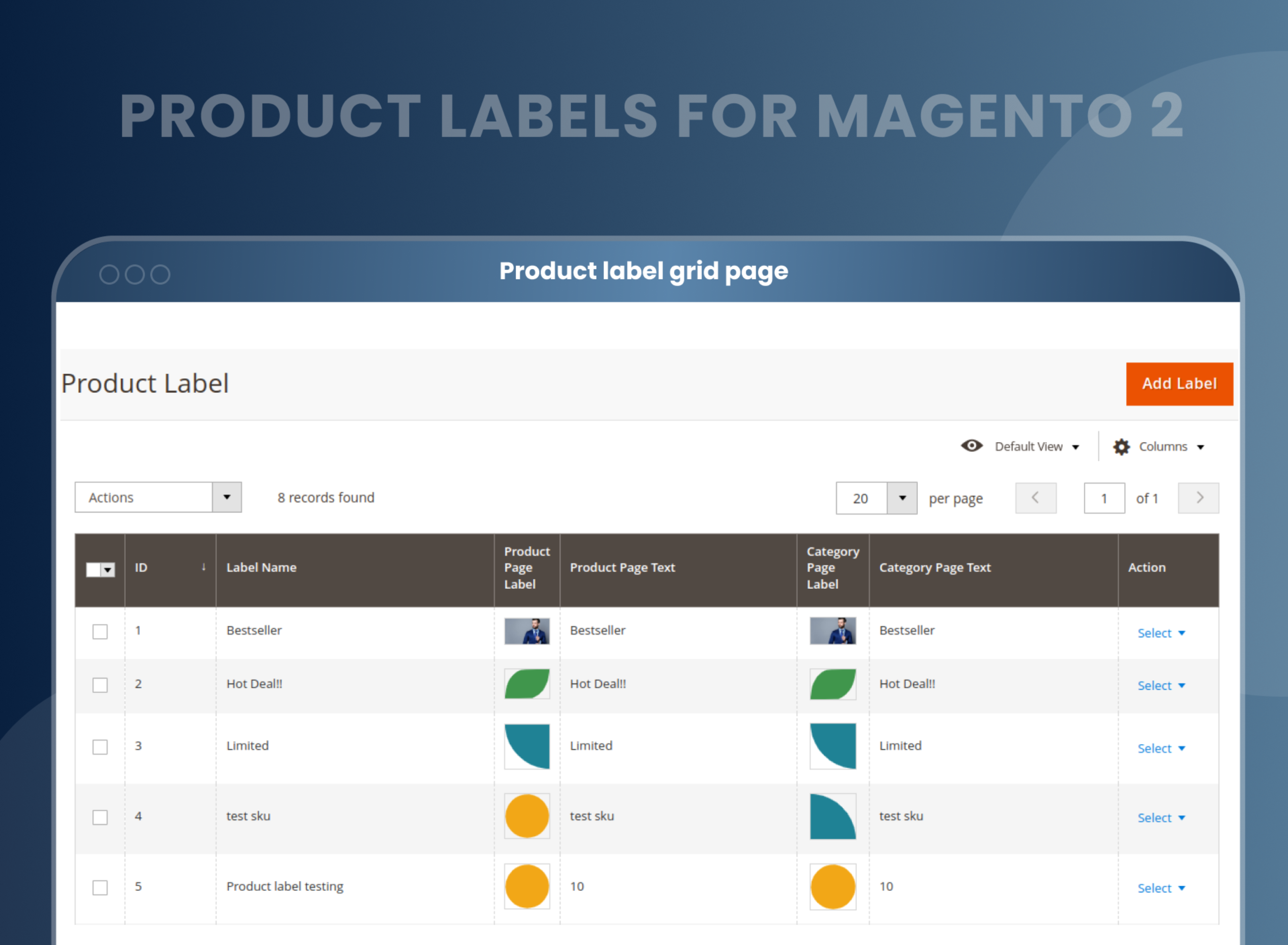
Create unlimited labels and manage them from one grid
Product labels are the perfect marketing strategy for your online store to highlight your product's unique features and status.
Magento 2 Product Labels is an amazing extension that allows store owners to create an unlimited number of product labels without limitation to inform customers about their products.
Admin can also show all labels on the grid and edit or delete them at any time.
Show product status with custom labels and badges
Custom Product Labels for Magento 2 allow admin to add their own customized image and text to describe their store's product status.
Magento 2 product label extension from MageAnts help you add custom badges to the products listed on their website to inform customers about product status, like which product is "new," "out of stock," "in sale," etc.
Add various and unique product labels to a single product
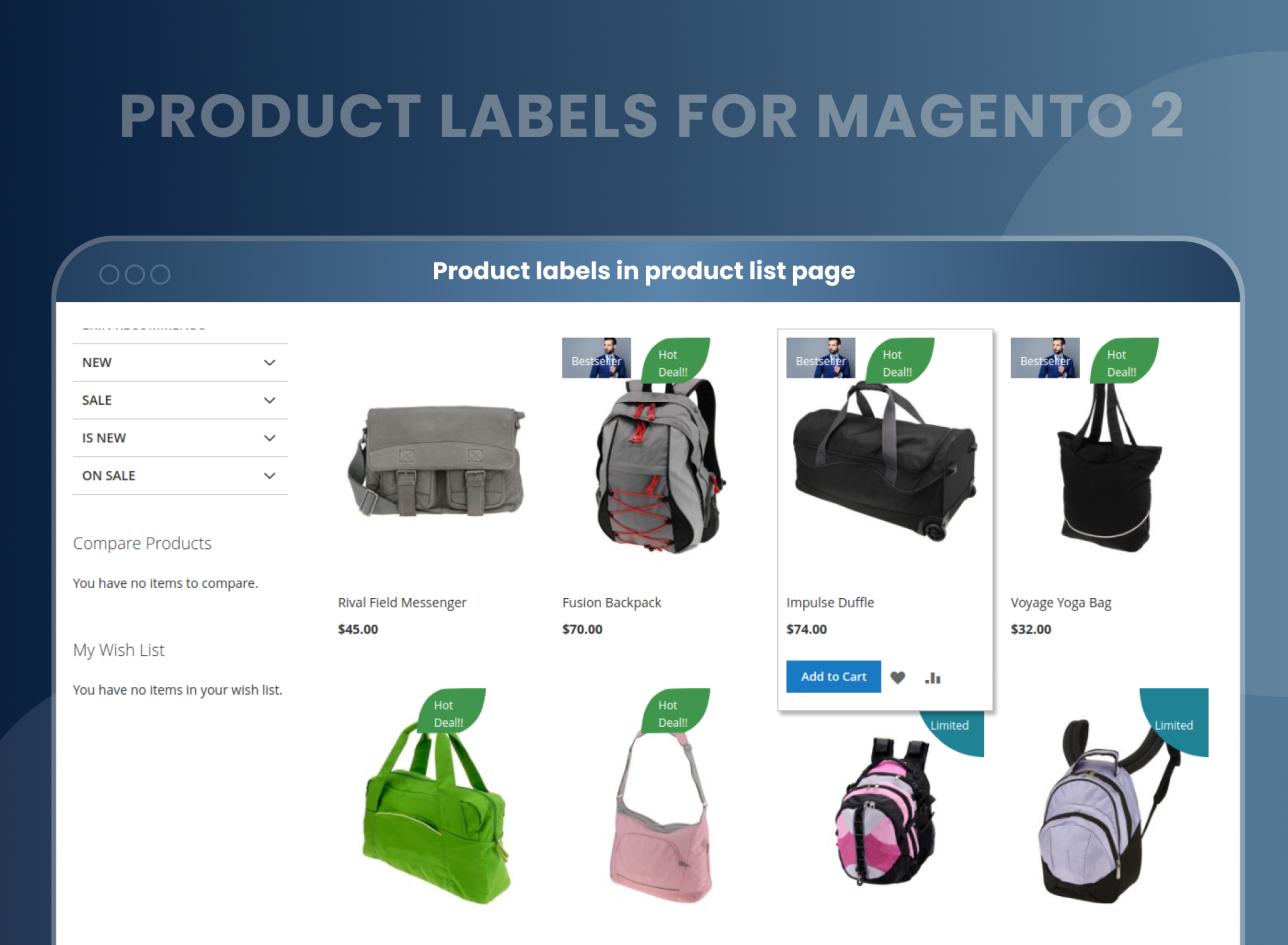
The Magento 2 product labels extension allows you to add different and unique product labels to each product, like "free delivery," "bestseller," "new arrival," "sale," "coming soon," and many more.
This way, you can draw shoppers' attention to your offers and unique and best-selling products, as well as build visibility for your products.
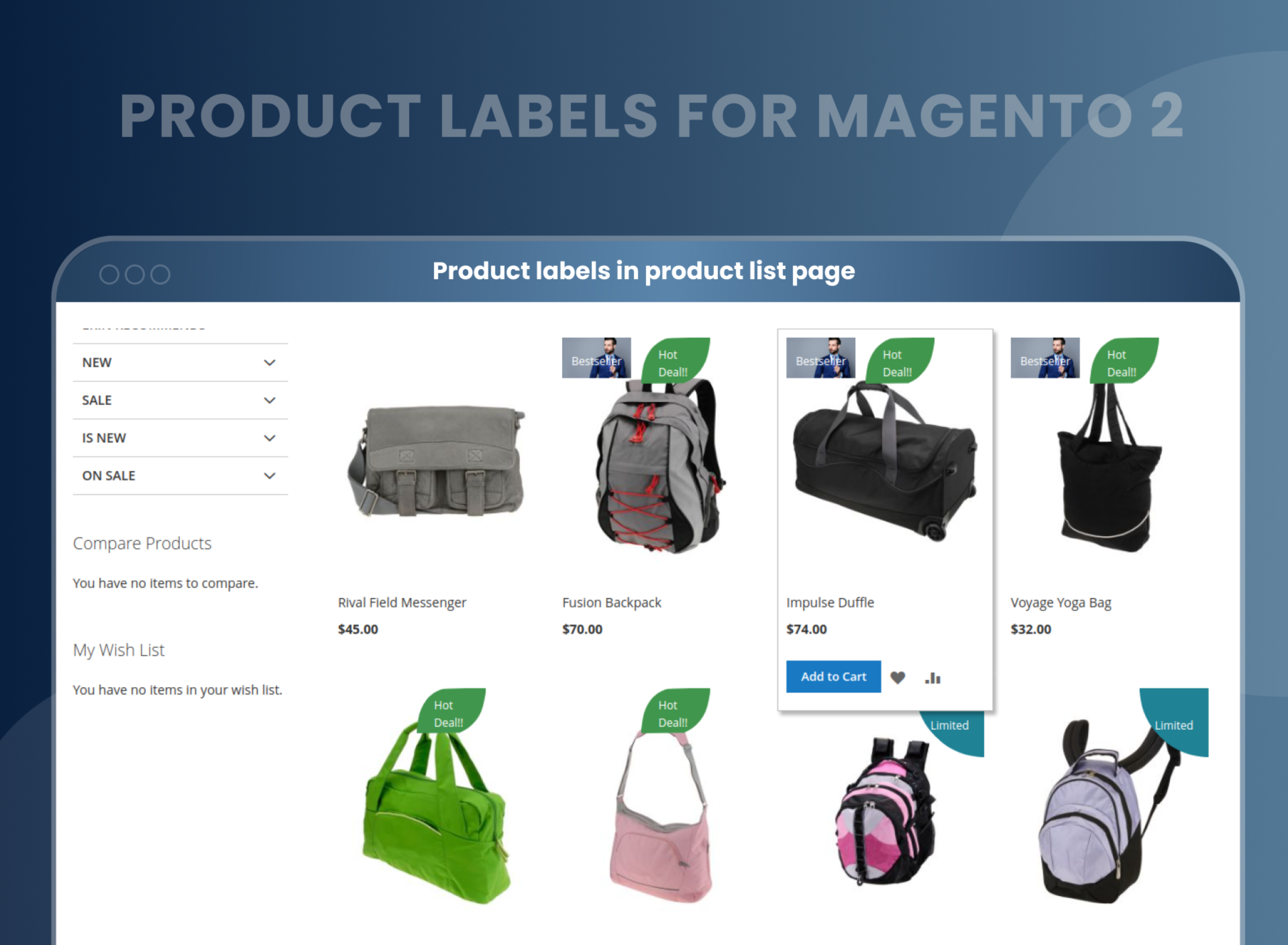
Create custom labels by choosing your own sticker images
If you are not satisfied with the options available in the extension, we can still help you make amazing labels. In order to make the labels completely customizable, we also allow you to upload your own images to create custom labels. Thus, you can experiment with options and create something unique and attractive for your store with the utmost ease.
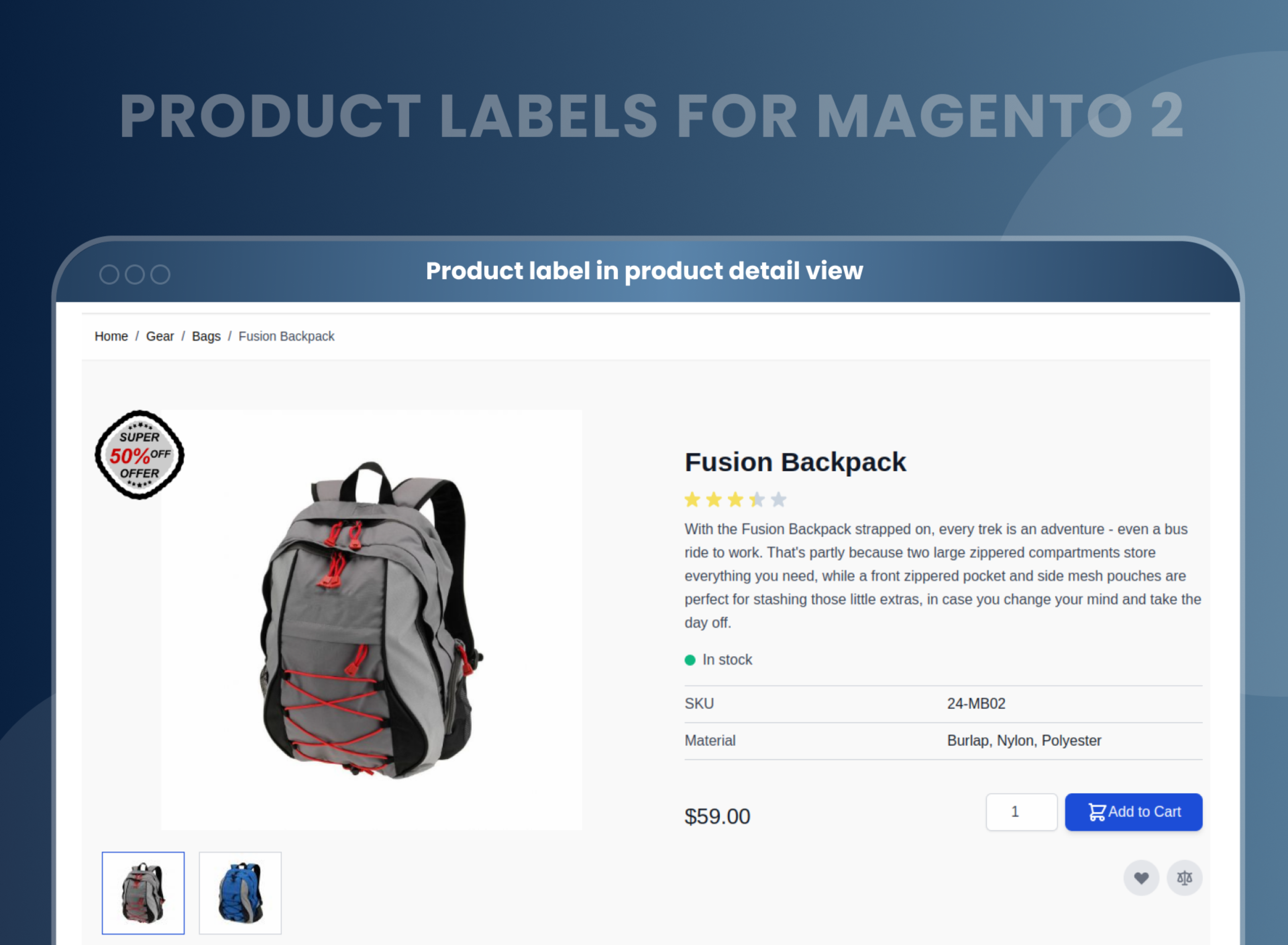
Customize the labels according to your preferences
Product labels Magento 2 extension allows store owners to customize the product labels according to their preferences and store themes to make the label's design unique.
Store owners can:
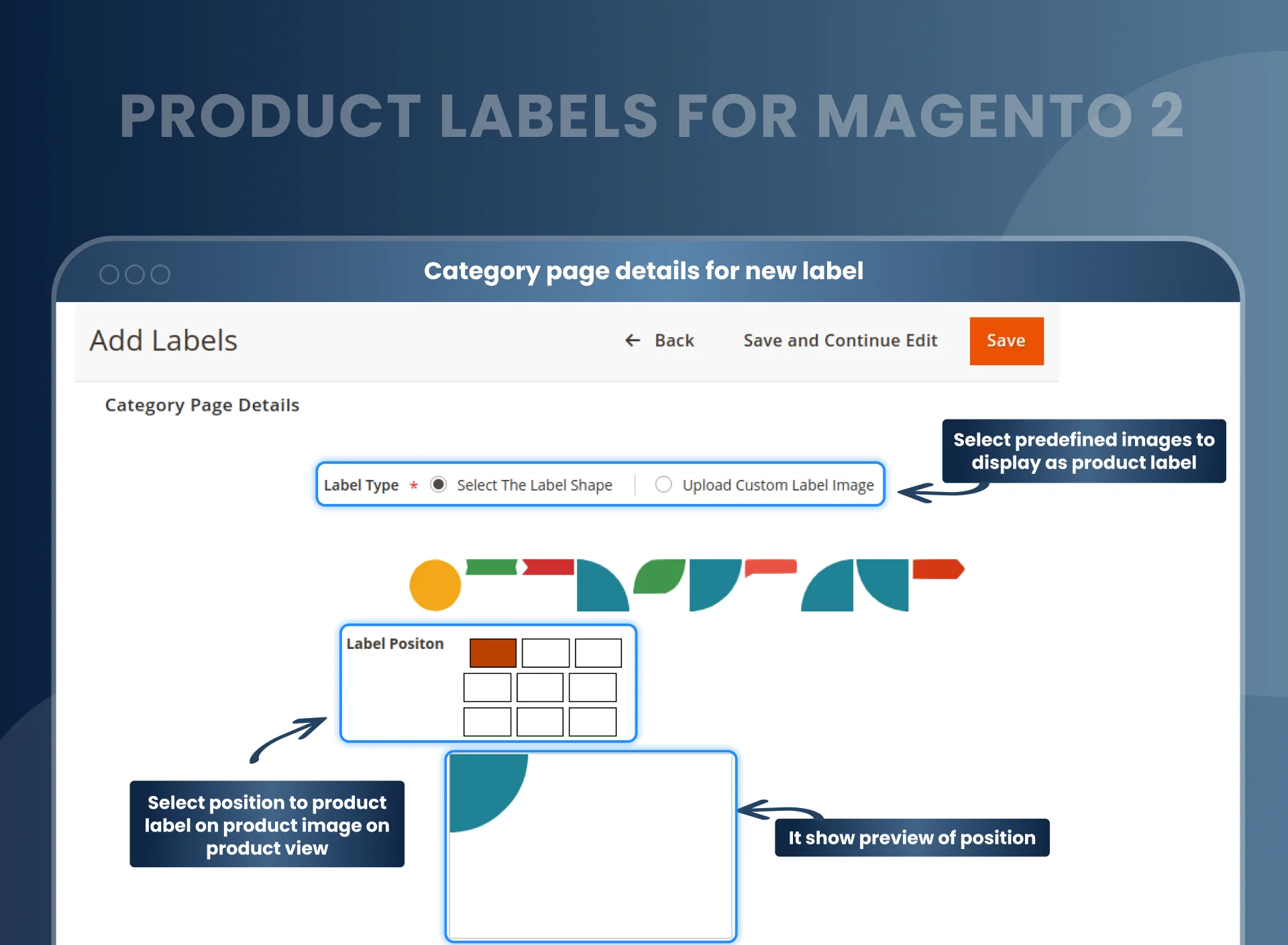
- Choose the label shape.
- Add your own customized text and upload the image
- Select the position for showing the label on the product image, and also show a preview of the position.
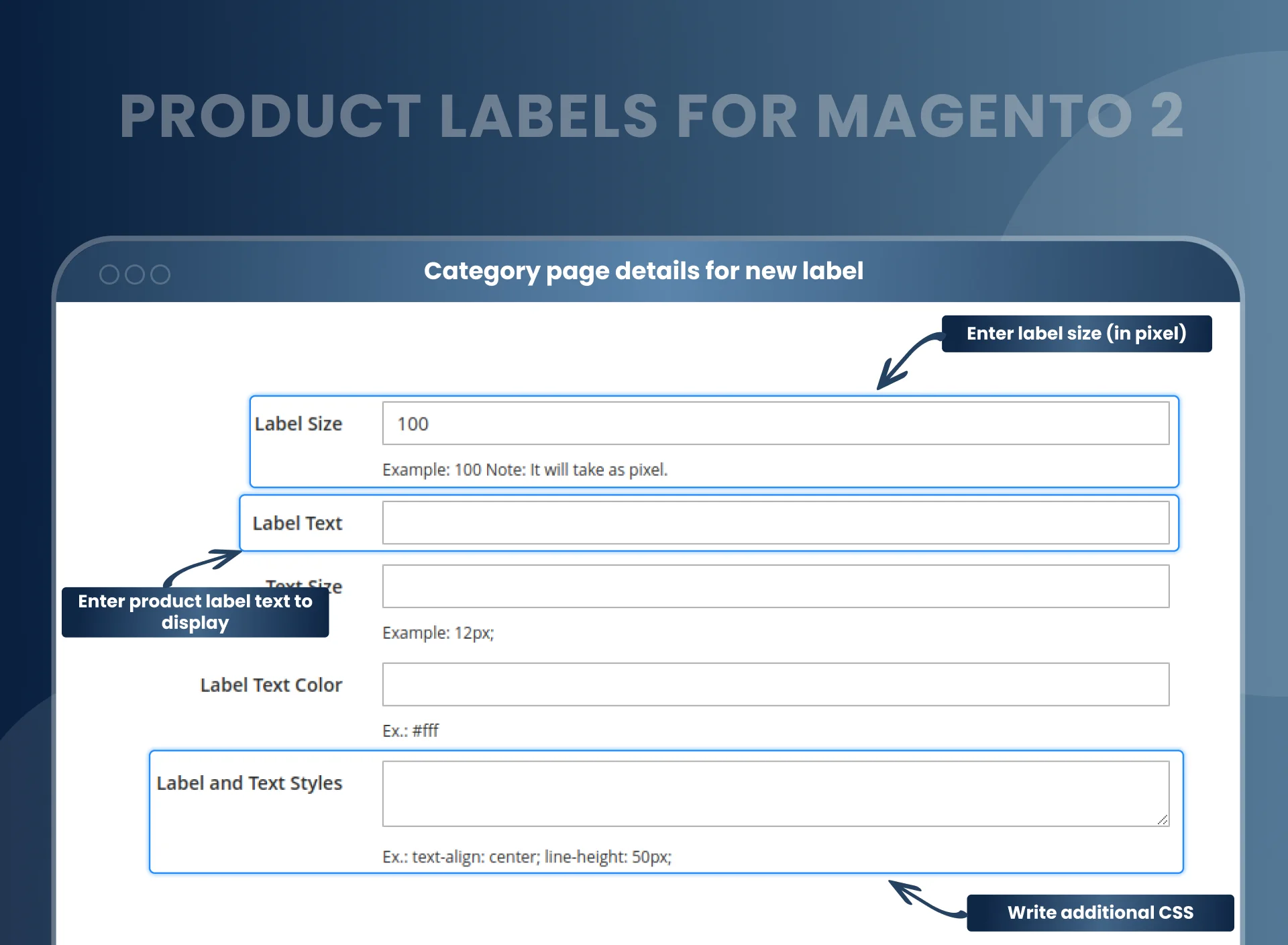
- Choose the label's size, color, text, and text size.
- Place the label in any of 9 positions on the product image, with a live preview.
- Set the label size in pixels (100 px by default), text color and text size.
- Add your own CSS for full control over the label style.
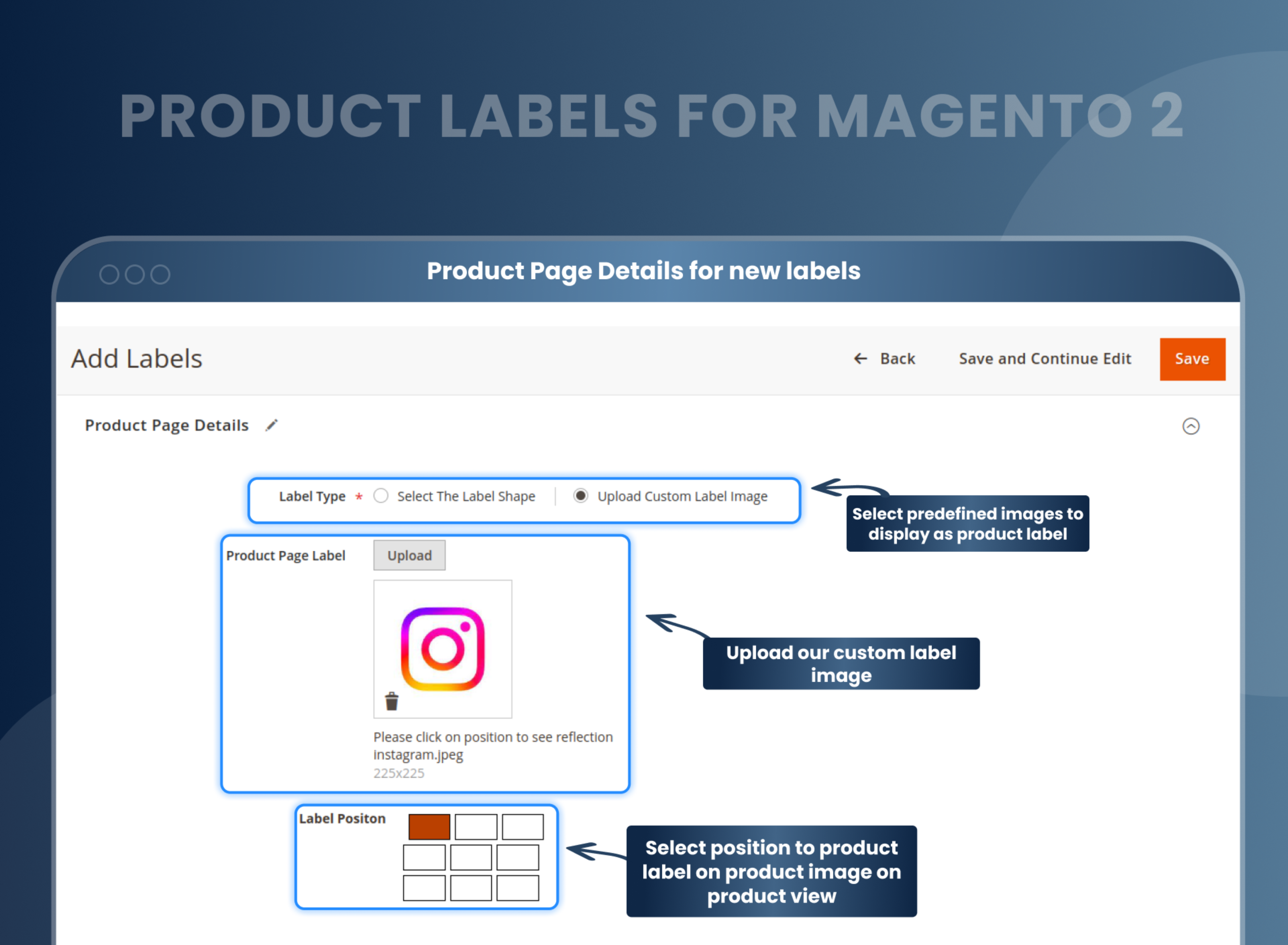
Enable or disable the labels for any product with a configuration
With the Magento 2 new product label, admins can set the product label priority (set 0 for the display label first and set 99 for the display label last) and set the rule for displaying the label on the parent product or not.
- Select the store views to show the product labels.
- Set the category to display the label.
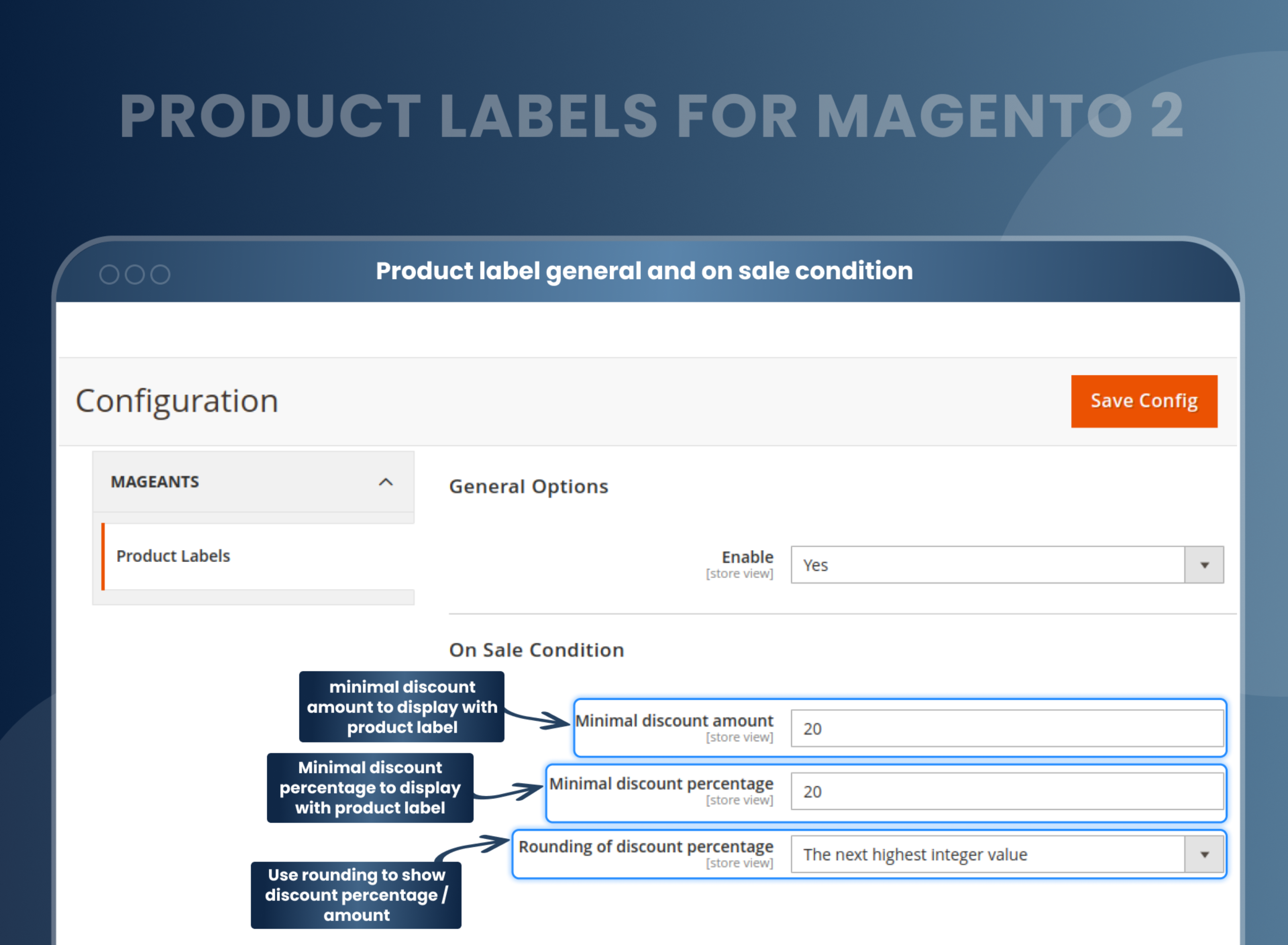
Display labels with flexible conditions
With the Magento 2 product labels, you can easily handle the promotion by setting flexible conditions for particular product labels according to your preferences. Once these conditions are met, the particular label will be displayed.
Admin can set the conditions for:
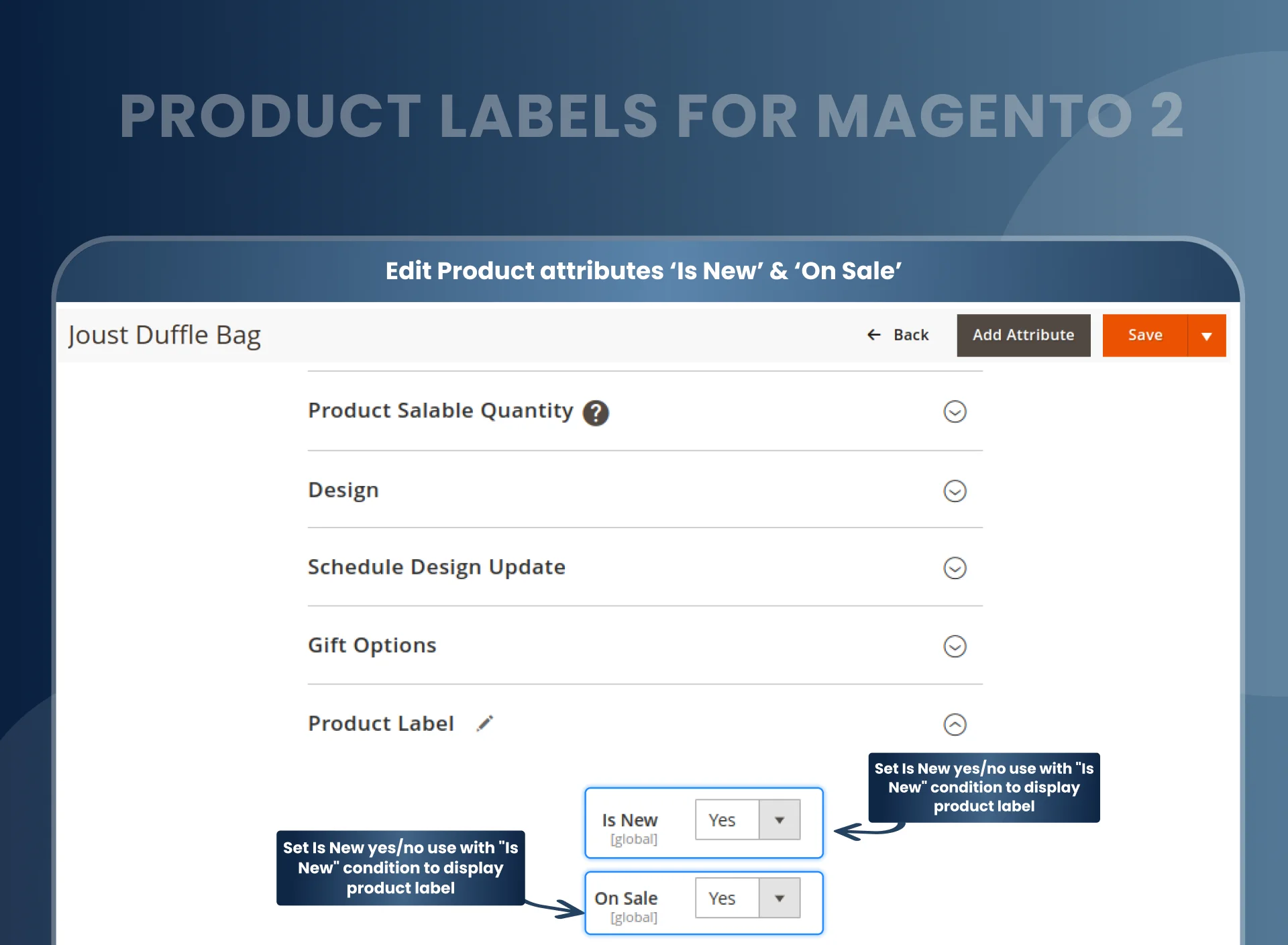
- Product attributes like "Is New" and "On Sale".
- Minimum discount amount and discount amount in percentage
- Time period for the display label. When the time period expires, the labels will stop displaying. This is a very helpful function.
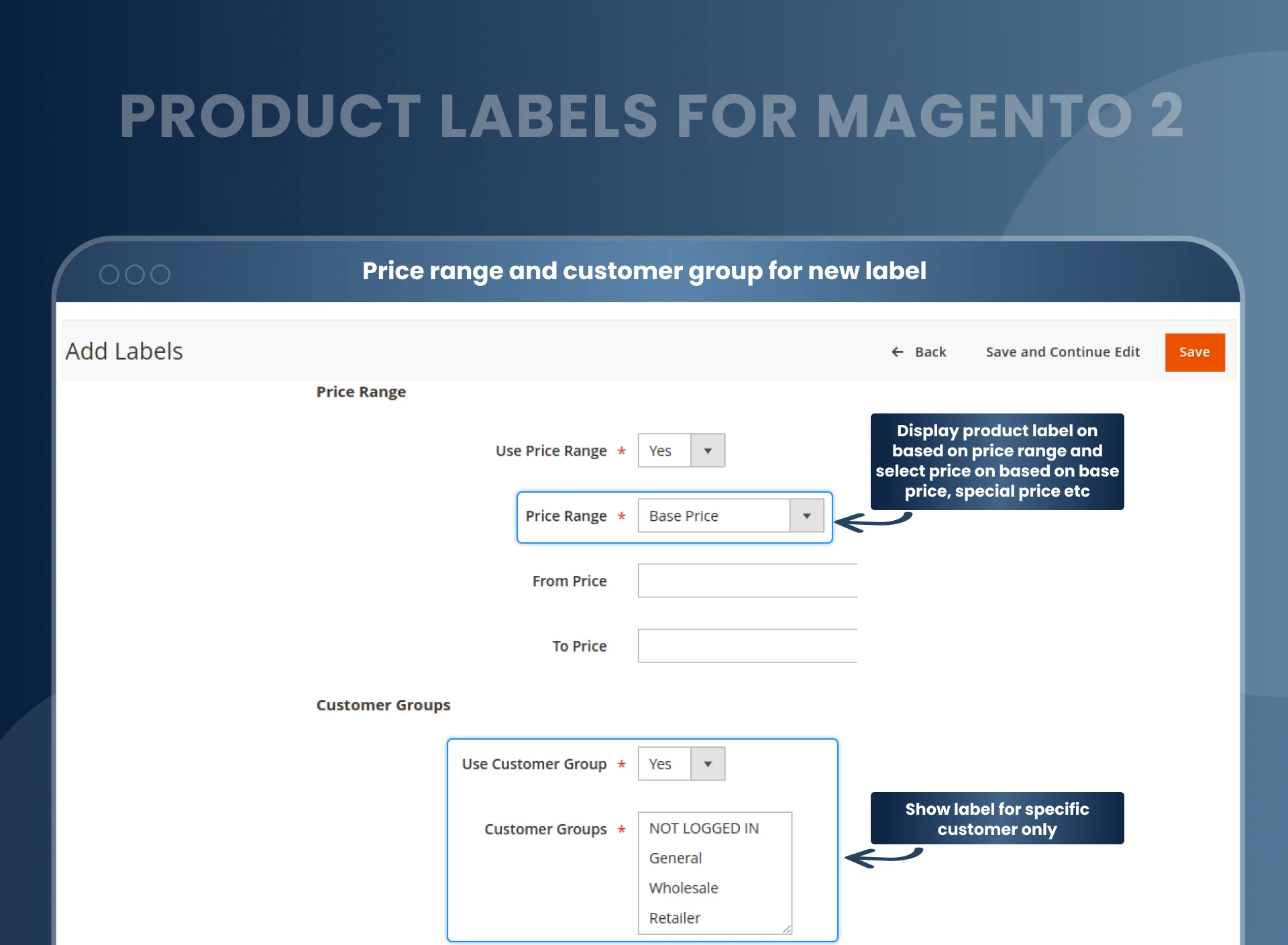
- Choose the specific customer group for display labels like "general," "wholesaler," "retailer," or "not logged in."
For example, if you want to give a discount on tops to retailers, the discount label will be displayed only for retailers.
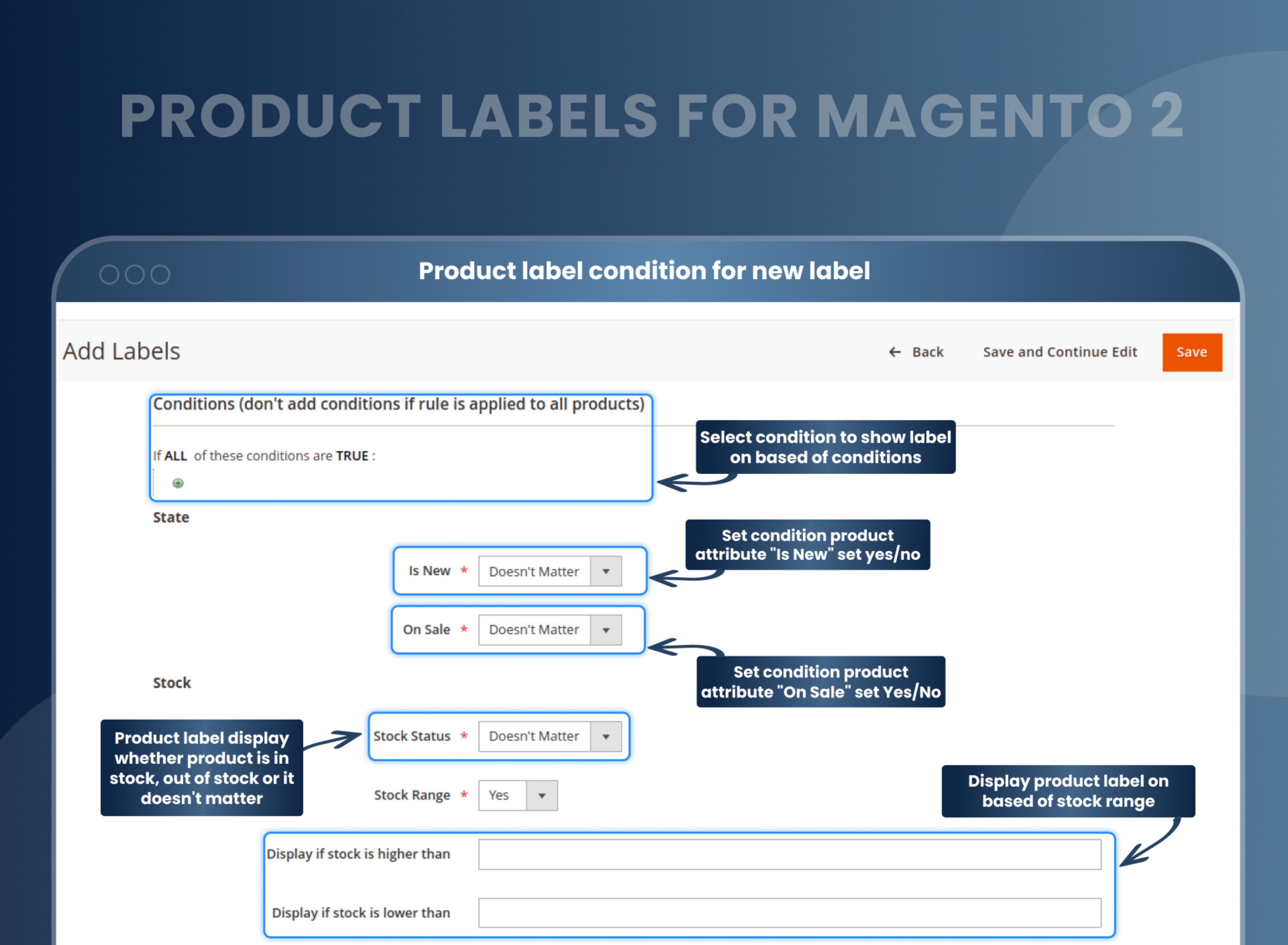
Show labels based on price range
Show a label only on products inside a price range. Pick which price the rule checks, such as the base price or the special price, then set the From and To values. For example, add an "Under $50" sticker to every product in that range.
Mark new products automatically
The "Is New" condition can use the product's New from / New to dates, or its creation date. New arrivals get their "New" badge without anyone editing the product. With the New from / New to dates, the badge also disappears on its own once the end date passes.
Different labels for category and product pages
Each label has separate settings for the category page and the product page: its own shape or image, position and text. For example, show a "Free Shipping" badge in the corner of category listings and a "Most Popular" label on the product page. For configurable and grouped products, "Use for Parent" shows the child product's label on the parent.
Label ideas you can set up today
| Label | Where it helps | How to set it up |
|---|---|---|
| "New" | This month's arrivals | "Is New" condition with New from / New to dates |
| "Sale" with the discount | Marked-down products | "On Sale" condition, plus a minimum discount so small markdowns don't get a badge |
| "Low stock" | Fast sellers running out | Stock Range: display if stock is lower than 5 |
| "Wholesale price" | B2B buyers | Customer Groups: Wholesale |
| "Under $50" | Gift guides and budget shoppers | Price Range: base price from 0 to 50 |
| "Black Friday" | A sale weekend | Start and end date for the label |
| "Free Shipping" | One category | Category condition, with its own image on the category page |
FAQs
Can I add custom labels?
Yes, you can add custom labels.
Is it possible to add labels on some specific categories?
Yes, it is possible to add tags in a particular category.
Is it possible to add a label on a specific product?
Yes, to achieve this, you can set a condition on product ID.
Can I set different labels on the category page and product detail page?
Yes, you can set various names on a category page and product detail page.
Is it possible to set labels on the product for a specific store?
Yes, it is possible to add tags on a product for a particular store.
Is product label extension works with all types of products in Magento?
Yes, MageAnts product label extension works with all kinds of products in Magento.
What should a product label include?
Product labels include image, Position, Label size, label text, label text color, text styles.
How do you make an attractive product label?
To make an attractive product label, you should consider using appropriate font, including good images and readable clear information.
Does Product Labels work with Hyvä?
Yes, through the Hyvä compatibility add-on, which costs $99 on top of the extension price.
Which Magento versions does it support?
Product Labels is compatible with Magento 2.4.7, 2.4.8 and 2.4.9.
Can a label show automatically when stock is low?
Yes. Turn on Stock Range and set "Display if stock is lower than" to a number, for example 5. The label shows only while stock is below that number.
Can I schedule a label for a sale period?
Yes. Set a start and end date for the label. It shows only during that period and stops automatically when the period ends.
Can I show a label only to wholesale or logged-in customers?
Yes. Turn on Customer Groups and pick the groups that should see it, such as Wholesale, Retailer or NOT LOGGED IN. Other customers won't see the label.
How much does the Magento 2 Product Labels extension cost?
$89 for the Community edition, with 90 days of free support and a 30-day money-back guarantee. The Enterprise edition is $99 extra, Hyvä compatibility is a $99 add-on, and support can be extended for 6 months ($49) or 12 months ($69).
What's the difference between product labels, badges, stickers and tags in Magento 2?
Labels, badges and stickers mean the same thing: a small image or text placed on the product photo, such as "New" or "Sale". Some store owners also call them product tags, but in Magento a tag usually means a keyword used to group similar products, and it doesn't appear on the photo.
What is an image label in Magento 2?
In Magento 2, the image label is the Alt Text you give a product photo in the image settings. It describes the photo for search engines and screen readers and isn't shown on the image. A product label from this extension is different: it's a visible badge placed on top of the image.
Reviews
Customization
Changelog
- Compatibility:- Verified and confirmed compatibility with Magento 2.4.7 & 2.4.8 and PHP 8.4.
- MageAnts team make extension compatible with latest magento 2.4.6 version.
- Make extension compatible with Hyva Theme.
- MageAnts team makes this extension coding as per magento coding standard.
- "Stock Range" didn't work for the configure product on the product page and category page.
- Fixed from date, to date and current date related product label issue.
- Sale condition not working also discount in label not display.
- When the user adds a condition and click the save and continue button, then it is automatically removed the condition.
- MageAnts team make product label extension compatible with the latest version of Magento 2.4.
- Admin set label position in backend then in some Positions label size decrease.
- In Backend, text color is defined as label color.
- When admin delete product label from backend, then it displays error(Magento 2.3).
- In backend text size is not work in Product Page Details.
- Change all file URLs and paths from pub/media to web/images.
- When admin upload image, then not working on image preview.
- In Backend admin save without select required field value.
- Some filters and conditions are not work proper, all issue solve and working fine in all Magento version.
- MageAnts update Product Label extension in latest magento2.3 version, Now extension working with all Magento version.
- Update module version name in composer.json file same as module.xml file.
- When user add product attributes conditions then give error because when user create product label and set product label rules condition then that rules are save in Magento sales rule table, now change the table and save in pl_condition table so issue solve and working fine for all Magento version.
- When save label then spelling mistake.
- When user create two product label first labels for Women category and second label for men category. Now user add condition women category label display only in women product and men category label display in men product. Then Product label not display in product view page.
- When user select product label display in only gear category product then it's not working product label display in all category.
- When create product label then product rules id created if same rules id exist then it updated.
- When user want display product label in only gear product then user add condition in "Apply the rule only if the following conditions are met" in this section but condition not working now this issue fixed, and it's working as per condition.
- update current version module number 2.0.1
Why Choose MageAnts
-

30 Days Money Back Guarantee
We offer 30 Days money back guarantee if customer meets our refund policy. For more info you can read our terms and condition
-

Tested Before Every Release
Every version is tested on the latest Magento 2.4 release before it goes live, and bugs reported during your support period are fixed by our team.
-

Free 90 Days Support
MageAnts ensures quick and quality technical support. Take advantage of our 90 days free support for a smooth and efficient experience.
-

Frequent Extension Updates
Intensive update roadmaps ensure highly compatible, bug-free, great performance, and innovative extensions.
