



Store Credit For Magento 2
Ask AI About This Extension





Key Features
- It is easy to add and subtract store credit.
- Admin can check the customer's store credit history.
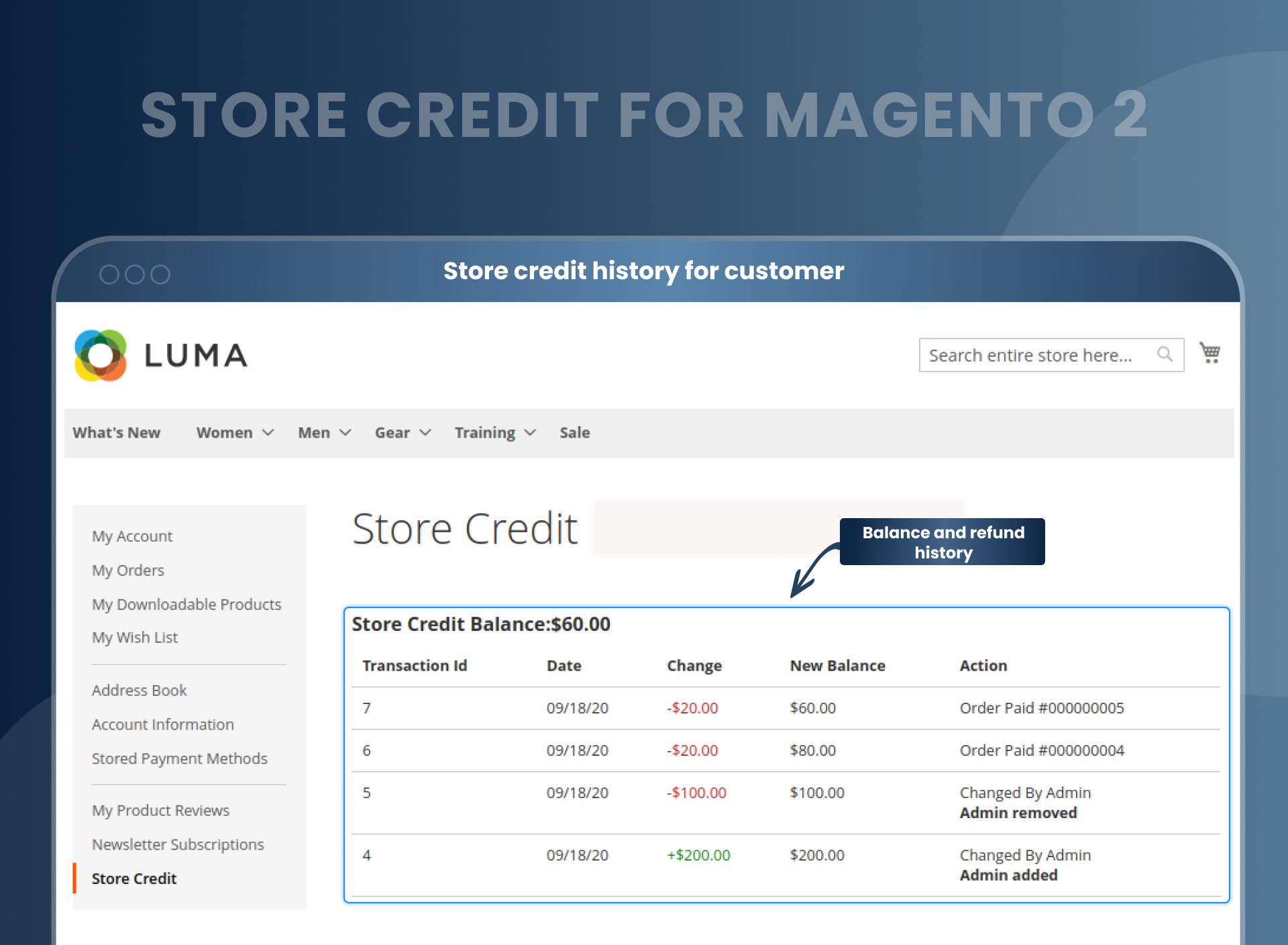
- Customers can see store credit balances and refund histories.
- Customers can use the store credit amount on the checkout page.
- Customers can apply for store credit on the tax.
- Automatically email notifications to customers for any changes in their store credit balance.
- Increase sales by giving credits to customers.





Current Limitation in Magento 2
What Magento 2 Cannot Do
By default, Magento 2 lacks a feature enabling administrators to allocate store credits to customers for their purchases. This means that store owners cannot offer such credits to customers to encourage them to purchase from their store. This can be a disadvantage for store owners, as providing store credits to customers can help increase sales and revenue.
How Our Extension Solves This
MageAnts Magento 2 Store Credit extension allows store owners to provide customers with credit points for their refunds. It helps to convert the order refund into revenue with virtual credits, which can be used by customers in their future purchases.
Store credit can be used as a payment method for items in the store, allowing customers to pay for their purchases with store credit instead of real money. This will simply help create new sales opportunities and boost sales revenue.
Description
Enhance loyalty with flexible store credit options.
Offer store credit for refunds or as a loyalty reward to encourage repeat purchases. Effective for managing returns while keeping the revenue within your store.
Enable and disable module functionality
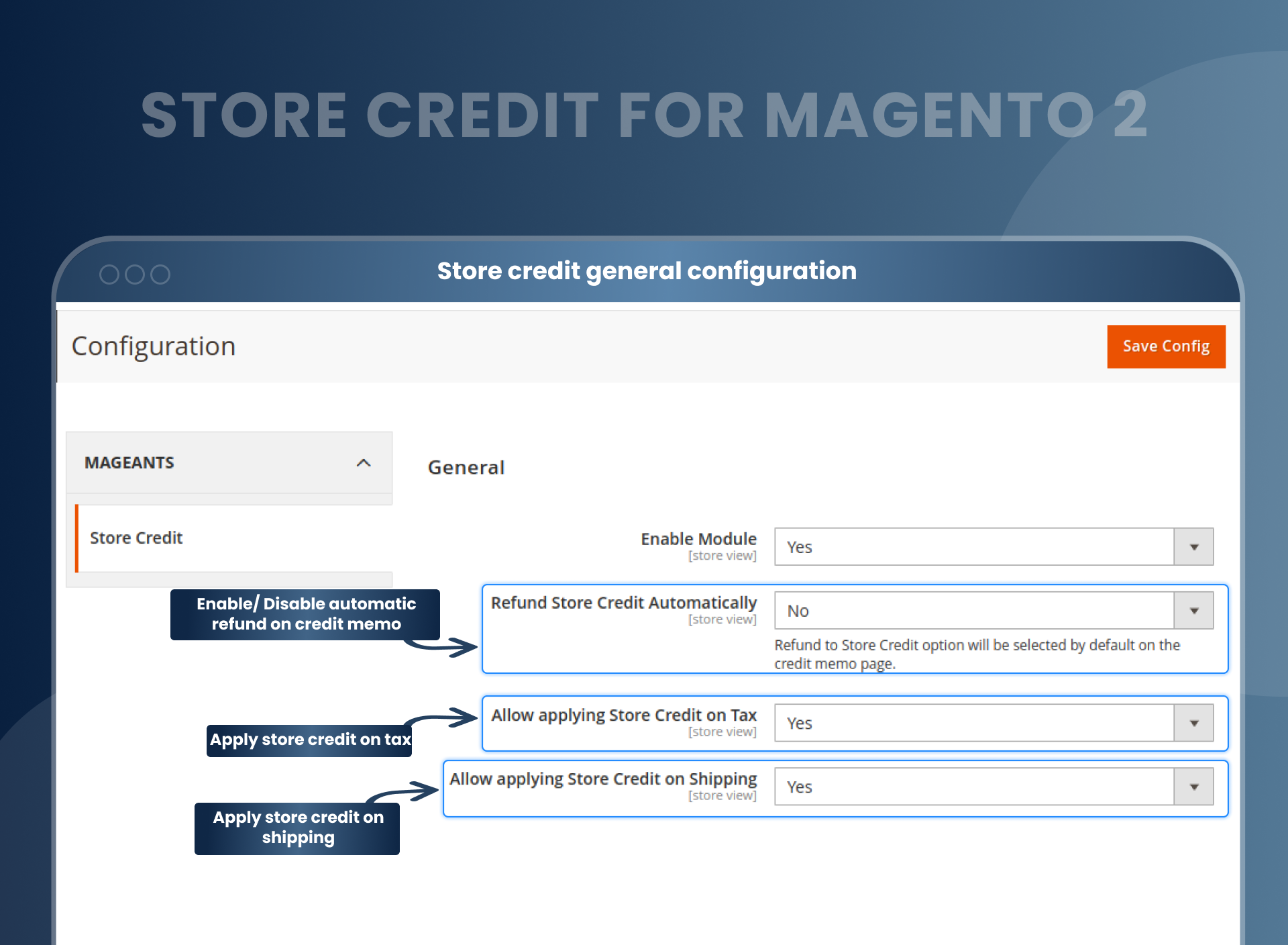
With the help of the Magento 2 Store Credit & Refund extension, store owners can configure a module and store credit functionality in the backend. Store owners can easily enable and disable the below functionality, as shown in the screenshot.
- Enable or disable automatic refunds on a credit memo.
- Allow customers to apply the store credit on tax.
- Allow customers to apply store credit to the shipping amount.
- Easily send store credit balance updates via email to customers.
- Select a particular action to send a store credit email, such as placing an order, refunding an order, or cancelling and/or cancelling an order.
Easily add and subtract store credit
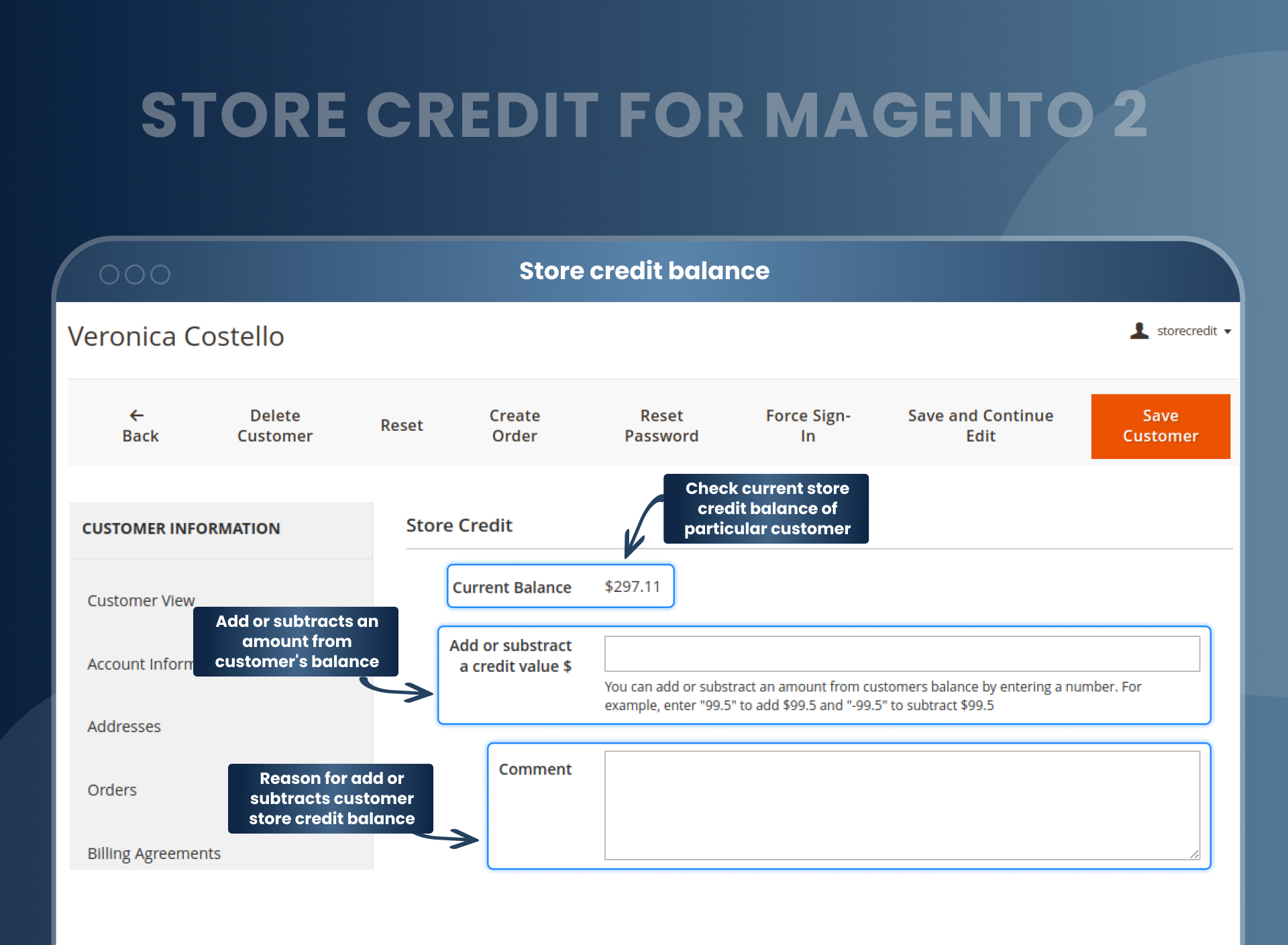
This awesome feature of the Magento 2 Store Credit extension by MageAnts allows store owners to edit customers's credit balances from the backend, which can be visible to customers if the admin enables the same.
Store owners can add or subtract customers' credit balances by entering a specific amount and updating the balance. After the admin's configuration, the customer's total credit balance will be increased or decreased. For reference:
Enter “99.5” to add $99.5 and “-99.5” to subtract $99.5.
Admin can check the customer's store credit history
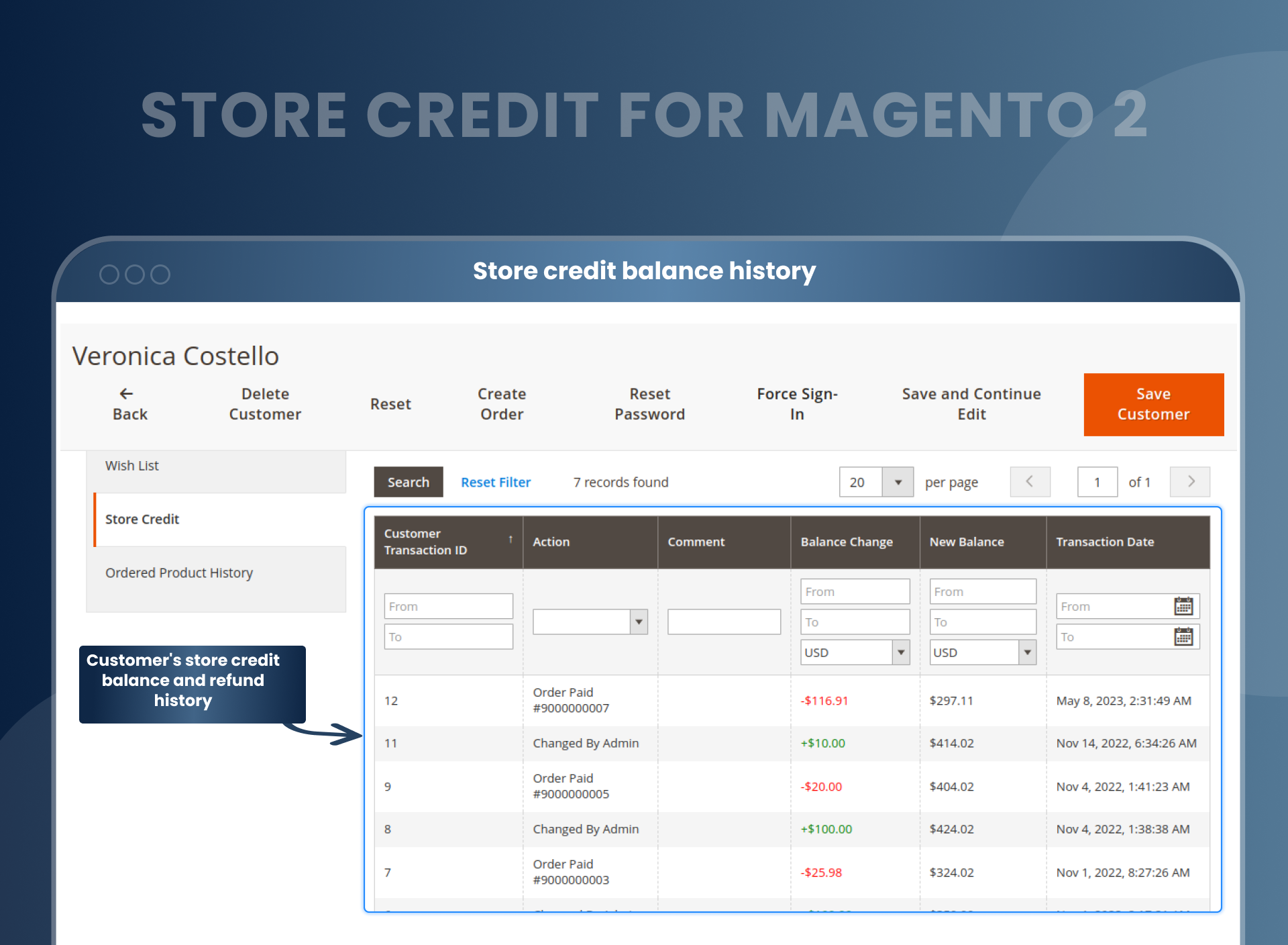
The Store Credit for Magento 2 module enables the admin to quickly check the customer’s balance and store credit history. So, the backed admin can check the customer’s store credit history, balance update, and refund history.
Easy to check the order invoice with store credit
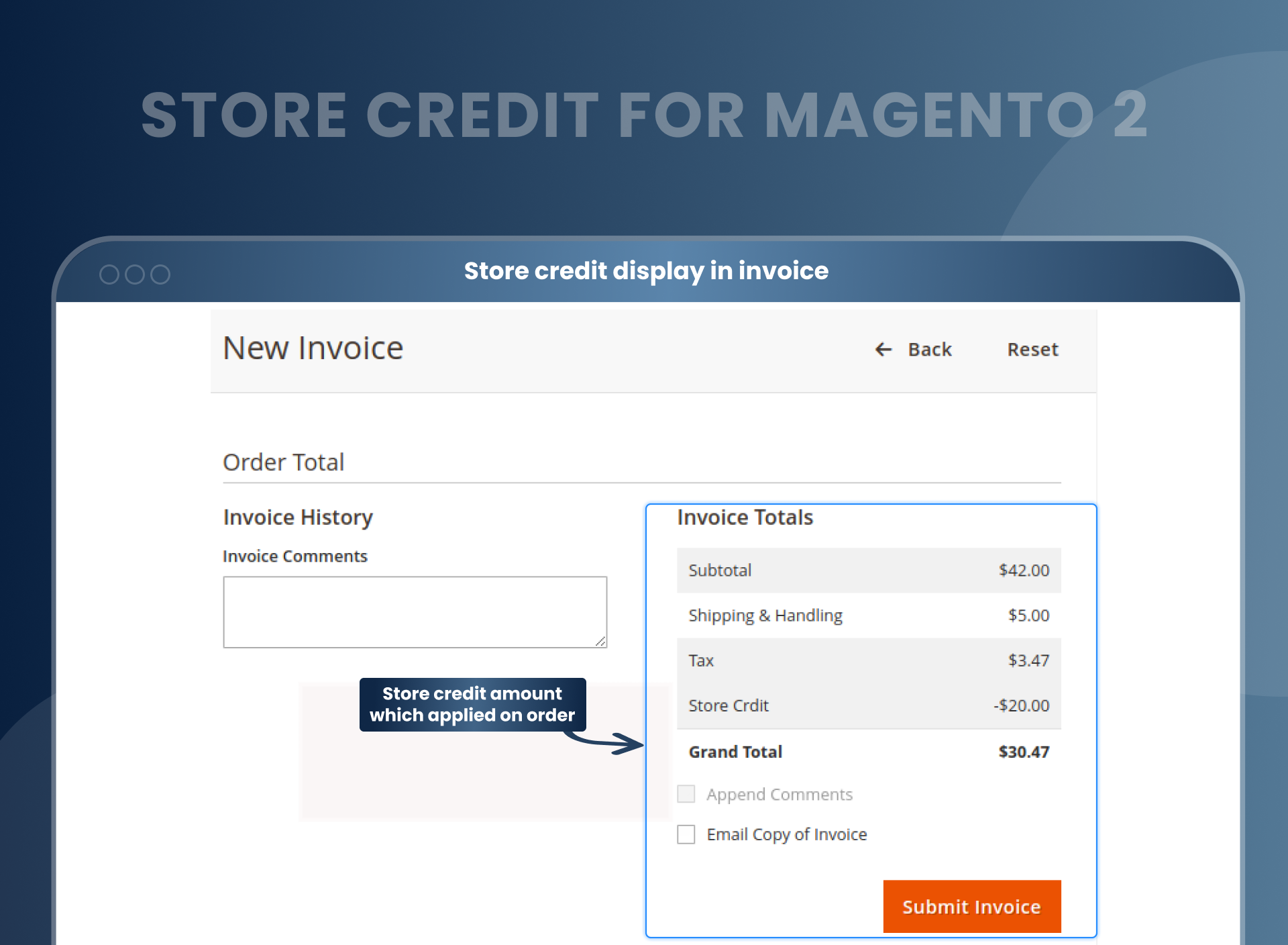
With the help of the Store Credit Magento 2 Extension, customers and store owners can see the store credit amount applied to an order, and it will also be displayed in the order invoice. Follow the path to see the order invoice: Sales > Orders > Particular Order Invoice. Refer to the screenshot for more details.
Customers can see store credit balances and refund histories
Customers can effortlessly enhance their shopping experience by utilizing their customer account to view the remaining store credit balance and check the refund history for purchasing new goods from your Magento store. Customers can see detailed information about store credit balances and refund histories in My Account > Store Credit tab.
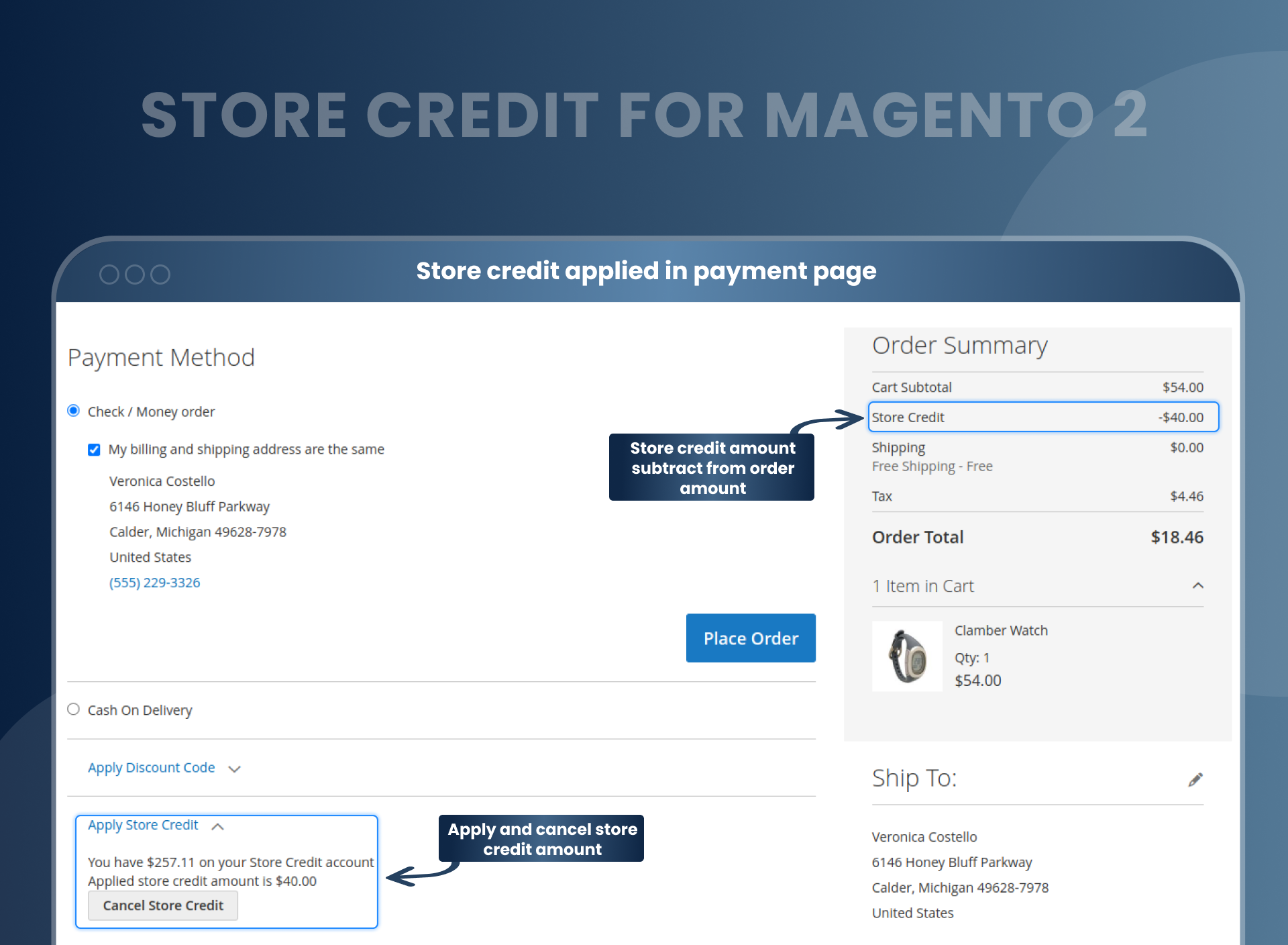
Customers can use the store credit amount on the checkout page
If customers want to use their store credit amount while buying any products, then they can use it on the checkout page. At the same time, customers can apply store credit amounts by clicking on the "Apply Store Credit" button and cancel store credit amounts by clicking on the "Cancel Store Credit" button on the checkout page. This seamless process can improve the user experience and boost loyalty.
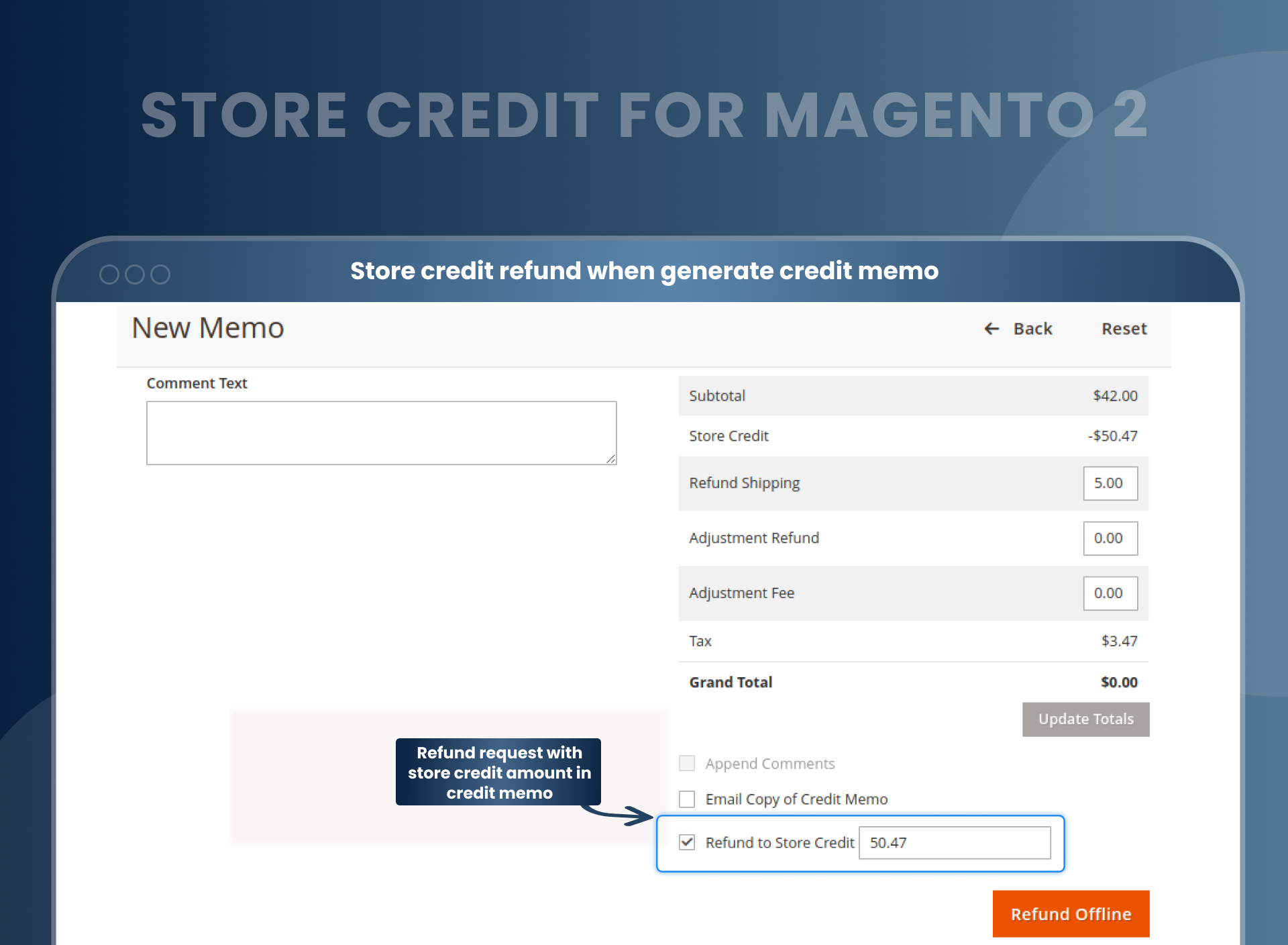
Easy to display store credit amount in order credit memo
With the help of the Magento 2 Store Credit extension, store owners can easily display the store credit amount applied to a specific order. Follow the below steps to achieve the same:
Sales > Orders > Particular Order Credit Memo
Users who want to make a refund request with the credit memo's store credit amount can enable the store credit option, as shown in the screenshot. And with this, you can generate refund requests in Magento 2 with store credit amounts, partially or fully.
Notify buyers about their store credit balance
To motivate customers, the Store Credit & Refund for Magento 2 allows the store admins to notify the customers about their store credit balance updates via email. This way, customers can update their credit amounts.

How To Handle Offline Magento 2 Refund Requests?
How Does Store Credit Magento 2 Extension Work?
Full Features Of Magento 2 Store Credit Extension
Why Does Your Store Need Store Credit And Refund For Magento 2?
Benefits of the Store Credit Magento 2 Extension
- You can generate refund requests from the admin panel.
- Go to orders from sales > Order.
- Open particular order to generate refund request.
- At the top bar(Header), you can find the credit memo URL.
- Click on it and open the refund request page.
- Go to the particular refund section and confirm your refund shipping, adjustment, and fee.
- Click on it and generate your refund offline.
- Also Read : How To Configure Magento 2 Store Credit To Improve Customer Retention?
- This Store Credit module allows making your customers more satisfied with their shopping and enables store owners to get more orders. By installing this Magento 2 store credit, store owners can convert refunds into credits within a fraction and save their time. And yes, if your customer is satisfied with their purchase, they can use their credit to pay for the next purchase. So, one of the most beneficial features is that you can give the customer any amount of credit, and then they can utilize their credits all at the same time while ordering the product.
- Enable and Disable the module
- Enable/Disable store credit balance updates email
- Allow/Disallow refunding store credit products
- Select email template to send a notification
- Add custom store amount to enhance customer loyalty
- Select contact for reply
- Add or subtract store credit values
- Track customer’s refund and store credit amount
- Allow/Disallow customers to generate Magento 2 refund requests
- Notify customers about their store credit balance update
- Allow/Disallow applying for store credit on tax
- Check store credit amount for specific order invoice
- Allow/Disallow using for store credit on shipping
- View, create customer’s credit transaction with the help of grid
- Store credit Magento 2 helps store owners to update credit balance quickly and at the same time, it encourages customers to place more orders. This extension enables store owners to enhance financial relations with customers and simplifies working with customers' bank accounts.
- Store owners can manually update the current customer balance by adding or subtracting the specific number of credit points. It helps to offer a remarkable shopping experience to potential buyers so that customers can easily use the same credits to buy products on the website.
- Who doesn’t like free gifts? Magento 2 Free Gift extension allows admin to offer free gifts to their customers with particular product purchases. Free gift products will automatically be added to the user’s cart and even customers can choose their gift on the cart page.
- Boost sales with seamless gift card experiences of Magento 2 using the Gift Cards module. Sell gift cards as a separate product and drive more traffic to your website and even to physical stores if you have.
- Sample Product for Magento 2 allows customers to order sample products for trial with restricted amounts and sizes before purchasing the actual product.
- Credit report
- Time-Saving
- A better and enhanced shopping experience
- Flexible payment process using store credits for the next purchase.
- Helping to keep customers loyal to your store
- This module improves sales and boosts customer engagement.
- Store credit is a solution that can be used as a promotional and marketing tool, as it allows customers to use store credits for future purchases.
- Boost the ROI of your e-commerce business.
FAQs
What is store credit in Magento 2?
Magento 2 Store Credit is one of the best tool to build customer loyalty and turn refunds or exchanges into new purchases with the help of virtual store credits. Store credit is a value that you offer to the customers for any online purchase they make through your website and now wish to exchange or return.
How do I get a refund on Magento 2?
Magento 2 store refund extension is exclusively made for store owners who want to Automated refund system when the customer cancelled the order.
What can I do with store credit?
You can use your store credit at the time of order on the checkout page, and place the order easily.
Is store credit the same as gift cards?
No, they're not the same. A gift card is a type of prepaid debit card purchased by customers for others or themselves, and it is loaded with funds for future purchases. Store credit is issued to you when you return or exchange products to the store. Credits get added to your account and instead of a refund in cash, you will have to purchase something of those credits in future.
How do I get store credits in Magento 2?
- Install store credit Magento 2 in your store.
- You can enable it from store --> Configuration --> MageAnts --> store credit.
- You can set other configurations as per your need and requirement.
- After opening any particular customer store credit amount.
- Then go to frontend and add a product to the cart.
- On the checkout page, you can apply store credit to deduct the amount from a cart.
- You can easily place an order with store credit.
- In case of a cancelled order, the customer can get the amount in the store credit account.
- Allow customers to spend their store credits on a future purchase.
Is there an option for customers to view their store credit balance and transaction history?
Absolutely! Customers can view their store credit balance and detailed transaction history in the "Store Credit" tab under their "My Account" section.
How can store admins manage customer store credit?
Admins can easily manage customer store credit from the admin panel. They can add or deduct store credit for individual customers, and the updates are instantly reflected in the customer account.
Can store credit be used in combination with other discounts or promotions?
Yes, store credit can be combined with other discounts, coupons, or promotions, providing customers with a flexible and rewarding shopping experience.
Is it possible to refund orders using store credit?
Yes, store admins can process refunds using store credit. This is a convenient option for both store owners and customers, reducing refund processing time.
Does this extension support multi-store or multi-currency functionality?
Yes, the Magento 2 Store Credit extension supports multi-store and multi-currency setups, ensuring compatibility with stores serving global customers.
Can customers cancel their applied store credit during checkout?
Yes, customers can easily cancel the applied store credit during checkout by clicking the "Cancel Store Credit" button and proceed with other payment methods if desired.
Is the extension updated to support the latest Magento 2 versions?
Yes, the extension is regularly updated to ensure compatibility with the newest Magento 2 versions and security patches.
Does the extension provide reporting features for store credit usage?
Yes, the admin panel includes reports to track store credit activity, including credit allocation, usage, and refunds.
Reviews
Customization
Changelog
- Compatibility:- Mageants team make extension compatible with Magento version 2.4.8.
- Compatibility:- Mageants Team make extension compatible with Hyva theme.
- Fixes:- Resolved the issue with action data in the Store Credit grid on the Admin Customer Edit page.
- Fixes:- Resolved the issue with action data in the Store Credit section of the Frontend Customer Account.
Bug fixed
- MageAnts team make extension compatible with latest magento 2.4.6 version.
Coding Standard
- MageAnts team makes this extension coding as per magento coding standard.
New extension
- MageAnts develop new Store Credit extension working fine in all Magento version.
Why Choose MageAnts
-

30 Days Money Back Guarantee
We offer 30 Days money back guarantee if customer meets our refund policy. For more info you can read our terms and condition
-

Tested Before Every Release
Every version is tested on the latest Magento 2.4 release before it goes live, and bugs reported during your support period are fixed by our team.
-

Free 90 Days Support
MageAnts ensures quick and quality technical support. Take advantage of our 90 days free support for a smooth and efficient experience.
-

Frequent Extension Updates
Intensive update roadmaps ensure highly compatible, bug-free, great performance, and innovative extensions.
