



Inventory Report For Magento 2
Ask AI About This Extension



Key Features
- Keep track of all inventory adjustments on your website.
- It helps you follow the stock changes for all products.
- Admin can find all stock update information in the inventory report.
- Admin can also check for particular product updates from the product page.
- Admin generates a credit memo for any order quantity automatically added to the product.
- Export the inventory report as a CSV or XML file.
- Admin receives an email notification for any changes in any product inventory.





Current Limitation in Magento 2
What Magento 2 Cannot Do
Default Magento 2 does not give store owners the ability to manage all product quantity updates. This means that they cannot track changes in product quantity, whether they increase or decrease, and they also cannot view the history of a specific product's quantity.
How Our Extension Solves This
MageAnts Inventory Report for Magento 2 is an advanced feature that can be integrated into the Magento store to provide detailed reports on inventory levels and stock movement. This extension helps store owners track their inventory more efficiently and receive email notifications when any product quantity increases or decreases. Generated reports help store owners have a clear understanding of their inventory performance and make data-driven decisions to optimize their inventory management.
Description
Track and analyze inventory with actionable insights.
Magento 2 Inventory Report extension provides detailed reports on stock levels, low inventory, and product performance. For example, identify top selling products and replenish stock before it runs out.
Easy to Install and Configure
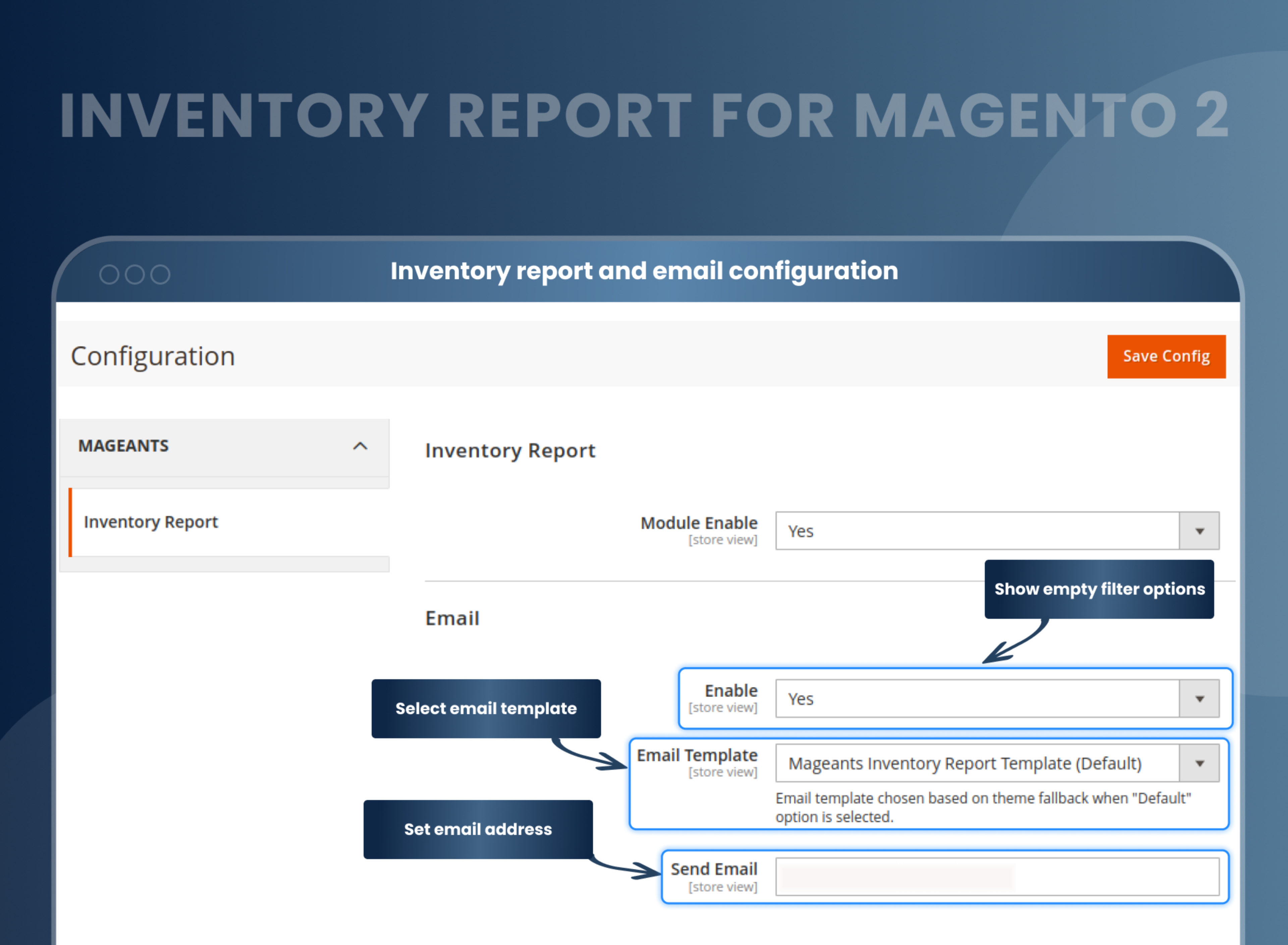
With this extension, you don't need to worry about installation. The Magento 2 Inventory Management Reports installation is quite simple. After installation, follow the below steps:
- Enable the Inventory Report Module.
- Enable Email Notification (notify admin via email about product stock updates).
- Select Email Template
- Set the email ID.
All product quantity updates will be tracked automatically
All the information about the product stock and inventory is monitored, recorded, tracked, and displayed in an inventory report grid. By using Inventory Report Magento 2 Extension, admins can know about the product quantity change, the old quantity, when it was ordered, the new quantity, the current action, and who did this action.
An interesting part of this extension is that every action that is performed in product stock change will be tracked, including creating credit memos, creating orders (from the backend and front end), importing products, deleting orders, and changing the quantity on the product edit page.
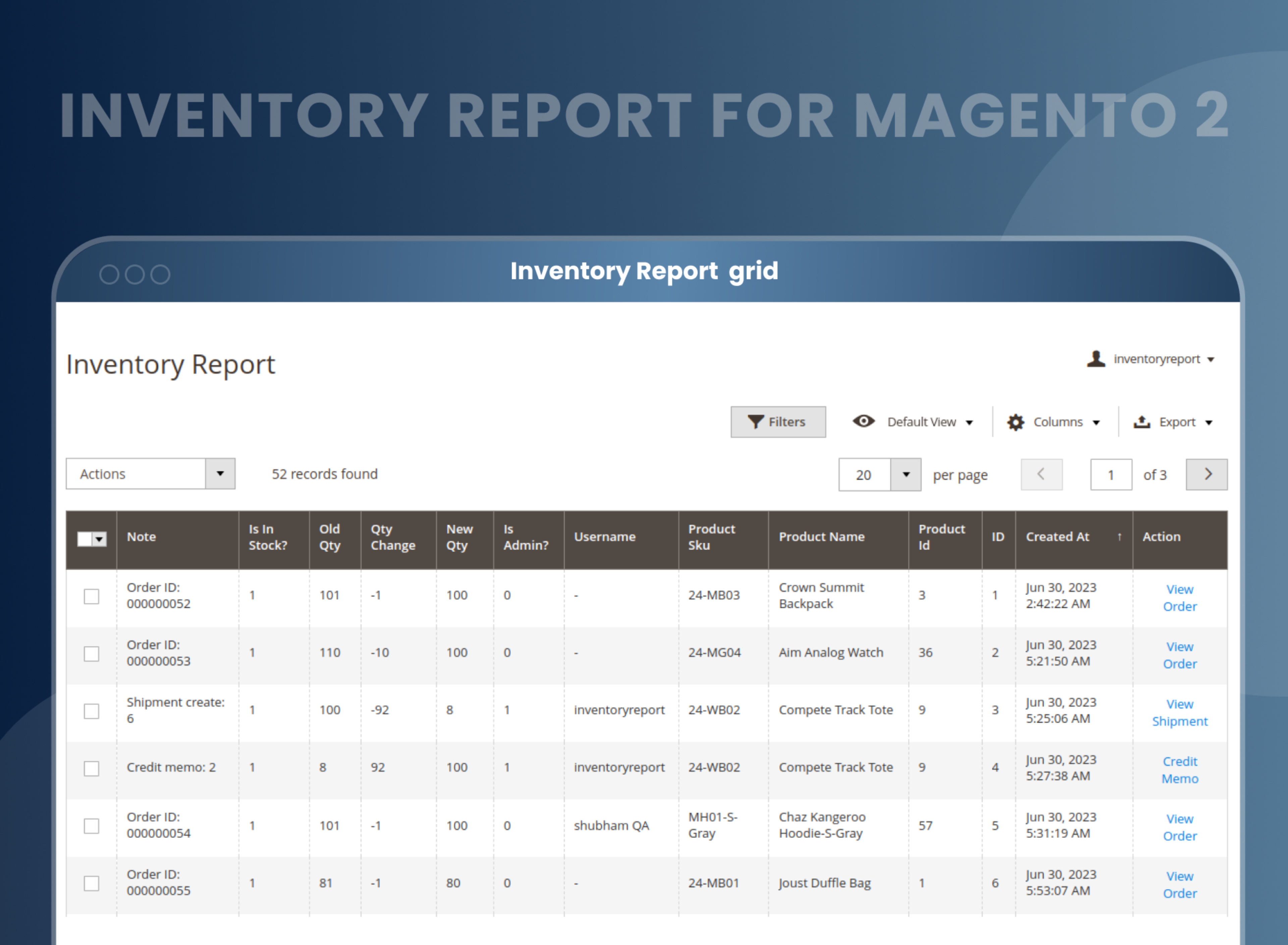
Efficiently track and manage stock activities
Admins can visit the backend grid at Sales > Orders > Create Order in the default store view. Admin can also view the purchased quantity details of a particular product and view the product stock updates in the inventory report after an order is placed.
The Magento 2 inventory report extension helps the admin generate a credit memo for the product quantity change. All these stock updates will be logged in the inventory report automatically, and after that, the admin can export the inventory report as a CSV or XML file.

How Does Magento 2 Inventory Report Extension Work?
Why Does Your Store Need An Inventory Report Extension For Magento 2?
Benefits of Inventory Report Magento 2 Extension
- The Magento 2 Inventory Report Extension is a popular extension that helps store owners manage their inventory more effectively. How does it work? Let's take a look.
- The Magento 2 Inventory Report Extension is an add-on for Magento 2 that enables merchants to view detailed information about their inventory, such as sales totals and stock levels. The extension helps you manage and report your inventory accurately. This report's data can be exported in CSV format. The extension provides real-time updates on inventory levels, so store owners can make informed decisions about remaining inventory and ordering new supplies.
- Inventory reports are essential for any business that relies on the accurate tracking of physical stock. The Inventory Report for Magento 2 provides total visibility into the product stock and total inventory in real time. In addition to this important function, an inventory report extension for Magento 2 can help you better understand your product stocks and product demand. With this add-on, you'll quickly and easily identify where shortages or overstocks exist and make the necessary adjustments to your inventory. This way, you can manage your inventory & warehouse effectively.
- If inventory is important to your business, contact our team for more information about how this Magento 2 extension can help you track inventory and make smarter decisions about your next purchase.
- Accurate inventory and stock tracking
- Real-Time Updates and Reports
- Stock Updates Email Notifications
- User-Friendly Interface
- Reduce the risk of errors.
- Scalable and cost-effective
FAQs
What is the Inventory Report Extension in Magento 2?
The Magento 2 Inventory Report Extension provides merchants with the ability to better manage inventory and allows you to create custom reports that monitor your inventory levels. This extension provides a number of different reports that let you track the status of your inventory, including current and past stock levels. By using the extension, you can also optimise your inventory levels for maximum efficiency.
How to check inventory in Magento 2?
Checking inventory is an important part of running a successful business. Knowing how much stock you have available can help to keep your business running smoothly. Magento 2 has a new Inventory Report Extension that makes checking inventory quick and easy. Keep track of each product's stock.
Reviews
Customization
Changelog
- MageAnts team developed a new extension Inventory Report working with all Magento version.
Why Choose MageAnts
-

30 Days Money Back Guarantee
We offer 30 Days money back guarantee if customer meets our refund policy. For more info you can read our terms and condition
-

Tested Before Every Release
Every version is tested on the latest Magento 2.4 release before it goes live, and bugs reported during your support period are fixed by our team.
-

Free 90 Days Support
MageAnts ensures quick and quality technical support. Take advantage of our 90 days free support for a smooth and efficient experience.
-

Frequent Extension Updates
Intensive update roadmaps ensure highly compatible, bug-free, great performance, and innovative extensions.
