


Store Pickup For Magento 2





Key Features of Store Pickup:
- Add store pickup as a shipping method.
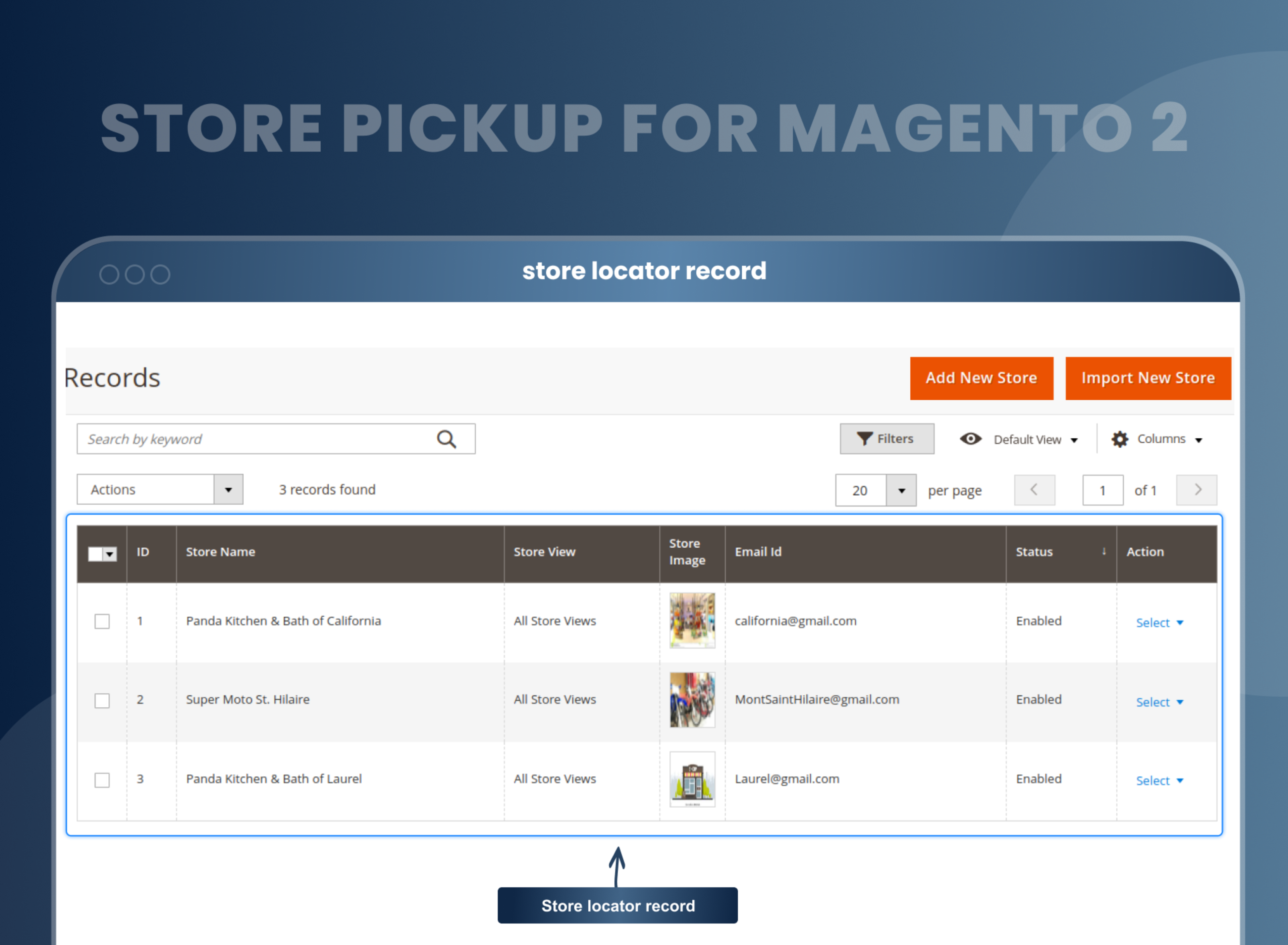
- Add an unlimited number of store locations to your website for order pickup.
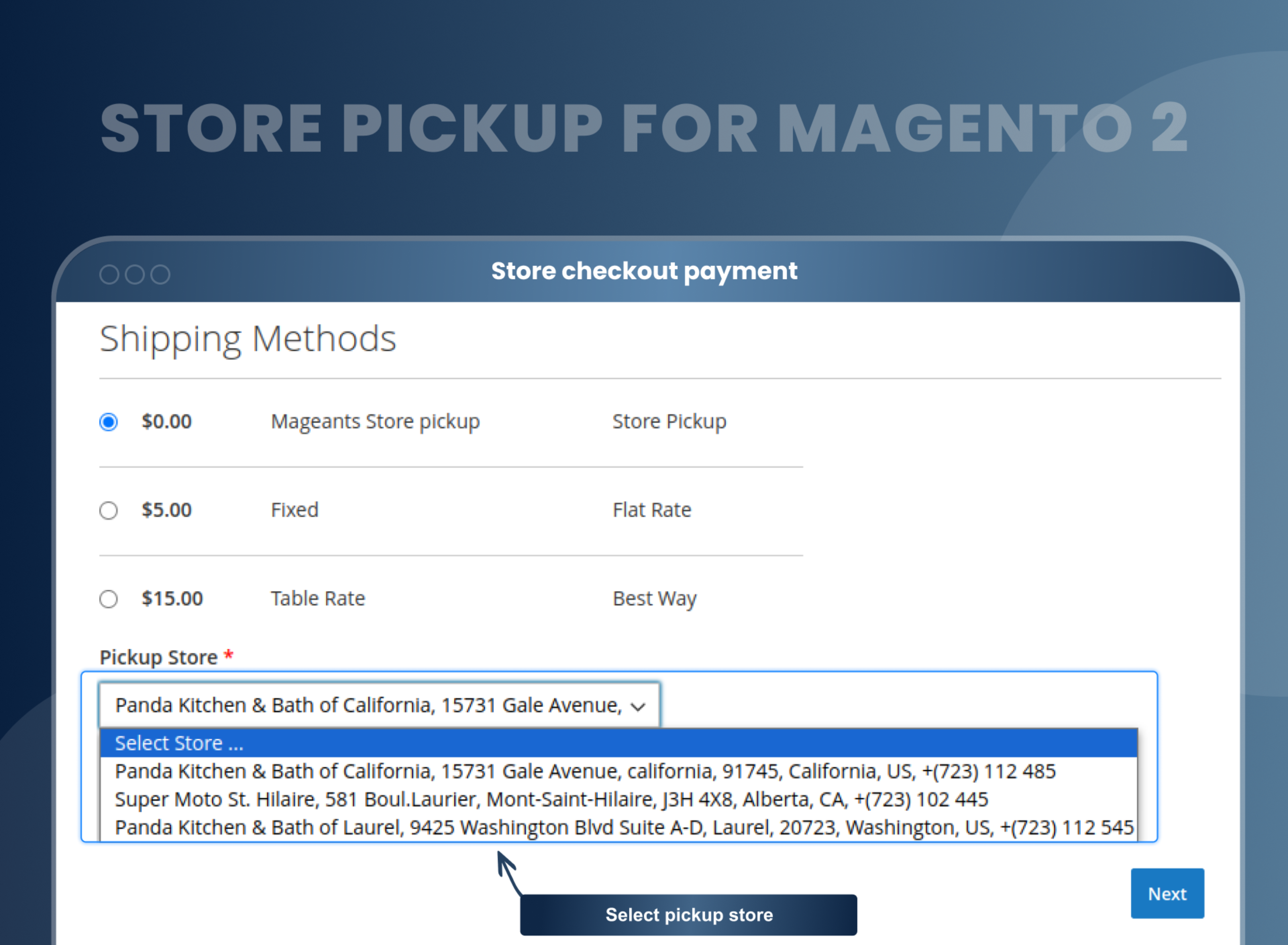
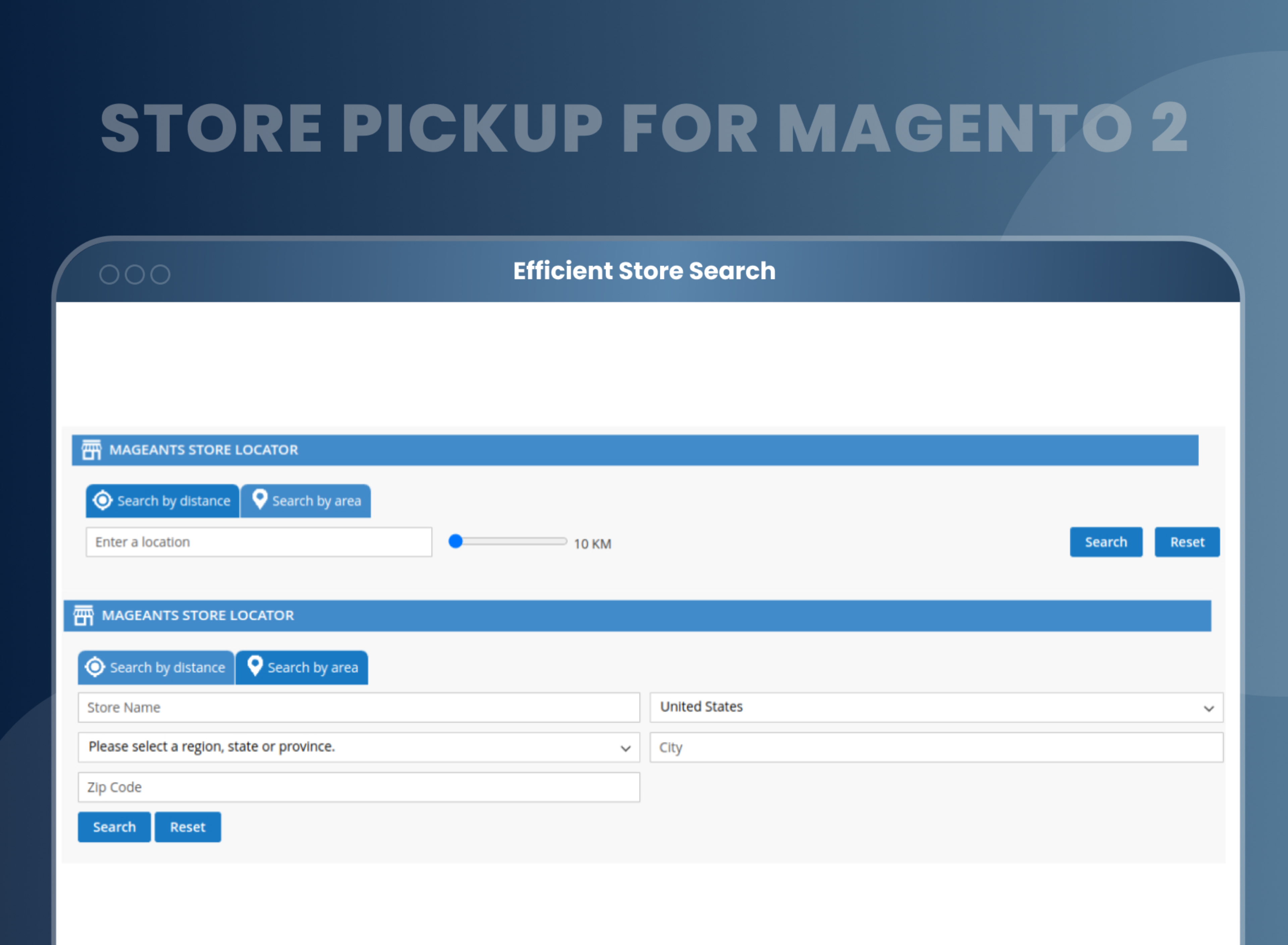
- Customers can choose the pickup store during checkout from multiple pickup locations.
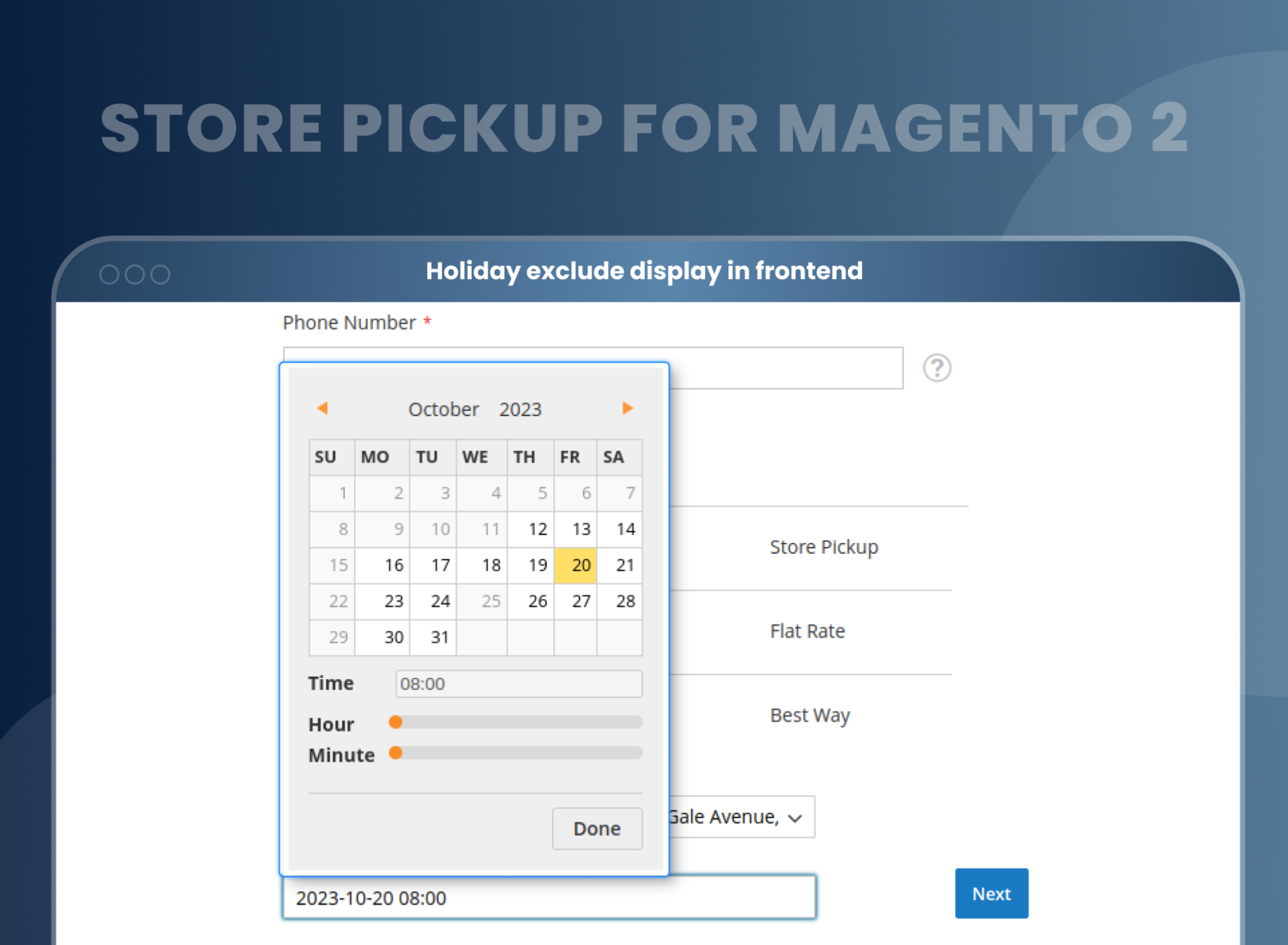
- Allow customers to choose their most convenient date and time slot.
- Assign products to a specific store.
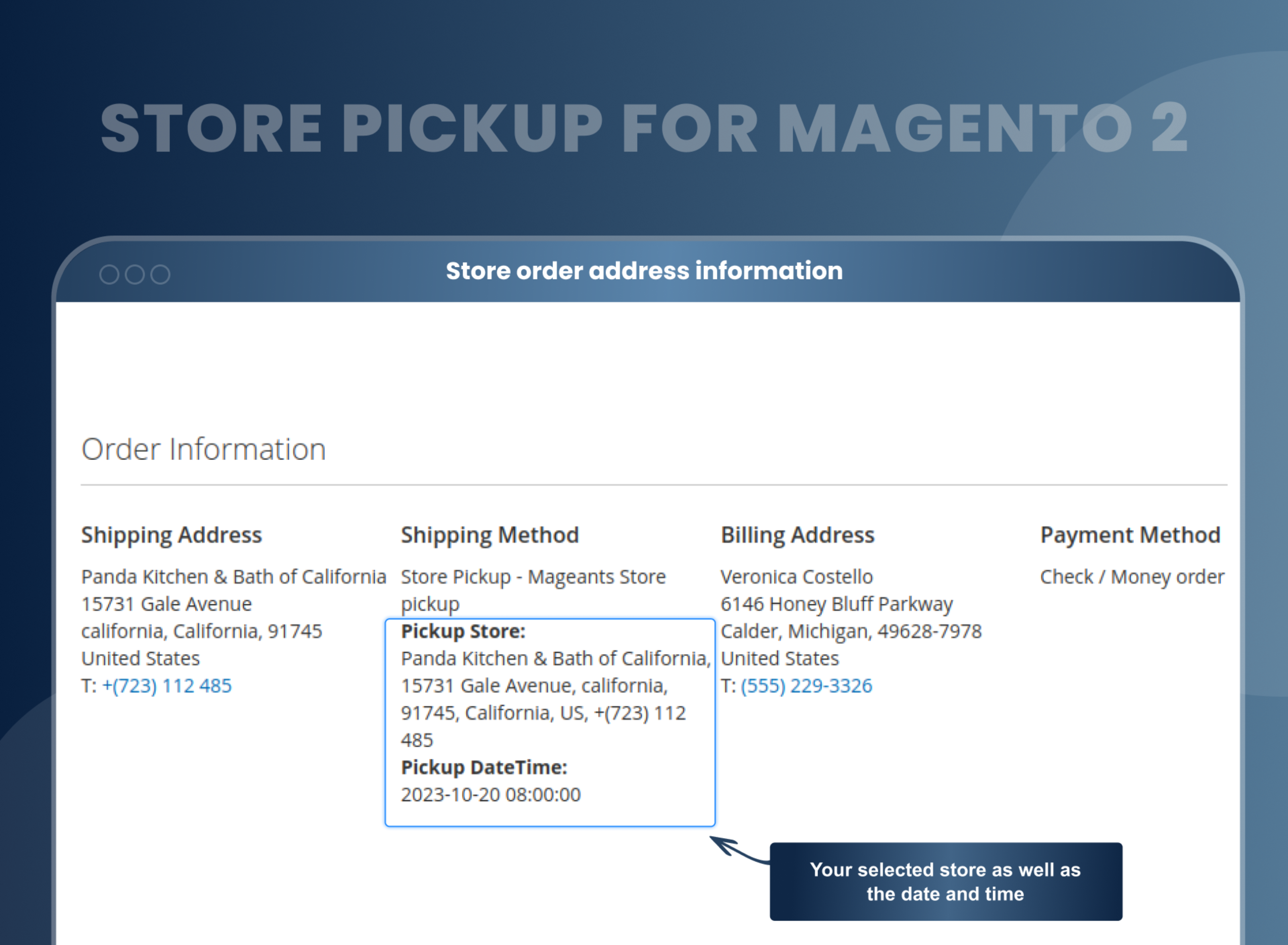
- Show all store address information on the backend and frontend orders.
- Add store information using a CSV file.
- Compatible with the Hyvä theme





Problem:
We all know that shipping costs are the primary cause of online shopping complaints. Customers have to pay any extra charges for their purchase, and they can do anything to avoid this additional cost.
Another issue with online shopping is the COD option. There are times when consumers order products online and select the COD option, but when the order arrives, they refuse the order delivery. As a result, the order returns to the shipper or the seller.
To overcome this, many merchants opt for free shipping or have reduced shipping charges, but this cannot be a one-stop solution.
Solutions:
MageAnts Magento 2 Store Pickup Extension enables customers to easily find the nearest store and pickup products from the store with convenient dates and times, so there is no need to pay any shipping charges.
With the Magento 2 pickup in store, store owners can offer an additional in-store shipping method option on the checkout page to improve the shopping experience. Customers can now opt to have their products delivered in less time via in-store pickup. This is a great way for customers to avoid shipping costs as well as the wait time that can come with online orders.
Description
FAQ
You can add unlimited stores.
Yes, it is possible to display a phone number and address in the frontend.
Yes, the customer can select pickup date and time while placing an order.
Yes, you can display it in order details and invoice.
Yes, you can create a store for a particular store view.
To enable MageAnts store pickup Magento 2, Go to Admin --> Store --> Configuration --> Sales --> Shipping method --> Store pickup.
Store delivery simply means allowing your customers to pick up their orders from the nearest store or any other pickup location.
In Store pickup means customer can select store and set date & time during checkout, and easily collect product from nearest store.
You can provide a custom store pickup shipping method to your customers using Magento 2 click and collect extension.
Reviews
Customer 21 Reviews
Customization
Change Log
Current Version Number : 2.1.4
Date : 26/06/2023
Compitable and Bug fixed
- make the extension compatible with Magento 2.4.6 with Php8.2
- Fixed an issue where the shipping summary was not showing on the checkout page(2.4.5)
- Fixed an issue where the map does Not Show in search page
Current Version Number : 2.1.3
Date : 03/01/2023
Coding Standard
- Mageants team makes this extension coding as per the Magento standard compatible with the latest Magento version.
Current Version Number : 2.1.2
Date : 30/09/2021
Bug fixed & New feature added
- Billing address didn't get updated when user selects store address on the checkout shipping step. Mageants team resolved this issue in all Magento version.
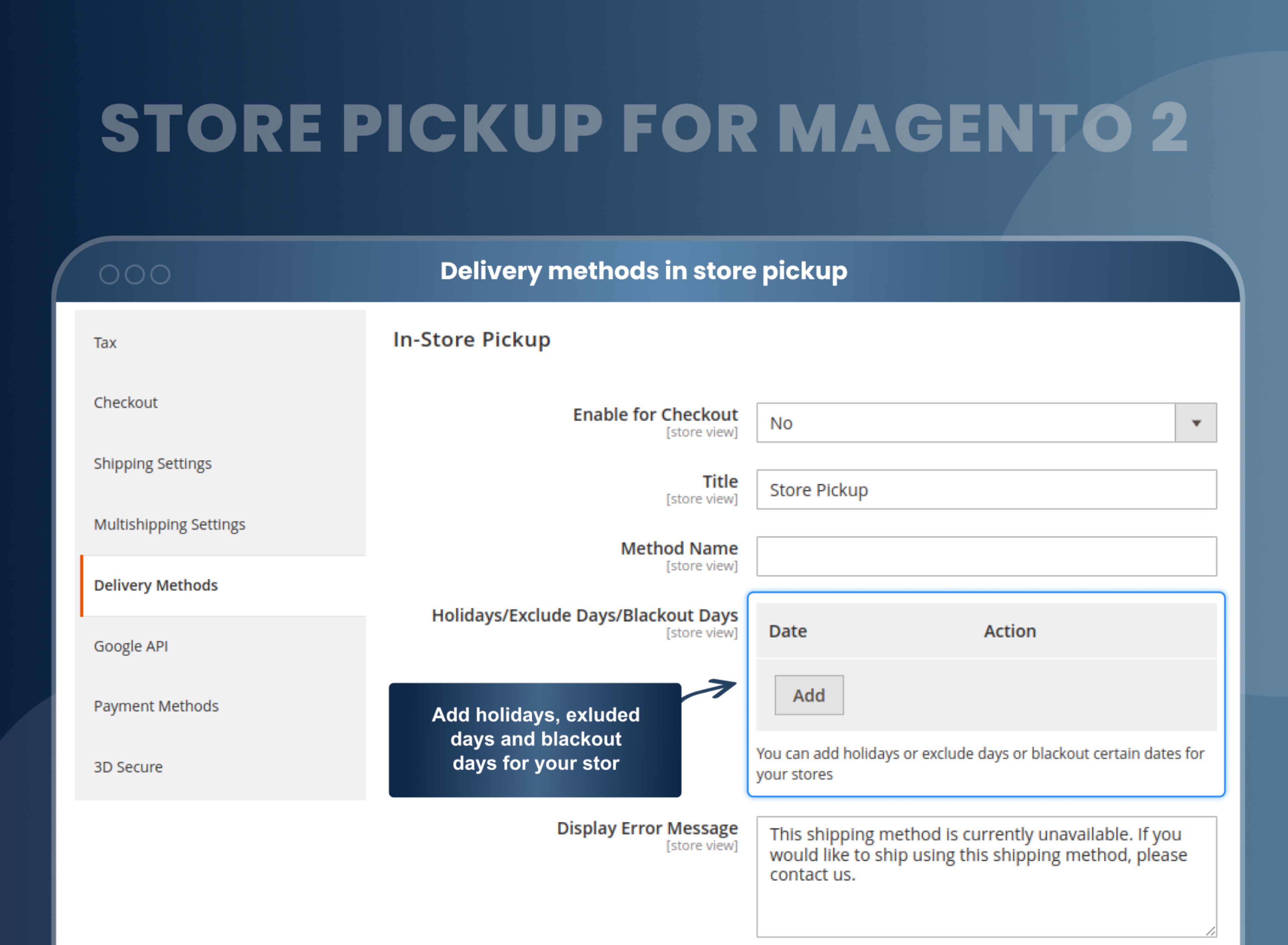
- After set holidays in backend configuration, frontend date picker holidays date didn't disable when user access Windows system.
- Store pickup method name and method type both same on the checkout page. Now admin can set different as per requirement from backend configuration. Mageants resolved this issue in all the Magento versions. - https://nimb.ws/aigvP3
Current Version Number : 2.1.1
Date :14/02/2020
Bug fixed & New feature added
- Store name displayed two times on the checkout payment page in shipping information if store name is too long.
- In store pickup extension store name & date and time information for pickup order didn't show in the order email. Mageants add this feature. Now it works in all the Magento versions.
Current Version Number : 2.1.0
Date : 30/12/2019
Bug fixed
- Checkout page didn't load in internet explore browser when store pickup extension is disabled. Now issue is fixed and works fine in all the Magento versions.
Current Version Number : 2.0.9
Date : 05/09/2019
Bug fixed
- When user refresh payment page then store pickup shipping method remove also when user place order then order grid showing billing as a shipping address. Now issue solve and working fine in all Magento version.
Current Version Number : 2.0.8
Date : 24/06/2019
Bug fixed
- Customer use store pickup shipping method then tax will be not calculated on selected store pickup Address, now issue solve in all Magento version and working fine in all Magento version.
Current Version Number : 2.0.7
Date : 10/06/2019
Bug fixed
- When customer select store from map then also store selected from store list.
- Only change in store locator extension.
Current Version Number : 2.0.6
Date : 03/05/2019
Bug fixed
- MageAnts add new functionality in store pickup extension now admin can disable any date(s) to restrict store pick up on those days(e.g. holidays).
- Order not place from admin side when admin use store pickup method, now issue solve and working fine.
Current Version Number : 2.0.5
Date : 11/03/2019
Bug fixed
- MageAnts update store pickup extension in latest magento2.3 version, Now extension working with all Magento version
Current Version Number : 2.0.4
Date : 22/11/2018
Bug fixed
- When user select multi shipping addresses then store pickup shipping method not working now we enhance in our extension and multi shipping addresses working in store pickup extension for all Magento version.
Current Version Number : 2.0.3
Date : 13/11/2018
Bug fixed
- When store pickup shipping method enable then any other shipping method not working in magento2.2.x version, now issue fixed in magento2.2.x version and working fine for all Magento version.
Current Version Number : 2.0.2
Date : 12/10/2018
Bug fixed
- When customer first select store pickup method after that customer can change any shipping method and place order then in order view page is show ("Pickup Store:" and "Pickup Date Time:") block, now issue fixed in all Magento version.
Current Version Number : 2.0.1
Date : 11/07/2018
Bug fixed
- We combine store pickup and store locator extension in one store pickup extension, we add store through store locator extension and show in frontend.
- When user pickup Store from frontend checkout page then select address display as a shipping address.
- This address display backend as well as Frontend.
- We add first option "Select store" in pickup store text box. And also create date as required field.
How To Add Store Pickup As A Shipping Method In Magento 2?
How Does Magento 2 Store Pickup Work?
Why Does Your Store Need Store Pickup Extension Magento 2?
Benefits of Store Pickup Magento 2 Extension
- Install Store Pickup extension in your store.
- You can enable it from store > Configuration > Sales > Shipping method > Store pickup.
- You can set other configurations as per your need and requirement.
- Then you want to create a store of store pickup.
- You can create from Store locator grid > Manage Store > Add new store.
- After creating a store, you can add products to cart from the frontend.
- At checkout, you can select store pickup as a shipping method and place an order.
- You can easily use the store pickup shipping method in Magento 2.
- The Magento 2 pickup in store module is an extremely feasible sales boosting option. Enabling this extension can allow e-com sellers to cater to various different needs.
- Not only can they get business from the customers expecting the door-to-door services, but they can also facilitate the customers who want to avail store pickup services easily with this extension. The sellers can list down all the available pickup locations. And all the customers have to do is select the most convenient pickup location for them. Add Magento 2 store pickup shipping method to your store and let your customers collect their orders at their convenience. Drive them to the nearest store with the help of Google Maps' instant direction feature.
- Also Read : Buy Online Pickup In Store Extension For Magento 2
- Also Read : "Buy Online, Pick-Up In Store" Strategy In Retail
- The dynamic customers of the 21st century also have varying needs. One single facility can never fulfil all their demands. To keep up with changing needs of the modern customer, the modern sellers also have to update themselves. Similar is the case with e-com sellers. They also have to modernize and upgrade themselves at each and every step.
- Providing door to door shipping services might seem convenient to most of the customers. However, for some others, it may be extremely inconvenient. They might prefer to pick up their products from a store outlet. Now, e-com sellers cannot and must not let go of sales just because they provide door to door services.
- The MageAnts Store Pickup extension for Magento 2 can give a very smart solution to this problem. Let your customer buy online and pick up in store with Store Pickup with store locator Magento 2 extension. This can be the best option out for customers who don’t want products to be shipped at their place.
- In-store pickup allows customers to pick up their order within a specific timeframe, which can reduce overall shopping time and also cut the shipping cost.
- It gives customers peace of mind because they know that their product is in stock and they can get it on their own time.
- It's simple and convenient! In-store pickup simply involves picking up your order from one location instead of having it shipped to you. This makes it perfect for busy people who don't have time to shop at multiple stores or wait for deliveries.
- Merchants can add store pickup as a shipping method.
- The most convenient dates and times to pick up their order
- Add store information using a CSV file.
- Improve the customer shopping experience.
- Increase sales.
- Merchants have the option to promote their offline stores along with their online eCommerce stores.
Why Choose MageAnts
-

9+ Years of Industry Experience
9+ years of extensive experience in delivering Magento solutions & services. Over the years, we have watched technologies change and bounds, and our team has always focused on staying ahead in this competition.
-

100% Bug Free
Our team follow rules and takes care of perfect setup to ensure a bug-free and error-free code for the development process of theme, extension, or website development.
-
Extension created By Certified Developers
Team of certified developers for developing MageAnts Magento extensions. Skilled, qualified, and committed professionals to work on every extension.
-

Quick Technical Support
MageAnts ensures quick and quality technical support. Take advantage of our 90 days free support for a smooth and efficient experience.
-

Frequent Extension Updates
Intensive update roadmaps ensure highly compatible, bug-free, great performance, and innovative extensions.
Our services
-

Hyva Theme development
Are you facing Speed issues? Integrate Hyva Theme
-

Hire Magento 2 Developer
Hire Developer as per your custom requirement
-

Magento 2 Upgrade Services
Upgrade your Store with Magento 2 Latest Version
-

Support & Maintenance Services
Maintain your Store with MageAnts Support Services